
Outlook Classic Bug Breaks Encrypted Emails After Latest Update


 2 min. read
  Published on

Microsoft has confirmed a new issue in Classic Outlook that prevents recipients from opening some encrypted emails after a recent update. The bug shows up after updating to Current Channel Version 2511 (Build 19426.20218) and affects messages protected with “Encrypt Only” permissions.
Classic Outlook Can’t Open Encrypted Emails, But Workarounds Are Available
On impacted systems, recipients may see the email arrive as an attachment named message_v2.rpmsg instead of readable message content. Outlook’s Reading Pane may also display a prompt that asks users to verify credentials, but the encrypted message still won’t render. :contentReference[oaicite:1]{index=1}
BleepingComputer highlighted practical workarounds for both senders and recipients while Microsoft works on a permanent fix. Microsoft says its Outlook team is working on a resolution, but it has not shared a timeline.
Sender workaround: Use Options > Encrypt instead of File > Encrypt
- Open a new email in Classic Outlook.
- Click Options on the ribbon.
- Click Encrypt.

- Select Encrypt or Do Not Forward.

- Save the message after you apply encryption.
- Send the email.
This approach avoids the File > Encrypt flow that triggers the “message_v2.rpmsg” behavior for some recipients.
Recipient workaround: Roll back to the last known good build
- Save your work and close Outlook (and other Office apps).
- Open Command Prompt as an administrator.
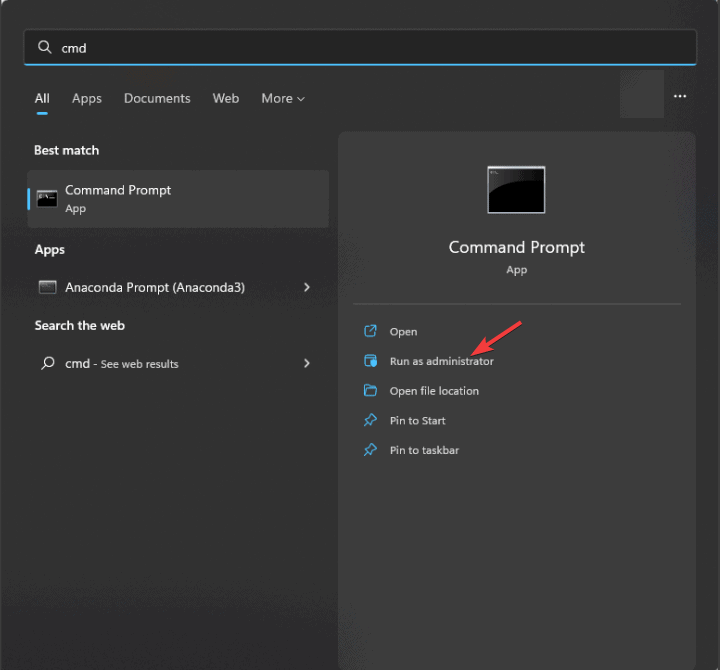
- Run the rollback command below.
"%programfiles%\Common Files\Microsoft Shared\ClickToRun\officec2rclient.exe" /update user updatetoversion=16.0.19426.20186 - Reopen Outlook and try the encrypted email again.
Microsoft says Build 19426.20186 works as the next prior build before the issue started.
Separately, Microsoft continues to expand Copilot experiences in Outlook, including meeting and scheduling assistance in supported Outlook clients and Microsoft 365 environments.

Read our disclosure page to find out how can you help Windows Report sustain the editorial team. Read more



Improve this guide




User forum
0 messages