Microsoft meets Apple's iPad Pro release with optimized Office Apps

Apple isn’t the only company ready for today’s launch of the iPad Pro, Microsoft is also getting in on the action. Under the direction of CEO Satya Nadella, Microsoft has refocused its approach to how it provides its services to customers. Unconstrained by one OS (Windows) Microsoft has shifted its focus from pushing Windows OS as its core ecosystem to saturating the market with their proprietary products and services. This strategy has been seen with Nadella’s demonstrations of Office on iOS, as well as the Microsoft Band 2’s cross-platform functionality. A major focus for Microsoft is productivity apps, mainly Microsoft Office, which Nadella wishes to push as Microsoft’s key monopoly.
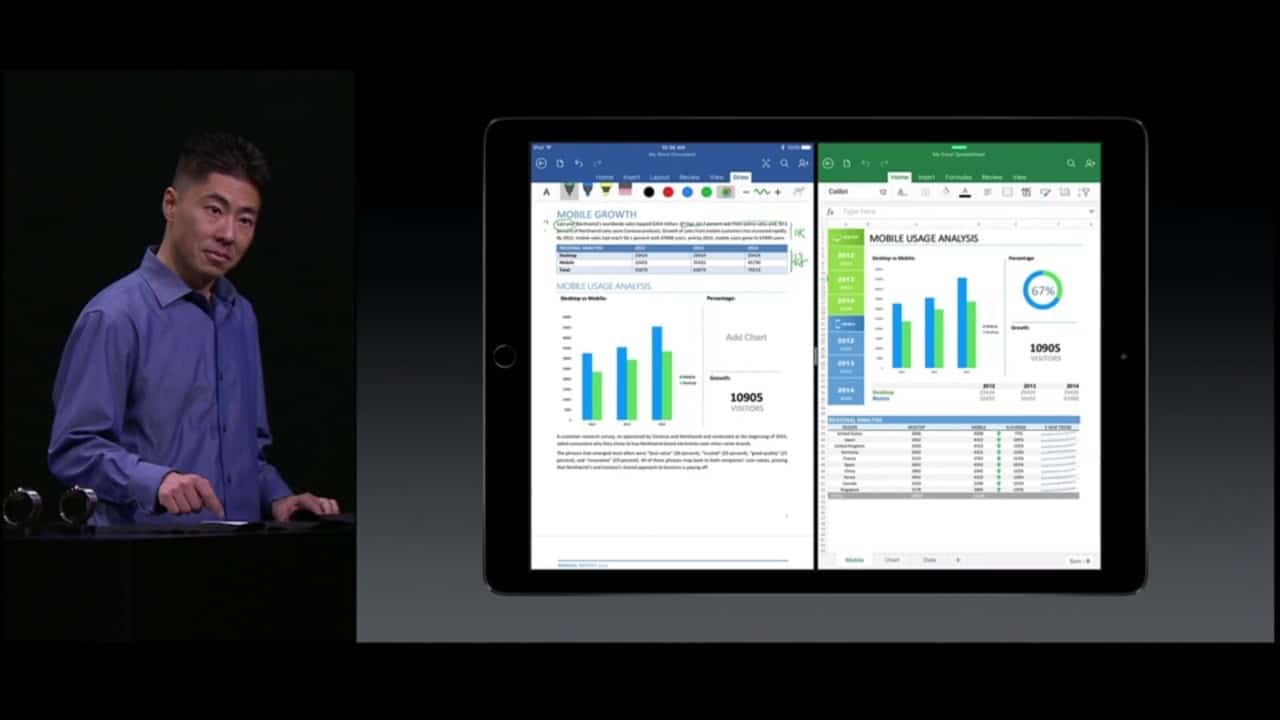
During Apple’s last press conference, Microsoft’s Products manager, Kirk Koenigsbauer, was invited on stage to demo how Microsoft Office will work on the iPad Pro and iOS 9. During the demo, Koenisbauer demonstrated how the Apple pencil can be used with programs like OneNote and PowerPoint to annotate and create content. With the release of iOS9, Apple also introduced several new features, albeit not new for Windows 8 or 10 users, that can be used with Office. These features include a split screen view as well as a slide over feature to improved multitasking and productivity.

Microsoft-Office-apps-are-ready-for-the-iPad-Pro-3-3Microsoft-Office-apps-are-ready-for-the-iPad-Pro-1-1-1024x768

These Office apps are not just available for the iPad Pro, however, but will also function on the iPad Air, iPad mini, and iPhone. To take full use of this productive suite users will need to subscribe to Office 365 which provides a subscription service for up to five PC’s and/or Macs, as well as 5 tablets and 5 phones. This subscription also comes with 1 TB of cloud storage via OneDrive that can be shared among all of your devices.
The addition of Microsoft Office apps, especially ones tailored to take advantage of the real-estate and pen input of the iPad Pro, demonstrates Nadella’s focus and strategy. Not only can one use the full suite of apps on Windows devices, but on most iOS devices as well with no compromise. What are your thoughts on Apple’s iPad Pro and Microsoft Office? Let us know in the comments below.

‎Microsoft Word
‎Microsoft Word
Price:
Free+


‎Microsoft Excel
‎Microsoft Excel
Price:
Free+


‎Microsoft PowerPoint


‎Microsoft OneNote
‎Microsoft OneNote


‎Microsoft Outlook
‎Microsoft Outlook


‎Microsoft OneDrive
‎Microsoft OneDrive

How Azure Search thrives off of customer obsession

If you’re like most people, when you think of Microsoft you think of a massive, sprawling corporation that’s too big to fail. While that’s not wrong, the truth is that Microsoft has several small “start-ups” working inside of it, facing the hard choices and high risk that any small business would be faced with. One such group, profiled in a Microsoft News Center post, is Azure Search. The service became publicly available back during March.
The team’s story is relatively odd within the confines of Microsoft, as they took a different approach to building up their business. Namely, the Azure Search team is obsessed with thinking like their customers. In fact, they go about cold calling potential customers – something that most people would never imagine a Microsoft engineer doing. In fact, one of Azure Search’s top customers came from one of these cold calls, and he initially thought that a prank was being played on him.
Azure Search credits its tenacious advancement as a service to the fact that it simply had no choice. Indeed, Azure search views “scarcity as a virtue,” giving them “no choice but to focus on what really matters.” The reasoning behind this is that, without any time or people to spare, the team at Azure Search had no choice but to focus on what really mattered. Making constant contact with customers, being obsessed with the way that they think and making sure that they make the products that people want to buy.
With Azure Search becoming bigger by the day, they still haven’t forgot what’s made them successful: their unyielding effort to stay in touch with customer needs. “We could go off on our own and build a billion things,” Says Liam Cavanagh, veteran Microsoft engineer in the Azure search team. “Instead, we pick the right battles. We almost don’t do anything without first talking to customers.” The Azure search team is looking like a group that’s headed in the right direction, and with Azure looking for new employees, it may even be growing. Hopefully this love for customer satisfaction spreads throughout other departments of Microsoft.
 

Microsoft opens its first international flagship store today in Sydney, Australia

Microsoft recently opened the doors of its first flagship store in New York City. The grand opening of their newest store on 5th Avenue was followed with a lot of fanfare, including a concert at Rockefeller Center featuring Pitbull. But that isn’t their only flagship store set to open this fall. The technology company is also launching its first international flagship store in Sydney, Australia on November 12th. The two story and 6,000 square foot store is located in the Westfield shopping centre in the Pitt Street Mall and comes with all the familiar aspects of a Microsoft Store. There will plenty of opportunities to try out Microsoft devices, PCs from other OEMs, and a Microsoft Answer Desk to help with PC repair and troubleshooting.
artist rendering
To celebrate the opening of the Sydney store, Microsoft is giving away 750 tickets to the first in line for the grand opening to see Jessie J in concert with opening act Ellie Drennan. There are also other events taking place at the store to commemorate the grand opening, including demonstrations of the Surface Pro 4, Halo 5 photo opp with Master Chief and Spartan Locke, and a fitness workshop with the Microsoft Band 2. Microsoft detailed the following itinerary for the day on its Facebook page.

Wednesday 11 November
• 10:00 PM — Customer lineup begins
Thursday 12 November
• 8:00 AM — Customers in line can enter to win a meet and greet with Jessie J*
• 11:30 AM — Grand Opening ceremonies begin
• 12:00 PM — Microsoft opens (complimentary concert tickets* distributed)
• 12:30 PM – 2:30 PM — Fashion Illustrator Kerrie Hess live illustration on Surface Pro 4
• 2:00 PM – 4:00 PM — Halo 5 characters Master Chief and Spartan Locke photo opportunities
• 4:00 PM – 5:00 PM — Base Body Babes Fitness Workshop with Microsoft Band 2
• 5:00 PM — Doors open for the special performance with Jessie J and opening act Ellie Drennan at the State Theatre
• 7:00 PM — Special performance begins with Jessie J and opening act Ellie Drennan at the State Theatre

To find out more information about the day’s events, head over to the Store’s Facebook page for the latest updates.

Ubisoft announces PC minimum specs for Rainbow Six Siege, launching December 1st

Tom Clancy’s Rainbow Six Siege is set to release in less than a month, on December 1st. And in anticipation of the release, Ubisoft announced the minimum and recommended PC specs for this latest installment in the tactical shooter franchise.

The announced required specs are rather in line with most AAA titles to debut this year. Maybe even a little lower than some, with Ubisoft suggesting a minimum possible GPU and CPU combo of an Intel i3 560 with a GTX 460. However, gamers should note that the game will require 6GB of RAM at minimum.
Minimum:

  • Operating System: Windows 7, Windows 8.1, Windows 10 (64bit versions required)
  • Processor: Intel Core i3 560 @ 3.3 GHz or AMD Phenom II X4 945 @ 3.0 GHz
  • RAM: 6GB
  • Video Card: NVIDIA GeForce GTX 460 or AMD Radeon HD 5870 (DirectX-11 compliant with 1GB of VRAM)
  • DVD ROM Drive: DVD-ROM Dual Layer
  • Sound: DirectX® 9.0c compatible sound card with latest drivers
  • Hard Drive: 30GB
  • Multiplayer: Broadband connection with 256kbps upstream or faster

Recommended:

  • Operating System: Windows 7, Windows 8.1, Windows 10 (64bit versions required)
  • Processor: Intel Core i5-2500K @ 3.3 GHz or better or AMD FX-8120 @ 3.1 Ghz or better
  • RAM: 8GB
  • Video Card: NVIDIA GeForce GTX 670 (or GTX 760 / GTX 960) or AMD Radeon HD 7970 (or R9 280x [2GB VRAM] / R9 380 / Fury X)
  • DVD ROM Drive: DVD-ROM Dual Layer
  • Sound: DirectX® 9.0c compatible sound card 5.1 with latest drivers
  • Hard Drive: 47GB
  • Multiplayer: Broadband connection with 512kbps upstream or faster

Are you planning to play Rainbow Six Siege when it is released this holiday season? How does your gaming rig stack up against the recommended specs? Let us know in the comments section below.

Microsoft teases "Decoded," new online video series focused on coding

Microsoft is putting together a new video series covering one of the company’s all-time favorite topics. Called “Decoded,” the series will travel the world with Microsoft’s John Shewchuk to discover new tools and how they’re being used to develop the most exciting software solutions.
There’s a trailer out teasing the new series, and it’s a short one so go ahead and give it a view.

Here’s Microsoft’s description of the new series:
Always unorthodox and at times irreverent, DECODED takes viewers around the globe and shares modern developer best practices.
“Decoded” has its own YouTube channel, which you can access here. If you’re a developer, or just interested in how software gets created, then hit that subscribe button.

Microsoft to open data centers in Germany controlled by Deutsche Telekom, providing greater security

Yesterday at The Future Decoded in London, Microsoft announced it was opening new datacenters in the UK, and today at a press conference in Berlin, the company announced further plans to open more datacenters in Germany, this time with a twist.
The new data centers, although they will “enable the full power of Microsoft’s cloud in Germany”, will be under the control of a subsidiary of Deutsche Telekom, acting as something of a shield between Microsoft and the US and German data.  Microsoft will have no access to data held in the facilities without the permission of that subsidiary, T-Systems.
Germany has one of the strictest data protection laws in Europe, and the move will help to allow German companies to store their data in the cloud without exposing them to possible US intrusion, similar to the attempts by the US government to gain access to data held in Irish servers.  According to the Financial Times, the 3rd party trusteeship will protect German data by forcing official requests to go through German authorities.
Microsoft is pushing hard both to enable companies outside the US to use its cloud storage offerings, and also to clarify government rights and limits when it comes to data storage.


Fix: Outlook 2016 for Mac Freezes in OS X El Capitan

Many Windows 10 users use Microsoft Office on regular basis and the same goes for Outlook. However, Outlook isn’t available only on Windows it, also available on Mac, and speaking of which, it seems that Outlook 2016 freezes on Mac, so let’s see what we can do about it.

What to do if Outlook 2016 for Mac Freezes in OS X El Capitan

Users report that they are having issues with Outlook 2016 on OS X El Capitan, and according to them Outlook 2016 freezes and only way to close it is to use Force Quit. To make things worse, users can’t export their emails, calendar and such, so you can see why is this such a problem, but there’s no need to worry since today we have a few solutions.

Solution 1 – Update Outlook 2016 and your Mac OS

Microsoft and Apple are aware of this issue, and according to the reports there’s an updated version of Outlook 2016 available that fixes this issue. In addition to updating your Outlook 2016, it won’t hurt that you update your OS X as well. Some users even suggest downloading the beta update because it fixes the issues with Outlook 2016.

Solution 2 – Uninstall Outlook 2016 and download the older version

The second solution is to dragon the Outlook app to the trash, but make sure that you back up your data if you can. After you’ve done that download the earlier build and make sure that you turn off auto-update function, so you don’t update to the latest version. This isn’t a solution, but a workaround until stable and functional version is released.

Solution 3 – Run MS Database Utility

Some users suggest that the main reason for this issue is a problem related to Identity so it’s best to rebuild your Identity. To do this you need to navigate to your Office folder and to run MS Database Utility.

Posted in Fix

StaffPad app optimized to make beautiful music on Windows 10

StaffPad, an app that allows composers to create digital scores, has received a major update. The program was created specifically for Windows 8.1 and Surface devices and launched back in March of this year. What makes this app unique is its ability to transcribe digital ink to actual musical notes. Today, StaffPad has been updated for Windows 10, bringing with it a new look and a host of updated features.

As the video above demonstrates, this app is not for novices, but music professionals. The benefits of the program range from its ability to recognize user handwriting, sync scores to the cloud via OneDrive, real-time audio playback, and its ability to understand the difference between touch and pin input as users compose through a series of pen gestures and quick access menus. These menus have been redesigned, straying away from the hidden windows in Windows 8.1, and using the newer design language (hamburger menus) from Windows 10. In fact, the entire app has been redesigned as a Windows 10 exclusive with the developer stating that the Windows 8 version will no longer receive updates. Current users will, however, be able to update to the newest version for free.
Additional changes to the app include a redesigned home screen. The previous gray color scheme has been abandoned for a dynamic background that changes based on the time of day and the current weather at your location. A realtime search has also been added that makes finding scores, adding to collections, and editing scores directly from search more efficient. Fly out menus have been added under each score (three white dots) which reveals additional options such as access previous versions of the score, sort, edit, and delete.
These design features find they’re way to the Score page, where the bulk of this app’s work is done. Instead of swiping from the bottom to reveal the command bar as in the Windows 8.1 version, there is now a permanent command bar at the top, with a carrot indicating access to more options. This command bar also houses a Composer assistant, a Cortana-like helper that responds to voice commands. This feature can be used to process commands such as “add strings in 3/4 , in F major” or “140bpm at bar 5”.
Other notable additions include a partial bar selection, swing playback options, directional symbols, sketch layer colors, and copy and paste to OneNote. The developer also notes several ways to optimize the user experience. These suggestions include running StaffPad in Windows 10’s tablet mode, disabling the Surface Pen’s press and hold gesture, and removing the pen cursor.
Overall, StaffPad is striving to bring a very comprehensive solution to composers, providing features that optimize productivity, function, and usability on Windows 10. If you are using the current version of StaffPad, let us know how you feel about these changes in the comments below.

StaffPad
StaffPad
Developer:
StaffPad Ltd
Price:
$89.99

Microsoft Surface Book allegedly not coming to the UK until 2016

Some bad news oncoming for UK-based coveters of Microsoft’s newest engineering marvel, the Surface Book: it won’t be hitting UK shore for the next 4 or 5 months.
The news was broken by Microsoft MVP and previous Neowin writer, Michael Gillett, on his Twitter page. He reportedly acquired the information from the Surface stand in #FutureDecoded, Microsoft UK’s annual 3-day partner conference for discussions and prediction of the future of technology, business, society, leadership, and more, among leaders of the industry in UK and Europe. Microsofts CEO Satya Nadella gave a talk at this year’s event in London, whose audience reportedly capped at 10,000. With the credibility of the information established, here is the details in Gillett’s own words:


Not stopping there, Gillett continues to sadden owners of the Surface Pro 3 looking forward to a taste of Windows Hello without changing their machines, by revealing information regarding the availability of the new Type Cover with fingerprint reader in the UK:


Not all hope is lost though:


While the news regarding Surface Book availability date may force some users with immediate needs to go for different laptop options, on the upside, this also means more time for other Surface fans to save up money, or to contemplate on whether the Surface Pro 4 might be the right choice after all. In the meantime, watch our hands-on of the device, and stay tuned for upcoming news, deals and more.

Microsoft lends a hand to wildlife conservationists

Microsoft has lent a hand to some conservationists at Woodland Park Zoo by assisting them in developing special scent-dispensers, devices that are designed to attract wildlife such as wolverines, lynx, fishers, and gray wolves to areas where they can be easily photographed for research and data gathering by automated cameras.
Mike Sinclair from Microsoft Research assisted the researchers in developing the new technology that allowed for the distribution of stinky liquid lures that could keep for the length of winter unattended while running on a new system run by an ultra-low power control processor powered by lithium batteries capable of lasting six to nine months without maintenance.
Dr. Robert Long from the Woodland Park Zoo was thrilled with Microsoft’s assistance and praised Mike Sinclair for his invaluable input. “Mike has been absolutely awesome, he was exactly what we were looking for. We needed a fairly straightforward way to control this thing over time. He created a tool to help us study and conserve these types of species. It really was a project that came about because of our true need.”
Over 25 of the devices have already been deployed since September with a further 35 to be distributed over 656 square miles in the North Cascades and 20 more in a multi-species forest carnivore project in north-central Idaho.
Microsoft has a long history with helping individuals and organisations improve their productivity such as when they helped entrepreneurs in Detroit or assisted visually impaired individuals in India. Microsoft has particularly been active in Africa with a variety of projects recently launched aiming to improve the quality of life for those who live there under their 4Afrika banner. Just in the last year, Microsoft’s 4Afrika has improved internet connectivity for universities in Ghana and brought the first telemedicine to Botswana.
Have you seen tech help anyone in your area? Let us know in the comments below.

Star Micronics signs Microsoft worldwide patent licensing agreement

Star Micronics Co. Ltd., a company who delivers Android-powered commercial printers and computing devices, announced today a patent licensing agreement with Microsoft. Under this agreement, the company will have the ability to use Microsoft patents in the design and deployment of their Android-based products. According to Microsoft’s News Center, Star Micronics’s licensing agreement is among 1,200 other agreements the Redmond based company has with other organizations. Among these organizations is Google, who recently settled their long-standing licensing issues with Microsoft.
According to the president of Microsoft Technology Licensing, Nick Psyhogeos, sharing the use of patents allows companies to build upon infrastructures created by Microsoft in an attempt to revolutionize products and deliver “state-of-the-art technology” to consumers. The Director and Executive officer of Star Micronics’s Special Products also supports this notion and states that, “Star Micronics has a reputation for innovation and leadership within the industries in which we operate. This patent agreement will allow us to continue to provide high-quality products to our customers, as well as develop new solutions that build upon Microsoft intellectual property.”
Overall, licensing patents are a win-win for companies like Microsoft. Not only is the company compensated for the use of their patents, but it also helps bolster a world of creativity and innovation, something that Microsoft seems to care deeply about. What do you think? Will Microsoft’s patent licensing help foster innovation and advancements from Star Micronics?

Redstone development branch "rs1_release" showing up for some Windows Insiders

With Threshold 2 now in the rear-view mirror development wise, Microsoft has now turned its focus over to Redstone, the next major update for Windows 10 slated launch in 2016. Internally, development is now way under way, and recently Microsoft began compiling builds in the “rs1_release” development branch, meaning Microsoft is now compiling code into one of the main development branches.
The ‘_release’ branch is usually where Insiders receive builds from. Insiders who recently partook in the Threshold 2 Insider Preview received them from “th2_release”, so for an rs1_release branch to exist is not surprising. However, it appears some Insiders are now seeing an option to switch to the rs1_release development branch, allowing them to download Redstone builds when they become available.
rs1
If you look at the screenshot above, you’ll see that below the Fast/Slow slider, there’s a new dropdown menu that includes the th2_release branch and rs1_release branch. I have not seen this dropdown on any of my insider machines unfortunately, but we’ve received a few tips claiming this option is showing up. This could be an error on Microsoft’s part, which would be unfortunate.
What are your thoughts on this? Do you see the option to switch to an rs1_release branch yet? Let us know below.
Thanks for the screenshot, Brendon!

Microsoft's new ads show what's been with improved in the Surface Pro 4

Microsoft has recently unleashed new ads highlighting improvements the Surface Pro 4 makes over last year’s model. These ads have less emphases on “the tablet that can replace your laptop” (presumably because the Surface Book is a laptop that can replace your tablet) and more on what you can do with the Surface Pro 4.

The ad shown above, mentions a few key improvements over the Surface Pro 3. First, the screen has been boosted to a 12.3-inch display with a higher pixel density of 267 PPI. In addition to that, the Surface pen (which is compatible with the Surface Pro 3 as well) now has 1024 levels of pressure sensitivity over 250 from the previous generation, and now attaches magnetically to the left side of the device. Finally, the ad touches on improvements to the speakers, making them 40% louder.
In addition to the main ad, there are also three separate 15-second ads  that cover specific features individually as well. Overall, the changes to the Surface Pro 4 can really improve a user’s experience and productivity with such a diverse device, and this is what Microsoft is striving to get across to consumers. The Surface Pro 4 is available starting at $899.99 through the Microsoft store.
What do you think about the new ads for the Surface Pro 4? Do they do the device justice? Let us know in the comments below.

Microsoft continues buying spree, acquires Israeli information protection company Secure Islands

Microsoft has been an acquisition monster lately, buying up apps like Wunderlist and Sunrise, fleshing out its mobile AI capabilities with Mobile Data Labs, and pumping up its CRM portfolio with Adxstudio. Today, Microsoft is announcing an addition to its data protection offerings with its purchase of Secure Islands.
Data security is clearly a hot topic today. Data breaches have hit everyone from the government to private organizations to companies like Target, T-Mobile, and many, many more. Securing data is made more difficult by the need to share data outside of an organization’s own information technology infrastructure, creating the need to protect data even when its outside of a given organization’s control.
Data protection technology provider Secure Islands is focused on protecting just this kind of data. From Microsoft’s blog:

Businesses continue to face challenges protecting their data in a world where information travels beyond the boundary of the corporate network and across many devices outside company control. To work effectively, organizations must share information with partners, vendors and customers. These realities make it more critical than ever to have solutions that prevent data loss and track information regardless of where it resides.
Based in Israel, Secure Islands provides powerful data classification, protection and loss prevention technologies for virtually any type of file, which allows customers to apply data protection to more applications. Global customers, such as UBS, OSRAM, Vodafone and Credit Suisse, use and trust Secure Islands to protect data at each stage of the information lifecycle – from creation to sharing.

Secure Islands’ technology will be integrated with Azure Rights Management Service to work alongside the data classification capabilities of Office 365 and Windows. Secure Islands CEO Aki Eldar also had some words on the merging of his company within the giant company from Redmond:

By joining Microsoft, we will be able to extend and expand our vision. Microsoft has been a long time partner and its leadership in enterprise IT, its resources and global reach will help us innovate and deliver new information protection capabilities to both our current and new customer base.

Microsoft is transitioning from the Windows platform company to a “cloud-first, mobile-first” strategy, and acquisitions like this are just one of the tactics they’re using to dramatically transform themselves. We’ll be keeping an eye on how the company continue to meld itself into a competitive giant going forward.

Rate your moustache for Movember with Microsoft Garage's newest creation

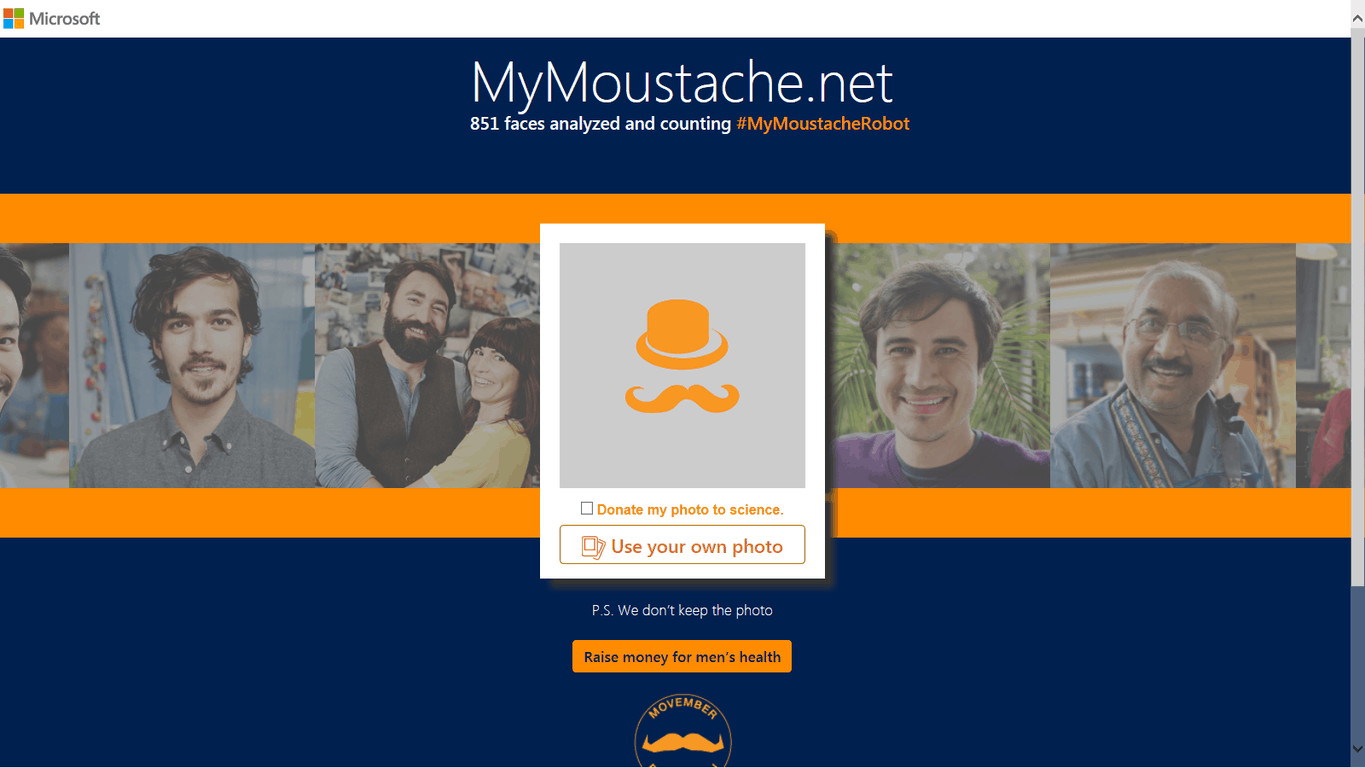
Microsoft’s arguably most creative division at the moment, Microsoft Garage is back with another invention, and this time, it’s to improve your facial hair, or actually, the only part of it that matters: the moustache. Welcome to MyMoustache.net, a new internet phenomenon in the making.
Part of Microsoft’s collaboration with the Movember Foundation in order to raise awareness of men’s health and showcase the power of machine-learning, the site uses complex functions to determine the length, form and awesomeness of your moustache and calculate your ranking in..yadayada, you know what? Here are some pictures, this is a thing to be seen:

mymoustache step 1
Submit your own photo for ‘stache evaluation ‘for science’ or do a test run using one of the stock photos.


Get respect for your awesome your 'stache level.
Get respect for your awesome your ‘stache level…


..or hang your head in shame at your undeveloped legend. But fear not, for the machines are here to help! Just press 'Auto-stache' and..
..or hang your head in shame at your undeveloped legend. But fear not, for the machines are here to help! Just press ‘Auto-stache’ and..


..voilà! Your future (or alternate) glorious self with ultimate moustache power presents. Try again as many time as you wish!

Of course, due to the power of machine-learning, you don’t even need to have any moustache at all to see how you would look with one (ladies, it’s your chance to step into our shoes). The app itself is certainly a good way to show off Microsoft’s software and cloud capabilities, while solidifying Redmond’s image as a fresh, innovative company finding back its charm. Want to see more creative projects from Microsoft Garage? Stay tuned, and get updated!

Windows 10 news recap: Threshold 2 signed off, flat skin drama, new build, and more

Windows 10, having been available for over three months now, has already surpassed 120 million installs worldwide. According to new statistics from NetApplications, Windows 10 continues to increase in market share, but Windows 7 remains the most popular operating system. For the month of October 2015, Windows 10 climbed in market share to 7.94 percent. Windows 10 has been seeing a steady increase in market share since its release in late July — going up a little over one percent every month.
Windows 10 continues to make headway amongst Steam users, rising to almost a 28 percent share in October. That’s a slower increase from September, which saw an increase from 17 percent to 25 percent, according to Steam.
One of the most popular stories this week involved Google’s vice president of design and the father of Material Design. According to him, Windows 10 is basically Windows XP with a flat design skin. You can read the controversial story here. You can also read an opinion piece by Kareem Anderson arguing why Windows 10 is less XP and more of a mature operating system.
At the end of this past week, Microsoft rolled out a new desktop build to Windows Insiders. Windows 10 build 10586 was released, offering bug fixes and nothing groundbreaking in terms of features.
Windows 10 Threshold 2 has been signed off for the desktop (as well as mobile), according to our sources. Microsoft has finally selected a build of Windows 10 Threshold 2 that will roll out to the public! According to our contacts, build 10586 has been selected as the final build of Threshold 2, for both desktop and mobile. The company is planning to begin rolling the update out sometime this month for everyone.
Stay tuned for another exciting week of Windows 10 news!

What to Do If You’re Unable to Stop Receiving Windows 10 Builds

Windows 10 is constantly improving and Microsoft has developed its Insider program that allows users to to try latest Windows 10 previews and test new features before they are released to the public. Although this sounds great, it appears that some users can’t leave the Insider program, so we showed you what to do if you can’t get back to Windows Insider program, and now, we’re going to show you what to do if you can’t leave it.

What to do if You Want to Stop Receiving Windows 10 Insider Builds

Solution 1 – Visit the Windows Insider support page

  1. If you wish to leave Insider program you need to visit Insider program support page.
  2. At the support page sign in with your Microsoft account.
  3. Then click the Leave the Windows Insider Program link.

This is it, you’re not into Insider program anymore, but remember that your Windows 10 won’t get restored to the previous version, you’ll just stop receiving Windows 10 Insider updates.

Solution 2 – Disable Insider builds from Settings

  1. Open Settings and go to Windows Update.
  2. In Windows Update section click on Advanced options.
  3. In the Advanced options navigate to Get Insider builds section and click Stop Insider builds button.stop receiving windows 10 builds
  4. Next you should see a confirmation dialog. Click Confirm.
  5. Next, click the Restart now button.

Solution 3 – Perform a clean install of Windows 10

Sometimes you’re unable to opt out of the Insider program and the best choice is to perform a clean install of Windows 10 and not join the Insider program again. In fact, even if you manage to opt out of Insider program, you still might want to perform a clean install in order to get back to the default version of Windows 10 that is more stable.

To perform a clean install of Windows 10 you’ll need to get Windows 10 ISO file which you can download here. You will also need Media Creation Tool and a 4GB or more USB flash drive or DVD to burn your Windows 10 ISO.

We would like to mention that Insider program is designed for testing purposes, and it’s not advisable to use it as your main operating system since some features and software might not work properly.

Teamviewer 11 released, brings SOS button and improved performance

Teamviewer has been a huge help to anybody who has ever needed help with their computer, or needed to collaborate in any other way. Teamviewer is an app for Windows and Windows Mobile that allows you to let somebody else take control of your computer remotely, often to troubleshoot technical issues. With the new version of the app, Teamviewer 11, people should look forward to a much better experience.
Most noticeably coming from the new update is the fact that Teamviewer is now 15x faster than its previous iterations. It’s been optimized to use less bandwidth and provide better image rendering. At the end of the day, this means that you’ll be seeing better image quality in TeamViewer and using up less bandwidth in the process. You’ll also be seeing file transfers going 15x faster than in previous versions.
One added feature in Teamviewer 11 is the SOS button, which makes it much more efficient to get customers the help they need, exactly when they need it. The SOS button can create an icon with your company’s name, that can be clicked to request help immediately, without going through any other extra hoops. This makes the customer support experience much faster, more efficient, and easier for everybody involved.
All in all, the improvements to Teamviewer are huge. In a world where it can be difficult to get effective customer support quickly, Teamviewer is there to make sure that you can communicate with your customers quickly efficiently, and in a way that makes everybody’s lives easier. In Teamviewer 11, along with updates to its general efficiency and the SOS button, it also adds an overhaul to its toolbar, better Android support, and more
Head over to Teamviewer’s website to download the application for Windows.
Thanks @NicholasHayman  for the tip.

Several Microsoft teams being rebuilt around legal chief Brad Smith

Huge changes have come to Microsoft’s legal team, which is being built around the company’s new president and chief legal officer Brad Smith. The most notable of these changes is the appointment of Horacio Gutierrez to general counsel – more specifically, the new department of Corporate, External and Legal affairs. This position in general counsel used to be held by Brad Smith, however since his appointment as Microsoft’s first President since 2002, he was no longer able to hold that position.
Along with Gutierrez’s new position, Microsoft has made a few other changes to its rosters. The company’s first female president, Mary Snapp, has been appointed corporate vice president of Philanthropy, and privacy lawyer John Frank will be leading the EU government affairs department. Taking up some of Brad Smith’s old responsibilities is John Seethoff, who has been named corporate secretary. It was also determined that the “trustworthy computing” team is going to be answering directly to Brad Smith.
The reason behind these changes? According to a Microsoft spokesperson, these changes are part of a “broader initiative” to put a larger emphasis on privacy, security, and external relationships, especially with governments, universities, and nonprofits.

Microsoft Store opening in Pennsylvania gets huge turnout

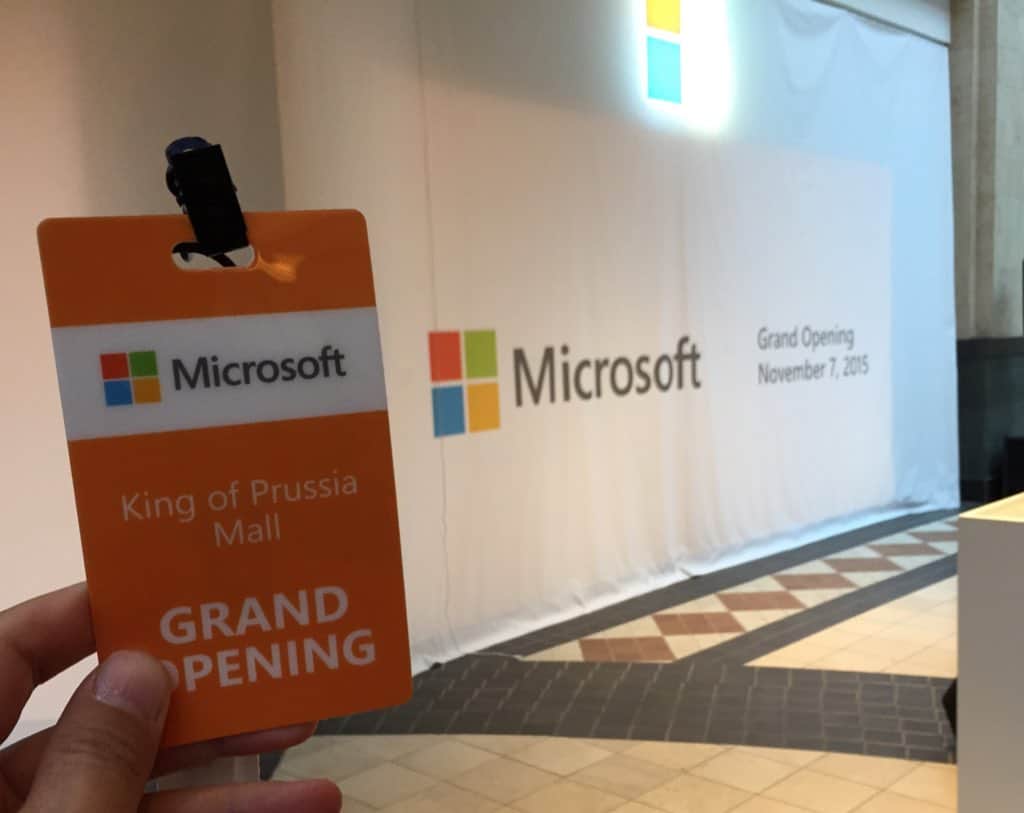
Today, Microsoft has opened up a brand new retail store at the King of Prussia Mall in Pennsylvania. Microsoft celebrated the grand opening by giving away gift cards with varying amounts (and one gift card worth $1000).
Judging by the photos in the tweets below, the grand opening party attracted a large turnout, as eager fans waited in line to be one of the first people to enter the new store — and win up to $1000.
Check out the tweets embedded below. Did you go to the grand opening? Let us know in the comments below.


https://twitter.com/SuperTongue/status/662973811525074944

GeForce 358.87 WHQL drivers for Windows 10 released, in time for Call of Duty Black Ops III

As Call of Duty Black Ops III hits Windows 10 PCs worldwide, Nvidia has rolled out a new set of “game ready” drivers. These drivers are dated November 4th, and have passed Windows Hardware Quality Labs testing.
“Prior to a new title launching, our driver team is working up until the last minute to ensure every performance tweak and bug fix possible makes it into the Game Ready driver. As a result, you can be sure you’ll have the best day-1 gaming experience for your favorite new titles,” the release notes state.
You can grab the new GeForce 358.87 WHQL drivers for Windows 10 32bit or Windows 10 64bit. Happy gaming!
 

Microsoft has added changes to the Windows Store to rid spam reviews

Microsoft has revealed today that they have added some new improvements to the Windows Store to help control the large number of spam reviews. Last year, Microsoft enabled app developers to reply to reviews, but now developers and other reviewers can also report spam reviews.

When a developer reports a review as spam, it will be reviewed by one of the Windows Store team members. In addition, Microsoft has also added a feature to the Store that will automatically detect and delete many of the spam reviews that are annoying and unhelpful.
Developers now have a little more control over nonsensical one-star ratings without comments or spam comments which are irrelevant to the app itself. Hopefully this will solve some of the spam cluttering the Store so that customers will read reviews that lot more helpful and informative so it’s easier for him or her to give the app a shot.
What do you think about these new features added to the Windows Store to rid spam reviews? Let us know what you think in the comments below!

Microsoft and Intel bring 'Speed Shift' technology to Windows 10 this Fall

To date, common knowledge of Skylake processors includes claims of better management of thermal temperatures, voltage during workloads, and its potential to increase operating system efficiency. For many new PC owners out in the wild, Intel’s claims hold true. Laptops, tablets, and 2-in-1’s housing Skylake processors have been reported to be cooler to the touch when processing, requiring less fan usage overall and in some cases, hosting noticeably longer battery life on devices.
As more reviews of the Surface Book, Surface Pro 4 and other various 2015 PC offerings continue to surface, customers are being inundated with information about Intel’s 6th generation core processor, Skylake. According to a recent AnandTech review, we learned that the Skylake processor has another trick up its sleeve for Windows 10 users. The processor utilizes a design change called ‘Speed Shift’, that enables the OS to hand over control of the frequency and voltage to the Skylake processor.

Compared to Speed Step / P-state transitions, Intel’s new Speed Shift terminology, changes the game by having the operating system relinquish some or all control of the P-States, and handing that control off to the processor. This has a couple of noticeable benefits. First, it is much faster for the processor to control the ramp up and down in frequency, compared to OS control. Second, the processor has much finer control over its states, allowing it to choose the most optimum performance level for a given task, and, therefore, using less energy as a result. – Brett Howse”

SpeedShift
Apparently, ‘Speed Shift’ was a technology that was announced early on in Skylake’s roadmap, but without OS support for it, the technology was overlooked, if not forgotten entirely until now. Fortunately, Microsoft and Intel worked together to bring the technology up to speed (pun intended).
Even though Microsoft and Intel’s efforts have gotten ‘Speed Shift’ ready and primed, the technology is still not available to Windows users with Skylake processors. Microsoft’s Fall update to Windows 10 is said to include a patch to enable ‘Speed Shift’ for PCs housing Skylake processors.
Years ago, Microsoft and Intel partnered on designing processors that would showcase the best of what Windows could offer consumers. While the line between Windows and Intel’s offerings hasn’t always been as taught as Apple hardware and its A-line of processors, Windows users appear to be still benefitting from years of continued Intel evolution.

Microsoft announces app submitting deadlines to the Windows Store for the holidays

Everyone loves the holidays, including app developers. In fact, the holidays are a great time for developers, as the Windows Store generated 40% more app sales than the average of the rest of the year, according to Microsoft.
Developers will want to take advantage of the upcoming holiday season to update their apps. To ensure their apps reach the Windows Store in time for the holidays, developers have until November 18 to get their app approved on Thanksgiving, and they have until December 15 to get their app approved by Christmas.
Of course, it’s always best to make sure the app is submitted as early as possible. Microsoft says that app volumes are typically higher and turn-around times might be a little longer than what developers usually experience.
What do you think of the deadline dates for submitting apps to the Windows Store? Do you have and app ready to be submitted for the holidays? Tell us what you think in the comments below!

Dell and HP representatives ask customers not to upgrade to Windows 10

It’s easy to see that Microsoft has been very aggressively getting Windows users to upgrade to Windows 10 since it came out. As this marketing push from Microsoft has been strong, they’ve had plenty of support from OEM’s like Dell, HP, and Lenovo, who have all been marketing their PC’s with Windows 10 in mind. While the OEM’s working with Microsoft remain supportive of Windows 10, some individuals working the phone support lines for these companies might not fully agree.
When LAPTOPMAG.com called out to several support lines attempting to get support for their Windows 10 PC’s, they were told to uninstall Windows 10 to resolve the issue. This happened multiple times, even going so far as to have a representative from HP recommend that people shouldn’t upgrade to Windows 10 at all. Windows 10 has been generally well received by the majority of customers, which makes it extremely odd to hear a representative of companies like HP and Dell suggest to their customers stay away from the new operating system.
Reps speaking out against Windows 10 isn’t necessarily coming from a place of dislike for the operating system, though. When LAPTOP reached out to Mike Nash, HP’s VP of Customer Experience, he reminded them “At the end of the day, the person’s job is to get the PC running,” and that “Given the scenario, it might have been the most expeditious thing to get them back to a known good space.”
It seems like this is just some customer service professionals trying their best to make sure they can do their job effectively when they’re not quite used to Windows 10 yet. When LAPTOP reached out to Dell, they noted that “We remain committed to Windows 10 and are ready to help our customers make the transition as easy as possible.”

Microsoft Garage makes PowerPoint more social with Social Share plug-in

Microsoft’s Garage, which provides opportunities for Microsoft employees to work on separate, innovate software outside the company’s mainstream, isn’t just for iOS and Android apps. The group can also produce some nifty Microsoft-specific offerings, such as the Social Share plug-in for PowerPoint.
Check out the short intro video:

Essentially, Social Share makes it easy to share PowerPoint presentations and slides as images, albums, or video. Available within the PowerPoint interface, Social Share can push content to Twitter and Facebook and also create OneDrive links to pass along.
The new plug-in leverages PowerPoint’s capabilities and familiarity in putting together compelling multimedia content. The Social Share activity pane within PowerPoint also brings some interactivity along, showing comments and general interactions.

Social Share brings social sharing and interaction to PowerPoint.

The reasoning behind the plug-in’s creation was simple:

“PowerPoint has rich editing, animations and photos that people might want to share on social media,” says Om Krishna, a senior software engineer with the Wildfire group in Office, which created Social Share. “We thought PowerPoint would be a good way to start to find a simple way to share content.”

Social Share’s value goes beyond just presenting information. The Microsoft Garage project can be used to solicit feedback, engage with audiences, and generally turn PowerPoint into a much more social solution.
You can download the plug-in here. Social Share works with Office 2013 or later, so head over, install the plug-in, and get sharing.

Windows 10 Camera app gets slow-motion video capture feature

Nokia and now Microsoft Lumias have always been known for their photo and video chops. Carl Zeizz optics, PureView, industry-leading sensors, they all have combined over the years to set Lumia devices apart. And, Microsoft continues to improve, both by creating new devices like the Lumia 950/950 XL and by adding features into older devices.
In an announcement in the Windows Insider Hub (click here if you’re on Windows 10 with the Hub app installed), Microsoft revealed that it has added slow-motion video capture as a new feature in the Windows 10 Camera app. The new feature is supported on existing Lumia 930, Lumia 1520, and Lumia Icon smartphones, and we can only assume that it will be supported on the Lumia 950/950 XL as well.
From the Hub:

Slow-motion video has been one of the most frequent requests we hear from people using the Camera app on Windows Phone and Windows 10. So, we’re happy to announce that you can now capture slow-motion video with Camera for Windows 10 on Lumia 930, Lumia 1520 and Lumia Icon phones. The latest Windows build now supports video capture of 120 fps in 720p resolution. To start capturing slow-motion video, select the Video button on the Camera screen, and then select the icon with the turtle.
To adjust your clips, select Edit slow motion when viewing the video in the Photos app. Trim your videos and play some parts back in normal speed and other parts in slow motion. Select Super slow to dramatically highlight a specific part of the video.

Just click the turtle!

Slow-mo video works by capturing images at high frame rates and then playing the resulting video back at normal (24fps or 30fps) speeds. The result is the illusion of slowing down time and showing more of a subject’s movement.
Other cameraphones have enjoyed slow-motion video for some now, and so it’s great to see Lumias getting in on the action. We’ll be looking forward to getting a Lumia 950 or 950 XL in our hot little hands to see how the feature works on Microsoft’s newest.

Microsoft expands program to train military veterans for software and systems careers

US Military veterans have been trained in many of the same leadership skills needed for civilian careers, and Microsoft is working to help train veterans to use those skills in the computer industry. Two years ago, the company began a program called the Microsoft Software and Systems Academy (MSSA), and has just recently announced that it’s expanding the program from 3 to 9 regions, serving twelve US military bases.
The program is beginning to make a difference, both inside Microsoft, where the company has hired a quarter of the hundreds of MSSA graduates, and more broadly in the computer industry:

More than 80 companies have hired MSSA graduates, with well over half of them in the IT industry, landing at places like Amazon, Expedia, Tableau, Century Link, even Apple. The average salary of our graduates has reached more than $70,000, with many of the grads doubling or tripling what they made in the military.

In the blog post, Chris Cortez, Vice President for Military Affairs at Microsoft, posted a video showcasing some of the work ongoing at MSSA:

Microsoft is actively looking to fill positions in the software industry, and using already well trained veterans seems like a winning way to do it.

Microsoft Store grand opening in King of Prussia Mall takes place Nov 7th

Microsoft is set to open up a new retail store at the King of Prussia Mall in Pennsylvania, known as the 2nd largest shopping mall in the United States. Best of all, the first 500 people to enter the Store will receive a gift card with a surprise amount worth up to $1000.
Think about that for a second. That’s money that can be spent towards a brand new Surface Book, Surface Pro 4, Microsoft Band, and much more. If you live in the area, head over to the grand opening on Saturday, November 7th. The grand opening party begins 7AM, so obviously get there a bit early and try to be one of the first 500 to line up!

You’re invited to come celebrate the Grand Opening of our newest store at King of Prussia Mall near Philadelphia, PA. With huge deals including our lowest price ever for a new Xbox One and great deals on Surface, cool giveaways, and tons of cutting-edge technology, it’s going to be an amazing time.
Make sure to come by early. The first 500 customers in line will get a gift card with a surprise amount up to $1,000. One lucky person will take home a $1,000 gift card, and more than 100 will win a gift card worth $100 or more. And for one day only, you can get the Dell Inspiron 15 (i5 5558 Silver) for $499.

If you are planning on attending this event, let us know in the comments below.

How to Enable Battery Power Icon in the Taskbar on Windows 10

No matter which laptop you use, one of the things you have to worry about all the time is your battery life. If your check your battery icon, and it says your laptop needs charging, you’ll know when it’s time to charge your laptop, so you’ll never run out of energy unexpectedly. Icon which shows your battery status should be placed in your taskbar, so you can see it no matter what you’re doing on your laptop.

How to Bring Back Battery Icon in the Taskbar on Windows 10

This icon should be placed in the taskbar by default, so you basically don’t have to do anything to enable it, but in some cases it may disappear, leaving you unable to quickly check your battery status. And if you don’t know if your battery is about to empty, your computer may suddenly power off, which won’t be good for your work. So, if that’s the case, you don’t have to worry a lot, because with just a few simple steps, you can get your battery icon back to your taskbar.

Here’s exactly what you need to do to enable battery icon in the taskbar on Windows 10:

  1. Open your Settings app
  2. Go to System
  3. Under Notifications and actions, click on Turn system icon on or off
  4. And now, check if Power icon is turned of, and just turn it back on (If turned on, turn it off and turn back on and check)turn on power icon

That’s all, after turning Power icon on, your battery status should be visible in the taskbar again, and you can quickly check your battery, so the sudden blackout won’t ever surprise you.

Speaking of the laptop battery, here are some tips on how to improve your laptop’s battery life, and if you have problems with charging your laptop, you’ll probably want to read this article. If you have any comments or questions, just reach for the comment section below.
Fix: ‘Windows is Uninstalling This Device’ Warning When iPod is Connected

iPods are great for playing multimedia files, and many Windows users use iPods on daily basis. However, some Windows 10 users are having issues with their iPods and they are getting Windows is uninstalling this device message when they connect their iPod.

How to Solve “Windows is Uninstalling This Device” Error When Connecting iPod with a Windows 10 Computer

Solution 1 – Reinstall iTunes and Apple support software

The first thing we’re going to try is reinstalling iTunes and Apple support software. If you’re not sure how to do that, just follow these instructions:

  1. Unplug your iPod from your computer.
  2. Go to Control Panel and uninstall iTunes, Apple mobile device support and Apple application support.
  3. After you’ve deleted these applications you need to visit Apple’s website and download iTunes again.
  4. After you’ve downloaded iTunes, right click the setup file and choose Run as administrator.
  5. Follow the installation process.
  6. After you iTunes has been installed open it and connect your iPod.

Solution 2 – Stop Apple Mobile Device service and iTunes helper

Next solution on our list is stopping Apple Mobile device service. Here’s how to do that:

  1. In the Search bar type services and click the results.
  2. Services window will open, and now you need to locate Apple Mobile Device service.
  3. Right click it and choose Stop from the menu.

After you’ve done this you need to close iTunes helper from Task Manager:

  1. Open Task Manager by pressing Ctrl + Shift + Esc.
  2. Go to Processes tab and locate iTunes helper.
  3. Right click it and choose End task.

Your iPod should be now visible in My Computer.

Solution 3 – Reinstall the device from Device Manager

Try with reinstalling iPod from Device Manager. If you’re not sure how to do that, follow these instructions:

  1. Connect your iPod to your computer and restart your computer.
  2. After the computer boots again try and see if your iPod works.
  3. If not disconnect your iPod from your computer and go to the Device Manager.
  4. Now locate your iPod in Device Manager and uninstall its driver.
  5. Restart your computer again.
  6. After the computer boots connect your iPod and wait for the Windows to install its driver.

Solution 4 – Download ShadePod and change iTunes settings

And if nothing mentioned above didn’t solve the problem, you can try with downloading ShadePode and changing iTunes settings. Here’s exactly what you need to do:

  1. Disconnect your iPod from your PC.
  2. End the ITunesHelper.exe process like we explained in Solution 2.
  3. Connect your iPod to your PC. Your iPod should be visible in My Computer.
  4. Download and run SharePod.
  5. SharePod should recognize your iPod Shuffle.
  6. Now start iTunes. Remember not to close SharePod.
  7. iTunes should detect your iPod.
  8. Go to your iPod Summary in iTunes and deselect iTunes autostart and select hard-drive usage.
  9. Save the changes.
  10. Close iTunes but don’t eject your iPod from iTunes. Now close SharePod.

Everything should work now, but remember not to eject iPod from iTunes, instead just unplug it from your PC. If you have any comments or questions, just write them down in the comments, below.

First-party business apps are one of the next big innovations worth keeping an eye on

As Microsoft prepares to launch their Windows Store for Business app store, the company’s Global Head of Digital Campaign, Binu Vaman, has written an interesting LinkedIn blog post about the importance of private business apps and their growing relevance in the evolving work space.
He discusses popular third-party apps such as Microsoft’s Word but claims that “the ability to quickly develop and deploy customized apps for particular lines of business is what can really give one outfit a competitive edge over another” and that first-party company apps are in many ways more efficient. “As business people well know, there are some great third-party apps out there, but organizations will often see the biggest boost to productivity and agility by developing their own applications for particular lines of business,” he says. “The trick here is to create the most compelling and useful apps by thinking about how the capabilities of smartphones and tablets can transform the way people work for the better.”
One big challenge faced by companies when it comes to creating first-party business apps is the variety of devices used by employees. With a combination of Apple, Android, and Windows devices in use by workers, it can seem rather futile to create an app that only a fraction of the workforce will integrate into their business practice. Vaman admits this is an issue and praises Windows 10, “which runs not only on standard PCs but also across Microsoft Lumia smartphones and Windows tablets” and has the “ability to write an application once that can be deployed across not only smartphones and tablets, but laptops and desktops too – automatically optimizing how information is displayed, and taking advantage of specific devices’ capabilities, without having to develop a separate app for each.”
Naturally, as a Microsoft employee Vaman is a bit biased towards which devices companies should use but there is no denying the appeal of developing an app for Windows 10, especially with the operating system’s existing prominence in the workplace and a growing number of organizations providing their employees with Windows devices such as the Surface Pro.
The Windows Store for Business app store is currently accepting applications for individuals and companies, though a proper public launch has yet to be officially announced. Do you see a future in first-party business apps or do you think third-party products are sufficient enough? Share your thoughts with the WinBeta community in the comments section below.

Plants vs. Zombies: Garden Warfare 2 release date revealed

Popcap’s sequel to Plants vs. Zombies: Garden Warfare, Plants vs. Zombies: Garden Warfare 2, has finally been given a release date, February 23, 2016. The game was first seen at E3 this past summer and will be playable on both Xbox One and Windows PC.

Plants vs. Zombies: Garden Warfare 2 features the same gameplay mechanics as before, but players can expect a few new features:

  • Go on the offensive and reclaim Sububria from the zombies, or fight to protect Zomburbia from the plants.
  • 14 playable classes for players to choose from with more than 100 playable plants and zombies.
  • Battle in 24-player online matches or have 3 of your friends join you in the fight against zombies and plants.
  • 12 immersive maps in Suburbia to defend.

In addition to the Standard Edition, there will also be a Plants vs Zombies: Garden Warfare 2 Deluxe Edition that will include exclusive customization options for any plant and zombie class character, a mystery character variant pack, and instant access to in-game coins to acquire weapons and accessories.
Plants vs. Zombies: Garden Warfare 2, both the Standard and Deluxe Edition, are available to pre-order now from the Xbox Store.

A 'quick-look' at Windows Hello on the Lumia 950 XL

Thanks to a generous Reddit user by the name of Tafsern, we’re getting another look at how the Windows Hello feature will work on Microsoft’s latest flagship smartphone.

It worked better than I expected! It was fast, I didn’t need to hold it straight in front of my face and it felt like something I could use daily with no problem at all. Felt a bit futuristic to be honest….it impressed me, and it’s been a long time since I have felt really impressed by something on a phone.
Other than that, the phones felt and looked awesome. And the shiny ring on the back of the 950 didn’t look bad at all. Man, I’m still pumped. Great night with Microsoft in Oslo :D”

Judging from the video, it looks like Windows Hello works fairly quickly, but still a bit oddly in its positioning. Tafsern reassures commenters that Windows Hello did in fact work at a more reasonable distance for him.

True. The iPhone fingerprint sensor is super fast, but the iris scanner wasn’t bad at all. And don’t get fooled by the angle of the video, it makes it look like he have to put it really close to his face, but it works on a distance that’s totally normal for me to hold a phone. :)”

While there hasn’t been a concrete release date set for either Windows 10 Mobile or the Lumia 950 and 950XL devices, keen observers are still receiving a steady stream of information about both. Watch the video below.
Thanks Tasfern for the video!

Microsoft Research China is rethinking a more human artificial intelligence

While digital assistants such as Cortana, Siri, and Google Now are helping ease many users into a world with artificial intelligence, Microsoft Research developers believe there may, yet, be another way to introduce people to A.I.

Corporate vice president in charge of Microsoft Research Asia, Hsiao-Wuen Hon sees the increasing use of a Microsoft technology called XiaoIce (pronounced Shao-ice) as the path forward for mass adoption of A.I. used in people’s lives. XiaoIce is similar to Microsoft’s other digital assistant Cortana, in that it incorporates natural language processing in its voice-initiated interactions. However, XioaIce is much less a digital organizer and more a chatbot that millions of young Chinese users are engaging with every day.
XiaoIce was a Microsoft program introduced last year in China and has since become a hit with younger users in the area. Users interact with XiaoIce daily, telling ‘her’ about their day at work, plans for the evening, discussions on current events and a host of other conversational topics. Based on how popular the chatbot program has become, Microsoft Researchers in China have become bullish on the idea of artificial intelligence not replacing human tasks and experiences, but augmenting them.
Many of Microsoft’s China researchers are already extrapolating XiaoIce’s appeal towards products such as search engines. Rather than entering in commands, the search for information becomes more conversational.
According to Hon, ‘The search engine could change into more like your chatting buddy.”
IW_06_CHAT1
Researchers are looking at concepts such as natural follow-up or extended search to incorporate that would play to the ‘chatting buddy’ scenario more often. Keeping a log of searches would help the search assistant continue to send additional information on a search as it becomes relevant or available over the course of time. Another wild idea is one where different chatbots could be experts on various topics. Some chatbots could show expertise in food, medicine, automotive activities, planting, fitness, etc.
Microsoft executive vice president in charge of technology and research Harry Shum, added credence to the rise of technologies such as chatbots, claiming they are part of an ‘invisible revolution.” Rather than leaps in physical changes such as chipsets, processors, and various metals for conductivity, the coming years will be filled with advances in artificial intelligence, cloud computing, and machine learning.
The ‘invisible revolution’ is more of a tangible end from the result of processing and analyzing massive amounts of data in minutes or seconds. While the focus at Microsoft Research in China has centered somewhat around XiaIce’s use of natural langue, other technologies such as Facial Recognition, Skype Translator, Windows, Bing Kinect, etc., are all benefiting from this new ‘invisible revolution’.


Microsoft's Future Unleashed conference: Rounding up the news from India

Earlier today, Microsoft held its Future Unleashed conference in Mumbai India. The customer conference is the largest one Microsoft holds in India with over 3,000 customers, business leaders, IT professionals, entrepreneurs, and developers in attendance. The technology company took the stage to showcase its newest Windows 10 devices, announced new e-commerce partnerships with Indian firms, and explained what Microsoft’s mission to empower every person and every organization on the planet means for Indian organizations and governments.
CEO Satya Nadella, himself born in India, led the Future Unleashed keynote by saying:
“At Microsoft, we strive to empower every Indian citizen and every business and government organization to achieve more. With the newly launched Microsoft Cloud and with Surface Pro 4, our customers here in India have the digital technology they need to seize incredible new growth and opportunity on a global scale.”
The company then announced that to “drive innovation in the fast-evolving e-commerce industry, Microsoft has entered into broad-ranging agreements with JustDial, PayTm and Snapdeal.” The deals include the use of a range of Microsoft technologies including “machine learning, Bing, Skype and Microsoft’s digital assistant, Cortana.”
Both the JustDial and PayTm partnerships seem to be standard, yet large scale, provision of Microsoft’s commercial cloud business. Specifically, the deals will augment and enhance the companies’ customer relationship management, as well as improve new ways to engage customers and provide more mobile services.
JustDial will use Bing and cloud-based analytics “to provide and enhance customer experience.” PayTm’s partnership is more expansive and will include integrating the PayTm app and PayTm wallet into Cortana. PayTm will also use Office 365 for inventory and account management.
Microsoft and Snapdeal’s collaboration is something different though, as they will be working together to create a new digital automotive dealership that they fully expect will “change the way customers make automotive buying decisions.” The project will use Skype, Bing, and Cortana to power new engagement platforms for Snapdeal.
smart city
Microsoft also announced a new initiative aimed at promoting innovative solutions for developing smart cities in India. The initiative will give away individual access of up to $120,000 worth of Azure computing to local-startups focused on creating smart city solutions in India. In addition to access to Azure’s cloud computing, recipients will also receive free software and tools like Visual Studio, Office and Dynamics CRM, training courses, and support for connecting with enterprise customers.
It was also announced, as we reported earlier, that the new Lumia flagship phones will be coming to India in December, and the Surface Pro 4 will be available in January.
India has been an important market for Microsoft. And with today’s announcement, coupled with other news this year of the technology company investing in its retail operations in India, the importance of the country is only growing for the Redmond based firm.
What do you think of the new partnerships announced at Future Unleashed? Let us know in the comments section below.