As the holiday shopping season races towards many advertisers, the Bing Ads Agency is set to help provide a curated marketing experience for advertising agencies. The Bing Ads team has recently announced the release of its new marketing tool, Bing Ads Holiday Agency Kit.
The new Bing Ads Holiday Agency Kit comes equipped with insights, marketing materials, coupons and a fun sales contest to help guide marketing efforts this season. Specifically, Microsoft’s new kit includes:
Useful data on holiday market spend and search trends
Templates and strategies to boost your clients’ holiday sales and maximize your time
Tips on how to best connect with holiday shoppers
For advertisers looking for something a bit more precise, The Bing Ads team have also created region-specific kits, which look to harness powerful regional insights to help better market in those areas.
The Bing Ads team is also hosting a chance to win a trip for two to Maui, Hawaii with its Bing Take Places Agency Contest.
From October 26 through December 31, 2015, grow the revenue of your existing Bing Ads accounts or onboard new client accounts to Bing Ads, and you could be eligible to win a trip for two to Maui. Runner ups will win great prizes too! No need to enter, just participate and we’ll monitor your success. See the official rules for the U.S. online.
Grand Prize: Trip for two to Maui. Includes roundtrip airfare, six nights standard hotel accommodation, and a $200 travel allowance.
Silver Prize:* Microsoft Surface Pro 4
Bronze Prize:* Xbox One with EA Sports Madden NFL 16 bundle
From everyone at Bing, have a happy holiday season!
Today’s the day when Microsoft’s newest Surface devices, the Surface Pro 4 and Surface Book, are officially available for purchase and delivery. Accordingly, Microsoft is pulling out all the stops to make sure people are well aware of the general awesomeness of the new machines.
Part of what makes them such incredible productivity powerhouses are the new Surface Pen and Type Cover accessories, and Microsoft has released some new ads highlighting their newest features.
The new pen improves on the Surface Pro 3’s version by offering up industry-leading latency, parallax (essentially, how straight a line the pen can draw), and palm detection, along with a full 1,024 levels of pressure. New pen tips and magnetic storage round out the features that make the new pen such a marked improvement.
The new Type Cover, which comes in two versions, with and without a fingerprint scanner, provides a more traditional design and layout compared to the original Surface Pro 3 Type Cover, with improved spacing and a quieter mechanism. The trackpad has also been improved, with a 40% increase in size. Both versions of the new Type Cover work with the Surface Pro 3, and so that’s a nice bonus for folks who aren’t yet ready to upgrade to a newer machine.
For a modern company, revenues, market shares and earnings are no longer the most important metrics for success: customer happiness is what defines a powerful, enduring brand (look at Apple in the PC and phone market for an example). And it seems that Microsoft is seeing the positive results of its effort in connecting and listening to its customers to its brand, reports Argus Insights.
Argus Insights consolidates feedback from over 942,000 consumer reviews from January to September 2015 to uncover some interesting insights into customer happiness for offerings from some of the most prominent tech brands, including Apple, Microsoft, Google, Amazon and Samsung. According to the research firm, while Apple still reigns supreme in terms of delighting its customers across its product range of phones, tablets and wearables, attributed to its focus on creating an integrated user experience Microsoft is not too far behind and is increasingly making an impact with its smartphones, fitness band and Surface tablets. The success of Microsoft is reported to come from its focus on “crafting new experiences built on solid hardware.” Indeed, Microsoft’s more recent forays into hardware has been well-received, starting from the third-generation Surfaces and the Microsoft Band, and even Lumia phones, while not taking the US market by storms, is doing much better around the world.
Apple has created a Walled Garden with its all-star mix of hardware and software. But over the past year we have watched Microsoft’s success in devices poking holes in Apple’s walls with their tablet and wearables offerings… Unlike Google and Amazon, which offer inexpensive hardware offerings meant to entice more consumers to visit their gardens more often, Microsoft has focused on crafting new experiences built on solid hardware that is delighting consumers. Samsung, without a strong content play, is just leasing space in the gardens of other brands.” – John Feland, CEO Argus Insights
The report also provides some surprising insights regarding how well Microsoft’s other big competitors are connecting with customers. Google’s Nexus line is not making people happy compare to Microsoft and Apple, despite its ownership of Android, as with its Smart Home offerings with Nest (in fact, this section is dragging down brand perception); only Amazon Echo is doing well in this market. Despite strong service offerings, Amazon’s Fire TV Stick is also failing to delight customers. Among the companies included in the research, Samsung seems to be hit the hardest by Apple’s success in devices, while its Smart Home offering of SmartThings is not doing any better than Nest. It seems that with the all-around negative customer perception for other brands, Microsoft’s absence from the Smart Home market is actually an advantage to its brand image.
Microsoft is reaching Apple in customer delight. Image courtesy of Argus Insights.
Overall, the report provides a positive picture of Microsoft’s brand position compare to some of its main competitors. It should be noted that the report’s timeline is only to September 2015, right before Microsoft’s big hardware launch, and with the all-around positivity regarding new devices in the Surface line, as well as pent-up demand for new Lumia models, we can safely assume that Microsoft will see even better results going forward; the company’s biggest mission right now is to build on the momentum and keep on delivering.
TASER makes the eponymous non-lethal self-defense weapon that’s been the subject of many action movies and much controversy since its introduction. Naturally, TASER and law enforcement organizations that use their products are interested in creating a system to effectively gather and manage evidence and make it available throughout and across organizations. That’s where Microsoft’s Azure comes in.
Microsoft’s Azure Government solution is popular with law enforcement, because Microsoft has worked hard to ensure that Azure meets the various compliance standards in place in agencies throughout the world. As an example, Microsoft is the FBI’s only hyper-scale cloud provider contracted according to the agency’s Criminal Justice Information Services Security Policy.
Microsoft Azure plays a key role in helping law enforcement agencies manage information.
This partnership will provide a security-enhanced digital evidence management experience for law enforcement in an efficient and low-cost environment. As part of their work together, TASER and Microsoft will create an integrated approach to capturing and managing evidence including ingesting, retrieving, sharing, analyzing and archiving video, sensor and other data to support law enforcement and criminal justice officials as they work toward creating safer communities.
TASER’s CEO Rick Smith on the partnership:
“We’re incredibly excited to announce our partnership with Microsoft, a recognized public sector leader with valued products across police agencies’ technical needs,” says TASER Founder and CEO Rick Smith. “Microsoft Azure is well known for its industry-leading security and reliability and, with it, we can provide the most secure and compliant cloud capability to our customers. I’m also excited to announce that the new partnership offers future opportunities for Axon customers to leverage even more cutting-edge technologies with Microsoft’s expertise in data analytics, machine learning and computer vision.”
For more information on Microsoft’s Cloud for Government, visit https://microsoft.com/government. Microsoft will be also showcasing their commitment to providing secure and robust cloud solutions for law enforcement agencies at IACP, currently on-going this week in Chicago, IL.
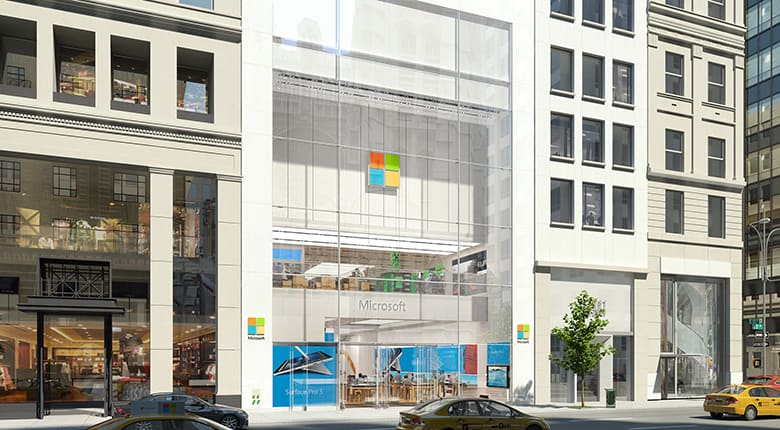
Microsoft finally launched its inaugural flagship store, at 677 Fifth Ave. in New York City, after six long years of waiting for just the right real estate to become available. The store joins Microsoft’s 110 retail outlets in the U.S., Canada, and Puerto Rico in highlighting Microsoft’s hardware and software solutions.
A render of Microsoft’s first-ever flagship Microsoft Store.
So, what makes this new location a “flagship store,” you ask? Well, it’s not just the fact that it spans 22,629 square feet, the largest Microsoft Store to date. The location also features some additional accoutrements:
A larger Answer Desk for providing technical support, even to non-Microsoft Store customers
Two community theatres providing space for free educational and community events
A total of 19 languages spoken by various staff members, such as Arabic, Hindi, Mandarin, Arabic, and Russian, to accommodate New York’s international population
Surface Hub display, the only Microsoft Store able to showcase the company’s largest Surface device
40′ x 20′ exterior culture wall celebrating the “vibrant Fifth Avenue shopping district culture” with non-commercial art playing on the building’s façade
Microsoft is kicking off the new flagship location with a community concert at Rockefeller Center featuring rapper PitBull. The company is also giving more than $3 million in products to New York education and youth charitable organizations, as part of more than $81 million Microsoft has donated to celebrate Microsoft Store launches.
If you live anywhere close to New York City, stop by the new flagship Microsoft Store and say hello. We’re sure the staff there will appreciate the traffic.
Welcome back to our weekly Windows 10 news recap. This week, WinBeta revealed that extensions for Microsoft Edge will be delayed until Redstone in 2016. This story was later confirmed by Microsoft, who issued WinBeta the following statement:
We’re committed to providing customers with a personalized web experience, which is why bringing extensions to Microsoft Edge continues to be a high priority. We’re actively working to develop a secure extension model to make the safest and most reliable browser for our customers, and look forward to sharing more in a future Windows 10 update in 2016.
Extensions for Microsoft Edge were originally going to arrive with Threshold 2, but the company has now decided to wait until early next year before allowing Insiders to begin testing them. Consumers will receive extensions when Redstone 1 rolls out in the summer of 2016.
Also this week, we revealed that Windows 10 “Threshold “, also known as the “Fall Update” will be released within the first week of November, possibly on the 2nd if my sources are correct. Microsoft has been working on Threshold 2 for a few months now, bringing a number of additional features to the operating system that were originally slated for the RTM back in July.
For those who don’t know, Threshold 2 will include a new Messaging app pre-installed with the operating system that will allow you to chat with friends on Skype. It will also bring SMS texting from the desktop with Cortana, plus a number of other improvements to Cortana as a whole.
Microsoft also released a broken update for Insiders this week, which caused many devices that utilise secure boot to BSOD upon boot. For some users, the update is causing blue screens of death (BSODs) and reboot loops, and the only way to fix it for now is to turn off Secure Boot in UEFI.
Microsoft has since pulled the update, so it won’t keep automatically installing. Just imagine if that update rolled out to non-insiders?!
That’s pretty much it this week. Threshold 2 should RTM very soon, so it’s not surprising that there isn’t much Windows 10 news right now. Still, what was your favorite story of this week?
If you’re running Windows 10 and you want to upgrade to newer version you might experience problems from time to time. One of the problems that users have reported is the blue screen caused by athwbx.sys when upgrading Windows 10, and today we’ll try to fix this error.
What to do if Athwbx.sys Prevents Windows 10 From Upgrading to Newer Build
Athwbx.sys is a file related to your Atheros WiFi driver, so let’s try updating your drivers, and see if the issue is resolved. First try to update your drivers ‘normally,’ and if that doesn’t work, try to boot your computer in Safe Mode, and then try to update your drivers:
While booting you’ll need to enter Safe Mode. You can do so by pressing F8 or Shift + F8. If F8 or Shift + F8 combination doesn’t work you’ll have to enter it from Windows 10. If the keyboard shortcut works, proceed to Step 4.
Open the Start menu and click Power.
Hold the Shift button on your keyboard and click on Restart.
After the restart, you will be asked to choose one of the several options. Choose Troubleshoot.
Next select Advanced options.
Choose Startup Settings.
You’ll be notified that you can restart your device in order to change advanced boot options. Press Restart.
After the reboot, you can choose between several options. Press the option that lets you enter into Safe Mode. In our case it’s option number 4, so you can press 4 or F4 to enter into Safe Mode.
In Safe Mode go to Settings and open Device Manager.
Find the Network Adapter section and find your Wireless and Ethernet adapters. Memorize the models because you’ll need to search for new drivers.
Search for the drivers on a different computer. It’s usually the best practice to visit the manufacturer’s website and download the latest drivers, or drivers optimized for Windows 10. We also recommend this third-party tool (100% safe and tested by us) to automatically download all the outdated drivers on your PC.
When you’ve downloaded the drivers, transfer them to a USB flash drive.
Connect the USB with new drivers to your computer and update the drivers.
Most people have reported that updating to the latest driver solved the issue, so we hope that it will work for you, too. However, if you have some other solution, or you have any comments, suggestions, or questions, just reach for the comment section below, and we’ll try to assist you further.
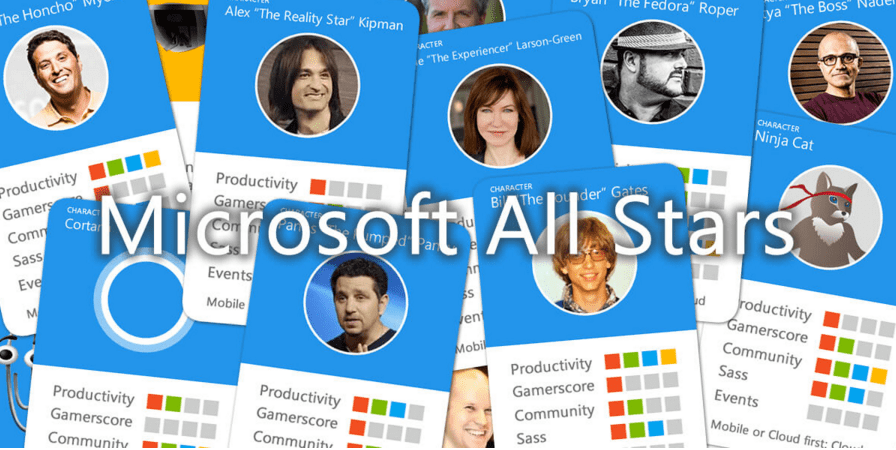
While Microsoft isn’t going to go making an online card game like Hearthstone any time soon, one Microsoft fan made sure that you can have a card game anyways. Michael Gillet has gone about creating Microsoft All Stars, a 2 player card game where you can use cards of your favorite Microsoft Engineers. People like Panos Panay, Bryan Roper, and Satya Nadella are all cards in the game, and they’re pretty amazing.
Each card has different statistics, being defined by productivity, gamerscore, community, sass, and events, and you can use power-up cards to modify them. It’s an exceptionally neat project, and anyone who’s a fan of Microsoft (and more specifically people who enjoy the team that works there) should get a kick out of it.
If you want to play Microsoft All Stars for yourself, you can get all of the cards, read the rules, and even get a DIY kit for your own additions to the game right here. If you just want to check out the cards, you can find them here.
Microsoft has finally made its Universal Windows Platform (UWP) app templates available for Adobe Photoshop. Previously, the templates were only available for Adobe Illustrator and Microsoft PowerPoint.
The templates contain UWP elements such as common controls, fonts, patterns theme colors, and type styles. Users can simply copy elements from the templates into their own Photoshop files. There’s also a template made up of nine screen sizes that enable for creating mockups to show the user how his app will scale on different screen sizes from 4-inch phones to 27-inch desktops. The templates also help the user to quickly create polished apps and visualize what the UI of the app will look like when the app is finished.
If you’re interested, you can download the templates here. Microsoft encourages you to share your feedback with them at their Windows platform developer User Voice, but we’d also like to hear what your thoughts are about the Photoshop templates in the comment section below!
Gameloft has announced a new game that will be available for the Windows and Windows Phone platforms. Sniper Fury is a shooter game that was made in the same game development studio as Blitz Brigade, Brothers in Arms 3, and Modern Combat 5. Here’s a description of the game:
“Using the latest rendering based technology seen in Modern Combat 5: Blackout, Sniper Fury will have amazing visual effects that will make it the best-looking shooter on the store. Accessible gameplay focused on shooting, players will deploy in sniper vantage points with clear missions: eliminate threats, protect allies, survive, and more. Take an impossible shot and see it again with intense kill cams. In Sniper Fury, you are only as good as your aim!”
Gamers who are interested in the new game can pre-register at the game’s official website to unlock some nice in-game content whenever the game becomes available, although we’re unsure the exact release date.
You can also watch the short game trailer below if you want to see a sneak peak of what the game might be like. Be sure to share your thoughts about what you might think of the game in the comments below!
Creating a beautiful product alone doesn’t guarantee adoption or success. The road to innovation and financial success is paved with the mismanaged marketing and failed communications of thousands of would-be competitors. While Microsoft’s Surface Book and Surface Pro 4 have garnered generous praise by the tech elite, the company is only at the beginning of its marketing journey.
We’ve recently been reporting Microsoft’s efforts to get the information out about its new hardware this Fall. From its street campaigns in New York announcing its new flagship store to tapping the NFL’s elite to make appearances at several of its well-trafficked stores, Microsoft is pulling out all the stops this shopping season.
Microsoft is also rounding outs event list with a few more details regarding breakfast tutorials on the Surface Pro for small businesses, and in-store workshops with Microsoft professionals.
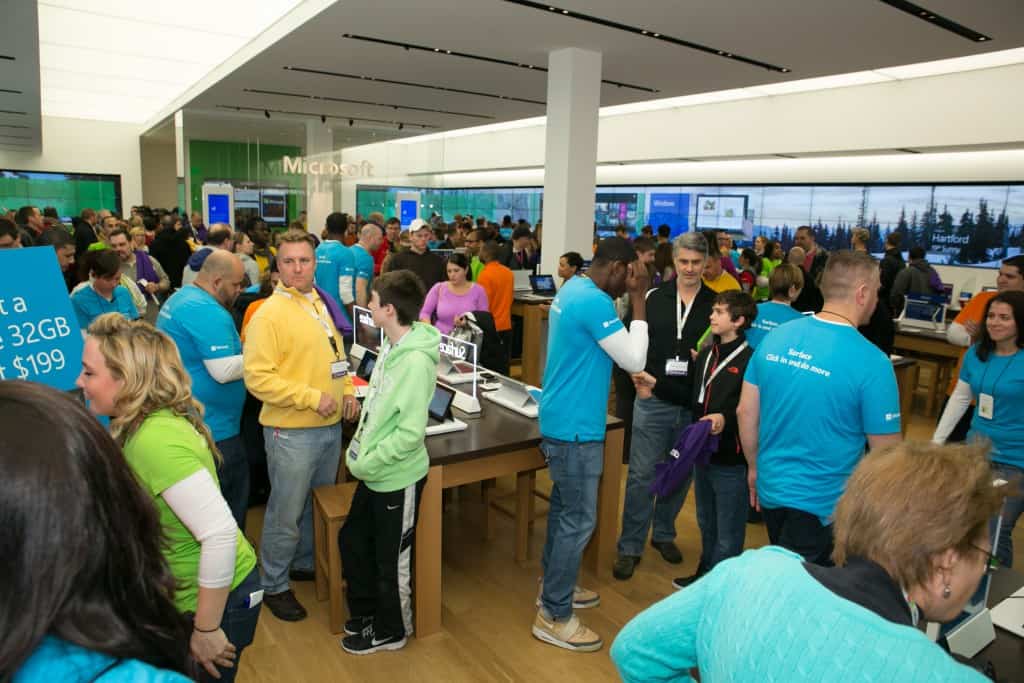
On Monday, October 26, head to your local Microsoft store to experience the launch of the Surface Book and Surface Pro 4. For anyone who has already pre-order their Surface device select stores, in-store pick up now include a t-shirt, Surface sticker, an 8GB USB and accessory carrying pouch for free. While at your local Microsoft Store the company is also encouraging some hands-on time with its new Microsoft Band (Band 2).
Free this weekend? You don’t have to wait until Monday to check out the new Windows 10 devices. Select Microsoft stores have both the new Surface devices and the new Microsoft Band so you can experience them sooner rather than later. You can also preview them online at microsoftstore.com.”
Microsoft’s new event list also has something for small businesses interested in the updated line of Surface devices.
Also on Monday, October 26, some stores will host an in-store breakfast focusing on the Surface Pro 4. Mobile professionals, small business owners and more are invited to the breakfast to learn more about the newest member of the Surface family
Hands-on product demos will highlight some of the top features for small businesses as Surface lets you work from anywhere while on the go.”
Similar to the Genius Bars at Apple stores, Microsoft is also highlighting its highly knowledgeable Answer Desk. For customers interested in the new devices, or OEM-related products, Microsoft is encouraging a trip over stores Answers desk, usually located towards the back of the store.
Microsoft reinvigorated efforts are a welcomed breath of fresh air for the millions of Windows users around. Hopefully, the company can maintain this level of execution that could result in a positive reputation for the stores.
For times and dates on Microsoft Store related events, visit the company’s Facebook page, or call your local store. Unfortunately, it seems many of these events are US-only for now.
Microsoft surprised everyone during the October 6th Windows 10 devices event when the Redmond giant unveiled the Surface Book. Microsoft is touting the Surface Book as “the fastest 13-inch laptop anywhere on the planet” and, portentously, as the “Ultimate Laptop.” This seems to be the ultimate example of Microsoft reinventing a category to, perhaps, show their OEMs how great Windows 10 devices can be designed and built.
If you are looking to snag yourself a fancy new Surface Book, there are several outlets that are carrying the device in the United States and Canada. Microsoft has yet to offer the device outside the United States and Canada, but we’re sure that will change at some point. For now, you can buy the device from the links below (keep in mind that pre-orders are currently taking place until the device becomes officially available on October 26th).
You can also purchase the Surface Book if you have a membership to Costco, but your choices will be limited. You can check out Costco’s offering here. Costco typically offers a bundled deal — and in this case, you can get a one year subscription to Office 365 Personal, and a Microsoft Wireless Display Adapter. Costco will be shipping out the device the week of Nov 9th. For those of you in Canada, check out the below links.
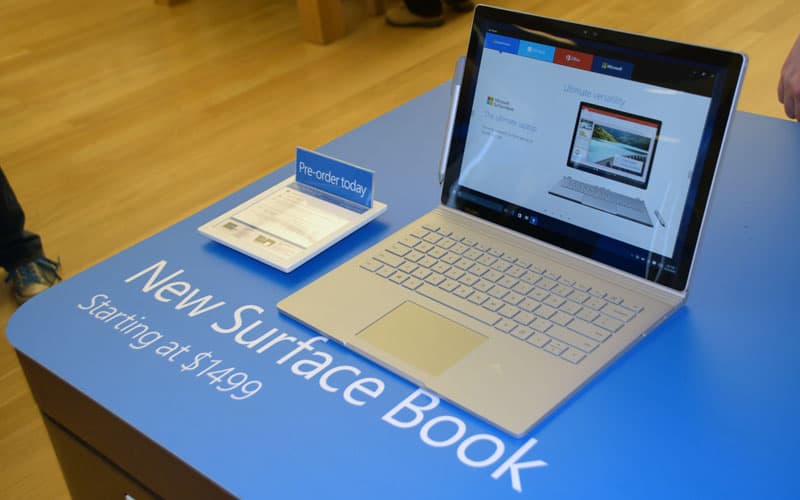
For those wondering, there are several different options to choose from. The cheapest model runs for $1,499 and features 128GB of storage and 8GB of RAM. For $200 more, you can get a dedicated GPU (read more about that here).
You can also head over to a retail Microsoft Store or Best Buy on launch day and see if they have any units in stock. We hope this quite guide helps you and good luck with your purchase! Let us know in the comments below if you pre-ordered a Surface Book and which model you selected. You can also bookmark our dedicated Surface Book page for all the latest news on Microsoft’s newest device.
Google has rolled out an update to their official app on Windows 10, and with this update comes a new app icon reflecting Google’s new logo. The update also adds bug fixes, according to the company.
“The world’s information at your fingertips. A familiar, fast, and precise way to find answers on your Windows 10 device,” the app description reads. This app offers the ability to search Google.com via an app, but you can also do that on the Google website or use Bing instead. But, to each their own. You can grab the app below if you are interested.
It’s been a long, long time since we’ve had the pleasure of welcoming another Fallout game into the world – almost exactly five years, in fact. Fallout is a beloved franchise for more reasons than I could count. Fallout brings an unmatched 1950’s-esque charm to the classic post-nuclear wasteland genre that’s been in fiction for ages. Fallout 4 has made it abundantly clear from its announcement back during E3 2015 that it intends to shatter our expectations, and then some.
According to this tweet from Bethesda, Fallout 4 has finally gone gold after its seven years of development. For those who aren’t privy to this lingo, “going gold” essentially means that the game is done and ready to be shipped off to retailers. Of course, Bethesda is still working on making sure its launch is smooth – they now have a few weeks to work on the day-one patch that will address many of the classic Bethesda bugs as they possibly can.
As a die-hard Fallout fan myself (along with many other people) this news is putting some spring in my step. It’s been a long time since we’ve been able to visit the Fallout universe, and knowing that this entry in the franchise is finally off the presses is pretty exciting, to say the least.
On the heels of a positive fiscal forecast, Microsoft was named Green Power Partner of the Year (GPPY) by the US Environmental Protection Agency. The GPPY award is given to companies that make substantial efforts in reducing their carbon footprint by using natural resources like sun, water, and wind (green power) to power its business and overall energy strategy. Microsoft’s chief environmental strategist, Rob Bernard, explains Microsoft’s green energy efforts:
“Microsoft remains dedicated to driving ever-greater energy efficiency across our business, while also increasing our purchases of green power and making long-term purchase agreements to power our facilities with local renewable energy. We have been 100 percent powered by renewable energy since 2014, and we are pleased to accept this award for the third time.”
In addition to gains in solar power, hydroelectricity, and energy-efficient buildings, Microsoft has made two huge strides in wind power in the last few years.
Pilot Hill Wind Project: In 2014, Microsoft bought 175 megawatts of wind energy from the Pilot Hill Wind Project in Illinois. Now, there is enough energy to power Microsoft’s Chicago datacenter, plus 70,000 Illinois homes.
Keechi Wind Project: In 2013, Microsoft signed a 20-year agreement to buy the 110-megawatt Keechi Wind project, a new wind farm in Texas, which began operating this year (2015).
Microsoft is involved in a wide array of energy preservation efforts; building more solar power in Silicon Valley, building in areas with hydroelectric power access, and cutting energy use in its offices around the world. In 2015, Microsoft bought more than 3.2 billion kilowatt hours of renewable energy.
Read more about Microsoft’s GPPY award and their other energy-related efforts at the Microsoft Green Blog.
Microsoft has released updates for a number of its apps on Windows 10 Mobile, including OneDrive, Photos and Windows Camera (via Windows Central). The updates mostly focuses on bug fixes and improvements, but there are a few changes made to OneDrive app.
As per the change log for the OneDrive app, there are some user interface changes. Furthermore, the “new progress” and search buttons are moved to the top-right corner of the screen. Last but not the least, the sort option is now available at the bottom of the screen as an icon.
As for the remaining two apps, Windows Camera and Photos, there’s no change log available so our wild guess is that it focuses on bug fixes and improvements, which are always welcomed as they boost the overall user experience.
Head over to the Windows Phone app store and grab the updated apps.
Computer issues are relatively common, and speaking of issues some Windows 10 users are having display issues. According to them, their display is divided in three parts with the middle part being black. This sounds like a big issue, but let’s see if we can fix it somehow.
How to Solve Display Issue After Installing “Sis Mirage 3 Graphics Card”
Solution 1 – Uninstall your display driver
This issue can be caused by a newly installed driver, so let’s try deleting the new display driver and using the default one instead.
Go to Device Manager. You can access it quickly by typing the Device Manager in the Search bar.
Now navigate to Display Adapter section.
Find your display driver and right click it.
Choose Uninstall.
Check the Delete the driver software for this device and click OK.
Restart your computer to complete the process.
Solution 2 – Update your display drivers / graphic card
If you’re having this issue, you might want to try and update your display driver. Try searching for the latest drivers or search for Windows 10 drivers from the manufacturer’s website. To avoid serious malfunctions, we suggest you use a dedicated driver updater tool to do it automatically.
You will also receive a comprehensive report detailing the exact condition of your Windows 10’s missing, damaged, or obsolete drivers. You may rely on these tools to make such changes to ensure a proper update with the most recent graphics card drivers.
Some graphic card manufacturers aren’t developing new drivers, so if that’s the case you might want to consider changing your graphic card for a newer model.
Solution 3 – Use shortcuts to switch Project mode
This isn’t a permanent solution, but a workaround that has been confirmed to work by some users. Try pressing Fn+ F7 (this combination might be different for your device) to change the output to projector.
In addition, you can try pressing Windows Key + P to activate the screen project panel. Now use the arrow keys to switch between PC screen only and Duplicate mode. You might need to repeat this process a few times before the black rectangle disappears.
As you can see, this is quite an unusual issue, but we hope that these solutions were helpful to you. If you have any comments, questions, or suggestions, just reach for the comment section below, and we’ll try to assist you further.
At least for the first quarter of the fiscal year 2016, Wall Street may like to see more from Microsoft’s clouding computing services, like Azure and Office 365. Microsoft’s CEO, Satya Nadella, commented on his thoughts regarding Microsoft’s cloud services growth:
“We are making strong progress across each of our three ambitions by delivering innovation people love. Customer excitement for new devices, Windows 10, Office 365 and Azure is increasing as we bring together the best Microsoft experiences to empower people to achieve more.”
Microsoft saw Azure’s premium services income and computer usage more than double in the past year and Enterprise Mobility customers saw the same double-digit growth. According to Microsoft’s Kevin Turner, more and more businesses are taking notice of Microsoft’s cloud-computing capabilities:
“We’re seeing great traction with businesses who want to bring Microsoft’s cloud, mobile device management technology and data analytics together to improve security and productivity resulting in almost 70 percent year-over-year growth in our commercial cloud run rate.”
Microsoft may benefit even more with business revenue from its cloud products and services in the upcoming year, and in one very early indicator of what might be a trend, Microsoft’s stock price is up almost 8% to $51.78 in after hours trading in the hours after 1st quarter earnings were released.
Microsoft was keen to highlight its Intelligent Cloud businesses as they help the company beat some Wall Street expectations. While what I would dub as Microsoft’s legacy sectors weighed down its earnings a bit, its Intelligent Cloud performance was an all-star during its FY16 Q1 reports.
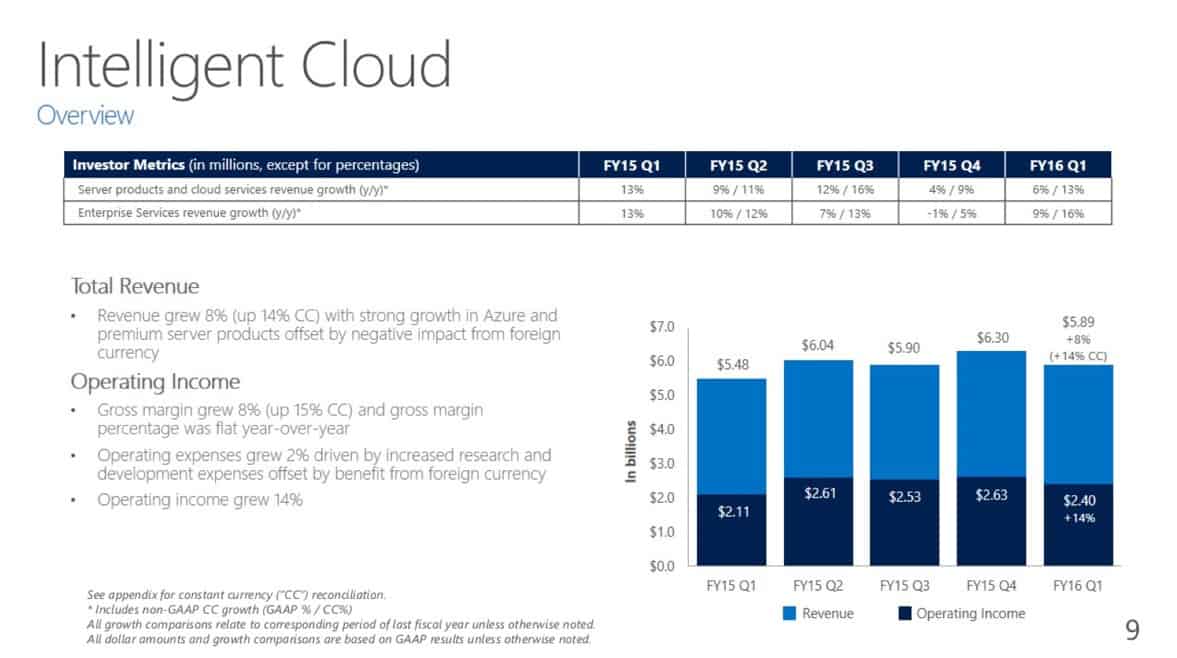
Intelligent Cloud revenue grew 8%, to $5.9 billion in revenue on the back of high Azure adoption and the premiums services tied to it.
Specific highlights include:
Server products and cloud services revenue grew 13% in constant currency, with revenue from premium products and services growing double-digits
Azure revenue and compute usage more than doubled year-over-year
Enterprise Mobility customers more than doubled year-over-year to over 20,000, and the installed base grew nearly 6x year-over-year
Microsoft CEO Satya Nadella seemingly confused many with his chant of ‘Mobile first, Cloud First’ during his first year as head of the company. As the results roll in, it is becoming more apparent what he meant, and where he’s steering the company.
As we reported, Microsoft’s continued push into cloud computing and storage is reaping dividends. However, not everything is on the rise. While its Intelligent Cloud businesses revenues grew to $5.9 billion on an increase of 8%, Microsoft’s ol’ bread and butter, personal computing, is posting declines.
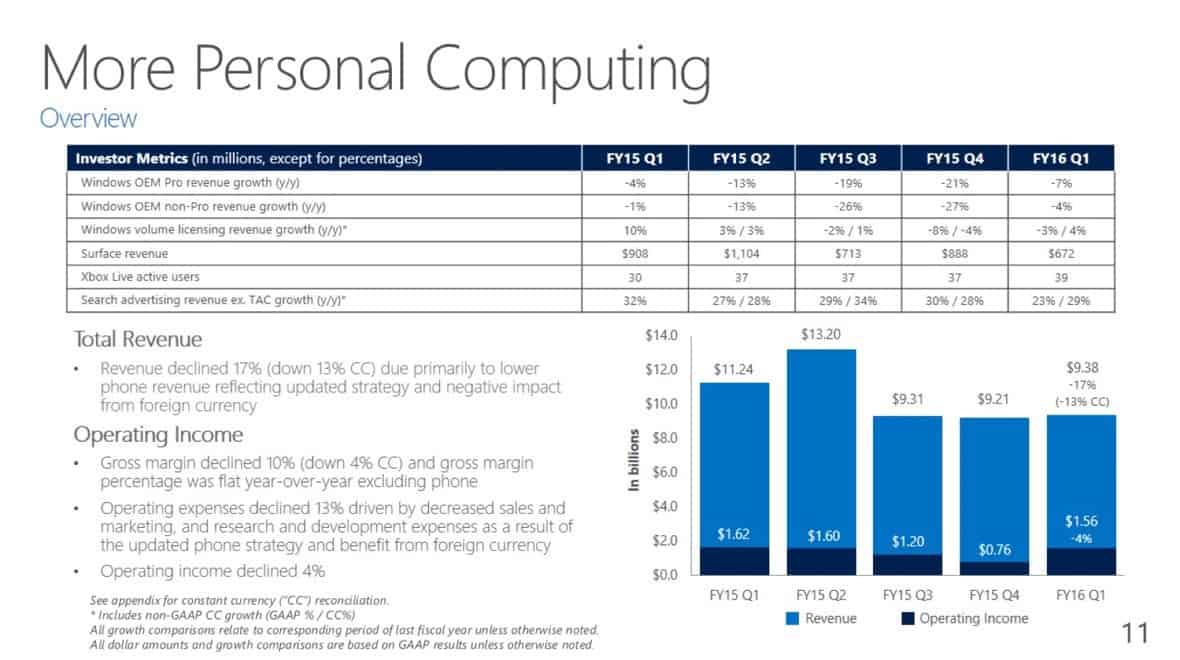
The section housing Windows, Windows 10 Mobile, Surface, etc has dropped 17% year over year despite Windows licensing volume being up 4%. Microsoft’s ‘More Personal Computing’ growth looks to be hampered by continued low phone revenue as well as oddly timed releases of Surface Pro products.
According to Microsoft, the Surface Pro 3’s launch in June of 2014, and its upcoming launch of the Surface Pro 4 had to do with the sharp drop in Surface revenue from almost a billion to roughly $672 million, as people supposedly stopped buying the SP3 in anticipation of an SP4. Those numbers should look better in the upcoming quarters as revenues for the Surface Pro 4 and the Surface Book come online.
On the phone side of things, phone revenues which were down 54% over the year appear to be among the biggest weights on the ‘More Personal Computing’ sector within Microsoft. As Microsoft looks to sure up supply chains by limiting the number of devices manufactured and sold, this strategy may soon turn out to be a positive. Unfortunately, for now, the reality is that devices in this section have revenue declines of 45 percent.
As for the Xbox, it’s a bit of good news/ bad news. Overall, Xbox hardware revenue was down as the company begins to phase out the production and distribution of Xbox 360 consoles. On the bright side, Microsoft’s gaming ambitions grew by 6 percent as the number Xbox Live users grew to 39 million.
It’s been mentioned that Microsoft is company still in transition, and for the most part that remains true. However, it looks like we’re starting to see a light at the end of the tunnel. Microsoft’s More Personal Computing businesses are becoming smaller, laser focused and aiming for higher profit margins.
Microsoft announced its first quarter earnings for fiscal year 2016 (ending September 30, 2015) today, and the results help paint a clear picture of the company’s future. As Windows licensing revenue declines, Surface sales stagnate, and the company’s smartphone phones continue a free fall, it’s the cloud that is helping Microsoft maintain its profits.
Microsoft reported first-quarter earnings of $4.6 billion on revenue of $20.4 billion. Unfortunately, Wall Street would have rather seen an increase up to 59 cents a share on revenue of $21.03 billion, Microsoft instead posted 57 cents a share on $20.4 billion due to a Windows 10 revenue deferral. Without the deferral, Microsoft’s Non-GAAP earnings were 67 cents a share on $21.66 billion.
But enough with the dollars and cents, here is the full breakdown of how Microsoft’s transition to the cloud is doing.
Revenue in Productivity and Business Processes declined 3% (up 4% in constant currency) to $6.3 billion, with the following business highlights:
Office commercial products and cloud services revenue grew 5% in constant currency with Office 365 revenue growth of nearly 70% in constant currency and continued user growth across our productivity offerings
Office 365 consumer subscribers increased to 18.2 million, with approximately 3 million subscribers added in the quarter
Dynamics revenue grew 12% in constant currency, with the Dynamics CRM Online enterprise installed base growing more than 3x year-over-year
Revenue in Intelligent Cloud grew 8% (up 14% in constant currency) to $5.9 billion, with the following business highlights:
Server products and cloud services revenue grew 13% in constant currency, with revenue from premium products and services growing double-digits
Azure revenue and compute usage more than doubled year-over-year
Enterprise Mobility customers more than doubled year-over-year to over 20,000, and the installed base grew nearly 6x year-over-year
Revenue in More Personal Computing declined 17% (down 13% in constant currency) to $9.4 billion, with the following business highlights:
Windows OEM revenue declined 6%, performing better than the overall PC market, as the Windows 10 launch spurred PC ecosystem innovation and helped drive hardware mix toward premium devices
Search advertising revenue excluding traffic acquisition costs grew 29% in constant currency with Bing US market share benefiting from Windows 10 usage
Xbox Live monthly active users grew 28% to 39 million
It is clear for now that Microsoft’s reinvigorated push into business and cloud platforms sees gains, while its legacy of Windows, is becoming less of reliance for the company.
Keep it here as we continue to comb through the numbers to help get a better understanding of what can expect from Microsoft in the near future.
Microsoft’s track record of supporting non-profit organizations in greater causes for humanity is the topic of a post on the Official Microsoft blog, as they talk about spreading the passion for soccer, and sports in general, to millions worldwide through collaboration with the Real Madrid Foundation.
Being the expressive face of Real Madrid’s social and cultural awareness, the Foundation aims to promote the value of sport in individual development and social integration for the suffered. Microsoft empowers this cause through donating software to Foundation employees, volunteers and eligible local partners worldwide, helping them to be more efficient and productive in their work and also in communication, as in the case of a knowledge-sharing community based on Microsoft’s Yammer app. A reported 40,000 children in several countries have participated in the project.
The post also mentioned another positive effect to Microsoft’s donation in the form of increased exposure to technology and IT skills, which, coupling with leadership learned through sport, will all be great preparations for the productive world.
Although Microsoft’s recent foray into product development has become fairly successful with more companies than ever already investing the products like the Surface Pro 4, Microsoft has always been known as a software company. With products from Office 365 and OneNote to Visual Studio 15 and Windows 10, software is still a priority for the company. However, Microsoft’s work is not only centered around productivity; their research teams have varying interests, some of which have wings.
Red Bull Race pilot, Kirby Chambliss, has been working with Microsoft researchers Michael Zyskowski and Rick Rogahn on how to improve his racing abilities. Using sophisticated sensors and technology, the trio hope to give Chambliss a major advantage over his competition as described in Microsoft’s News Center.
For months, the research team has been traversing the globe with Chambliss, using control theory, robotics, machine learning and path planning to help the pilot figure out the most efficient path through the high-speed, low-altitude courses.
During each race, Chambliss is faced with making split-second choices flying at speeds of up to 200 miles per hour. Each erroneous maneuver can cost him anywhere from a tenth of a second to a hundredth of a second; meaning the difference from winning a race and being eliminated. However, that is what Microsoft’s research team is for.
By analyzing the course, Chambliss’s performance compared to other racers, as well as the plane’s performance, the team is fighting to gain just fractions of a second to give Chambliss a better chance at winning races.
This process is slow, however, and the team is not aspiring to make Chambliss into an instance success story. Instead, the team is working with their pilot each step of the way, finding ways to improve his performance and the performance of his aircraft.
Already, however, the data analysis has led the team to make some significant changes, beyond just how Chambliss approaches each race day. After analyzing his performance relative to other teams, the researchers realized that the airplane itself might be putting them at a disadvantage relative to other teams.
So, they collaborated with researchers from The University of Kansas to add winglets, which modify the wings so they turn up at the ends and are intended to reduce drag. They also have modified the plane’s body to make it lower and more streamlined.
Aesthetic changes aren’t the only improvements the team is making, however. Using mapping software, the team can digitize each racing course. This digital map is coupled with data obtained from either Chambliss or other pilots to create the best possible route for Chambliss to fly in an effort to minimize his time as much as possible.
Although Chambliss and the team have not taken home any trophies this year, that hasn’t hindered the trio’s efforts. This is a work in progress and the team is certainly making progress. These advancements will only continue as Zyskowski and Roghan carry on to push their software to the limits, learning how they can make Chambliss an even better pilot.
As is to be expected, Microsoft has already begun prepping for their 2016 events and has announced several details and dates for their major conferences. They’ve also promised that going forward they’ll be trying to keep similar dates for future events to help attendees plan their schedules.
The first major event for 2016 will be Build which is set for Spring 2016 in San Francisco, U.S.A.. Build is mainly a conference for developers interested in Microsoft’s latest developments and future plans. 2015’s Build was particularly eventful due to the arrival of Windows 10 this year and several major announcements regarding app development were made.
The second event will be Convergence, which is scheduled for April 4-7, 2016 in New Orleans, U.S.A. and is for businesses to explore emerging trends and solutions. 2015’s Convergence explored new developments in Microsoft’s Office, Azure, and Skype programs with the announcement of Microsoft Azure IoT Suite being a major focus.
Worldwide Partner Conference (WPC) is set for July 10-14, 2016 in Toronto, Canada and will continue its tradition of focusing on Microsoft’s partners and helping them deliver solutions to their customers while Microsoft Ignite, Microsoft’s special event for IT Professionals interested in the latest technological advancements, is scheduled for September 26-30, 2016 in Atlanta, U.S.A., after being relocated from its original Chicago location and May 2016 dates. Registration is already open for Ignite and the event promises to feature over 1000 hours of content and more than 700 sessions. 2015’s Ignite made headlines due to its Windows Hello and Continuum demoes as well as other Windows 10 reveals.
Each of these four major events provide a different lens from which to view the latest Microsoft news and developments and we’ll be here to report on all of the biggest (and even smallest) reveals.
Are you excited for any of these events or is there another one that gets you more hyped? Let us know what your favorite conference is in the comments below and we’ll do our best to cover it.
Microsoft will be releasing updates to its Movies & TV app later today according to Ellen Kilbourne, a Windows Software Engineer for the Groove Music and Movies & TV apps. While not much will be changed in the app, we do know that Microsoft is prepping for the release of the Threshold 2 update of Windows 10 scheduled for release sometime this November.
An update for the #MicrosoftMoviesTV app is headed to the Store now. Be on the lookout for version 3.6.1382.0 later today!
The Microsoft DVD Player app will also received an update in preparation of the Windows 10 update coming in November. DVDs can’t be played in Windows Media Center on Windows 10, but users who want to play their DVDs can do so with the Microsoft DVD Player app.
An update for the #WindowsDVDPlayer app is headed to the Store. Be on the lookout for version 3.6.1329.0 later today.
— Ellen Kilbourne (@ellenment) October 21, 2015
@ellenment Less visible changes in this update…it’s mostly about getting the app ready for future builds of the OS.
— Ellen Kilbourne (@ellenment) October 21, 2015
The updates aren’t yet available for download, but when they are, they should automatically download and install. If automatic updates aren’t turned on or the app doesn’t download automatically, open the Store app, click your profile icon, click Downloads and updates, and then Check for updates.
Do you use the Movies & TV app, or do you personally prefer something like Windows Media Center or VLC? Let us know what your thoughts are in the comments below!
Minecraft is one of the most popular games in the world. It’s easy to see why―Minecraft lets players use their imagination to shape the world however they see fit. Even Microsoft saw its potential when it bought the company that developed it for $2.5 billion last year.
People all over the world play it, a lot of the time they’re playing on a multiplayer server with their friends. But did you know that there’s a quick and pretty easy way of setting up a Minecraft server on Microsoft Azure?
Amanda Lange, a technical evangelist at Microsoft, put up a short video tutorial that guides Azure users on how they can get their own Minecraft server running just a few minutes. She also explains how the whole process works and how you can configure individual settings for your Minecraft server.
Have something you’d like to share? We’d love to hear what your thoughts are in the comments below!
Update: I’m told Threshold 2 will not be launching on November 2nd now, the original plan was for it to launch the first week of November, but Microsoft failed to sign off on a final build this week meaning it will have to happen next week. Microsoft will likely want to flight the final build to Insiders for testing before rolling it out to the public too, which will further add to the wait time for consumers. Original story follows.
Windows 10 “Threshold 2” is almost ready. In fact, we’re now less than two weeks away from it being publicly available as according to my sources, the update will launch for consumers on November 2nd, lining up with our previous report which claimed it would launch in early November. Microsoft has been working on Threshold 2 for a few months now, bringing a number of additional features to the operating system that were originally slated for the RTM back in July.
For those who don’t know, Threshold 2 will include a new Messaging app pre-installed with the operating system that will allow you to chat with friends on Skype. It will also bring SMS texting from the desktop with Cortana, plus a number of other improvements to Cortana as a whole. There are improvements to Microsoft Edge, although extensions are now slated to arrive sometime next year.
Threshold 2 also brings new customization options such as the ability to enable an extra column on Start and enable coloured title-bars. Threshold 2 feels like a much more rounded operating system compared to the Windows 10 release in July, and that’s a good thing. Consumers will receive this update automatically, much like any other update starting November 2nd. Of course, until this is officially confirmed by Microsoft, the date could always change. Will you be updating to Windows 10 Threshold 2 once it’s available, or are you already running it via the Insider Program?
The day is finally coming where we’ll be able to get our hands on each of the new devices that were shown off to us earlier this month. To celebrate the release of the Surface Pro 4, Microsoft is holding launch events at several of its Microsoft Stores throughout the US (unfortunately for some international fans). To bring in a bit more of a crowd, Microsoft is even inviting a few professional football players to come and celebrate with them.
Here’s the list of all of the participating locations, along with the athlete that will be showing up:
The Fashion Mall at Keystone – Indianapolis, Indiana – Indianapolis Colts quarterback Matt Hasselbeck
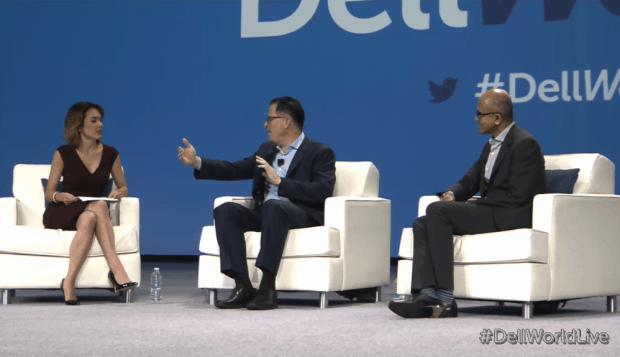
Bloomberg TV interviewed Dell CEO Michael Dell and Microsoft CEO Satya Nadella, via GeekWire.
As GeekWire reports, Dell CEO Michael Dell is just fine with Microsoft leading the way in demonstrating just what Windows 10 can accomplish when paired with the right hardware. Bloomberg TV interview Dell and asked him point-blank about what it’s like to both compete and partner with the software giant:
“We’re absolutely friends,” responded Dell, talking about the ways the company is working together in the cloud and on Windows.
He added later, “When I look at what Microsoft is doing with Windows 10 and the Surface family of products, what they’re doing is they’re pushing Windows 10 into new spaces and driving the platform forward. I’m actually excited about that. The reason I’m excited is it’s helping drive the Windows 10 ecosystem faster.”
Dell also points out what might very well be Microsoft’s tactic for both providing visionary products and yet providing plenty of room for OEMs to compete:
“Satya’s got some nice products. The volumes are not very high, the prices are pretty high, but it’s great,” Dell said, as Nadella [also being interviewed] and the audience laughed.
Dell summarizes Microsoft’s strategy, and where his company fits in:
“I wanted to understand what they were doing and why they were doing it,” said Dell. “When we understood that the intent is basically to drive the platform — as I call it, the “icebreaker” strategy, push into new territory — and then we come in with a product that is more affordable, but we can sell 100 times more, great, that works.”
We have to wonder if Dell is really this accepting of Microsoft’s strategy, or whether his opinion would be a bit more pointed behind closed doors. Nevertheless, at least in public, Dell fully understands that his company has the option of undercutting Microsoft on price and leveraging its capability to produce at volume while providing its own innovative products. Certainly, Dell makes some nice laptops with the Dell XPS 13, XPS 15 and hybrids such as the XPS 12.
The interview was conducted at Dell World 2015, currently taking place in Austin, TX, where Dell is highlighting its efforts to both build out its own enterprise-level solutions while continuing to compete in its traditional PC business.
With Windows 10 engineering picking up steam, the core app development from the Windows team is becoming so fast-paced it could almost border on annoying for some. However, as some Windows Phone users can cop-to, too many updates are worlds better than infrequent or worse, none.
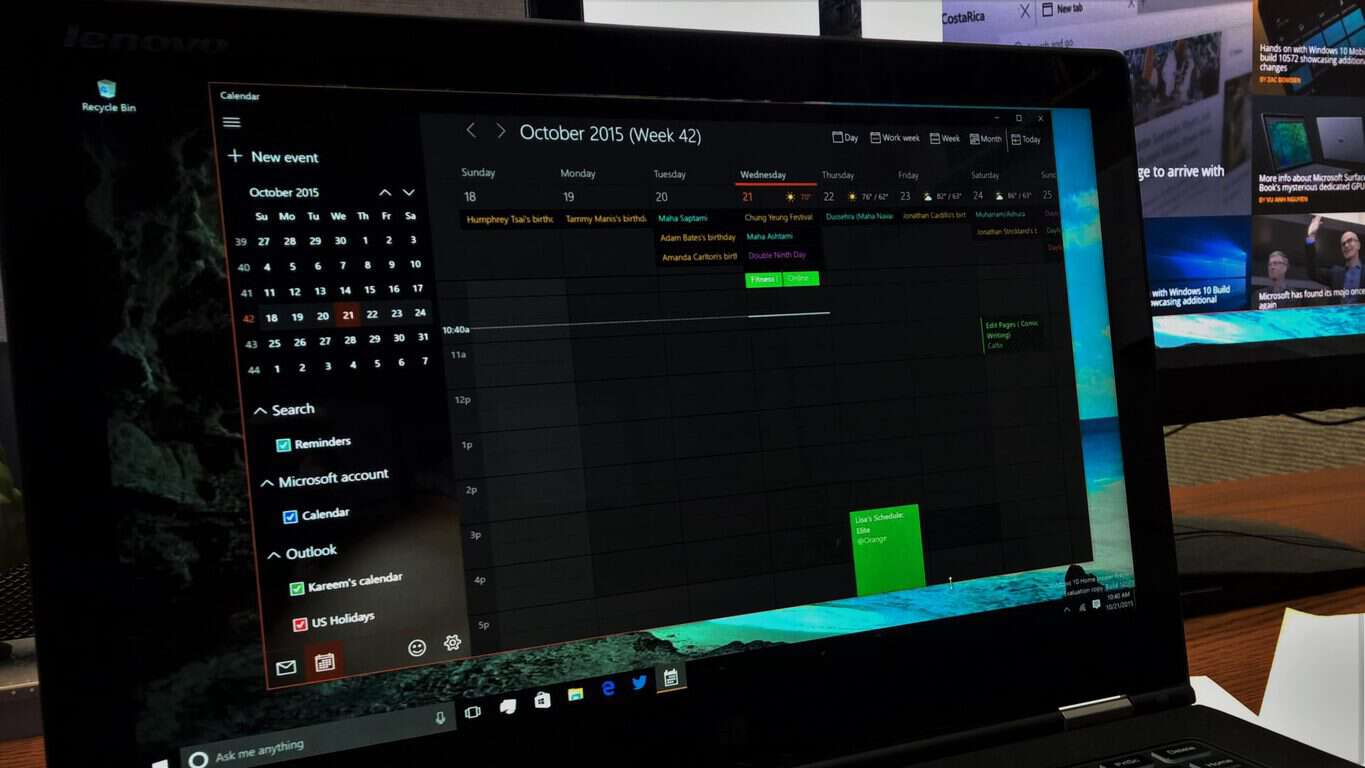
On that same note, the Outlook Mail and Calendar app for Windows 10 picked up another update recently. The new update listed as 17.6319.42022, not be confused with the current 17.6310.42252, brings more than just shuffling of numbers.
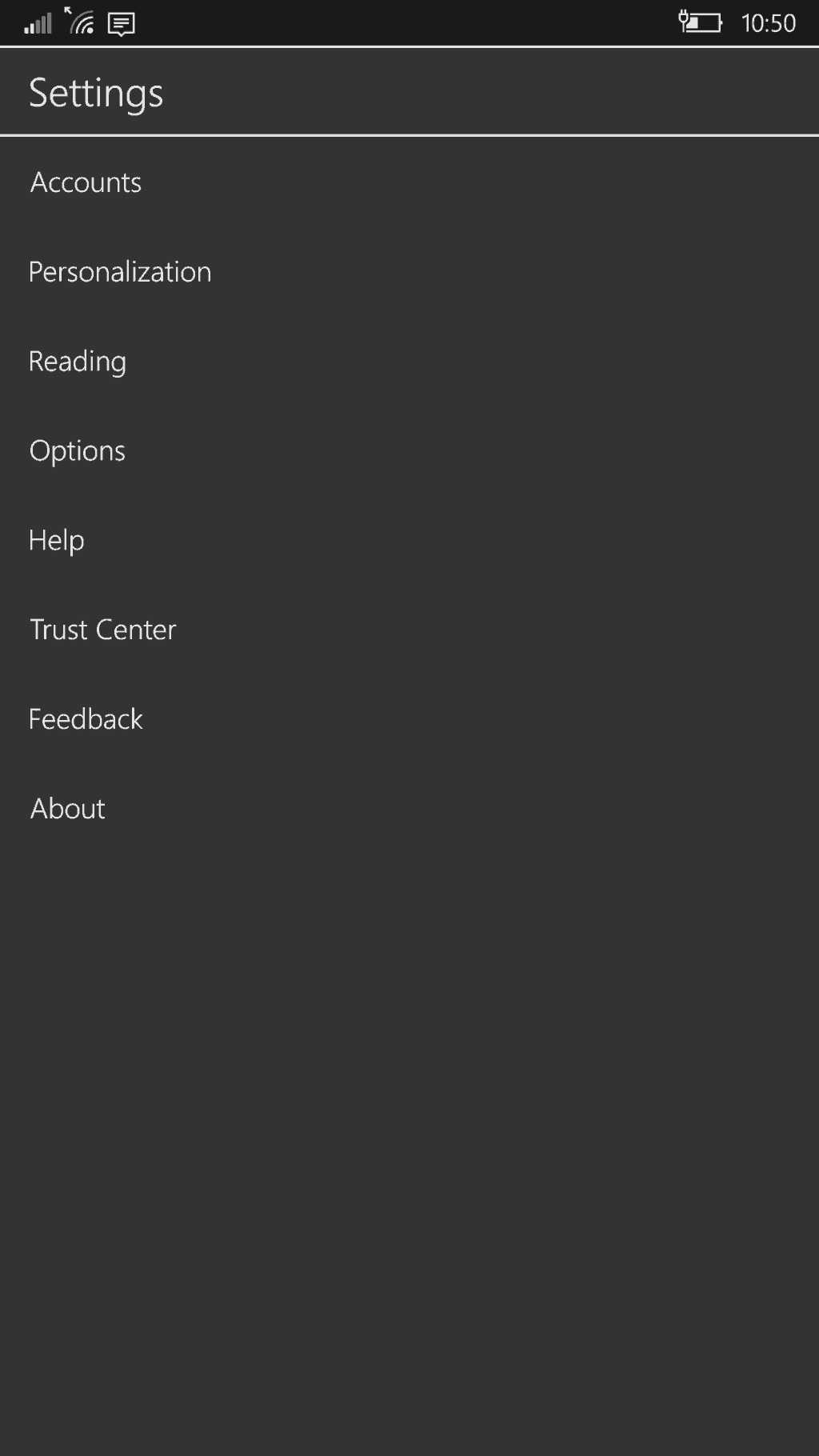
Outlook Mail and Calendar users should notice the entirely enveloped dark theme throughout the apps. A few updates ago, both the Mail and Calendar apps underwent a dark them addition, but the theme only extended to the front-facing parts of the app. With the new update, the dark theme appears in the settings menu as well, thus adding a bit more polish to the apps.
Colors and themes were not the only changes in the two apps received. The user should also notice there is a new Week View option in addition to the Work Week View. The subtle difference is that in Work Week View the calendar targets are expanded and show only Monday through Friday of the calendar week. In Week View, the targets are shortened but display a full week beginning with Sunday and ending on Saturday.
It may also be safe to assume the update also brings some bug and performance fixes that were not specifically called out in the notes. The app does feel a bit smoother in transitions and sending emails with attachments or jumping in and out of calendar events happen almost instantaneously.
Let us know if you notice any other subtleties we may have missed in our quick hands-on with the updated Outlook Mail and Calendar apps.
Microsoft president and chief legal officer Brad Smith, in a blog post, highlights the company’s latest 2015 Citizenship Report, showcasing how Microsoft is doing the world good through corporate citizenship. Microsoft carries a set of corporate citizen commitments which include empowering every individual and organization on the planet, in addition to:
Human rights
Responsible sourcing and manufacturing
Environmental stability
Ethical business conduct and governance.
The Citizen Report contains information about how the company implements and executes these commitments through its company policies, business practices, products and services, and community investments.Smith enumerates the forward progress highlights for the 2015 fiscal year:
Microsoft becomes the first major cloud provider independently verified to meet the world’s first international standard for cloud privacy (under ISO/IEC 27018).
The company purchases more than 3 billion kilowatt hours (kWh) of renewable energy (equal to 100 percent of (Microsoft’s) global electricity use), creating a carbon offset project portfolio representing more than 600,000 metric tons of carbon dioxide emissions, and becoming the second largest user of green power in the U.S., according to the U.S. Environmental Protection Agency.
Microsoft launches new policies to ensure that U.S. suppliers provide paid leave to their employees who handle Microsoft’s work.
Creating education, employment and entrepreneurship opportunities for 307 million young people worldwide through the company’s YouthSpark initiative.
Donating more than $922 million in software and services to more than 120,000 nonprofit organizations around the globe, including more than 1 million new Office 365 licenses for nonprofit workers and their strategic volunteers.
For the second year in a row, Microsoft surpasses $1 billion in total company annual giving, with cash donations of $135 million USD in addition to the $922 million in Microsoft products and services.
Smith concludes by stating that Microsoft recognizes there’s always more to do, and welcomes feedback from stakeholders around the world. It’s worth noting that these “stakeholders” are not just investors out for profit, but also customers and concerned citizens, ranging from parents concerned about their children’s safety, all the way to international human rights experts.
It’s October 21st, 2015 – the day that Marty McFly and Doc Brown traveled to in Back to the Future. People have made several hoaxes of the time-travel panel in the fabled DeLorean, making us prematurely celebrate the Back to the Future day. Today is the real deal, however – the day where we were promised all of the space-age gadgets and gizmos that the 80’s were able to dream up.
As a company that is forever on the frontier of technology, Microsoft has put a bit of an easter egg on Microsoft.com in celebration of this special day. If you visit the website and type “outatime” you’ll be greeted with a short animation paying homage to Back to the Future, and then you’ll be shown a page showing off some of Microsoft’s newest gadgets (like the HoloLens, Band 2, Surface Pro 4, and Xbox One) and proudly proclaiming that “the future is precisely on schedule.”
On top of the easter egg on Microsoft’s website, they’re also doing a celebration with Skype. Skype’s Facebook, Twitter, and Instagram accounts have all been given and 80’s-style makeover celebrating Back to the Future, and you can now share Back to the Future Mojis on Skype itself. If you’re interested in hearing some Back to the Future trivia today, you can add Skype ID “WereGoingBack” on Skype, and you’ll be given messages with clips from events, trivia, and more.
Whether you’re a big fan of Back to the Future, a fan of the 80’s in general, or you just want to get caught up in today’s festivities, it seems like Microsoft is more than happy to help you celebrate. Go ahead and check out all of the easter eggs that they’ve set up for us, and start waiting for your hoverboards.
Jason Shirk of the Microsoft Security Response Center announced yesterday that the company is again expanding its bug bounty programs to include the .NET Core and ASP.NET Beta. The bounty programs are essentially hit lists for various bugs, where Microsoft pays contributors rewards for finding and fixing bugs throughout the company’s software stack.
Microsoft projects like .NET Core, having been recently been open sourced, are expanding to become the backbone for not just Microsoft’s software ecosystem, but for the company’s cross platform endeavors. As such, it is paramount Microsoft expands the bounty program’s reach as much as possible to incentivize independent contributors and developers to help the company solve down bugs and problems.
The expanded bounty programs include:
.NET Core and ASP.NET Beta 8 and any subsequent Betas or Release Candidates during the bounty period
Supported platforms on Windows, OS X and Linux
The bounty will run October 20, 2015 – January 20, 2016
Bounty payouts will range from $500 USD to $15,000 USD
Up to date information on the program can be found here.
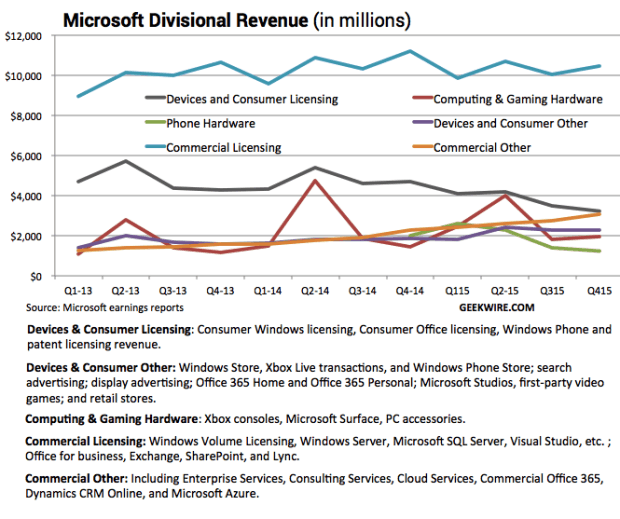
Microsoft’s 1Q16 earnings report is just around the corner (actually tomorrow, October 22), and we’ll get our first glimpse at the performance of the new Microsoft following their restructuring on September 29, 2015.
In case you forgot, Microsoft simplified their organizational structure from six “reportable segments” down to three. Simplified, the new structure breaks out as follows.
Productivity and Business Processes segment, made up of:
Office Commercial (including services such as Office 365 Commercial, Exchange, SharePoint, and Skype for Business)
Office Consumer (including Office 365 Consumer, Outlook.com, OneDrive, and Skype)
Microsoft Dynamics
Intelligent Cloud segment, comprising:
Server products and services (including Windows Server, SQL Server, Visual Studio, System Center, and Azure)
Enterprise Services (including Premier Support Services and Microsoft Consulting Services)
More Personal Computing segment, which includes:
Windows (including Windows 10, Windows 10 Mobile, Windows Embedded, MSN, and Windows Phone)
Devices (including Surface, smartphones, and PC accessories)
Gaming
Search advertising revenues
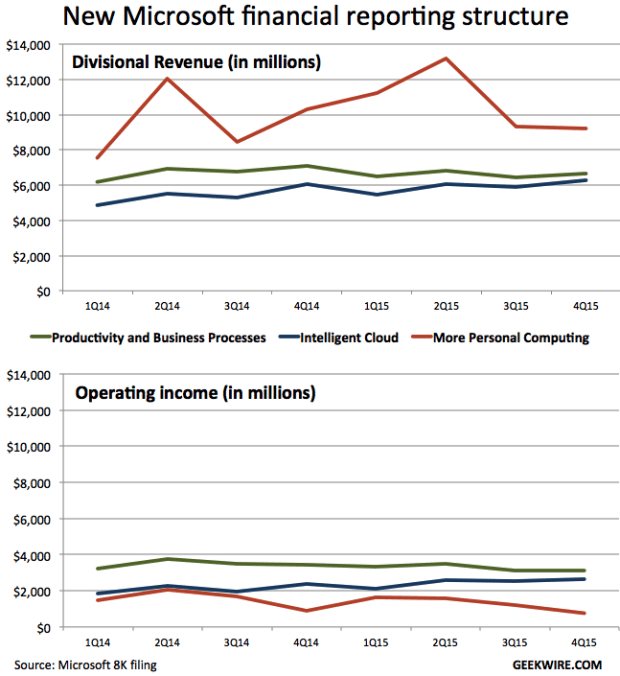
As GeekWire reports, Microsoft published financials that reflect what the company would have looked like if the new structure had previously been in place:
How Microsoft’s past financials would look under the new reporting structure.
This compares to Microsoft’s old structure:
How Microsoft’s financials actually looked under the old structure.
As GeekWire points out, the level of detail that Microsoft provides going forward will dictate the ability to see just how individual products, such as the Surface and Lumia lines, performed. These are important metrics for determining just how well Microsoft’s “mobile-first, cloud-first” strategy is playing out, and we’ll be digging into Microsoft’s earnings report with some vigor.
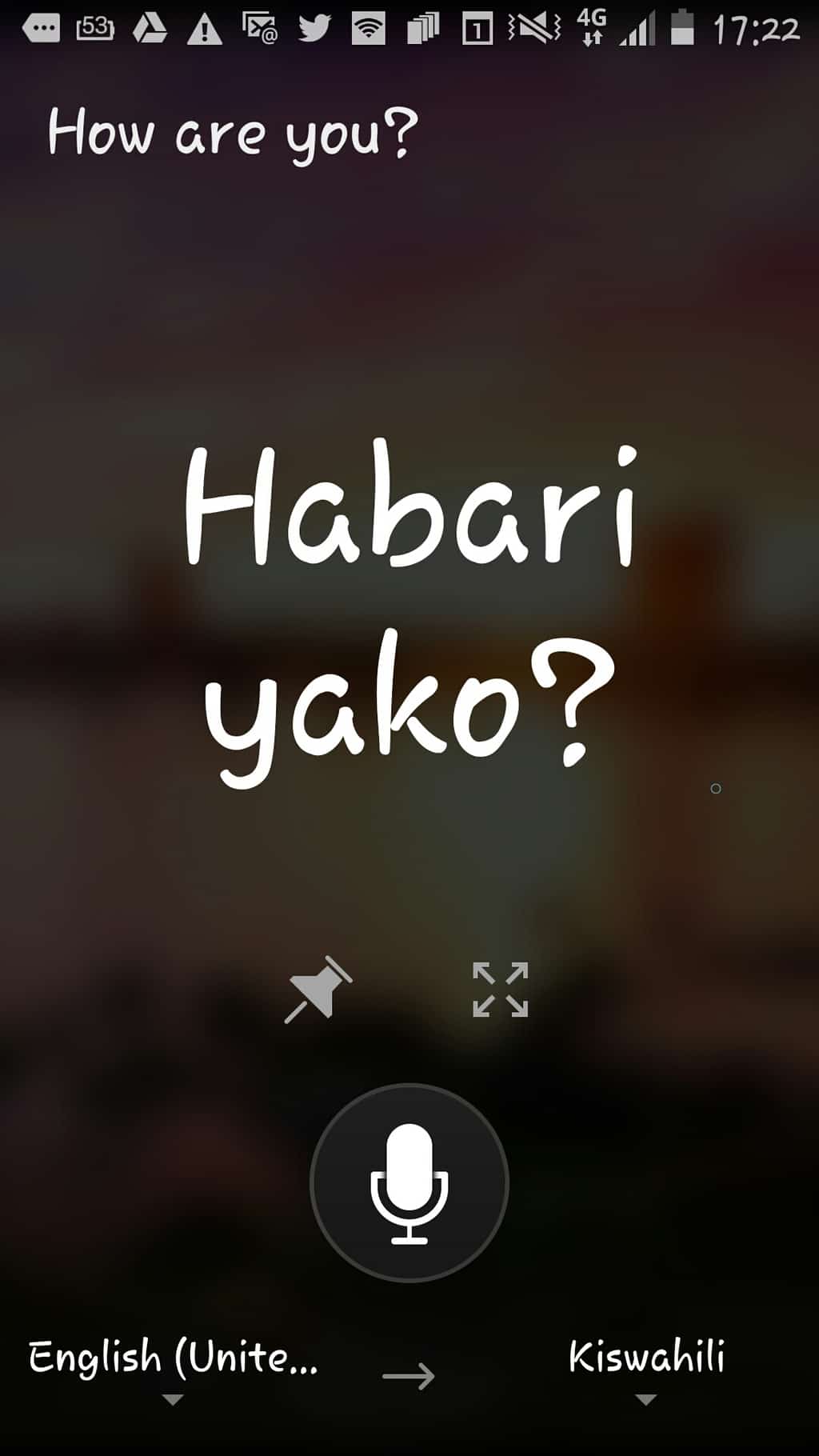
Microsoft has taken to their blog to announce the introduction of Kiswahili language to its Translator repertoire.
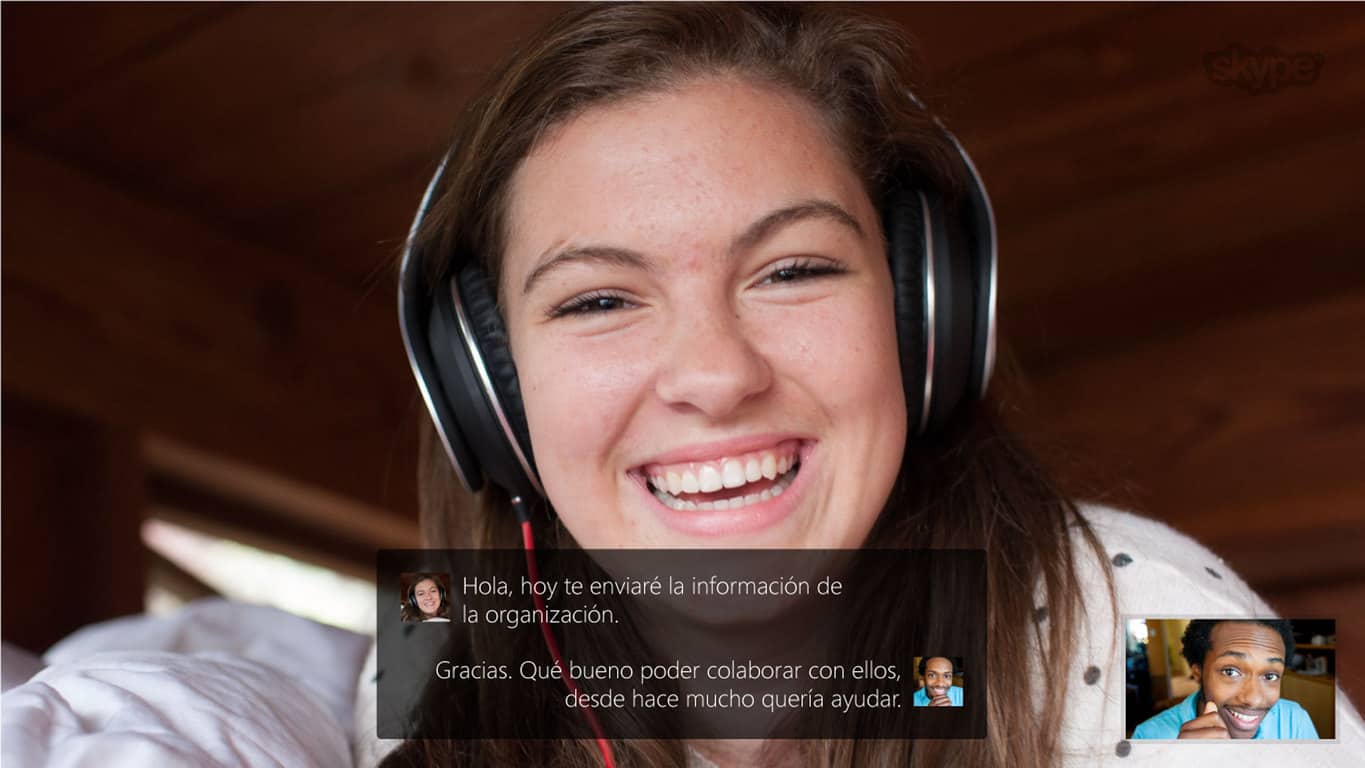
All versions of Microsoft Translator on supported platforms will have immediate access to the new language. Kiswahili will also be available throughout the Translator-integrated range of communication and productivity software by Microsoft including the Office Suite, SharePoint, Yammer, Cortana and Skype for Windows. Note that you may have to update the Windows 10 app to see the language.
How to say “How are you?” in Kiswahili.
Also known as Swahili, the language is spoken predominantly in East Africa by up to 150 million people in countries including Tanzania, Kenya, Uganda, Mozambique and the Democratic Republic of Congo. This marks the first African language to be supported by Microsoft’s translation service, and its inclusion will no doubt be beneficial to both local governments, especially ones who are using Microsoft’s solutions, and to foreign business owners planning to expand to the area. Tourists to the region who relies on these software for cross-culture communication should be also be well-served.
The translation was developed in collaboration with NGO Translators without Borders (also the people who brought Klingon among other languages to the platform), using Microsoft Translator Hub.