
Panda Antivirus Uninstaller - How To Download and Use It


 2 min. read
  Published on
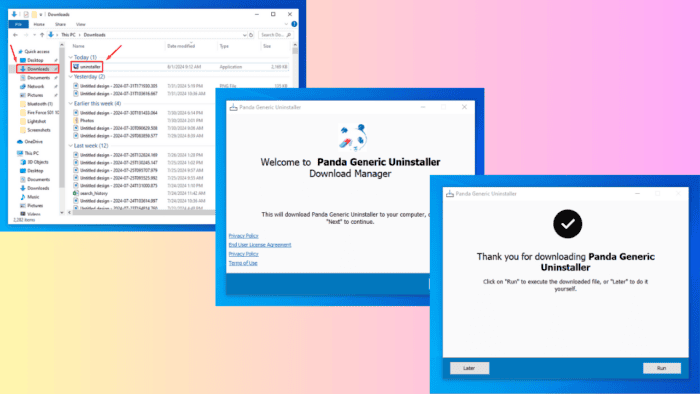
Looking for the Panda antivirus uninstaller? It removes all software remnants from your system to prevent conflicts with other programs.
I’ll show you how to download and install it easily, so stay tuned!
How To Download and Use Panda Antivirus Unistaler
You can get the software from the official website or a third-party source.
Using the Official Panda Generic Uninstaller
Follow the below steps:
- Open your browser and download the Panda Generic Uninstaller file. This app will help you uninstall all Panda products, including the antivirus software.
- Locate the file in the Downloads folder on your computer.

- Right-click on the uninstaller executable file and select “Run as administrator” to ensure it has the necessary permissions.

- Tap Yes to allow the app to make changes on your computer.
- The Panda Antivirus uninstaller will launch. Follow the on-screen instructions to proceed with the installation.

- After completing the onscreen instructions, you’ll be asked to click “Run” to execute the downloaded file or “Later” to do it yourself.

If you run it, it’ll automatically restart your PC for a clean uninstallation of the antivirus.
Using a Third-Party Website

I recommend always downloading the uninstaller from the official Panda Security website. But you can also find it on third-party websites. In that case, use a reputable one like Softonic to avoid infecting your computer with malware.
Overall, the Panda antivirus uninstaller can remove all traces of this software from your system. Whether you download it from the official file or a trusted third-party source like Softonic, these steps guarantee a clean uninstallation.
Moreover, if you need recommendations for an antivirus with tune up features or to use with a VPN, we can help out! Also, if Panda Security is acting up, check out this guide on how to fix it.

Read our disclosure page to find out how can you help Windows Report sustain the editorial team. Read more



Improve this guide



User forum
0 messages