
How to Log In to Procore and Access Your Projects


 3 min. read
  Published on
Use Procore to access your projects, documents, schedules, drawings, RFIs, and submittals. This guide explains how to log in to Procore on a computer or mobile device.
How can I log in to Procore?
1. Use the Procore login page
Make sure you have your account email address and password ready before signing in.
- Go to app.procore.com or login.procore.com.
- Enter your registered email address.
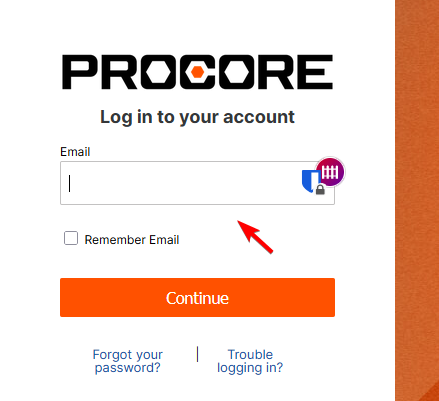
- Select Remember Email when using a private device.
- Click Continue.
- Enter your password.
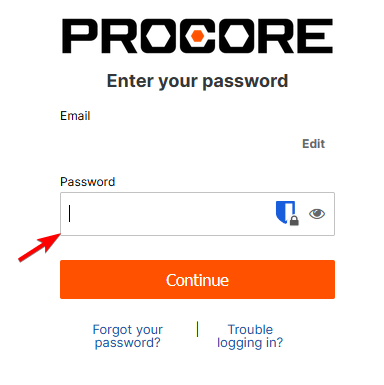
- Click Continue again.
- Select a company or project when prompted.
Do not select Remember Email on a public or shared computer.
2. Log in to the Procore mobile app
Install the official Procore app and use the same account details as your desktop login.
- Install Procore from the Apple App Store or Google Play Store.
- Open the Procore app.
- Enter your registered email address.
- Enter your password.
- Complete any required security verification.
- Select the company or project you want to open.
The mobile app uses the same login details as the Procore website.
3. Log in with Procore SSO
Some companies use Single Sign-On through Microsoft Entra ID, Okta, OneLogin, or another identity provider.
- Open the Procore login page.
- Enter your company email address.
- Click Continue.
- Complete your company’s SSO login process.
- Finish any required security verification.
- Wait for Procore to open your account.
Contact your IT department when your SSO password does not work. You cannot reset an SSO password through Procore.
4. Complete Procore MFA verification
If your company enables multi-factor authentication, Procore will request a verification code after you enter your login details.
- Enter your Procore email address and password.
- Open your authenticator app or SMS messages.
- Find the six-digit verification code.
- Enter the code in Procore.
- Click Continue.
Never share your MFA verification code with another person.
For other useful tools, see our guide to construction planning software.
You can also read our guides on how to log in to Denticon and how to complete an AOL Mail login.
FAQ
What is the official Procore login website?
Use app.procore.com or login.procore.com to sign in.
Can I log in without a Procore invitation?
You need an invitation or access from a company administrator before you can open that company’s Procore projects.
Can I use the same Procore login on mobile?
Yes. Use the same email address and password on the Procore website and mobile app.
Why does Procore redirect me to another login page?
Your company likely uses SSO. Complete the login through your company’s identity provider.
How do I unlock my Procore account?
Reset your password or contact your Procore administrator to check and unlock the account.
Why is my Procore password not working?
Check your email address, password capitalization, and Caps Lock setting. Reset your password when the problem continues.
Why did I not receive the Procore invitation?
Check your spam folder and ask your administrator to confirm the email address attached to your account.

Read our disclosure page to find out how can you help Windows Report sustain the editorial team. Read more



Improve this guide




User forum
0 messages