
Remote Desktop Retirement Begins as Microsoft Pushes New Windows App


 3 min. read
  Published on
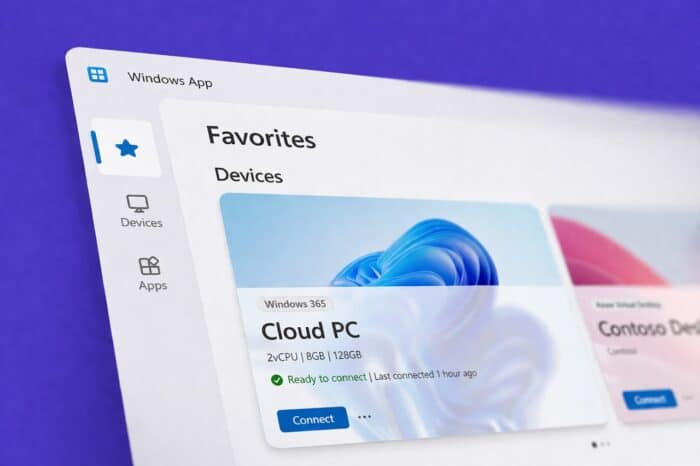
Microsoft is officially phasing out its legacy Remote Desktop app, replacing it with the newer Windows App as part of a broader modernization effort. The move introduces improved reliability, stronger security protections, and a more consistent experience across devices.
End-of-support timeline confirmed
Microsoft has outlined a staged retirement for Remote Desktop across platforms.
Support for the Remote Desktop app on Windows and the web client is expected to end on May 27, 2026. Environments tied to Azure Government and 21Vianet clouds will receive extended support until September 28, 2026.
After these deadlines, users will need to transition to the Windows App to continue accessing remote systems and services.
Windows App focuses on reliability and performance
The Windows App introduces a redesigned connection layer built to improve stability across varying network conditions.
Microsoft added support for RDP Multipath, allowing sessions to maintain performance even on unstable connections. The app also improves how it handles reconnections and session continuity, reducing disruptions during remote work.
These changes aim to address long-standing complaints about inconsistent Remote Desktop performance, especially on mobile or fluctuating networks.
Productivity upgrades improve workflow
Microsoft is also positioning Windows App as a productivity-focused upgrade.
Users can launch sessions faster through native entry points like the Start menu on Windows or Spotlight search on macOS. Switching between remote apps is more seamless, and split-screen support on Windows allows better multitasking.
File transfers have also been improved, particularly in the web client, making it easier to move data between local and remote environments.
Platform-specific enhancements expand usability
The new app includes tailored features depending on the device.
On iOS, users can connect to external monitors and use accessories like a Surface mouse. Windows users gain auto logoff functionality, helping enforce session security. Microsoft also added URI-based links, allowing users to quickly resume remote sessions from shortcuts or integrations.
Windows App delivers a unified experience across Windows, macOS, iOS, Android, and web clients. This marks a shift away from fragmented Remote Desktop implementations that often behaved differently depending on the device.
Security improvements address growing threats
Microsoft added Data Loss Prevention controls through Intune Mobile Application Management, helping organizations prevent sensitive data leaks. The app also includes protections against keystroke-based attacks, a growing concern in remote access environments.
The timing of the transition aligns with increased reports of attackers exploiting Remote Desktop services. With RDP exploits actively traded in cybercriminal markets, Microsoft’s move to retire the older app reflects a push toward more secure remote access tools.
The Remote Desktop retirement comes alongside other ongoing Microsoft updates.
The company recently introduced Copilot Cowork in the Microsoft 365 Frontier program, expanding its AI capabilities. At the same time, Microsoft is working to address long-standing UI issues, including Dark Mode inconsistencies in Windows 11.
The shift to Windows App signals a broader effort to modernize core Windows experiences while tightening security across its ecosystem.
Via Neowin

Read our disclosure page to find out how can you help Windows Report sustain the editorial team. Read more



Improve this guide




User forum
0 messages