
SharePoint Gets “Sections with AI” for Smarter Page Building
Full-fidelity sections powered by Copilot prompts


 2 min. read
  Published on
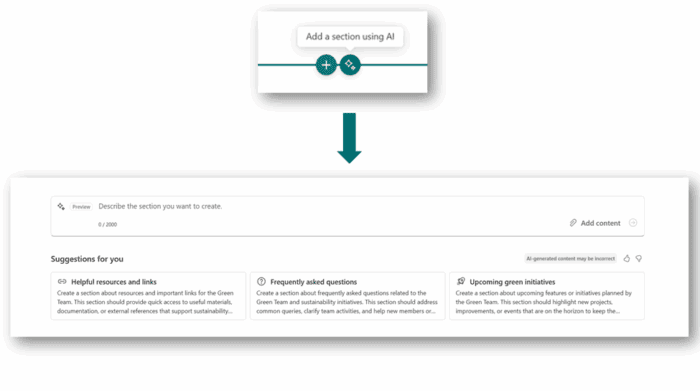
Microsoft is giving SharePoint creators a new productivity boost. Starting this week, a new feature called “Sections with AI” is rolling out.
As the name suggests, this feature letting you build complete SharePoint page sections with just a simple prompt. It pulls from your existing page context, organizational knowledge, and even linked files to generate rich, full-fidelity sections in seconds. Now, you must be wondering how to use the new feature, right?
Well, you first need to click the new “Add section using AI” button between page blocks. From there, you’ll see suggested prompts tailored to your current content, or you can type your own. Additionally, you can attach relevant files like meeting notes or project docs.
Once you’re done, click on “Generate,” and SharePoint will create polished layouts that can mix text, visuals, and organizational insights. Copilot can pull in transcripts, recent documents, or other knowledge your team already has access to.
If you don’t like the first result, you can cycle through multiple variations using the arrows in the header.
What sets Sections with AI apart is how editable the results are. You can refine both the look and the wording with natural language prompts like “make the text more professional” or “add John Smith’s contact information.” Need something different altogether? Just regenerate for new suggestions.
Microsoft says it aims to cut down the time it takes to create professional, knowledge-rich pages. In demos, the tool showed how quickly it can build usable layouts that adapt to different needs, all while keeping you in control. Moreover, SharePoint sites are soon getting header and footer enhancements starting late August.

Read our disclosure page to find out how can you help Windows Report sustain the editorial team. Read more



Improve this guide



User forum
0 messages