
SharePoint Site's New Header and Footer Enhancements Will Start Rolling Out Soon
Custom backgrounds, font choices, and cleaner layouts


 2 min. read
  Published on

If your SharePoint sites have always seemed a little stodgy, Microsoft is finally relaxing things a bit. The new update, scheduled to release between late August and mid-September, introduces a reworked header and footer experience.
The upcoming change will be simpler to customize and considerably cleaner to navigate. It’s worth noting that the most significant difference is background image support.
As a site owner, you can drag an image behind a site’s header or footer and adjust overlay colors to suit your brand. It supports all layouts, and you can access it under the “Change the Look” design tab.
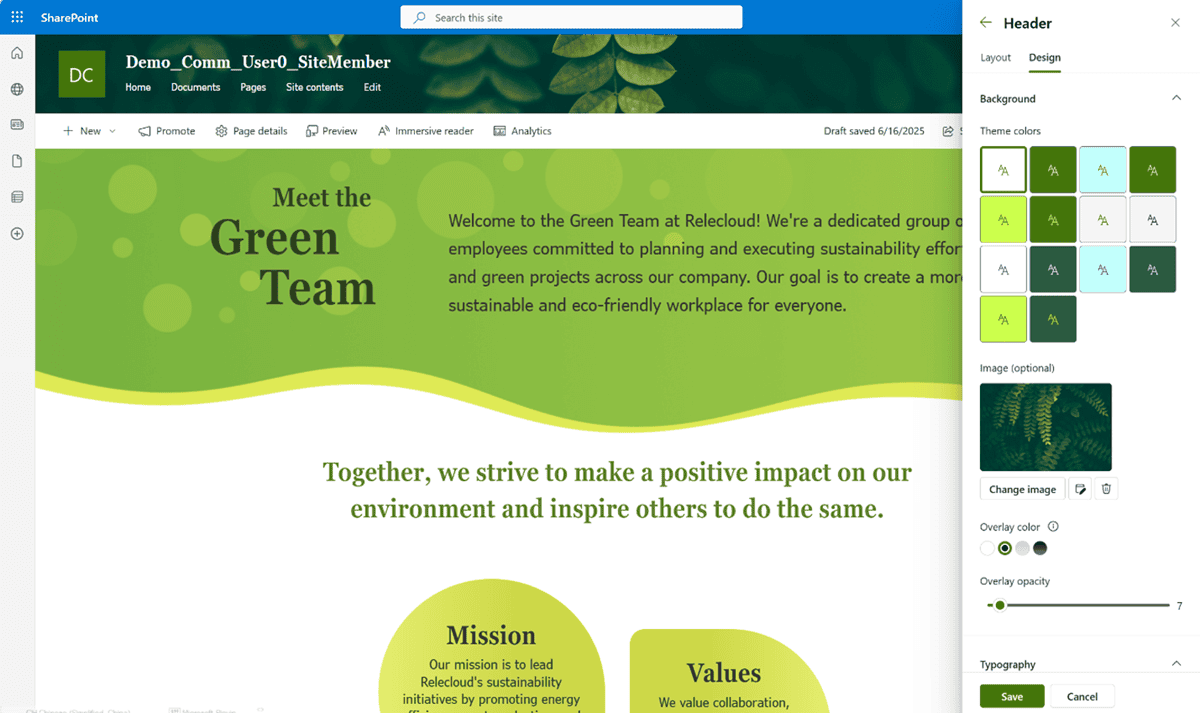
Microsoft is also giving some attention to the fonts. Rather than being limited to a single type, you can now choose from a group of predefined titles, navigation links, and footer text families. If you want a more corporate feel or a friendlier one, your design can now bear it out.
Another notable addition is fluid footer alignment. Previously, footers were tied to centering. Now, with the update, you can left-align them if centering is not ideal for your design.
Not to forget, in view mode, the command bar no longer surfaces, which keeps surfing neater and less distracting. While these are a small batch of updates, they amount to a neater, more contemporary SharePoint experience.
If you’d like to get a glimpse of the new tools at work, watch Microsoft’s walkthrough video with Tina Chen and Vesa Juvonen. Alternatively, you can simply jump into the refreshed “Change the Look” settings and begin experimenting. In relatable news, SharePoint is also getting “Sections with AI” for smarter page building.

Read our disclosure page to find out how can you help Windows Report sustain the editorial team. Read more



Improve this guide



User forum
0 messages