
Snipping Tool gets upgraded with Quick markup
Updates for Notepad and Paint app have also been rolled out


 1 min. read
  Published on

Microsoft is updating the Snipping Tool in Windows 11 with a feature called Quick markup. It is designed to make screenshot editing faster and more intuitive. The update is now rolling out in version 11.2508.24.0 to Insiders in the Canary and Dev Channels.
When using the familiar Win + Shift + S shortcut or launching the app directly, users will now see a Quick markup toggle in the capture toolbar. Once enabled, it lets you immediately annotate your selection before finalizing the screenshot.

The Quick markup bar includes essential tools like the pen, highlighter, and eraser, plus shapes and even emojis for expressive editing. Users can also re-crop selections on the fly with simple grab handles.
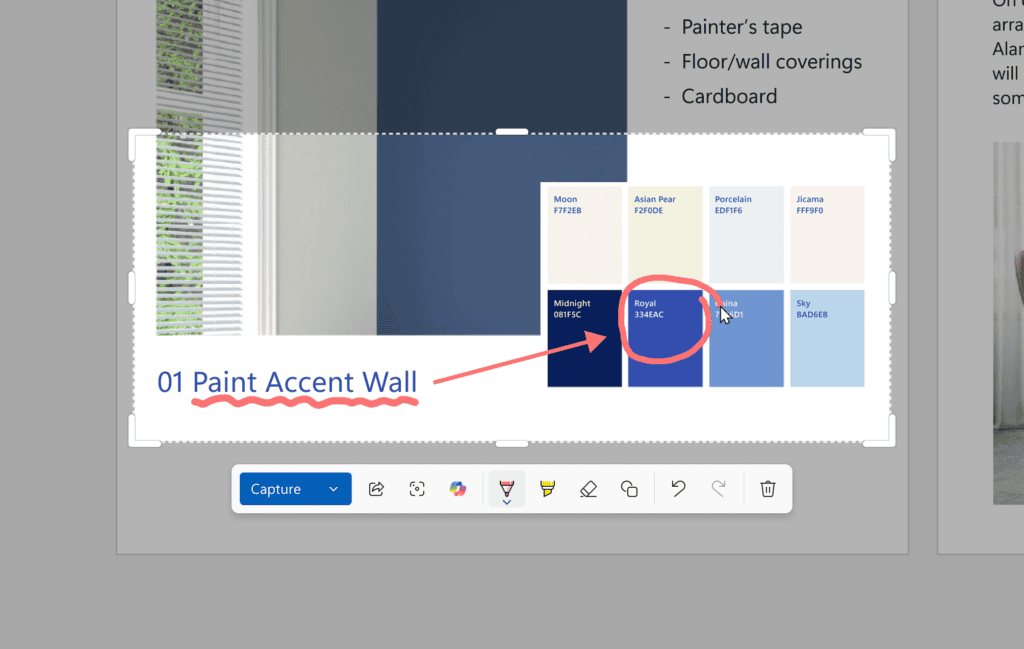
Microsoft has integrated shortcuts for sharing, visual search with Bing, and Copilot assistance. However, screenshots edited with Quick markup won’t automatically save to the clipboard, keeping workflows more intentional.
This upgrade further to cut down steps for anyone who frequently captures and edits screenshots, from students highlighting notes to professionals creating quick mockups. The feature makes Snipping Tool feel more powerful without losing its lightweight design. Not to forget, Microsoft has pushed updates for Paint as well as Notepad app in Windows 11.

Read our disclosure page to find out how can you help Windows Report sustain the editorial team. Read more



Improve this guide




User forum
1 messages