
What Is EFI in Windows and How It Works


 3 min. read
  Published on
EFI connects your PC’s hardware to Windows and replaces legacy BIOS. It enables faster startup, stronger security, and support for large modern drives. This guide explains EFI and shows how to identify the EFI partition safely.
Table of contents
What Is EFI in Windows?
What Is EFI?
EFI, the Extensible Firmware Interface, is the firmware layer that initializes hardware before Windows loads. It checks CPU, RAM, storage, and peripherals, then hands control to the operating system. Modern PCs use UEFI, a standardized, feature-rich evolution of EFI with a graphical setup interface.
If your EFI partition was removed accidentally, learn how to recover or rebuild the EFI partition on Windows 10.
Key Differences Between BIOS and EFI
| Feature | BIOS | EFI / UEFI |
|---|---|---|
| Boot Speed | Slower | Faster |
| Drive Support | Up to 2 TB with MBR | Over 2 TB with GPT |
| Interface | Text only | Graphical |
| Security | Basic | Secure Boot support |
| Architecture | 16-bit | 32-bit or 64-bit |
How to Check if Your PC Uses EFI
Use System Information to confirm whether Windows boots in UEFI or Legacy mode.
- Press Windows + R to open Run.
- Type msinfo32 and press Enter.
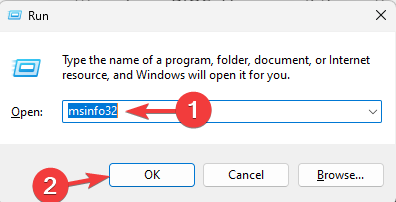
- Find BIOS Mode in the right pane.

- UEFI means EFI is in use. Legacy means the old BIOS mode.
See more ways to check UEFI or Legacy on Windows 11.
How to Access EFI Settings on Windows
Open UEFI settings to change boot order, enable virtualization, or adjust security.
- Press Windows + I to open Settings.
- Go to System > Recovery.
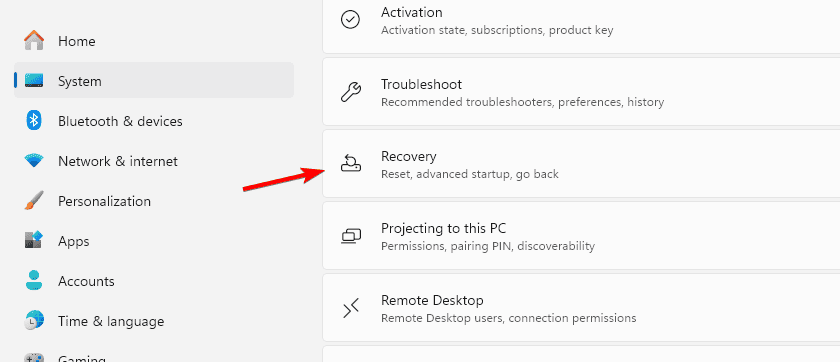
- Under Advanced startup, select Restart now.
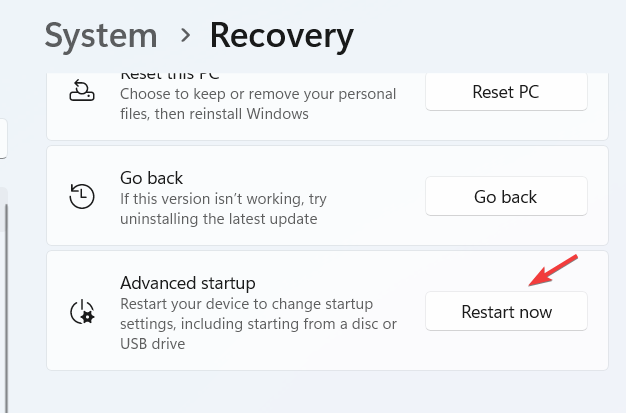
- Choose Troubleshoot > Advanced options > UEFI Firmware Settings.
- Select Restart to enter the firmware menu.
Tip: Many PCs also accept a startup key such as F2, Del, or Esc.
How to Identify the EFI Partition in Windows
The EFI System Partition stores boot files. Locate it with one of the methods below.
1: Use Disk Management
- Press Windows + X and open Disk Management.

- Find a small EFI System Partition in the disk map.
- Confirm it is FAT32 and about 100–300 MB.
- Avoid deleting or formatting this partition.
2: Use Command Prompt
- Open Command Prompt as administrator.
- Run the commands below:
diskpart
list disk
select disk 0
list partition
Look for a partition labeled System or EFI, typically 100–300 MB.
3: Use PowerShell
- Open Windows Terminal (Admin).
- Run this command:
Get-Partition | Where-Object {$_.GptType -eq "{C12A7328-F81F-11D2-BA4B-00A0C93EC93B}"}
Note the disk number and any drive letter if assigned.
Why EFI Matters
EFI improves startup reliability, enables Secure Boot, supports large NVMe SSDs, and provides a flexible pre-boot environment for diagnostics and updates.
FAQs
It is a dedicated partition that stores bootloaders and related files required to start Windows.
No. Removing it makes Windows unbootable.
UEFI is the modern standard based on EFI and is used on current PCs.
Most systems use 100–300 MB, though some OEMs allocate slightly more.
Conclusion
EFI is a core component of modern Windows PCs. By checking your boot mode, accessing UEFI settings, and correctly identifying the EFI partition, you can manage startup and security with confidence. If your system fails to boot, follow this guide to repair the EFI bootloader on Windows 11.

Read our disclosure page to find out how can you help Windows Report sustain the editorial team. Read more



Improve this guide



User forum
0 messages