
Windows 11 26H1 KB5101681 Update Adds an Update Pause Calendar and Better Widgets


 3 min. read
  Published on
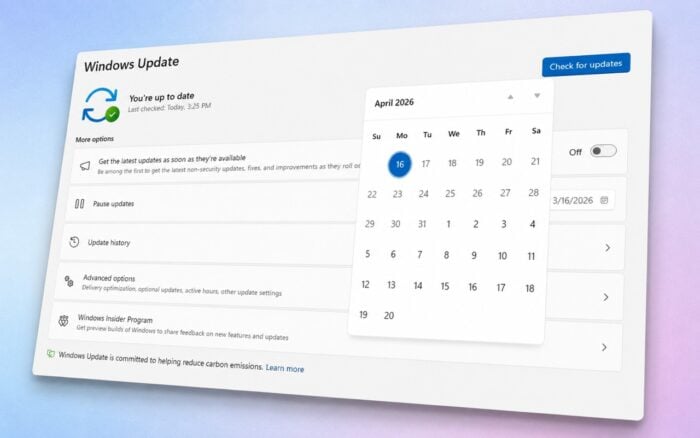
Windows 11 26H1 update KB5101681 is now available with new Windows Update controls, accessibility features, File Explorer improvements, and extensive Bluetooth fixes.
Microsoft has released KB5101681 for Windows 11 version 26H1, raising the operating system to build 28000.2608.
The preview update includes production-quality features, reliability fixes, and performance improvements. Microsoft is rolling out several changes gradually, so they may not appear on every device immediately.
Windows Update gets a pause calendar
Windows Update now includes a calendar that lets users choose when paused updates should resume.
Users can select a specific end date, pause updates for up to 35 days, and extend the pause by choosing another date. They can also pause updates again after installation resumes.
The feature forms part of the improved Windows Update experience Microsoft previewed several months ago.
Widgets no longer open on hover
Widgets will no longer open automatically when users hover over the taskbar icon. Microsoft previously tested this behavior in the Windows 11 26H1 Release Preview.
Notifications and taskbar badges now remain minimized by default. Widgets also open directly to the dashboard on first use.
Dashboard icons display the number of available alerts, while badges clear automatically after users leave a dashboard. Users can adjust these options through the Widgets settings menu.
Microsoft also improved Widgets reliability, responsiveness, and visual quality.
New screen tint and Magnifier controls
KB5101681 introduces a screen tint accessibility feature that places a color overlay across the entire display. Users can choose preset colors, adjust the intensity, or configure the tint to activate automatically.
Magnifier now accepts an exact zoom percentage. Users can also select specific zoom increments and change them directly from the Magnifier toolbar.
File Explorer launches faster
Microsoft says File Explorer should open faster after installing the update. Mounting disk images should also feel more responsive.
Hovering over files in File Explorer Home can now display quick actions such as “Open file location” and “Ask Copilot.” These options are available for work and school accounts.
The address bar now handles paths containing quotation marks and double backslashes more reliably. Suggestions should also close correctly after users select an option.
Microsoft fixed an issue that could duplicate OneDrive files in Favorites. The update also stops text from becoming repeatedly selected while renaming files and ensures that case-only filename changes appear immediately.
Bluetooth reliability improves
The update synchronizes the microphone mute status between the Windows audio mixer and compatible Bluetooth headphones.
AirPods should appear faster after entering pairing mode, while Beats Studio Pro microphones should work more reliably. Microsoft also addressed blue screen errors linked to certain Bluetooth drivers.
Voice calls using Classic Audio and the Hands-Free Profile should experience fewer interruptions. LE Audio devices should begin playing sound faster while the microphone remains active.
Windows should no longer display a “Remove failed” message when the Bluetooth radio is unavailable. The Bluetooth settings page should also remain more stable.
Bluetooth devices can reconnect faster after hibernation, while LE Audio connections and streaming should recover more reliably after an interruption.
Phone Link changes call audio behavior
KB5101681 changes how calls from connected phones handle ringing audio.
The ringing sound now stays on the phone when a user starts a call. Windows transfers the audio to the PC only after the user answers the call on the computer.
Incoming calls from paired phones will also stop ringing through the PC when Windows Do Not Disturb is enabled.
In other news, Microsoft has released a new Windows 11 Insider Preview Build with a Voice Isolation feature.

Read our disclosure page to find out how can you help Windows Report sustain the editorial team. Read more



Improve this guide


User forum
0 messages