
How to Download and Install Windows 11 26H2 (2026 Update)


 3 min. read
  Updated on
Windows 11 26H2 is finally rolling out to eligible PCs. Microsoft has made the upgrade process much easier for compatible PCs. If your device is running Windows 11 24H2 or 25H2, the Windows 11 26H2 update is offered as a small enablement package, so you do not have to go through a traditional full Windows upgrade.
Microsoft says eligible devices can move to 26H2 with a relatively small download and a single restart. However, the rollout is controlled, so not every compatible PC will see the update immediately.
How to get Windows 11 26H2 through Windows Update
Microsoft is initially offering 26H2 to eligible, unmanaged PCs where users have enabled the option to receive the latest updates sooner. Follow these steps:
- Open Settings on your Windows 11 PC.
- Go to Windows Update.
- Turn on Get the latest updates as soon as they’re available.
- Click Check for updates.
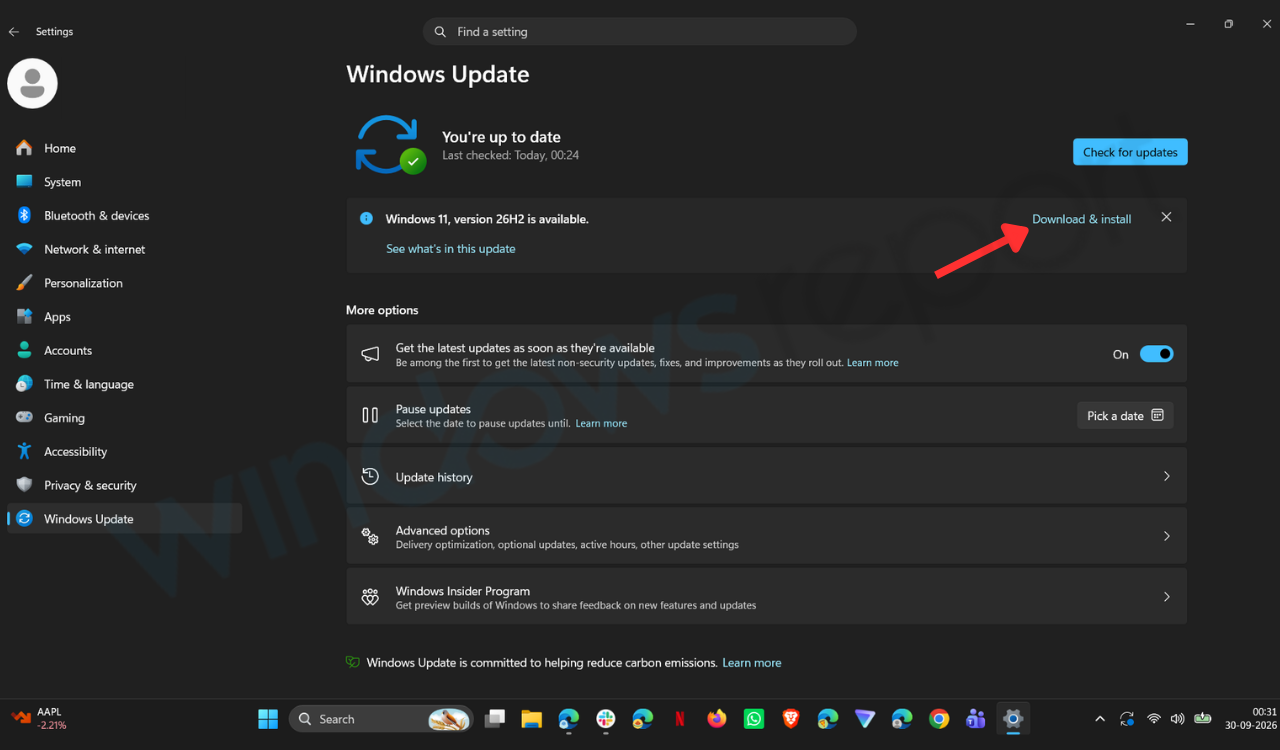
- If Windows 11, version 26H2 appears, select Download and install.
- Restart your PC when prompted to complete the installation.
Once Windows finishes installing the update, you can check your version by going to Settings > System > About. Look under Windows specifications and check the version number. If it says 26H2, you are running the Windows 11 2026 Update.
What if Windows 11 26H2 does not appear for you?
Don’t panic if 26H2 isn’t showing up yet. Microsoft is using a controlled rollout and will expand availability over time. The company can also place a safeguard hold on a device when it detects a known compatibility problem that could affect the update experience.
Turning on Get the latest updates as soon as they’re available does not bypass these compatibility safeguards. Work or school PCs can also behave differently because an organization’s Windows Update policies may control when feature updates are offered.
Windows 11 26H2 is a much smaller update for many PCs
There is an important detail behind the 26H2 upgrade. Microsoft says the release is delivered as an enablement package to eligible devices running Windows 11 24H2 and 25H2. That is possible because those releases share the same servicing branch and underlying codebase.
Many of the components required for 26H2 are therefore already sitting on the PC after previous monthly updates. The enablement package essentially activates the new features and version rather than replacing the entire operating system. Microsoft says this approach means eligible PCs can receive 26H2 with a small download, quick installation and a single restart.
You can also use other Windows 11 installation options
For users who need installation media, Microsoft maintains its official Windows 11 download page with options including the Installation Assistant, Media Creation Tool and ISO downloads. However, Microsoft’s public download page currently identifies Windows 11 2025 Update, version 25H2, as its current release, so users should not assume that downloading an ISO from that page will install 26H2. For a normal existing Windows 11 PC, Windows Update is the route Microsoft is currently recommending for the 26H2 rollout.
What about businesses and schools?
Windows 11 26H2 is also available through Microsoft’s management tools, including Windows Autopatch and the Microsoft 365 admin center. Microsoft recommends that commercial and education customers begin with targeted deployments to validate applications, devices and business-critical workflows before expanding the rollout.
The update also continues Microsoft’s annual Windows feature-update cadence. Microsoft says installing 26H2 resets the support lifecycle for supported Windows 11 editions, providing 24 months of support for Home and Pro and 36 months for Enterprise and Education editions.

Read our disclosure page to find out how can you help Windows Report sustain the editorial team. Read more



Improve this guide


User forum
0 messages