
Windows 11 KB5120998 Hits Release Preview With Movable Taskbar


 2 min. read
  Published on
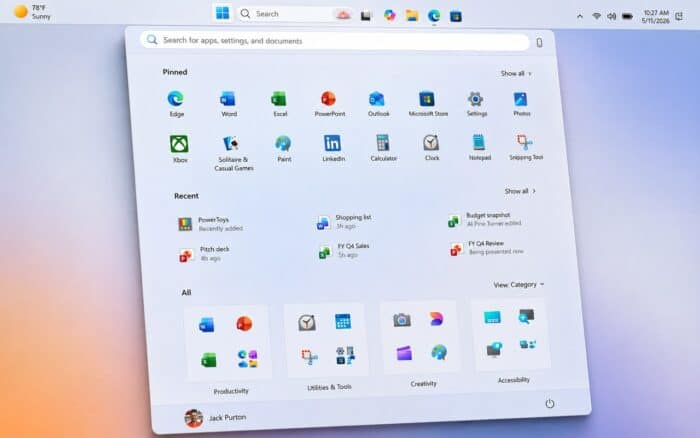
Windows 11 KB5120998 is now available in the Release Preview Channel, bringing major taskbar, Start menu, Search, and File Explorer changes.
Microsoft released Windows 11 Builds 26100.9267 and 26200.9267 for devices running Windows 11 24H2 and 25H2, respectively. New features will roll out gradually, while quality improvements will follow the normal rollout process.
Windows 11 finally gets more taskbar control
One of the biggest changes is the ability to move the Windows 11 taskbar to any edge of the screen.
Microsoft has adjusted tooltips, flyouts, animations, and most customization options to work with the new positions. However, the search box and smaller taskbar currently support only top and bottom placement.
KB5120998 also introduces a Small taskbar option that reduces both taskbar height and icon size.
Microsoft has also expanded the Taskbar behaviors section by default and improved system tray reliability on PCs without touchscreens.
Start menu gets new size and privacy options
Windows 11 users can now choose between Small, Large, and Automatic Start menu sizes.
Microsoft has renamed the Recommended section to Recent and added an option to hide the user’s name and profile picture from Start.
The redesigned Start settings also separate controls for Pinned, Recent, and All, giving users more control over what appears in the menu.
Windows Search becomes cleaner and more customizable
Microsoft has simplified Search Home to reduce clutter.
Search results now identify their sources more clearly, including Apps, Settings, Files, Web, and Microsoft Store.
Users can also turn web and Microsoft Store suggestions on or off without disabling local Windows Search results.
Another change allows Windows 11 to automatically index frequently used folders, which should make frequently accessed files easier to find.
File Explorer Home should feel faster
Microsoft has improved File Explorer performance, with File Explorer Home opening faster and responding more quickly.
The Recommended files carousel also supports touch scrolling.
Windows gets redesigned progress indicators
KB5120998 also introduces updated progress indicators throughout Windows 11.
The new design appears during startup, sign-in, restart, shutdown, and Windows update installation, giving these system screens a more consistent appearance.
Windows 11 KB5120998 is currently available through the Release Preview Channel, although some of the new features may take time to appear because Microsoft is using a gradual rollout.

Read our disclosure page to find out how can you help Windows Report sustain the editorial team. Read more



Improve this guide


User forum
0 messages