
Windows 11 New Experimental (Dev) Build Brings Modern Run Dialog & Key Improvements
The changes rolling out with Build 26300.8346 also applies to Dev channel Insiders


 4 min. read
  Published on

Microsoft has wrapped up the week with a bunch of new builds. Speaking of which, the company has rolled out Build 26300.8346 in the Experimental channel. As a reminder, the changes included in this build apply to Windows 11 Insiders in the Dev channel too. As part of this update, Microsoft has updated the Run Dialog, introduced some changes to Widgets, fixed a few issues related File Explorer, and more. Here’s all changes and improvements gradually being rolled out as part of Experimental Build 26300.8346.
Widgets gets quieter while core apps like File Explorer get some important fixes and improvements
As for Widgets, Microsoft say, it’s testing “new set of default settings” listed below to reduce unexpected alerts and visual interruptions:
- Disabling Open on hover by default
- Turning off taskbar badging by default
- Opening to widgets experience on first launch
- Limiting taskbar alerts until you choose to open and engage with the Widgets experience
Next up, Microsoft has fixed a grey flash on load and unexpected scrolling to the top on the Home page in some cases. That’s not all; File Explorer’s Favorites section won’t be showing duplicated OneDrive files in some cases. Meanwhile, file thumbnails are getting improved in the Recommended section on the Home page. Microsoft says they are now more “crispier and easier to read.”
Modern looking Run dialog, Windows Share updates, Magnifier improvements & more
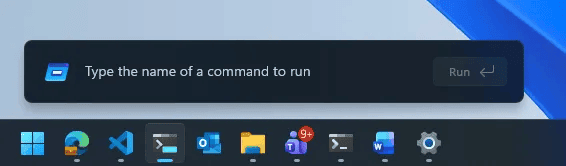
Interestingly, Microsoft has also rolled out the updated Run dialog as part of Build 26300.8346. The Run dialog experience now looks more modern, accompanied by improved usability. As of now, Microsoft is offering the modern-looking Run dialog as an opt-in experience for Insiders in the Experimental channel. In case you are willing to try it out, make sure to check our dedicated guide in which we explained how to enable it.
Moving on, Windows Share is getting smarter, especially for AAD users. You can now discover and install relevant apps directly from the ShareSheet without jumping to the Microsoft Store. This feature was previously limited to MSA users but now it expands to AAD accounts as well. There is also a new Settings option within the ShareSheet, letting you control whether app recommendations appear, making the experience more flexible and user controlled.

Speaking of improvements, Windows Magnifier is getting more precise controls. You can now enter an exact zoom percentage or choose from preset steps ranging from 5 percent to 400 percent. This should make zooming feel more consistent and easier to manage.

On the storage side, Microsoft has updated Dev Drive settings. Users can now specify sizes in GB instead of just MB, both during creation and while resizing volumes.
Finally, the Feedback Hub is receiving version 2.2604.301.0. This update improves reliability, refines design and accessibility, and expands localization support. It also restores the 500 MB file upload limit, improves translation for feedback content, and makes upvote and comment counts more accurate. Not to forget, some of the changes we discussed above related to Windows Share and Storage applies to Beta channel Insider, who are getting them with Build 26220.8340.
Other fixes and known issues in this update
Microsoft is also addressing a few system-level issues. If you were noticing a large number of APISet events showing up in Event Viewer after recent Insider builds, that behavior should now be resolved with this release. In addition, Task Scheduler is getting a small but useful improvement. Column width adjustments in the task list view will now persist across sessions, so you won’t have to reset them every time. There is also a fix for Task Manager, specifically for virtual machines. CPU speed readings on the Performance page should now appear more accurate after resuming from hibernate, instead of showing unusually high and unrealistic values.
As for known issues, users who enable the Release Preview toggle in WIP settings may find that it does not actually allow selection. If that happens, exiting and reopening the settings page appears to resolve it. Meanwhile, those using Feature flags to enable the new WIP experience might notice the feature state being incorrectly labeled as current. That said, changing the state and applying updates should still work as expected.
Moreover, let’s not forget that the company is also rolling out two Experimental builds (Build 29580.1000 and 28020.1921), which apply to Insiders in the Canary 29000 and 28000 series channels, respectively.

Read our disclosure page to find out how can you help Windows Report sustain the editorial team. Read more



Improve this guide




User forum
0 messages