
Windows 11 Phone Link Bug Causes Massive RAM Usage, Users Say


 3 min. read
  Published on
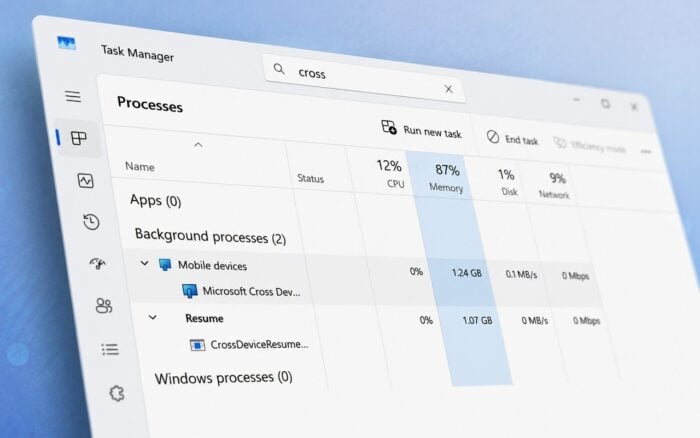
Windows 11 users are reporting a serious Phone Link memory leak that can cause the Cross Device Service to consume tens of gigabytes of RAM.
One recent report claimed the service used between 25GB and 30GB of memory during a gaming session. A related Phone Link process reportedly increased total memory usage even further.
Phone Link memory leak reports date back years
Complaints about unusually high Phone Link memory usage are not new.
Similar reports date back to at least 2023, with some users claiming that Cross Device Service consumes between 15GB and 20GB of RAM approximately once per day.
One user on Microsoft Q&A said the problem regularly pushed total system memory usage above 90%. Affected users often need to manually end the process through Task Manager to restore normal performance.
The issue appears to develop over time rather than causing an immediate spike after startup.
What is Cross Device Service?
Cross Device Service is a Windows background component used by Microsoft Phone Link and other cross-device features.
It supports functions such as clipboard sharing between devices, notification syncing, remote device control, cross-device app continuity, and the Windows Resume feature.
Under normal conditions, the service should remain active in the background while using a relatively small amount of system memory.
However, affected users report that the process continues allocating RAM without releasing it. This can eventually reduce system performance, cause applications to slow down, and leave less memory available for games or other demanding software.
Microsoft has not confirmed the issue
Microsoft has not officially acknowledged the Phone Link memory leak as a known Windows 11 bug.
Most of the current evidence comes from Reddit posts, Microsoft Q&A discussions, and other individual user reports.
However, multiple users have described similar symptoms involving Cross Device Service, Phone Link, and unusually high memory consumption.
It remains unclear whether the issue affects a specific Windows 11 update, Phone Link version, device configuration, or connected smartphone model.
How to reduce Phone Link memory usage
Users experiencing the problem should first install the latest available Windows 11 and Phone Link updates.
Microsoft may address the issue through an app update or Windows servicing update even if the company has not publicly confirmed the bug.
Disabling the Mobile Devices entry under Task Manager’s Startup apps section may also help prevent related services from starting automatically.
Users can temporarily recover memory by opening Task Manager, locating the affected Phone Link or Cross Device Service process, and selecting End task.
This stops the process and releases the consumed RAM, although the memory leak may return after the service restarts.
Disabling Phone Link may be the only reliable workaround
Users who continue experiencing severe memory usage may need to disable Phone Link entirely.
This removes access to features such as notification syncing, clipboard sharing, messaging, calls, and cross-device continuity. However, it can also prevent Cross Device Service from consuming excessive system memory.
Microsoft is separately testing an option that lets users remove a connected PC directly from the Link to Windows mobile app.
Security researchers have also recently reported that hackers are abusing CloudZ RAT and Phone Link-related functionality to intercept one-time passwords.
Via Neowin

Read our disclosure page to find out how can you help Windows Report sustain the editorial team. Read more



Improve this guide




User forum
0 messages