
Xbox Achievements Reportedly Getting Long-Due Visual Refresh With Xbox Cloud Gaming UI Redesign


 2 min. read
  Published on
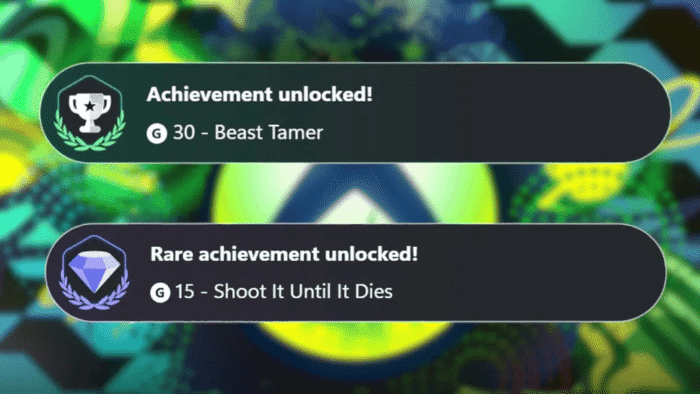
Microsoft appears to be quietly experimenting with how Xbox achievements would look, and the first visuals are finally here. A recent update to the Xbox Cloud Gaming web experience introduces refreshed visuals for achievement notifications, which offer a small but noticeable change to a system that hasn’t evolved much in years.
The update was spotted by TrueAchievements, which noticed redesigned achievement pop-ups inside the new Xbox Cloud Gaming UI preview. While the changes are purely visual for now, they offer a glimpse of how achievement notifications could look in the future. The standard and rare unlocks now use cleaner icons and toned-down animations, with rarity being easier to spot at a glance.
This Cloud Gaming refresh brings broader changes. The web interface now feels more console-like, with smoother navigation, updated animations, and improved usability overall. It has also fueled speculation that some of these design ideas could eventually influence Xbox consoles or PC experiences down the line.
According to sources familiar with Microsoft’s plans, there are no immediate moves to overhaul the Xbox achievement system itself. Despite online chatter following the UI preview, this appears to be a presentation update rather than a deeper rework. The new look feels cleaner and more modern, especially compared to a system that has remained largely unchanged since the Xbox One era.
However, the preview still shows rough edges. Achievement descriptions are missing, animations feel limited, and audio behavior appears inconsistent, hinting that work is in progress. Moreover, if you want to check the updated achievement visuals, you’ll need to enable the Xbox Cloud Gaming preview experience.
Simply visit the Xbox Cloud Gaming website, sign in to your account, open Settings, and switch on Preview features. After a short wait, the site should refresh and load the new web interface. If the update doesn’t appear right away, signing out and logging back in usually does the trick.
via: Windows Central | Article feature image source: TrueAchievements

Read our disclosure page to find out how can you help Windows Report sustain the editorial team. Read more



Improve this guide




User forum
0 messages