
Microsoft Details Windows Ready Print Rollout Ahead of July 2026 Launch


 3 min. read
  Published on
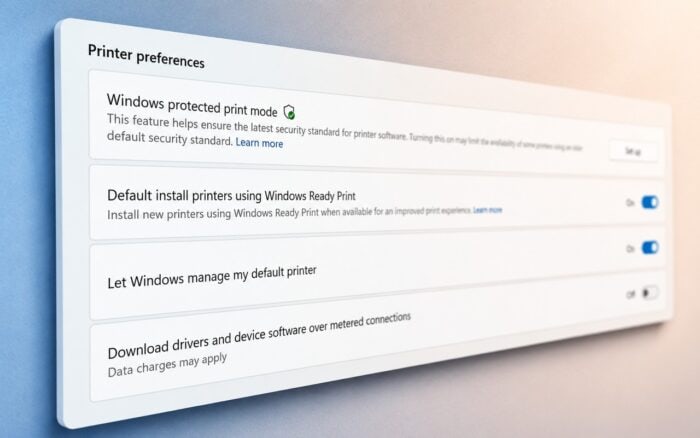
Microsoft recently released Windows 11 Experimental build 26300.8553, introducing several under-the-hood changes aimed at improving the printing experience. While the initial changelog only briefly mentioned printing updates, Microsoft has now provided additional details about its long-term strategy for printer support on Windows.
The biggest announcement is the rebranding of the Modern Print Platform to Windows Ready Print. According to Microsoft, the new name better reflects its goal of creating a printing ecosystem that is simpler, more secure, and easier to manage across Windows devices.
Microsoft Is Moving Away From Traditional Printer Drivers
As part of the transition, Microsoft plans to reduce reliance on OEM-specific printer drivers and move toward the Internet Printing Protocol (IPP) and the built-in Windows IPP printer driver.
Starting in July 2026, eligible Windows devices will automatically use Windows Ready Print as the default option for new printer installations. This marks a significant shift from the traditional model, where users often downloaded manufacturer-specific drivers through Windows Update or directly from printer vendors.
Microsoft believes the new approach will streamline printer setup while reducing complexity and potential security risks associated with third-party drivers.
Users Can Still Choose OEM Printer Drivers
Microsoft acknowledged that many organizations and users still depend on manufacturer-specific printing features. Because of this, Windows Ready Print will not completely replace traditional printer installations overnight.
Users will be able to choose between Windows Ready Print and the OEM printer installation process through the Printer preferences section in the Settings app.
The option only affects newly installed printers and does not change the behavior of existing printer configurations.
IT Admins Get Group Policy Controls
Enterprise administrators will also have control over how Windows Ready Print behaves within managed environments.
To configure the feature, admins can open the Group Policy Editor and navigate to:
Local Computer Policy > Administrative Templates > Printers
From there, the Configure Windows Ready Print driver ranking policy determines how Windows selects printer drivers.
- Enabled: Allows Windows Ready Print driver selection.
- Disabled: Prevents Windows Ready Print driver selection and favors traditional printer installation methods.
These controls should help organizations gradually transition to the new printing platform without disrupting existing workflows.
Windows Protected Print Mode Will Use Ready Print
Microsoft also confirmed that Windows Protected Print Mode will default to Windows Ready Print exclusively.
The company hopes this approach will strengthen security while eliminating many of the compatibility and maintenance challenges associated with legacy printer drivers.
Although Microsoft has outlined the transition plan, the company has not yet detailed all of the practical benefits users can expect from Windows Ready Print. More information about performance improvements, security enhancements, and compatibility support is expected in the coming months.
In separate news, the company recently released the June 2026 Patch Tuesday updates, KB5094126 and KB5093998, fixing more than 200 security vulnerabilities across Windows 11.

Read our disclosure page to find out how can you help Windows Report sustain the editorial team. Read more



Improve this guide


User forum
0 messages