
Chrome Tests New AI Mode Suggestion Chips on the New Tab Page
Chrome Canary briefly displays AI suggestion chips below the New Tab page search box, offering one-click prompts to launch AI Mode.


 2 min. read
  Published on
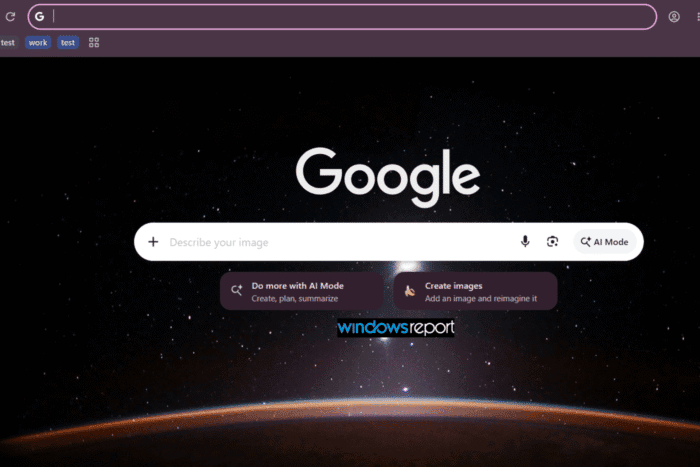
Google is experimenting with a new way to promote AI Mode in Chrome. In Chrome Canary, the browser briefly displays AI suggestion chips below the New Tab page search box, giving users one-click access to common AI tasks.
AI Mode has gradually become a bigger part of Chrome over the past few months. What started as a shortcut to Google’s AI-powered Search experience has expanded with browser integrations, including an AI Mode button on the New Tab Page (NTP), image and file uploads, contextual browsing features, and other Gemini-powered capabilities. Chrome is now surfacing AI suggestions directly on the NTP, where many users begin their browsing.
During our testing, Chrome Canary occasionally displayed two prompts beneath the search box: “Do more with AI Mode” with the description “Create, plan, summarize,” and “Create images” with the text “Add an image and reimagine it.” Clicking either prompt opens AI Mode with the selected task.
These chips don’t appear consistently. They showed up briefly during our testing and disappeared after switching tabs, suggesting the feature is still experimental or limited to certain sessions. We were only able to capture them once before they vanished.
Instead of typing a query from scratch, the chips provide one-click shortcuts for common AI tasks, including image creation, planning, and summarization.
As with many Canary experiments, there’s no guarantee these suggestion chips will reach the stable version of Chrome. For now, they offer an early look at how Google could make AI Mode a more visible part of the New Tab page experience.


Read our disclosure page to find out how can you help Windows Report sustain the editorial team. Read more



Improve this guide



User forum
1 messages