
Best Office 365 Features Microsoft Wants You Try Before 2026 Ends


 2 min. read
  Published on
Microsoft 365 has picked up bunch of useful features this year. While you may have used many of them, there might be some that might have gone unnoticed. Well, the good news is that Microsoft has now highlighted seven of that worth trying before 2026 ends.
Excel and PowerPoint have gotten smarter
Excel users can now bring text-based data into spreadsheets using new Import Functions. The feature uses a single formula for a simpler workflow. It is available on Windows Version 2502, Build 18604.20002, or later.
Meanwhile, PowerPoint also received built-in image editing across the web, Windows, and Mac. Users can remove backgrounds, erase objects, improve quality, and upscale images. Windows requires Version 2510, while Mac requires Version 16.104. The web version is also supported.
Microsoft has also improved accessible math tools across Microsoft 365. Updates cover Word, PowerPoint, OneNote, Narrator, and Windows audio feedback.
Teams and Outlook are cutting everyday hassles
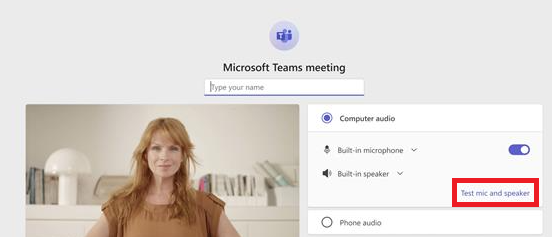
Teams users can now test their microphone and speakers directly from the pre-join screen. That means fewer last-second audio problems before meetings. The feature is rolling out across desktop experiences.
Outlook is also getting a useful Copilot feature for calendar conflicts. Copilot can reschedule conflicting events in supported Outlook experiences. The feature requires a Microsoft 365 Copilot Enterprise license.
Word and Copilot get useful upgrades too
Word users can now paste links directly onto selected text. The feature works across Word for the web, Windows, and Mac. Microsoft 365 Copilot is also getting organization-specific suggested prompts. These prompts can reflect company terminology, priorities, and workflows.
The feature requires Microsoft 365 Copilot Standard or Premium licenses. Microsoft says these updates are still rolling out across supported apps and platforms. Do note that, availability can vary depending on your version and license.
So, which features have you tried, and which ones did you miss? Let us know in the comments below.

Read our disclosure page to find out how can you help Windows Report sustain the editorial team. Read more



Improve this guide

User forum
0 messages