
How to Log in to WordPress in a Few Simple Steps


 2 min. read
  Published on

WordPress gives you access to your website dashboard, where you can create posts, edit pages, install plugins, and manage settings. You can usually sign in through your site’s WordPress admin URL, and in this guide we’ll show you how to log in to WordPress.
How do I log in to WordPress?
1. Log in through wp-admin
This is the easiest way to access your WordPress dashboard.
- Open your web browser.
- Enter your website address followed by /wp-admin or /wp-login.php.
- Type your username or email address.
- Enter your password.
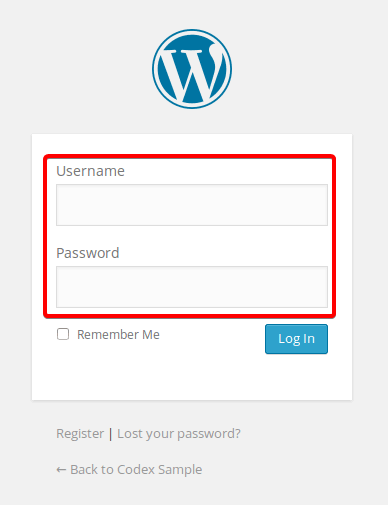
- Check Remember Me if you want WordPress to keep you signed in.
- Click Log In.
After signing in, WordPress takes you directly to the admin dashboard.
2. Log in to WordPress.com
WordPress.com uses a different login system from most self-hosted WordPress websites.
- Go to the WordPress.com login page.
- Enter your email address or username.
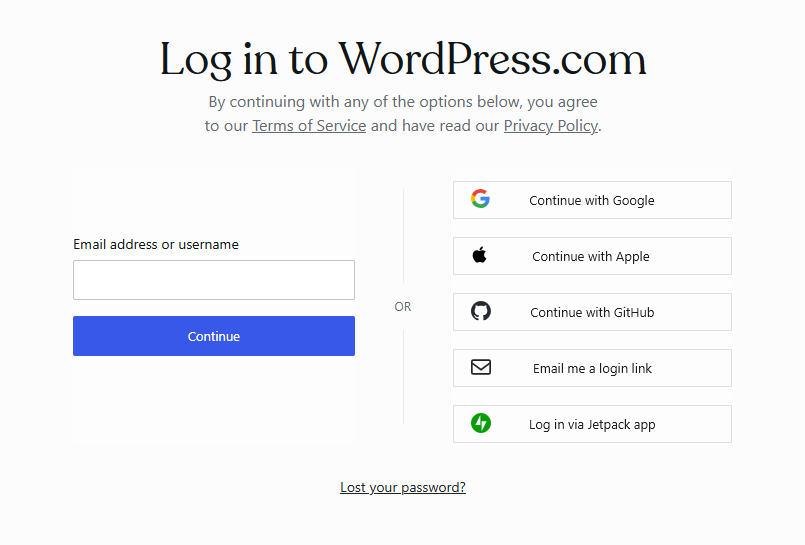
- Click Continue.
- Enter your password when prompted.
- Complete any additional security verification.
- Open your site dashboard after signing in.
Make sure you use WordPress.com only if your website or account runs through the WordPress.com platform.
WordPress login usually takes only a few steps through /wp-admin or /wp-login.php. If you cannot access your dashboard, reset your password, clear browser data, and confirm that you are using the correct login address.
If you’re setting up a new site, you can also learn how to install WordPress, choose reliable WordPress hosting, or find suitable web design software.
FAQs
What is the default WordPress login URL?
The default login address usually uses /wp-admin or /wp-login.php after your website domain.
Why can’t I log in to WordPress?
An incorrect password, expired cookies, plugin conflicts, security restrictions, or a changed login URL can prevent access.
How do I access my WordPress admin dashboard?
Open your website address followed by /wp-admin, enter your login details, and click Log In.
Can I log in to WordPress with my email address?
Yes. Most WordPress installations allow you to sign in using either your username or the email address associated with your account.
How do I recover my WordPress password?
Select Lost your password? on the login page, enter your username or email address, and follow the reset instructions sent to your email.

Read our disclosure page to find out how can you help Windows Report sustain the editorial team. Read more



Improve this guide



User forum
0 messages