
Progressive Insurance Login: How to Access Your Account


 4 min. read
  Published on

Progressive Insurance allows policyholders to access their accounts online, pay insurance bills, download ID cards, review coverage, and track claims. You can log in to Progressive Insurance using the official website or mobile app.
How do I Log In to My Progressive Insurance Account?
1. Use your browser
Follow these steps to access your Progressive account through a web browser:
- Open Progressive’s login page.
- Type your registered User ID or email address, depending on what the page requests.
- Make sure you use the correct password associated with your account.
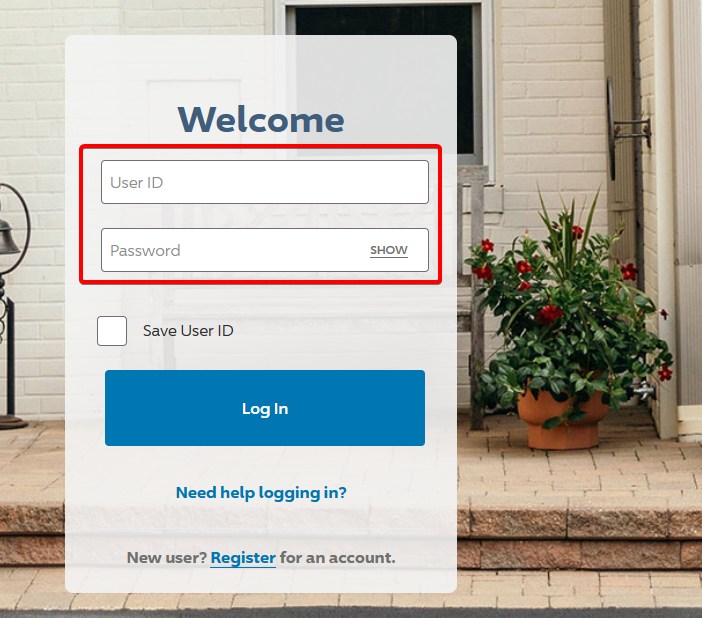
- Select the sign-in button to continue.
- If prompted, enter the six-digit verification code Progressive sends to your registered email address or phone number.
- Once you sign in, you can review your policy, payments, claims, and account information.
You can also visit Progressive’s policy management page and select Log In to access your account.
2. Use the mobile app
Progressive offers an official mobile app for iPhone and Android users. The app allows you to access insurance information without opening a browser.
- Download the Progressive app from the App Store or Google Play Store.
- Open the app on your device.
- Enter your Progressive account credentials.
- Tap the login button.
- Complete identity verification if necessary.
You can also enable fingerprint authentication or Face ID on supported devices for easier access.
Note: The mobile app supports several vehicle insurance policies, including auto, motorcycle, boat, and RV insurance. It does not currently support full account management for homeowners, renters, condo, mobile home, or umbrella policies.
How to Fix Progressive Insurance Login Not Working
If you cannot access your Progressive account, try the following solutions:
- Check your login credentials – Make sure you enter the correct User ID or email address and password. Check for typing errors or reset your password if necessary.
- Enable JavaScript and clear browser data – Turn on JavaScript, clear your browser’s cache and cookies, or try another browser.
- Check your verification code – Enter the six-digit code within 10 minutes. Check your spam folder or request a new code if it expires.
- Update the Progressive app – Install the latest version, restart the app, or try logging in through Progressive’s website.
- Contact Progressive customer service – Visit the Progressive contact page if you still cannot access your account.
Accessing your Progressive Insurance account is straightforward through the official website or mobile app. Once you log in, you can manage your insurance policy, pay bills, review claims, and download important documents.
If you need to access other insurance or healthcare accounts, check our guides on how to log in to Anthem.com and how to access your Medicare account.
Frequently Asked Questions
What is the official Progressive Insurance login website?
The official Progressive Insurance customer login page is https://account.apps.progressive.com/access/login. You can also access it through Progressive.com.
Can I pay my Progressive Insurance bill without logging in?
Yes. Progressive offers a quick payment feature that lets customers make insurance payments without signing into an online account.
Why can’t I log in to my Progressive Insurance account?
Incorrect credentials, expired verification codes, disabled JavaScript, or browser problems can prevent you from signing in. Try resetting your password, checking your browser settings, or contacting Progressive support.
Can I log in to Progressive Insurance using my phone?
Yes. You can log in through your phone’s web browser or the official Progressive app for iOS and Android.
What should I do if I don’t receive my Progressive verification code?
Check your email spam folder and confirm that your registered phone number or email address can receive messages. If you no longer have access to your verification method, contact Progressive customer service.
Is Progressive Insurance login available 24/7?
Yes. Progressive provides 24/7 online self-service account access, although occasional technical issues or maintenance may temporarily interrupt availability.

Read our disclosure page to find out how can you help Windows Report sustain the editorial team. Read more



Improve this guide


User forum
0 messages