
Medicare Login: How to Access Your Medicare Account


 3 min. read
  Published on

After you log in to your Medicare account, you can check claims, view your Medicare card, manage prescriptions, and pay eligible premiums.
Medicare now lets users sign in through Login.gov, ID.me, or CLEAR, and in this guide, we’ll show you how to log in properly.
How to log in to Medicare.gov?
Use a web browser
You can access your Medicare account from a computer, phone, or tablet.
- Go to Medicare.gov.
- Select Log in/create account near the top of the page.
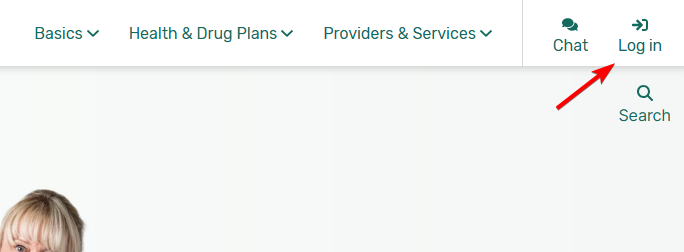
- Choose Login.gov, ID.me, or CLEAR as your sign-in method.
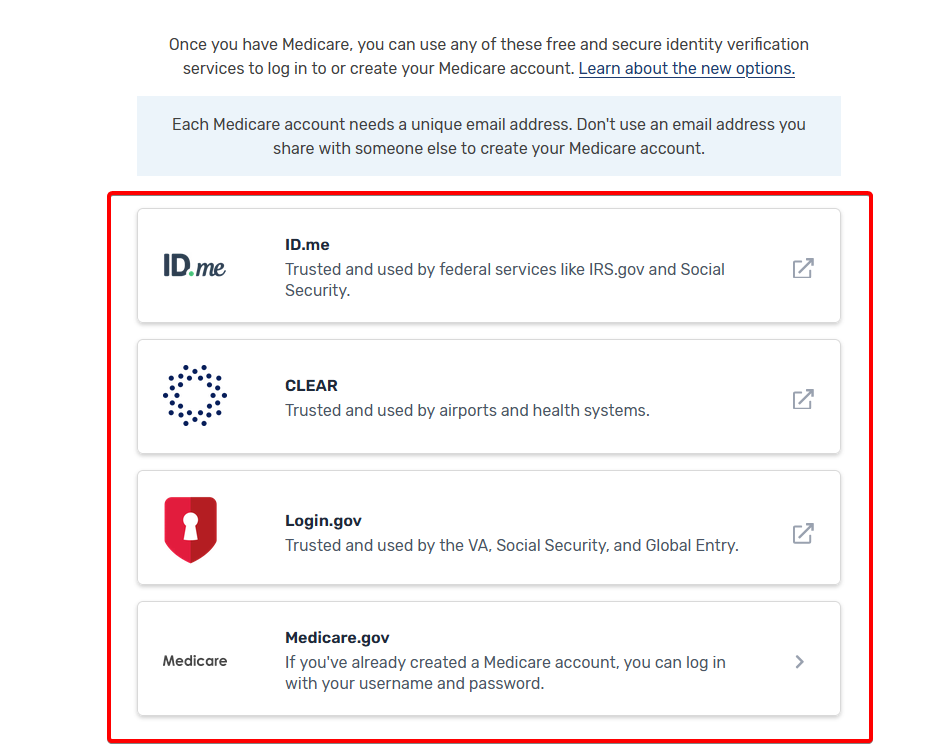
- Enter the email address and credentials associated with that service.
- Complete any security verification requested.
- Continue to your Medicare account.
Medicare uses these identity verification services to help protect personal information and reduce account fraud.
If you previously created a Medicare account with a Medicare username and password, Medicare may ask you to connect it to one of the newer sign-in services.
Once you connect an existing Medicare account to Login.gov, ID.me, or CLEAR, you can no longer use your old Medicare username and password to sign in.
Medicare gov login not working
If you can’t sign in, try these basic troubleshooting steps:
- Check that you entered the correct email address.
- Reset your password through the sign-in provider you use.
- Close your browser and reopen the Medicare login page.
- Clear your browser’s cookies and cached files if the page isn’t loading correctly.
- Try another supported browser or device.
- Make sure your browser allows the verification page to load.
If your identity verification fails, use the support options provided by Login.gov, ID.me, or CLEAR.
Logging in to Medicare.gov should only take a few minutes once your account and sign-in provider are set up correctly. If you use other online services, you may also want to see how to log in to Sentara MyChart or follow our guide on how to log in to DocuSign.
FAQs
Is Medicare.gov login the same as Social Security login?
No. Your Medicare.gov account gives you access to Medicare information such as claims and Medicare cards. Social Security handles tasks such as enrolling in Medicare Part A or Part B and changing certain personal information.
Do I need my Medicare Number to create an account?
Yes. Medicare requires your Medicare Number before you can create and connect a secure Medicare account.
Can I still use my old Medicare username and password?
You may need to connect your existing account to Login.gov, ID.me, or CLEAR. After you connect it, your previous Medicare username and password will no longer work for login.
Can I print my Medicare card online?
Yes. After signing in to your secure Medicare account, you can access and print a copy of your official Medicare card.

Read our disclosure page to find out how can you help Windows Report sustain the editorial team. Read more



Improve this guide




User forum
0 messages