
How to Fix CBS Sports Fantasy App Not Working


 6 min. read
  Published on
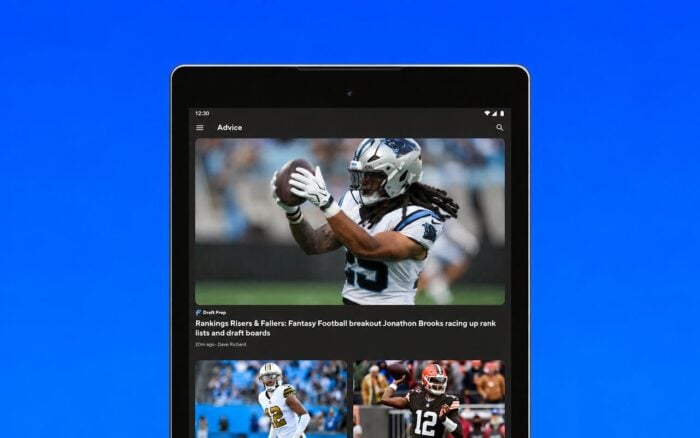
The CBS Sports Fantasy app may stop working, crash unexpectedly, or fail to load your fantasy leagues and live scores. These issues can affect both Android and iPhone users, especially when the app encounters connection problems, outdated files, or software bugs.
If you can’t access your team, update your lineup, or view matchups, try the following solutions to get the app working again.
How to fix the CBS Sports Fantasy app not working
1. Force close and restart the CBS Fantasy app
Temporary app glitches can prevent CBS Sports Fantasy from loading properly. Restarting the app clears its current session and can resolve freezing, blank screens, and loading errors.
Follow these steps on your device:
On Android:
- Open Settings and select Apps.
- Find CBS Sports Fantasy in the installed apps list.
- Tap Force Stop.
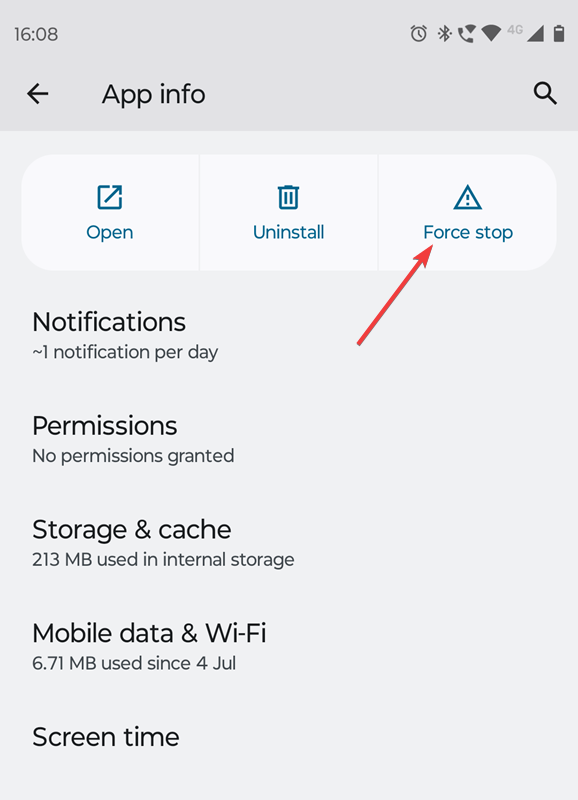
- Reopen the app and check whether it works.
On iPhone:
- Swipe up from the bottom of your screen and pause in the middle.
- Find the CBS Sports Fantasy app.
- Swipe up on its preview to close it.
- Launch the app again.
2. Update the CBS Sports Fantasy app
An outdated version of the app can cause crashes, missing features, or compatibility problems with your phone’s operating system.
CBS regularly releases updates to improve performance and resolve bugs.
To update CBS Sports Fantasy, follow these steps:
- Open the Google Play Store or Apple App Store.
- Search for CBS Sports Fantasy.
- Open the app’s listing.
- Tap Update if a newer version is available.
- Restart the app after installing the update.
You can also download the latest version through the official CBS Sports Fantasy download page.
App updates can resolve similar loading problems across other services. For example, updating or reinstalling an application can also help when the Best Buy app is not working.
3. Check your internet connection
CBS Fantasy requires an internet connection to load league information, player statistics, live scores, and roster updates.
If your connection drops or becomes unstable, the app might display a loading screen or a network error even when other apps appear to work.
Try these troubleshooting steps:
- Disconnect from your current Wi-Fi network.
- Switch to mobile data and reopen CBS Sports Fantasy.
- If the app works, reconnect to Wi-Fi.
- Restart your router if the problem continues.
- Temporarily disable any VPN or network-filtering app to check for interference.
If the app works on mobile data but not Wi-Fi, the problem likely involves your wireless network rather than your CBS account.
Connection problems can affect other mobile services as well. You can follow similar network troubleshooting steps when the Stop & Shop app is not working.
4. Clear the CBS Fantasy app cache on Android
Corrupted temporary files can prevent CBS Sports Fantasy from opening correctly or displaying updated league information.
Android lets you remove these files without uninstalling the app.
Here’s how to clear the cache:
- Open Settings on your Android phone.
- Navigate to Apps and select CBS Sports Fantasy.
- Tap Storage or Storage & cache.
- Select Clear Cache.
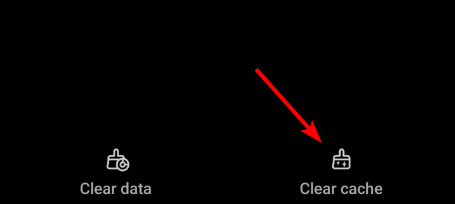
- Reopen the app.
If clearing the cache doesn’t help, return to the same menu and select Clear Storage or Clear Data.
Keep in mind that clearing app data resets locally stored settings and typically requires you to sign in again. Make sure you know your account credentials before continuing.
5. Reinstall CBS Sports Fantasy
If the CBS Fantasy app still isn’t working, reinstalling it may resolve problems involving damaged application files or incomplete updates.
Before you proceed, confirm that you can access the CBS account associated with your fantasy leagues.
Follow these steps:
- Locate CBS Sports Fantasy on your phone.
- Uninstall or delete the application.
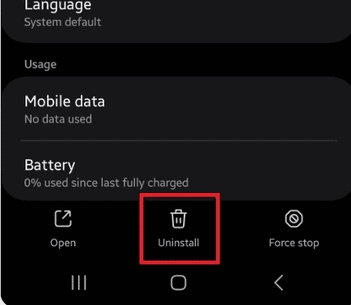
- Restart your device.
- Open the App Store or Google Play Store.
- Download CBS Sports Fantasy again.
- Sign in using your existing account.
Your fantasy teams and league information should remain associated with your CBS account, although you may lose locally stored app settings.
Reinstalling can also help resolve persistent problems with other mobile applications, including situations where the Ford app stops working.
6. Sign out and log back into your CBS account
Sometimes, CBS Sports Fantasy opens normally but fails to display teams, league standings, or player information.
An expired login session or account mismatch could explain the problem.
To troubleshoot your account:
- Open CBS Sports Fantasy.
- Access your account settings.
- Sign out of your account.
- Close and reopen the app.
- Sign in using the account associated with your fantasy league.
If you can’t find your team after signing in, open the app’s main menu and navigate to the Lobby. Look under My Teams and scroll through your available teams.
7. Check for a CBS Sports Fantasy outage
If CBS Sports Fantasy suddenly stops loading across multiple devices or networks, the issue may originate from CBS’s servers.
In this situation, reinstalling the app or clearing its cache may not resolve the problem.
Check whether other users report similar issues through services such as Downdetector. You can also try accessing your fantasy league through CBS Sports Fantasy on the web.
When the CBS Sports Fantasy app stops working, start by force-closing it, installing available updates, and checking your internet connection. Clearing the cache on Android or reinstalling the app can help with more persistent issues.
If the problem affects your league on multiple devices, use the CBS Fantasy website as a temporary alternative and contact CBS support for further assistance.
FAQs
Why is my CBS Fantasy app not loading?
CBS Fantasy may fail to load because of an unstable internet connection, outdated application files, corrupted cache data, or a temporary server problem. Restart the app, update it, and test another network first.
Why does CBS Sports Fantasy keep crashing on my iPhone?
Software incompatibilities, app bugs, and damaged local files can cause repeated crashes. Update the app and iOS, restart your iPhone, and reinstall CBS Sports Fantasy if the issue continues.
Why is CBS Fantasy showing a network error?
A network error means the app cannot communicate with the service correctly. Check your Wi-Fi or mobile data connection, disable any VPN temporarily, and see whether the CBS Fantasy website works.
Why are my CBS Fantasy leagues not showing?
You may have signed into a different CBS account or opened the wrong section of the app. Check My Teams in the Lobby and confirm that you’re using the account linked to your league.

Read our disclosure page to find out how can you help Windows Report sustain the editorial team. Read more



Improve this guide



User forum
0 messages