
Chrome tests "Google Recommended Browser Settings" Pop-Up in Windows 11
What the “Google Recommended Browser Settings” Pop-Up Says


 2 min. read
  Published on
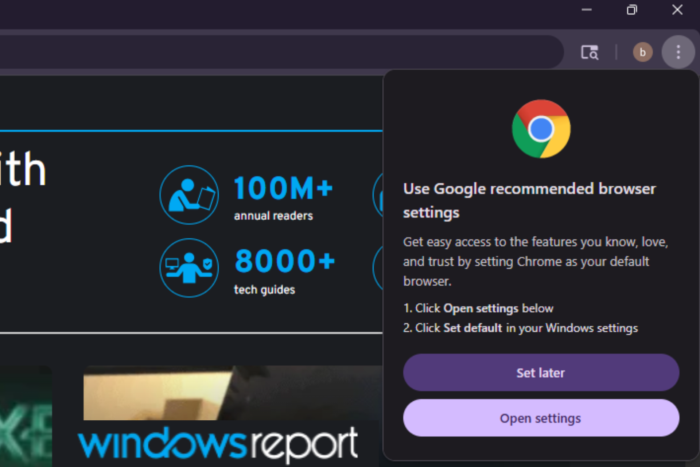
Google is preparing to show a new “Use Google recommended browser settings” pop-up in Chrome that asks users to make it the default browser in Windows 11. The dialog opens from the browser menu and takes users to Windows Settings to complete the change.
The pop-up reads as follows :
Use Google recommended browser settings
Get easy access to the features you know, love, and trust by setting Chrome as your default browser.
Click Open settings below
Click Set default in your Windows settings
Set later
Open settings
Selecting “Open settings” launches the Windows Default Apps page, where Chrome can be set as the system browser. Users can also choose Set later to dismiss the prompt without making any changes.

Google has been testing more ways to promote Chrome as the default browser. Recently, we reported that Chrome is trying to show a default prompt during the first-run experience. It is now experimenting with another method. In addition to the InfoBar, Chrome is testing a bubble-style dialog, visible in the screenshot above.
In addition to the bubble dialog, Chrome can display a smaller infobar at the top of the browser window when it is not set as the default browser.

The change is being tested behind the Default Browser Prompt Surfaces flag on Mac, Windows, Linux, and ChromeOS, with options such as “Enabled with infobar” and “Enabled with bubble dialog.”
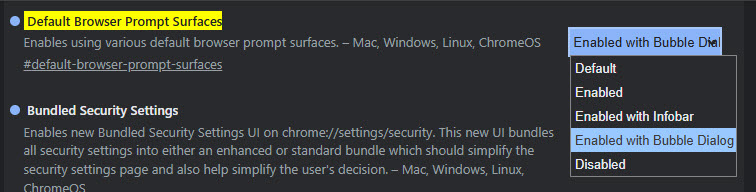
Code changes reveal that Chrome selects the type of default browser prompt based on how many times a user dismisses it. After three declines, Chrome switches to the experimental surface, such as the bubble dialog. After additional declines, it falls back to the infobar. Another update modifies the field-trial configuration and sets the bubble dialog as the active surface.
Windows users may recognize the pop-up. Edge has long used a recommended browser settings dialog in Windows 11, and Chrome now uses a comparable format in this test.


Read our disclosure page to find out how can you help Windows Report sustain the editorial team. Read more



Improve this guide


User forum
0 messages