
Enable IPv6 On Windows 11 With Simple Step By Step Methods


 2 min. read
  Published on

Enabling IPv6 on Windows 11 helps your device use modern networking, improve stability, and access services that rely on new protocols. This guide shows quick step by step methods to turn on IPv6 and confirm everything works.
Table of contents
How do I Enable IPv6 On Windows 11?
1. Enable IPv6 In Network Settings
Use the Settings app for the fastest method.
- Click Start and open Settings.
- Select Network and Internet.
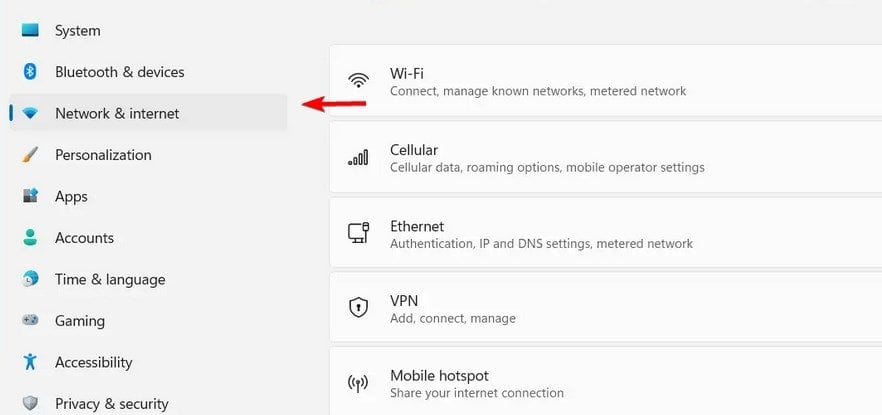
- Choose Wi Fi or Ethernet.

- Click Hardware properties.
- Turn on IPv6.
If IPv6 stops your connection from working, check the fix in our IPv6 No Internet Access guide.
2. Enable IPv6 From Control Panel
Use classic adapter settings if you prefer traditional controls.
- Open Control Panel.
- Select Network and Sharing Center.
- Click Change adapter settings.

- Right click your active adapter and choose Properties.

- Check Internet Protocol Version 6 (TCP IPv6).

- Click OK.
3. Enable IPv6 Using PowerShell
Run an admin command to switch IPv6 on instantly.
- Click Start and type PowerShell.
- Right click Windows PowerShell and choose Run as administrator.
- Enter:
Enable-NetAdapterBinding -Name "*" -ComponentID ms_tcpip6 - Press Enter.
4. Confirm IPv6 Works
Verify your device now uses an IPv6 address.
- Press Windows + R and type cmd.
- Enter
ipconfig
- Look for an IPv6 address under your active adapter.
- Visit an IPv6 test site to confirm connectivity.
If you need help checking your IP information, use our Find Your Windows 11 IP Address guide.
What Is IPv6
IPv6 is a modern Internet protocol that supports more devices, improves routing, and strengthens security. It removes many limits that IPv4 created.
FAQ
It improves compatibility with modern services and gives your device a more efficient protocol.
It reduces certain network overhead and can improve connection quality in supported setups.
Yes, Windows supports dual stack mode and uses whichever protocol works best.
Some streaming, gaming, and cloud platforms rely on IPv6 for smoother performance.
Conclusion
You can enable IPv6 on Windows 11 through Settings, Control Panel, or PowerShell. These methods give you full control over your connection and help you take advantage of modern networking. If you need to turn IPv6 off later, check our Disable IPv6 On Windows 11 article.

Read our disclosure page to find out how can you help Windows Report sustain the editorial team. Read more



Improve this guide


User forum
0 messages