
Excel for Windows Finally Gets Clear Error Cards That Actually Make Sense
An easier way to fix mistakes


 2 min. read
  Published on
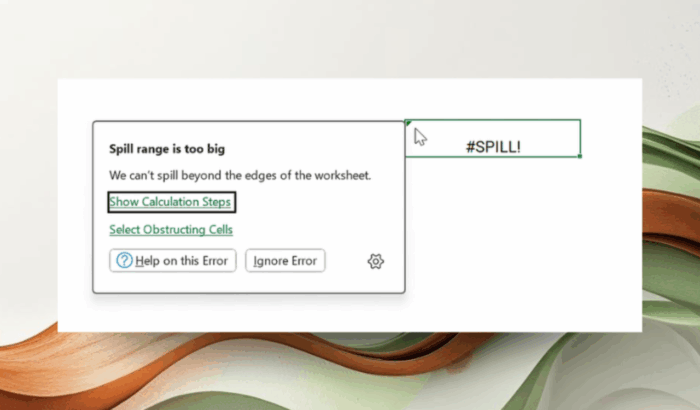
If you’ve ever experienced a mysterious #VALUE! or #SPILL! error in Excel, and wondered what on earth you did wrong, Microsoft is finally fixing that. Excel for Windows is rolling out new descriptive error cards, a feature that web users have enjoyed for years. Thanks to this, you’ll now get the same clarity right on the desktop.
Now you can hover over that tiny green triangle in the corner of a cell, and you’ll see a clean, structured card that explains exactly what went wrong, why it happened, and what you can do to fix it. It’s a small change, but it’s super handy for someone who uses Excel daily.
Whether you typed ’1234 by mistake or tried something wild like =SQRT(-1), Excel now gives you actual context instead of leaving you to decode cryptic symbols.
The feature is rolling out in Excel for Windows, starting with Version 2512 (Build 19502.20000) for Beta Channel users. Once you’re on that build, the workflow is simple:
- Enter a formula that triggers an error
- Hover over the green corner indicator
- Get a clean breakdown of what caused the issue
- Explore suggested actions like “Show Calculation Steps”
It’s the same format that debuted on Excel for the web roughly six years ago, and yes, Windows users have been waiting that long to get it. If you use Excel on Mac, the good news is that Microsoft has a similar update coming for you.

Read our disclosure page to find out how can you help Windows Report sustain the editorial team. Read more



Improve this guide


User forum
0 messages