
Extensions for Microsoft Edge on iPad are here: how to install
Microsoft is officially rolling out Extensions to Edge on iPad. The latest update, version 142.3595.53, adds extension support for users on iPadOS 18.4 or later.


 3 min. read
  Published on

Microsoft has added support for browser extensions on iPads with the latest Edge release (version 142.3595.53). Users on iPadOS 18.4 or later can now install extensions such as Ublock Origin Lite, Immersive Translate, Keepa, Coupert, and others for a personalized browsing experience.
Microsoft Edge for iPad now supports Extensions
Users no longer need to rely on flags to make extensions work on Edge. The new Extensions section now appears directly in the menu, next to items such as Downloads and New InPrivate Tab. It gives iPad users instant access to add-ons.

Microsoft has made it simple to install extensions on iPad.
How to install extensions in Microsoft Edge on iPad
- Open Microsoft Edge on your iPad.
- Tap the three-dot menu in the top-right corner.
- Choose Extensions from the menu.
- The Extensions panel opens, showing all available add-ons.
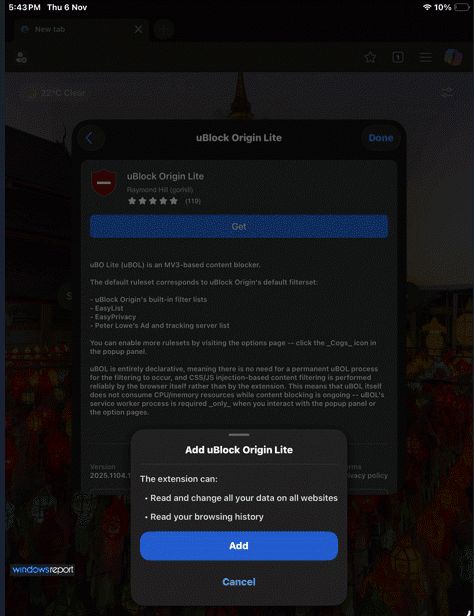
- Tap Get next to any extension you want to install.
- Review the permission prompt that appears. It lists what data the extension can read or change.
- Tap Add to confirm.
The extension installs instantly and appears active in Edge.

Here are the 17 extensions available so far
- Stay for Mobile
- Keepa – Amazon Price Tracker
- uBlock Origin Lite
- Coupert for Mobile
- Immersive Translate – Translate Web & PDF
- Cookie-Editor
- I don’t care about cookies
- Unhook – Remove YouTube Recommended & Shorts
- Global Speed
- Trancy – AI Web & Subtitle Translator (Mobile Only)
- Dark Reader
- Return YouTube Dislike
- SponsorBlock for YouTube
- Swift Read
- AdGuard Ad Blocker
- Web ChatGPT
- Scribe
The panel also displays a note saying “More coming soon. Stay tuned!”, which confirms Microsoft’s plans to expand the catalog further. Each extension includes a description, the developer’s name, ratings, and version details.

The update also adds a refreshed design for Copilot Composer, which now has simpler menus that make composing faster. A new Copilot Deep Research Export option lets users save research as a document, PDF, or even a podcast.
Edge now supports PDF annotation, so users can add notes directly within the browser instead of switching apps. Microsoft says the new version delivers a faster and more productive experience on iPad. The App Store changelog confirms extension support, and we have verified the rollout on iPad devices to confirm how it works in real use.
Microsoft’s decision to bring extension support to Apple’s platform is an important step, as it puts Edge closer to Safari’s iPad experience.
Apart from Safari and Edge, Orion Browser also supports extensions on iOS.
You can download Microsoft Edge for iPad from the App Store here
That’s not all. Edge has also added background playback for YouTube videos in its iOS beta version, which removes the need for a YouTube Premium subscription.


Read our disclosure page to find out how can you help Windows Report sustain the editorial team. Read more



Improve this guide




User forum
0 messages