
Google Is Testing a 'High-Engagement Signal' Trigger for Chrome's 4GB AI Model Download
New Chromium code suggests Chrome may wait for a high-engagement signal instead of downloading its AI model unconditionally


 3 min. read
  Published on
Google is preparing to change how Chrome downloads its controversial 4GB AI model. We spotted a new Chromium commit titled “Allow background model download to be triggered by signal” that suggests the company is rebuilding the download logic itself.
What happened
In early May 2026, a security researcher discovered Chrome was quietly downloading a ~4GB file to users’ devices without asking first. No consent prompt. No warning. Just a 4GB file showing up in your folder.
The file powers Gemini Nano, Google’s on-device AI model. Chrome uses it for scam detection, Help me write, tab organization, and webpage summarization. But here’s the thing: if you deleted it, Chrome downloaded it again. It didn’t matter if you ever used any of those AI features. If your device met Chrome’s hardware requirements, the file arrived anyway.
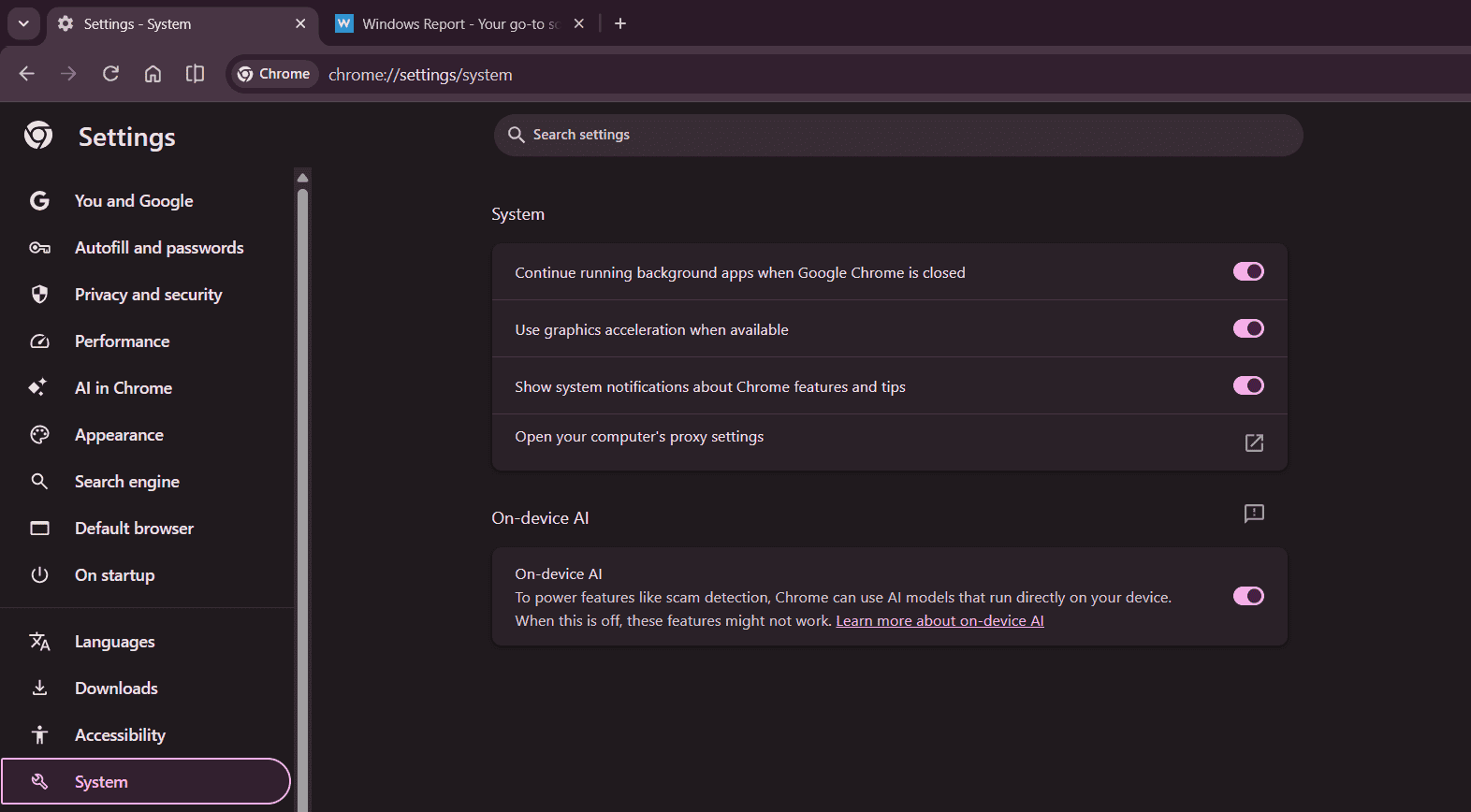
Google’s response was to publish a support page explaining the download and add a toggle under Settings > System to turn off on-device AI. Critics called it weak. Making users hunt for an opt-out to something they never opted into isn’t much of an answer.
What Google is preparing: signal trigger instead of automatic download
A new commit, still in review and not yet in the codebase, spotted by Windows Report, would restructure how Chrome decides to download the model. Before this, the download fired automatically on every eligible device. Under the new approach, Chrome would wait for a “high-engagement signal” before triggering the download. That means it would wait to see whether you actually use any AI features first.
The commit’s title makes the intent clear: “Allow background model download to be triggered by signal.” And the code comment explains it further:
Informs the ModelBroker that a high-engagement signal has been detected and the background download can safely proceed if otherwise capable.
If you never touch Help me write, tab organization, summarization, or any other on-device AI feature, Chrome has no signal to act on. The download wouldn’t happen.
But there’s an important caveat. The old unconditional download path still exists in the code. Google hasn’t removed it. They could still use it even if this commit lands. What this change would do is build an option for a smarter, signal-based approach. Whether Google fully switches to it is something we’ll keep watching.
What this means for you
If this change lands, most users who don’t use Chrome’s AI features might never see the 4GB file on their system.
It’d be Google’s first real move to make the 4GB download something users control, not something that just happens to them.
For users who do use those features, the download would still happen in the background without a prompt.
How to stop Chrome from downloading the AI model right now
If you’d rather not wait, you can turn off on-device AI downloads now:
- Open Chrome
- Go to Settings
- Click System in the left sidebar
- Toggle On-device AI off
If the file’s already on your system, you can delete it manually:
Windows: C:\Users[YourName]\AppData\Local\Google\Chrome\UserData\Default\OptGuideOnDeviceModel\
Mac: ~/Library/Application Support/Google/Chrome/Default/OptGuideOnDeviceModel/
Just turn the toggle off first.
Otherwise, Chrome will re-download it.
As of now, Google hasn’t issued an official statement about this commit. But the code change speaks for itself.
Apart from this, Chrome is testing an AI Mode shortcut on the toolbar. Google is also working on stacked split views and an off switch for Gemini Skills in Chrome.


Read our disclosure page to find out how can you help Windows Report sustain the editorial team. Read more



Improve this guide




User forum
0 messages