
How to Get the Facebook Verified Badge for Free


 3 min. read
  Published on
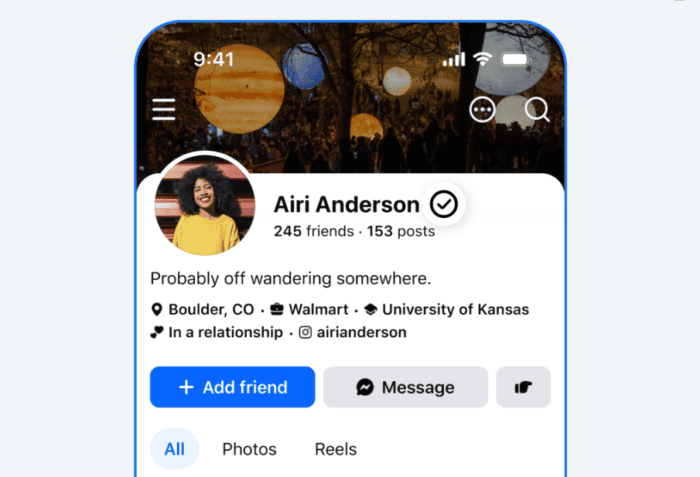
Yesterday, Meta introduced Facebook Verified, a brand-new verification system that doesn’t require a paid subscription. If you’re wondering how to get the Facebook Verified badge for free, this guide walks you through everything you need to know, including eligibility, requirements, and where the badge appears.
Unlike Meta Verified, this badge is designed to confirm there’s a real person behind a Facebook profile using a quick selfie verification process.
Here’s how you can get the new Facebook Verified badge for free
If the feature is available for your account, follow these steps:
- Open the Facebook app.
- Look for the Facebook Verified prompt on your profile, Marketplace, Dating, or Groups.
- Start the verification process.
- Record a short video selfie when prompted.
- Meta compares the selfie with your existing profile photos.
- Wait a few minutes while the verification is processed.
- Once approved, the badge is added automatically.
Who can get the free Facebook Verified badge?
Not everyone can claim the badge right away. According to Meta, you must:
- Make sure you are 18 years or older.
- Have a Facebook account in good standing.
- Comply with Facebook’s Community Standards.
- Show no signs of fraudulent or inauthentic behavior.
- Use a personal Facebook profile.
The feature isn’t available for Facebook Pages or Professional Mode profiles. It’s also rolling out gradually, so you may not see it immediately.
Where will the Facebook Verified badge appear?
Once you’re verified, the badge appears across:
- Your Facebook profile.
- Facebook Marketplace.
- Facebook Dating.
- Facebook Groups.
Meta says it will also expand the badge to Feed posts in a future update.
Does the badge mean someone is trustworthy?
No. The badge only confirms the account belongs to a real person who completed Meta’s verification process. It doesn’t mean Meta endorses the person or guarantees they’ll behave honestly. Users are still expected to follow the platform’s Community Standards and Commerce Policies.
Facebook Verified vs. Meta Verified: What’s the Difference?
It’s easy to confuse the two, but they’re different. Facebook Verified is free and only confirms a real person is behind an account using a selfie verification process. Meta Verified remains a paid subscription that includes a verified badge, account support, impersonation protection, and other premium benefits. It continues to exist alongside the new free verification system.
Why is Meta introducing Facebook Verified badge now?
Meta says AI has made it much easier to create fake profiles, convincing messages, and misleading content. The company believes giving users a simple way to identify real people will improve trust across Marketplace, Dating, Groups, and other parts of Facebook.

Read our disclosure page to find out how can you help Windows Report sustain the editorial team. Read more



Improve this guide

User forum
0 messages