
KB5067036 Update Brings Fluid Dictation to Voice Access in Windows 11 24H2 & 25H2
The update also adds full support for Japanese voice navigation


 2 min. read
  Published on
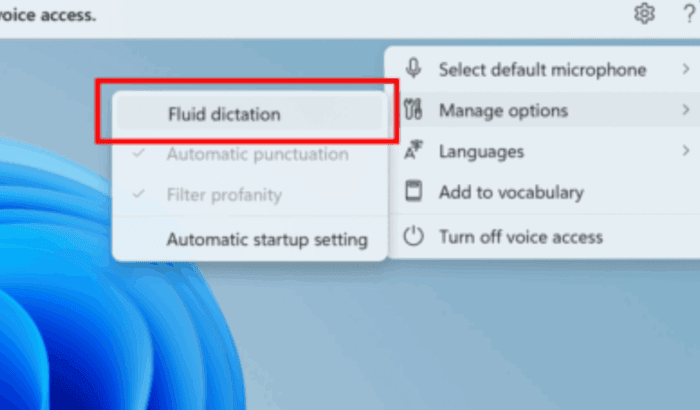
The latest Windows 11 Release Preview update, KB5067036 (Builds 26100.7015 (24H2) and 26200.7015 (25H2)), gives Voice Access a powerful new boost. Microsoft has introduced Fluid Dictation, which it calls a next-gen voice input model that’s faster, more natural, and locally processed.
Fluid Dictation helps improve your spoken words in real time. It corrects grammar, punctuation, and even filler phrases as you talk, delivering more accurate results with less editing. It’s powered by on-device small language models (SLMs), ensuring everything happens securely and instantly.
The experience works across most text input apps, except in sensitive fields like passwords or PINs. You can activate it by saying “Turn on Fluid Dictation” or toggling it in Settings > Accessibility > Voice Access.
Microsoft has also expanded language support with full Japanese voice navigation. Japanese users can now open apps, dictate messages, and browse the desktop entirely through speech.
Another improvement lets users configure a wait time before a voice command executes. This helps prevent accidental triggers during dictation or multitasking.
These changes come alongside an important update to Start Menu, which make it more personal and smarter than ever. After updating your system with KB5067036 preview, you’ll also notice Phone Link integration button next to Search.

Read our disclosure page to find out how can you help Windows Report sustain the editorial team. Read more



Improve this guide



User forum
0 messages