
Microsoft Edge Pushes an "All in One Browser" Message on Chrome’s Download Page
Microsoft is testing a new Edge banner that promotes online safety features when users try to download Chrome on Windows.


 3 min. read
  Published on
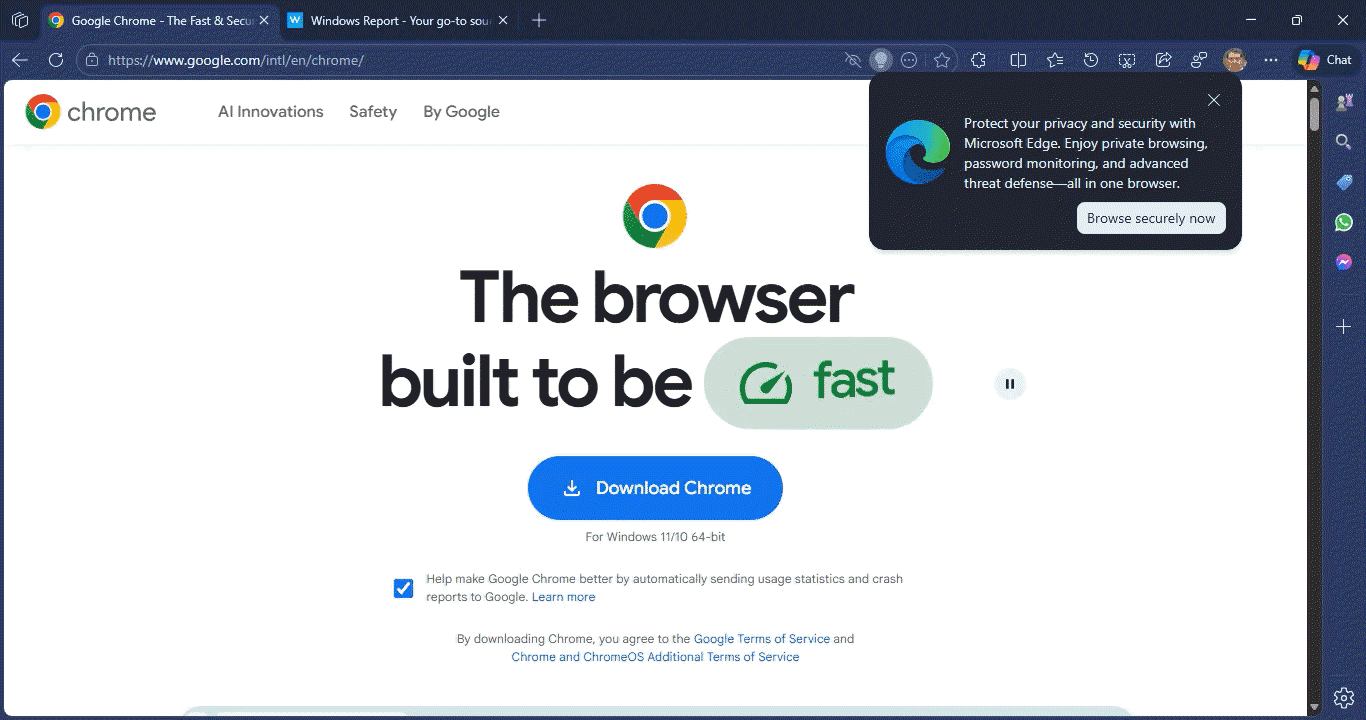
Microsoft is trying a new way to stop users from downloading Google Chrome. If you open the Chrome download page in Microsoft Edge, you may see a new banner at the top. This version looks different from the usual prompts that ask users to stay with Edge.
Instead of comparing Edge and Chrome, Microsoft now focuses on protection. The banner urges users to browse with Edge for privacy and security and frames the browser as an all-in-one option with features like private browsing, password monitoring, and protection against online threats.
That framing stands out. Earlier messages leaned on the fact that Edge and Chrome share the same Chromium base or pointed to Microsoft’s brand trust. This time, those points are missing.
The message stays centered on built-in safety features.
The banner includes a “Browse securely now” button. Clicking it no longer opens a blank tab or a generic Edge page. Instead, Edge redirects to a dedicated Online Safety page on Microsoft’s website.
That page highlights features such as InPrivate browsing, password monitoring, scam and scareware protection, and Edge Secure Network, the browser’s built-in VPN. It reads more like a walkthrough than a reminder.

Microsoft regularly rotates these Chrome download banners in Edge. The wording changes as the company tests what keeps users from switching browsers.
This version shows where Microsoft is placing its focus now. Rather than talking about browser engines, it leans on online safety as the reason to stay.
The banner appears to be part of a test and may not show up for everyone. It usually appears on Windows when Edge is used to search for or download Chrome.
That’s not all. Microsoft Edge’s Copilot now also works in InPrivate browsing mode, and Microsoft ensures the Tracking Prevention setting stays the same in InPrivate windows as in regular browsing.
Update: We are now seeing additional Microsoft Edge popups on Chrome’s download page with wording focused on speed, memory use, and battery life. Microsoft is showing more than one popup on the page.


Read our disclosure page to find out how can you help Windows Report sustain the editorial team. Read more



Improve this guide



User forum
0 messages