
Microsoft Edge now lets users sign in with Google accounts to sync browser profiles in Canary


 2 min. read
  Published on
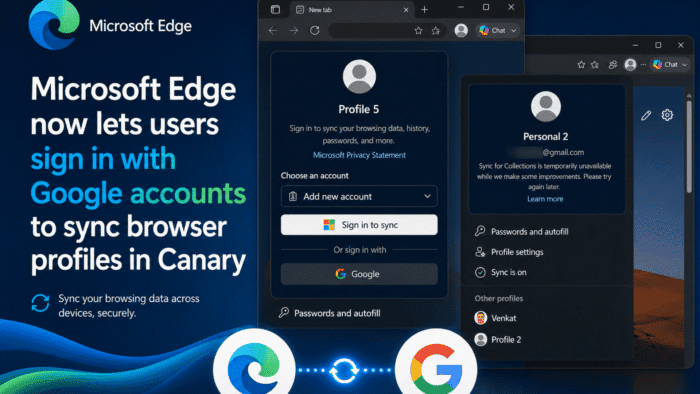
Microsoft is quietly testing Google account sign-ins for Edge profiles in Canary. In our testing, the feature worked, and Edge shows the usual profile sync options for a Gmail account.
Until now, Edge profiles have relied on Microsoft accounts for sign-in and sync, not Google accounts. As a result, you could create multiple profiles and use Microsoft accounts made with Gmail addresses. That still did not give you proper Google sign-in or Google-backed sync.
The only options were clumsy workarounds. For example, you could import Chrome data as a one-way transfer, or sign in to Google services by hand in every profile. Back in 2020, Microsoft even said it had no plans to integrate Google services into Edge by default.
How to enable Google account sign-ins for Edge profiles in Canary
Now, Microsoft is testing Google sign-ins for Edge profiles behind flags. Once the flags are enabled, a Google sign-in button appears in the profile menu dialog.
From there, you can pick “Sign in with Google” and follow the usual web flow. Edge asks for permission to access your Google account information. At the end, it may prompt you to protect the Gmail-linked profile with Windows Hello.

After setup, the profile menu displays the Gmail address tied to the new Edge profile, something Edge did not allow before. In our use, Profile Sync is available for that Google-linked account, with sync options turned on for Edge features, much like a Microsoft account.

Browser profiles have usually stayed tied to each company’s own ecosystem. Up to this point, you could not use a Google account to sign in to an Edge profile, just like you cannot use a Microsoft account to sign in to a Chrome profile.
Both browsers let you log in to individual sites with whatever account you like, but the browser profile itself has stayed tied to its own account system.

Microsoft appears to be changing that. For now, this change is limited to Edge Canary. The feature is hidden behind the “Google Sign-in button on profile menu” (edge-swag-m1-Google) and “Sign in with Google” flags in edge://flags, and the company has not announced the feature yet.


Read our disclosure page to find out how can you help Windows Report sustain the editorial team. Read more



Improve this guide
User forum
0 messages