
Microsoft Excel’s New Feature Uses Copilot to Explain Formulas Without Leaving the Sheet
Complex calculation with better understanding


 2 min. read
  Published on

Microsoft is rolling out a new Copilot-powered feature for Excel called Explain the formula. As the name suggests, the feature makes it easier for you to understand complex formulas without leaving the worksheet.
The tool delivers step-by-step explanations directly on the spreadsheet grid, right next to your data. With Explain Formula, users no longer need to open the Copilot chat pane to get help.
Instead, selecting a cell with a formula will display a Copilot icon. From there, choosing “Explain this formula” shows a breakdown of the calculation in a dedicated card on the grid.
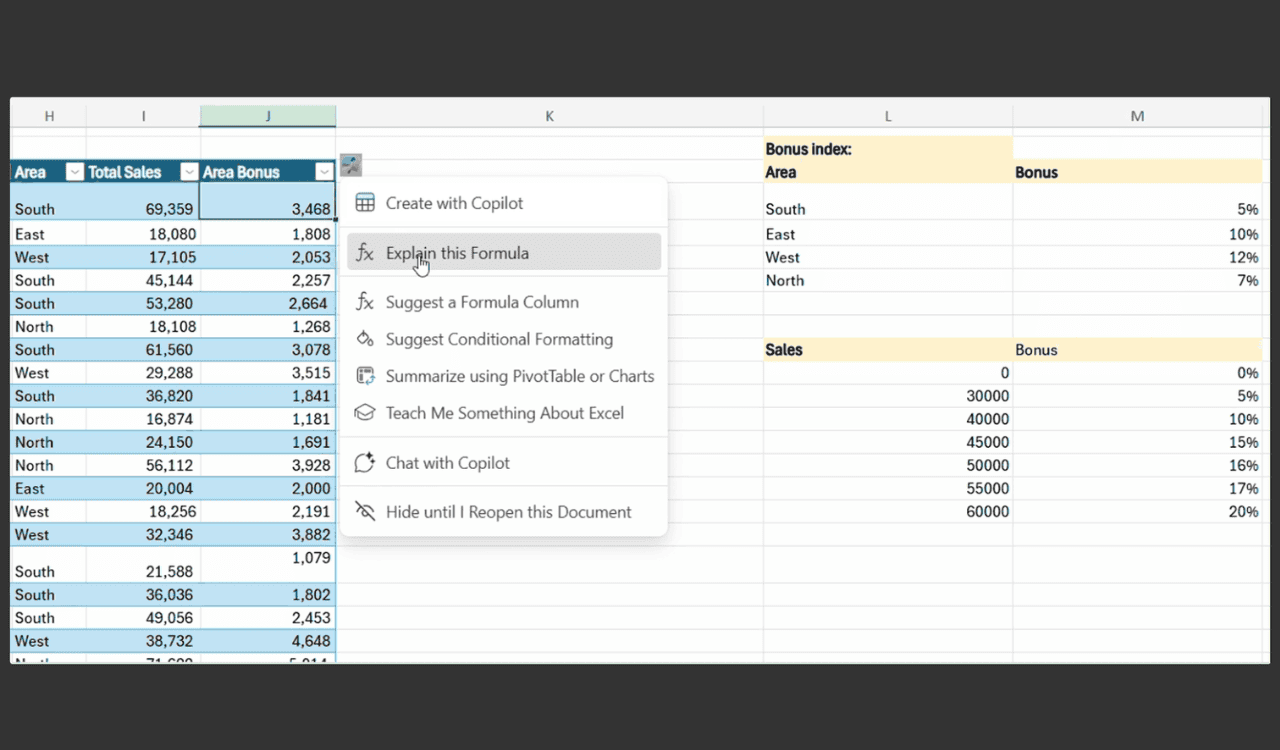

The explanations are contextual, meaning they’re based on the actual data in the workbook, not just generic definitions. This makes it easier to scan, verify, and apply the information without breaking focus.
Microsoft says the feature can handle any formula, from simple math and logic to more complex functions like arrays, lookups, and text manipulation. The explanations cover the formula’s purpose, break down each function, and describe how they work together in the context of your sheet.
If the Copilot chat pane is already open, the explanation will still appear, but inside the pane instead of on the grid. Users can also switch into a deeper conversation with Copilot for more details.
The Explain Formula feature is currently making its way to Excel for Windows and Excel for the web. The rollout is gradual, so it may take time before it appears for all users.

Read our disclosure page to find out how can you help Windows Report sustain the editorial team. Read more



Improve this guide



User forum
0 messages