
Microsoft Is Bringing Tabbed Web Browsing Directly Into Copilot


 2 min. read
  Published on

Microsoft Copilot desktop app is getting a built-in web browser on Windows and macOS, allowing users to open websites without leaving the app.
According to Microsoft 365 Message Center advisory MC1474455, the browser opens in a side-by-side panel on the right side of Copilot. It supports multiple tabs and full-screen viewing.
Copilot can open links without leaving the conversation
When users open a reference link from a Copilot response, the website can load directly alongside the current conversation.
Users can close the browser panel afterward and continue their Copilot session without switching between apps.
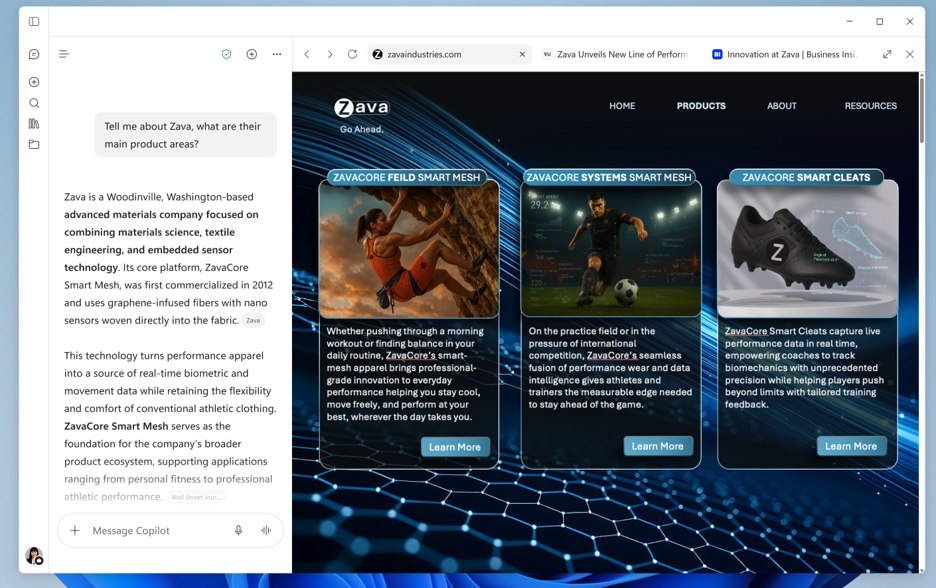
Microsoft says browsing history, cookies, and autofill information are stored locally on disk. Administrators may need to review whether that storage meets their organization’s data loss prevention and endpoint security requirements.
Administrators can enable the browser now
The embedded browser currently requires administrators to opt in through the BrowsingEnabled policy. Organizations can configure the setting through supported device management systems.
Microsoft plans to start a broader automatic rollout by the end of November 2026.
A supplementary update arriving September 21 will also add a right-click option on side-panel tabs for opening links in an external browser.
Users can still copy links from Copilot or open them in their preferred browser. Administrators can manage the embedded browsing experience through the Microsoft Edge policy framework.
Microsoft is also preparing other Edge changes. Microsoft Edge will add an opt-in autolaunch startup control for managed Windows devices, while Microsoft is keeping IE Mode alive inside Edge until at least 2029.
Via Neowin

Read our disclosure page to find out how can you help Windows Report sustain the editorial team. Read more



Improve this guide


User forum
0 messages