
Microsoft Temporarily Disables 'Ask Copilot' on Windows 11 Taskbar


 2 min. read
  Published on
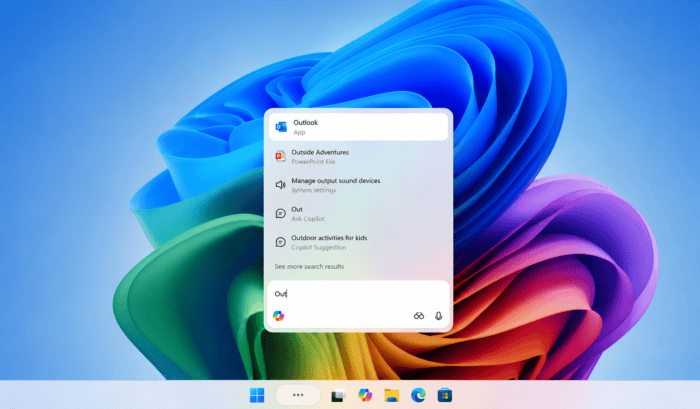
Microsoft has temporarily disabled Ask Copilot on the taskbar while Microsoft prepares a refreshed app experience. The company has confirmed that version 152.0.4191.25 is rolling out to Windows Insiders.
Microsoft is reworking Copilot while temporarily pulling Ask Copilot from Windows 11 Taskbar
The updated Copilot app introduces visual and navigation changes across Windows. Microsoft says Insiders may also notice changes in which features are available during testing. The biggest immediate change is Ask Copilot. Microsoft is temporarily disabling the Ask Copilot taskbar experience while it updates the feature and incorporates Insider feedback (via Windows Central).
That means users who previously relied on Ask Copilot from the taskbar may temporarily lose that entry point. Microsoft has not provided a specific date for its return. The move comes after Microsoft has been steadily pushing Copilot deeper into Windows.
Notebooks, Connectors and Vision are also temporarily unavailable
Microsoft warns that several Copilot features may disappear during this preview. Notebooks, Connectors, and Vision are among the capabilities temporarily unavailable. The company says feature availability will vary throughout the testing period. Some users may therefore see different Copilot experiences even while running the same version.
This isn’t the first major change to Copilot on Windows. Microsoft previously moved Copilot toward a traditional resizable app experience, moving away from its earlier embedded Windows implementation.
For now, Microsoft appears to be rebuilding parts of Copilot while also preparing for the unified experience. Not to forget, Microsoft has confirmed it’s working on a single Copilot super app, which reportedly is coming later this year.

Read our disclosure page to find out how can you help Windows Report sustain the editorial team. Read more



Improve this guide


User forum
0 messages