
Microsoft Widens Rollout of New Windows 11 Battery Icons


 2 min. read
  Published on
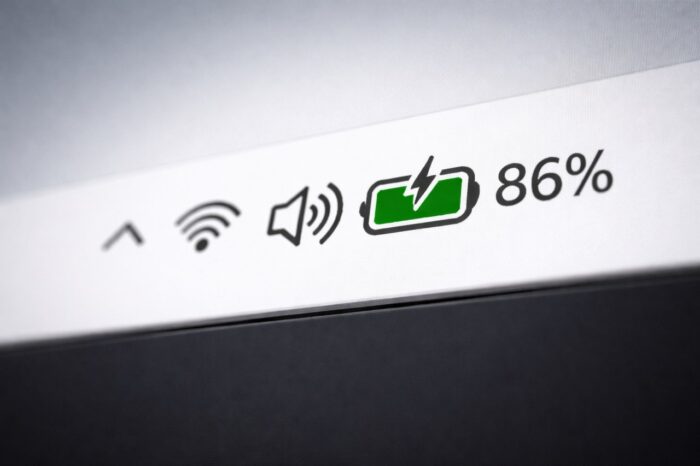
Microsoft is widening the rollout of its redesigned colorful battery icons in Windows 11, and more PCs should now see the change. The update arrives through the February 2026 optional update, KB5077241, according to Windows Latest.
The refreshed battery indicator has been in testing since late 2024 and started reaching users gradually in 2025. With KB5077241, Microsoft is pushing the feature to a broader range of devices, although availability still depends on A/B testing and hardware targeting.
Color-Coded Battery Icons Expand to More Windows 11 PCs
The updated battery icon replaces the old white bar with clearer color indicators.
When your device is plugged in, the battery turns green and displays a charging bolt. Once unplugged, the icon returns to white. If the battery level drops to around 30% or Energy Saver activates, the icon switches to orange. At roughly 6% remaining, it turns red to signal a critical level.
Microsoft has also increased the size of the battery bar, making it easier to read at a glance.
Battery Percentage Returns to the Taskbar
Windows 11 users can now show the battery percentage directly on the taskbar.
To enable it, go to Settings > System > Power & Battery and toggle on Battery percentage. This addition restores functionality that many users missed after early Windows 11 builds simplified the taskbar experience.
Start Menu Expansion and Feature Rollout Controls
The February optional update also expands the redesigned Start menu to more devices.
If the new battery icon or Start menu does not appear, users can try enabling the “Get the latest updates” toggle inside Windows Update. Even so, Microsoft continues to rely heavily on staged rollouts and targeted deployment, so not all systems will receive features immediately.
The battery refresh is not the only recent tweak. Windows 11 has also gained Local Group Policy support for GPP Debug Logging, alongside a new “Make Print Screen Key Yieldable” policy that allows third-party apps to override the default Print Screen behavior.
Together, these updates show Microsoft continuing to refine both the visual experience and enterprise-level controls in Windows 11 as the 2026 update cycle progresses.

Read our disclosure page to find out how can you help Windows Report sustain the editorial team. Read more



Improve this guide




User forum
0 messages