
Fix No Man’s Sky Not Detecting Controller (Easy Guide)


 3 min. read
  Published on

If No Man’s Sky is not detecting your controller, the issue is usually caused by driver conflicts, Steam settings, or controller configuration problems. Try the quick fixes below.
Table of contents
How to Fix No Man’s Sky Not Detecting Controller?
1. Reconnect the controller
The first thing you should try is reconnecting your controller.
- Unplug your controller from the PC or console.
- Wait 10–15 seconds.
- Plug it back in and restart the game.
- For wireless controllers, disconnect and re-pair via Bluetooth.
If your controller reconnects but still does not respond correctly, see this guide on No Man’s Sky controller not working for more controller-specific fixes.
2. Enable Steam Input
You can also force the game to detect your controller by enabling Steam Input.
- Open the Steam client.
- Go to Library and right-click No Man’s Sky.
- Select Properties > Controller.
- Set Steam Input to Enable.
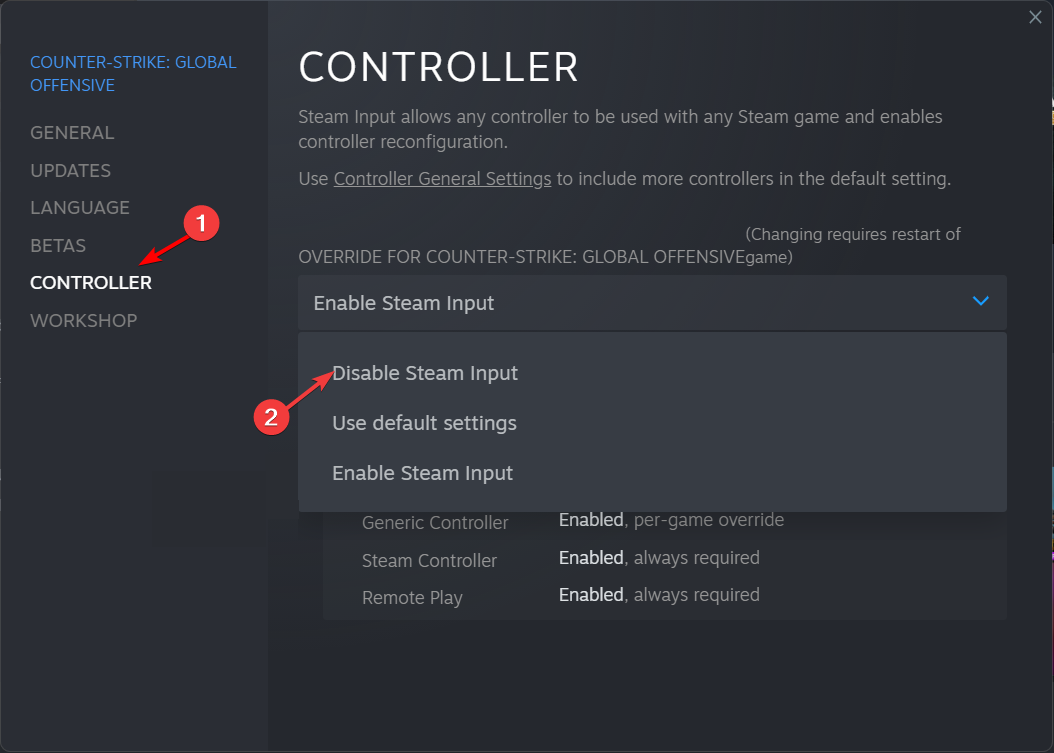
- Restart the game and test detection.
Network issues can also interfere with controller recognition; see how to fix Error Creating WebSockets in No Man’s Sky to rule out connection problems.
3. Update controller drivers
Outdated or corrupted drivers may prevent the controller from being detected.
- Press Windows + X and choose Device Manager.
- Expand Human Interface Devices.
- Right-click your controller and select Update driver.

- Choose Search automatically for drivers.

- Restart the PC when the update is complete.
If No Man’s Sky still struggles to detect your controller, it may also be running on the wrong graphics card. You can follow this guide on No Man’s Sky not using GPU to make sure the game uses your dedicated GPU.
4. Check USB port or cable
Sometimes the problem is hardware-related, so test the USB port or cable.
- Plug the controller into another USB port.
- If possible, use a different USB cable.
- Avoid USB hubs to reduce interference.
5. Disable other input devices
Multiple input devices can confuse the game, so disconnect extras.
- Disconnect additional peripherals like joysticks or steering wheels.
- Restart the game with only one controller connected.
- Test again to rule out conflicts.
6. Reinstall the game
As a last resort, reinstalling the game can refresh corrupted files.
- Back up your save files.
- Uninstall No Man’s Sky from Steam.

- Reinstall the game and check controller detection.
- Launch and test with a clean configuration.
Conclusion
If you also encounter display problems while testing, you can review this guide for when the No Man’s Sky screen goes black. Driver-level issues can also present as a Vulkan driver error in No Man’s Sky, which is separate from controller detection but worth checking if symptoms overlap.
If the game still refuses to recognize your controller or fails to start properly, you can also check our guide on No Man’s Sky not launching for additional solutions.
FAQs
It often happens due to Steam Input being disabled, outdated drivers, or USB port issues.
Most modern controllers work, with Xbox and PlayStation models offering the best compatibility.
Yes. Enabling Steam Input standardizes input, which frequently restores detection.
Random disconnects can be caused by faulty cables, weak Bluetooth signals, or device interference.
Not usually. Try Steam Input, driver updates, and USB changes first. Reinstall only as a last step.

Read our disclosure page to find out how can you help Windows Report sustain the editorial team. Read more



Improve this guide

User forum
0 messages