
How to Use OpenDNS Free DNS for Faster and Safer Browsing


 3 min. read
  Published on

OpenDNS free DNS gives you faster browsing, built in security filtering, and simple parental controls across home networks. It also improves stability when your default ISP DNS performs poorly.
Table of contents
What is OpenDNS And What Does it Offer?
Key features of OpenDNS free DNS
OpenDNS offers several valuable tools for users who want both performance and control.
- Fast DNS resolution for quicker page loading
- Phishing and malware protection
- Optional website category filtering
- Custom block and allow lists
- Free analytics and logs
- Support for routers, Windows, macOS, iOS, Android
These features help you build a safer browsing environment without installing extra software.
OpenDNS free DNS addresses
Use these DNS servers on your device or your router:
- 208.67.222.222
- 208.67.220.220
If you work with enterprise environments, this guide on how to set up DNS in Windows Server may help with broader network management.
How to set up OpenDNS free DNS
- Open Settings from the Start menu.
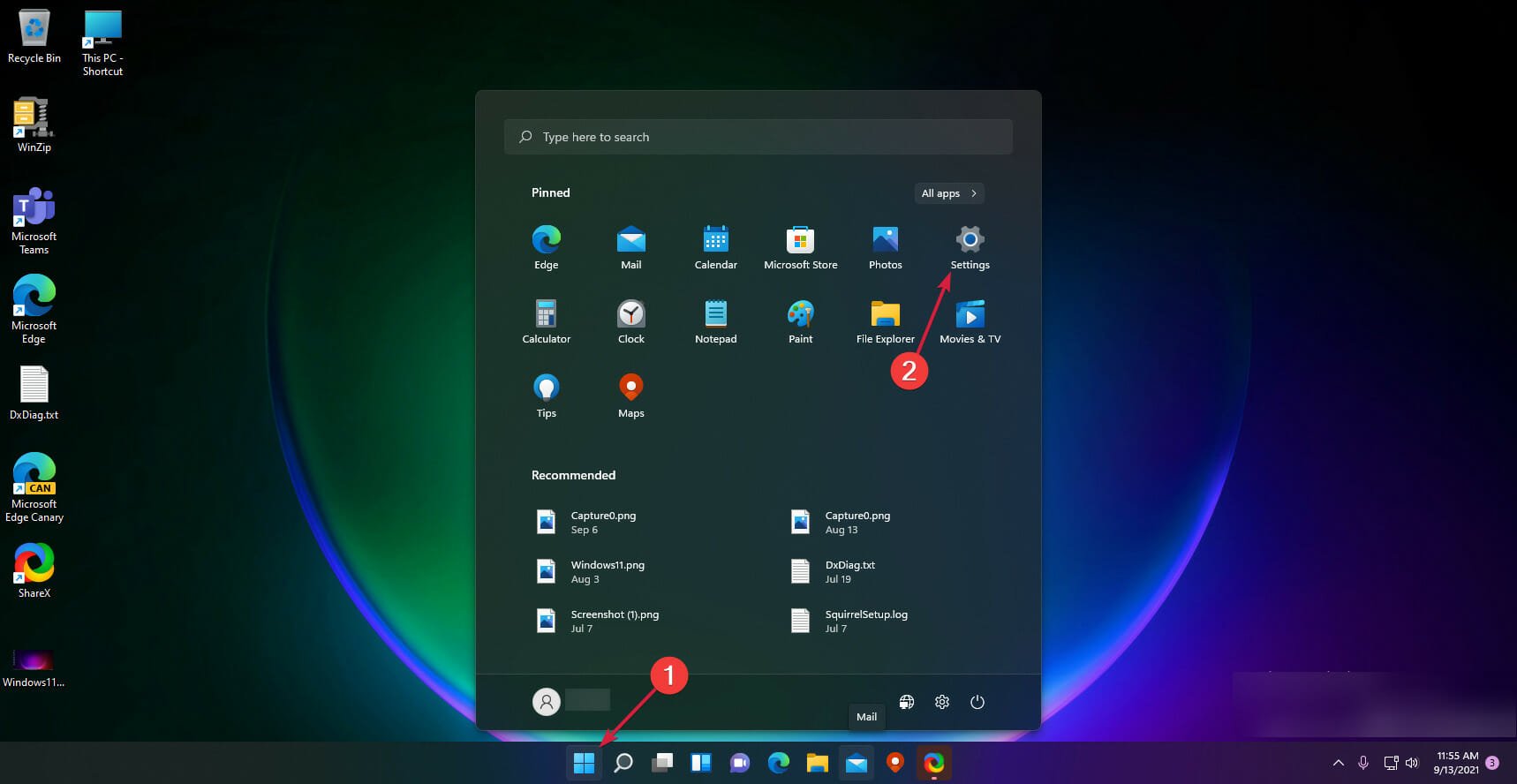
- Click Network and Internet, then pick Wi Fi or Ethernet.

- Click Edit next to DNS server assignment.

- Choose Manual and enable IPv4.

- Enter 208.67.222.222 as the preferred DNS.
- Enter 208.67.220.220 as the alternate DNS.
- Click Save and relaunch your browser.
If you need a broader walkthrough, check this guide on changing DNS settings in Windows 11.
Pros of OpenDNS free DNS
- Improves browsing speed on many networks
- Blocks phishing pages by default
- Offers simple parental controls
- Protects all devices when applied on a router
- Provides free logs and usage statistics
These advantages make OpenDNS a strong choice for families and home users seeking extra protection.
Cons of OpenDNS free DNS
- Filtering features require a free account
- Strict filters may block safe sites if not configured carefully
- Performance varies across regions
- Advanced security features belong to paid tiers
These limitations matter if you want fine grained filtering or enterprise level protection.
Who should use OpenDNS free DNS
OpenDNS works best for households that want safer browsing, parents needing category filtering, and small offices looking for free DNS level protection. It also helps users who struggle with unreliable or slow ISP DNS performance.
If you want to compare speeds with other providers, you can check nearby options using this guide on the fastest DNS servers near you.
FAQs
It provides faster lookups, malware protection, and customizable filtering.
No. It often improves speed due to faster domain resolution.
No. DNS servers work without an account, but filtering requires one.
Yes. Router configuration protects every device on your network.
Tips
- Tune filtering rules in the dashboard regularly
- Set DNS on your router to cover the whole household
- Compare speed with and without OpenDNS to find the best setup
- Review logs to understand browsing patterns
OpenDNS free DNS boosts speed, safety, and control for home and small office networks. It adds phishing protection, flexible filtering, and reliable resolution without costing anything. When you configure it on your router or device, you gain stronger security and a more stable browsing experience.

Read our disclosure page to find out how can you help Windows Report sustain the editorial team. Read more



Improve this guide


User forum
0 messages