
Outlook’s New Copilot Feature Eliminates Meeting Conflicts


 2 min. read
  Published on
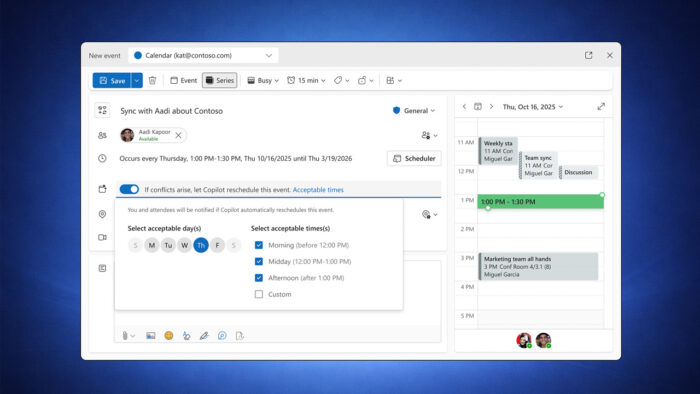
Microsoft is introducing a Copilot-powered tool that automatically handles meeting conflicts when they appear on a user’s calendar.
Instead of manually adjusting overlapping events, users can allow Copilot to step in and move flexible meetings. The feature prioritizes higher-importance meetings and shifts personal appointments or one-on-one sessions accordingly.
This functionality targets recurring check-ins and other meetings that do not require a fixed time slot.
Outlook’s New Hands-Free Rescheduling Option
Users will see a new option labeled “If conflicts arise, let Copilot reschedule this event” when creating or editing meetings.
Once enabled, Copilot continuously monitors the calendar and reacts when a conflict appears. It automatically finds a new suitable time based on user-defined preferences.
Under “Acceptable times,” users can define preferred days and time ranges to guide the AI when selecting a new slot.
The feature only applies to meetings marked as Busy or Out of Office. Tentative events remain untouched and will not trigger automatic changes.
Whenever Copilot reschedules a meeting, Outlook sends a notification through the notifications pane. Microsoft plans to introduce email alerts for these changes in a future update.
Enterprise-only rollout
The automatic rescheduling feature is rolling out to Teams, Outlook for the web, and the new Outlook for Windows.
Access requires a Microsoft 365 Copilot Enterprise license, limiting availability to enterprise customers.
This update follows other upcoming Outlook improvements, such as one-step folder access and simplified file workflows. However, some planned features, including People Hub, have been delayed.
At the same time, Microsoft continues to address known issues, including an invisible cursor bug affecting classic Outlook.
The move reflects Microsoft’s broader push to embed Copilot deeper across Microsoft 365 apps and reduce administrative overhead in enterprise environments.
Via Neowin

Read our disclosure page to find out how can you help Windows Report sustain the editorial team. Read more



Improve this guide



User forum
0 messages