Edge gets Pin It Button, OneNote Clipper extensions in Windows 10

Microsoft introduced the first set of extensions for Microsoft Edge a few weeks ago in build 14291 for Windows 10 Preview. Now, with the latest build 14316 released, Microsoft Edge is enjoying two new extensions.

Edge users are now able to use the Pin It Button and OneNote Clipper extensions in Microsoft Edge. Alongside these new extensions, Microsoft also updated a few other Edge extensions: Mouse Gestures, Reddit Enhancement Suite, and Translator. If you want to install any extensions on your Microsoft Edge browser, go to the three dotted menu, open the Extensions pane, and click “Get extensions”.

“A few weeks ago, we announced the availability of extension support for Microsoft Edge with more on the way. Today, we are excited to share with you some new extensions that you can try out – Pin It Button and OneNote Clipper. In addition, we have updated versions of Reddit Enhancement Suite, Mouse Gestures, and Microsoft Translator.”

The Pin It Button allows you to save your favorite images from across the internet to your Pinterest profile. It basically works like any other Pinterest plug-in, and is very practical for storing images quickly. The OneNote Clipper extension allows you to clip any web page and use it in a OneNote note or save it to your OneDrive account.

onenote clipper pin it button extensions windows 10

  • Read Also: Tell Microsoft about your problems in Edge with Microsoft Edge Platform Issue Tracker

As pointed out on the Edge Extensions page, these two extensions are only available in build 14316. If you decide to downgrade to the previous release, these extensions will be removed. Additionally, Gabe Aul warned users that extensions from the previous build that are already installed might not work in build 14316. To solve that problem, just reinstall all extensions.

More extensions to come to Microsoft Edge soon

Both the OneNote Clipper and Pin It Button make the total number of extensions five, all of which are available to download in the Edge browser. In the end, though, users will agree that this is not enough, as a higher variety of extensions is needed to make Microsoft Edge not only easier to use but more competitive.

As these features were introduced only a couple weeks ago, Microsoft is still testing it. We’re sure that the company will release many more extensions once they’re ready and once the browser is fully optimized for them.

Besides Microsoft’s in-house extensions, a lot of developers are also interested in releasing their own third-party extensions. Two big names, AdBlock Plus and LastPass, have already confirmed that their Edge extensions are in the works, so we should expect them to arrive this year. However, it seems unlikely that Microsoft will include third-party Edge extensions into the browser while this feature is in the preview phase. As such, the most realistic release date for third-party extensions is some time after the Anniversary Update’s release. Additionally, Microsoft is also preparing a tool which will allow developers to easily port their Chrome extensions to Microsoft Edge. So, a lot of extensions are coming to Microsoft Edge — the only question is: when?

Tell us in the comments below: what Edge extensions are you most looking forward to?

  • Read Also: Microsoft’s RemoteEdge will stream Edge browser to other platforms

Microsoft looks to improve Bing Maps by bringing new technology to developers

Microsoft released its new Bing Maps V8 control preview at Build 2016, taking another step forward towards improving this web mapping platform for developers. Four words best describe this version: more features and faster performance.

Let’s start with the features recently added. The company’s aim is to make business intelligence and data visualization richer and more interactive so that users can find locations more easily and get a clearer picture of them at the same time.

  • READ ALSO: Microsoft revamps the Maps app for Windows 10 with build 14291

The list of new features includes:

  • Autosuggest – Provides suggestions dynamically as you type a location in a search box

  • Clustering – Visualize large sets of pushpins, by having overlapping pushpins group and ungroup automatically as users change zoom level.

  • GeoJSON Support – Easily import and export GeoJSON data, one of the most common file formats used for sharing and storing spatial data.

  • Heatmaps – Visualize the density of data points as a heatmap.

  • Streetside imagery – Explore 360-degrees of street-level imagery.

  • Touch support – Easily navigate Bing Maps using a touch-screen device as well as mouse or keyboard.

  • Spatial Math module – Provides a large set of spatial math operations from calculating distances and areas, to performing boolean operations on shapes.

  • Administrative boundary data – easily access Bing Maps boundary data.

Performance has also been improved via the use of the HTML5 canvas, resulting in improved rendering performance compared to previous map controls. This allows users to view more data and gain deeper insights.

An annoying issue with Bing Maps has long been the search results for addresses outside the USA. Users have always complained that maps outside the USA are of bad quality and that search results are not accurate. What will be interesting to see is whether or not the Bing Maps V8 can address this issue. With Microsoft having recently updated Windows 10 Maps App with better search results for Insiders, it seems like the company is well on its way to do so. If this was possible for Windows 10 Maps, why shouldn’t it be the case for Bing Maps?

For more information about the Bing Maps V8 control preview, check out Microsoft’s page.

READ ALSO: Microsoft competing with Amazon for HERE Maps contract

Doom open beta begins next week, gets a $40 multiplayer DLC season pass

During the last year’s E3, Bethesda showcased the latest Doom game. Unsurprisingly, many fans were ecstatic over the game’s announcement. Since then, Bethesda has been actively working on latest Doom installment and according to the latest blog post by Bethesda, it seems that the Doom open beta is coming our way.

The first Doom game was released way back in 1993, quickly becoming the seminal first-person shooter with its fast-paced action and networked multiplayer support. Doom was a revolutionary game and therefore, it’s no surprise that many fans are excited for the latest Doom release.

Doom open beta to take place on April 15th

There was a closed Doom multiplayer test recently, but don’t fret if you didn’t get your chance to participate: Bethesda has plans for an open beta. Everybody is welcome to take part in open beta — in order to join, you only need to download the beta client and you’re good to go.

There won’t be any substantial differences between the open and closed beta. Just like in closed beta, you’ll have access to Team Deathmatch and Warpath game modes, and you’ll be able to play on the Heatwave and Infernal maps.

User created content was always a key aspect of Doom series, and the latest Doom game will also feature a map creator called SnapMap. Developers plan to update SnapMap regularly so we expect to see new objects and features added frequently. There are plans for future multiplayer updates as well, and both updates and SnapMap editor will be available to users for free.

In addition to free updates, there will be three DLC packs available after the game’s release. The first DLC will be available this summer and contain three new maps, one new weapon, and one playable demon. Additional content includes a new armor set and a new piece of equipment along  with new hack modules, taunts, and new customization colors and patterns. This DLC will cost$14.99, but you can purchase all three DLC for $39.99 using the Doom Season Pass.

The Doom open beta will take place from April 15 to April 17, and will be available on all major platforms. Regarding the full version of the game, the latest Doom installment will be available on May 13th.

  • READ ALSO: Battleborn Open Beta debuts in April for Windows PC, Xbox One, and PS4

Microsoft’s latest Windows Insider “Made by You” segment focuses on Cortana

Feedback! Feedback! Feedback! An argument could be made that ever since Microsoft cut part of its software and code testing division, the company has outsourced those jobs and responsibilities to consumers at larger by “inviting” eager participants into Insider, Preview and Beta programs for its various software and services. While that’s a strictly speculative assumption, the reality is that Microsoft has opened various programs, apps, and software up for feedback from its more educated and vocal minority groups of users to better assess how it should approach its entire consumer base.

In the latest “Made by You” article posted in the new Feedback Hub, the Windows team walks Insiders through the process of using the digital assistant Cortana, to gather even more feedback from users.

Cortana Feedback Hub
Cortana Feedback displays

One of the key sources of feedback comes from within the Cortana experience. You can provide ideas, likes and dislikes to our team. Each is recorded by our systems, including a screenshot (if you allow), as well as a few key details such as the Windows language used.

All that feedback is correlated into our system to the tune of thousands of items every week for Cortana alone. User-reported issues and ideas are key to finding which problems to concentrate on fixing and what the new experiences you want most. Don’t forget to add positive feedback too – we use this feedback to see which experiences we should invest in with even more features.”

Similar to the pop-ups that accompany the various new and retooled experiences in Windows 10, the Windows team is also seeking user info and feedback directly from within the Cortana app. While some users might argue that their feedback gets lost in the ether of Windows 10 because they never hear back about a particular request or the time frame between feedback given and implementation are so wildly spaced apart, an example of Cortana sourced feedback come by way of recent Cortana customizations.

Cortana Feedback Hub 1
Cortana requested additions and features

When we first shipped Cortana on the desktop, the final step of setting up Cortana required that users convert the local account they used to sign into their PC into a Microsoft account. Our Insiders reported that this was not quite ideal and that feedback helped us prioritize the fix. Now when you are setting up Cortana for the first time, you are given the ability to “Sign in to just this app instead”, instead of switching your entire login to use your Microsoft Account. This brings Cortana in-line with the other Windows 10 apps that make use of your Microsoft Account, such as Groove and Store.”

The feedback implementations didn’t stop there, however.

Another of the first major pieces of feedback that we received via the Insider program was the taskbar enabled Search Box, while useful, was taking up too much space. The Cortana team was able to quickly respond to that feedback by adding additional sizing options to the search box accessible via the right-click menu.”

The net result was a move from the seemingly large search box option to a more refined Cortana icon that sits flush with the other icons in the taskbar. The post continues at length about the new features found in Cortana as well as walking Insiders through a discoverability of Cortana-specific navigations.

At the end of the day, conspiracy theories withstanding, Microsoft’s approach to user feedback is a welcomed change from most. Despite the time it takes to gather, digest, and act upon user feedback, the Windows, Azure, Xbox, Office, and other software and hardware division within the company seem to value and appreciate what their users have to say about products. Hopefully, the trend continues and as a result, Windows 10 and the other software as a service model, projects get the attention and consideration users have been clamoring for.

Microsoft provides new ways to report on usage in SharePoint, OneDrive, Skype, and Yammer

If your organization is using Microsoft’s cloud services, it’s likely that you have some interest in knowing how your users are accessing them. Whether it’s because you need to predict the resources you’ll need as your organization grows and shrinks, or you have security and privacy issues around how your data is accessed and shared, being able to determine usage is vital.

New usage reports for SharePoint OneDrive Yammer and Skype 1
Office 365 usage reporting sample.

Today, Microsoft announced at the Office blog that some new usage reports are available for a variety of Office 365 services. Specifically, SharePoint, OneDrive, Yammer, and Skype can now access the following usage reporting tools:

  • Activity dashboard (also called reporting dashboard)—Provides you with a high-level overview of how many people in your organization are using Office 365. Each service in the suite, such as Skype for Business and Exchange, has its own tile that surfaces key activity data, making it easy for you to get a quick understanding of the activity within that service. To view detailed information by service or by individual user, simply click the specific tile or use the drop-down menu at the top of the reporting dashboard.
  • Email activity report—Enables you to understand email usage, such as send, receive and read activity. It also enables you to monitor trends in email traffic, and can be especially helpful in scenarios such as user migration.
  • Office activations report—Shows which users who have been assigned an Office 365 license have signed into Office 365 on at least one device, including a breakdown by device type. This report helps you identify users who have been assigned a license but have not yet activated it, so you can provide assistance as necessary.
  • SharePoint site usage report—Provides you with storage consumption details across all your SharePoint sites. The report helps you see activity across sites, how much storage is available per site and how the sites are being used for file storage.
  • OneDrive for Business usage report—This report helps you understand storage and sharing activity across OneDrive for Business, including number and size of files stored, in aggregate and per user.
  • Skype for Business report—Shows Skype for Business usage, with details such as minutes spent in a Skype Meeting and with breakouts on peer-to-peer activity such as IMs and calls, meetings organized and meeting participation.
  • Yammer report—Provides details on Yammer engagement—breaking out Like, Read and Post activities.

The reports are available both en masse and on a per-user level, providing some flexibility in how much detail are provided by reports. Reporting timeframes also vary, with 7 day, 30 day, 90 day, and 150 day options, and reports can be exported to CVS and Excel formats.

New usage reports for SharePoint OneDrive Yammer and Skype 2
Usage reporting detail and timeframes can be dialed in.

You can find additional information at the Compliance Center, and Microsoft promises more reports will become available in the future. Right now, the usage reports are available to Office 365 customers in the U.S., Australia, and Canada, and other regions will start receiving them in May, 2016. Finally, APIs to allow customers to develop their own reports will be coming this fall.

Microsoft is “ready” for cross network play on Xbox One

Over the past couple of months, the folks over in the Xbox division of Microsoft has dropped some rather large bombshells on both the gaming as well as the developer communities as they announced Xbox One dev kits, cross network play, and the development of Universal Windows Apps.

Some of the announcements are a bit of a rehash from what the console was originally introduced as over three years ago, but now with Microsoft finalizing the API underpinnings for cross-platform development and shared experiences across devices, Xbox executives are finally free to promote their efforts.

Speaking with Tom Philips from Eurogamer, ID@Xbox’s European boss Agostino Simonetta talked to the Xbox development efforts post announcements as well as Microsoft’s overall plan to re-court indie developers. While relatively new to his position within the Xbox division, Simonetta seems well versed about Microsoft’s cross-network efforts.

Well, now I should get back to programming as a hobby! Cross-network play was extremely well received; Rocket League will be the first to do it. And then there’s Game Preview, which when we announced we said was a pilot. Ark: Survival Evolved is unbelievable – after two, three weeks they came out and said how many concurrent users they had – they’ve been very vocal about how good it has been. Then there’s the Solus Project, Starbound, they’re both here [at Rezzed], and we’re working with them on their launch via Game Preview. Subnautica, too.”

Off to a modest start, the question of whether or not the full suite of tools for indie developers were available also came up during the interview.

But all the technology is there?

Absolutely – we’re ready. Rocket League is the first game – and it is a heavily network-orientated game. Last weekend I had a problem with my wife, I was playing too much Rocket League.

But yes, any title that wants to update their game to include cross-network play, any title that wants to launch soon and take advantage of that, we are ready.”

Moving onto a more recent announcement unveiled at Build 2016, Simonetta discusses the new Xbox One dev kit enabling the feature for developers. Back during the Xbox One’s unveiling event in 2013, Xbox executives highlighted the console’s differing development environment from previous generations by allowing consumer versions of the hardware to be turned into dev kits with a few software tweaks.

Rather devs having to purchase a console for a few thousand dollars to develop and test indie or less than AAA fidelity games, Microsoft would enact a software switch that could turn a four-hundred-dollar console into a test rig. As the company sought to right a colossal mismanagement in communication early on in the consoles life, it seemed the Xbox team had all but forgotten its promise to developers.

XboxStage_1
E3 2015 Xbox annoucement

Fortunately, with a bit of stability underneath them, the Xbox team is ready to revisit the conversation in a much more substantial way.

We went into preview mode for it on 30th March, and right now we’re seeing more professional developers use it. But it’s still in preview – when it’s not, we expect to see plenty more use it. We expect developers to take advantage of that path. 1400 developers now have Xbox One dev kits in their living rooms, basements. We build the technology, and the development community will get on board at their own pace. We were very keen to get this out there.

We have been dealing with a university in the UK which was interested because it’s an easy way to get their students programming.”

Beyond being able to create indie games on current consoles or enabling cross-network play in games, Simonetta cautions developers to consider timing when attempting to capitalize on the new tools allowed by Microsoft.

There is an element of timing – the way the industry behaves as a whole regarding releases is always changing. We’re always in discussion with the game creators. They are the publishers, but we can give them help or advice on when launching their project might maximize their profitability.

September until December, in general, is a difficult period for the retail business. We advise indie developers to be smart about their release dates. There was one game in particular recently who launched at the right time and got a lot of visibility in the console store’s list. There are busy periods in the year, but it’s not just games – it is the amount of content coming out. It’s not just an indie-related problem.”

There seems to be a lot of moving parts for developers to consider these days, but at least the landscape appears to be opening up. Hopefully, with a more integrated storefront, relatively inexpensive developer kits and a more open cross-network field, gamers and app developers alike will begin to offer consumers experiences never before seen in console history.

Microsoft partners with Seattle Reign Women’s pro soccer team for jersey sponsorship, more

Microsoft became the newest partner for the Seattle Reign FC today for the 2016 season, starting April 17. The Seattle Feign FC are a part of the National Women’s Soccer League and the latest Seattle team to join up with Microsoft. The Seattle Sounders FC and the Seattle Seahawks also partner with Microsoft. The Seattle Reign FC will utilize Microsoft’s technology and services on the field and in their offices.

Seattle Reign FC owner, Bill Predmore, released a statement about the new partnership with Microsoft:

“We are excited by the opportunity to partner with Microsoft and look forward to the chance to work together during the upcoming season. Our collaboration with Microsoft exemplifies what we believe our partnerships can and should be: an opportunity to leverage our unique assets and experiences to add meaningful value to our partner’s business.”

For the 2016 season, Microsoft’s logo will be branded on all Seattle Reign’s jerseys. Since 2009, Microsoft has a similar deal with the Seattle Sounders FC with the Xbox-themed logos printed on their jerseys. Previously, Microsoft had a partnership deal with the WNBA team, Seattle Storm, in 2010, but that deal expired in 2014.

Seattle Reign’s head coach and general manager thinks the Microsoft partnership will be good news for the club:

“I am a firm believer that player data can be utilized to improve player and team performance and to better manage the fitness of our players. Microsoft’s sports science and analytics platform provides our club with a powerful, easy-to-use way to develop actionable insights from the data we collect. I am excited about the impact this information can have on our club, and I am looking forward to working with Microsoft to provide a footballer’s perspective on how to optimize and evolve the platform.”

In addition to the Microsoft-branded jerseys and Microsoft wearables and hardware, like the Microsoft Band and tablets from the Surface Pro line, Seattle Reign’s front office will use the power of Microsoft’s other products and services like Microsoft Azure and Office 365 to help with Seattle Reign’s business operations.

Here’s how visual cues impact the effectiveness of Universal Windows Apps

The Windows team has just published the next post in a series of best practices in designing Universal Windows Apps (UWA), and this time, it’s about designing visual cues.

Specifically, the Windows team looks at the generals of visual cues before diving deeper into how they can inform users of possible interactions, as well as guiding them to do transactions. One of the rules being emphasized is that visual cue should never distract users from the main content. They also need to be easy to understand,  visible, and eye-catching.

Visual cues help your user to quickly understand what is happening in your app and to see what is important and what is not.

Similar to real-world objects, visual cues should also communicate well what they do and how they can be interacted with. The specific kind of visual cues that instruct people on these interactions are called “affordances”. These mostly come in the form of contextual changes to visual cues. According to famed designer Don Norman, two things matter in affordance design: whether they can be readily perceived and interpreted, and whether the desired action can be discovered.

Examples of affordances.

Call-to-actions (CTA), on the other hand, are used to guide users towards transactions, by inviting them to give information, urging them to act, and offering an opportunity. These are often seen in free-to-play games and apps that rely heavily on ads and in-app-purchases. Some oft-used elements in CTAs are contrasting colors, noticeable difference in scale, larger fonts, and noticeable margins. Nevertheless, they should not be jarring and frustrating to look at.

5_calltoaction
Makes visual cues and CTAs more like this..
..and less like this.

All in all, the post presents fascinating and useful guidelines on making your apps not just attractive, but also usable and effective. While the Windows team’s intention is obviously geared towards UWA builders, these guidelines should work for any developer who wants their apps to be as effortless to users as possible.

Image credits: The Windows Blog


Tron RUN/r FINALLY arrives on Xbox One with a host of cool extras for fans

TRON Run/r has finally arrived on the Xbox One. The game had initially been set for a February release on the console and despite it coming out on the PlayStation 4, TRON Run/r stayed in the “coming soon” section of the Xbox One game store and appeared to jump around with release dates until ending up with no release date at all and being placed in the bottom of the upcoming games list.

It’s unclear what caused the delay but it’s out now and should be available in most Xbox One regions.

TRON Run/r is an endless runner game that incorporates elements from the brilliant Tron Legacy movie that came out several years ago. The film was originally scheduled to get a sequel that was to begin filming in 2015 but even with the director and actors on board, it was cancelled a week after being announced, presumably due to the poor box office earnings of Tomorrowland, another live action Disney movie that came out the same week.

The game’s creation may seem a bit odd given how many years have passed since Tron Legacy came out but it’s likely that it was initially planned to help reintroduce audiences to the franchise in the lead-up to the now-cancelled film which would have come out in late 2016 or early 2017. Here’s TRON Run/r’s official description:

Return to the world of TRON with TRON RUN/r, a new lightning fast, action-adventure runner with a twist! Blaze through dynamic circuits, facing-off against virulent adversaries while taking on all challengers. Pack your loadouts with dozens of combinations of cycles, suits and powerups. Hone your DISC and CYCLE skills on the 32 included levels, then challenge your friends to the grueling STREAM program that throws endless combinations of modes and levels at you until you crash. New music from EDM godfather Giorgio Moroder and Raney Shockne, and remixes by Autechre, Bibio, patten, Joywave and others power you through this dazzling TRON universe.

TRON Run/r is available as a basic stand-alone edition or a special TRON RUN/r Digital Deluxe Edition which comes with the main game as well as all of the current and future add-on content. Some of this extra content right now includes 18 new levels, 8 more multipliers, 6 new light cycles and 3 new suits, extra in-game currency, and the special OUTLANDS and DISC Extender packs.

This OUTLANDS pack is rather significant and features an entire alternate game theme, 16 more levels, and 20 more multipliers while the DISC Extender pack comes with 9 new levels of DISC mode, 4 multipliers, 3 new light cycles, and a variety of character skins based on characters such as Classic Flynn, Legacy Clu, Legacy Quorra, Rinzler, Beck, and Mara.

With the cancellation of the third TRON movie, it’s fantastic to see new content being made for fans of the franchise. TRON characters and themes have also recently appeared in Disney Infinity 3.0, also on the Xbox One (and Windows 10 and Xbox 360), which features Sam Flynn and Quorra as playable characters, Tron Legacy and Tron objects, and two downloadable levels that tell an original story set after the events in Tron Legacy.

Are you a TRON fan and will you be supporting the franchise by buying TRON Run/r? Let us know in the comments below.

Buy TRON Run/r on Xbox One

Buy TRON Run/r Digital Deluxe Edition on Xbox One

Ubisoft dumps Xbox Live support in latest Rayman video game

In a rather perplexing move, Ubisoft has re-released the Windows 8 video game, Rayman Fiesta Run in a new version designed for the Windows 10 operating system but without some of the features that made the original release so popular.

While the game appears to very almost identical to the previous version, Rayman Fiesta Run Windows 10 Edition lacks any support for the Xbox Live service which means no syncing between devices, no Xbox Live cloud saves, and no Xbox Achievements. The most insulting aspect of this release is that it’s being sold as a completely separate game from the original Rayman Fiesta Run so even if users already own it, they’re expected to buy the Windows 10 version all over again. Granted, the game is only a few dollars but it’s still a very unusual decision to make on Ubisoft’s part.

Here’s the official description:

Join legendary platforming hero Rayman for a new adventure on your favorite mobile device! If you enjoyed Rayman Jungle Run, you will love Rayman Fiesta Run and its new wacky Fiesta world! Lunge for cocktail umbrellas, leap on limes and punch those piñatas…the sky’s the limit!

PARTY ALL NIGHT LONG

More than 75 levels welcome you for the Fiesta!

Bounce on sausages and make your way through 4 new festive worlds

Beat all 3 new epic bosses to reach the dreaded Land of the Livid Dead Island!

Collect Lums to get awesome rewards and power-ups

The game appears to have added Facebook connectivity, so that may be a feature that could appeal to those with no Xbox Live friends though. However, with the growing connectivity between Windows 10 on PC and Mobile and the Xbox One console, this does seem like a bit of a move backwards.

Let us know what you think in the comments. Does this release of Rayman Fiesta Run make sense to you?

Rayman Fiesta Run Windows 10 Edition

Microsoft Edge seriously improved with latest Windows 10 build

Windows 10’s default browser, Microsoft Edge, received a ton of improvements in build 14316, the latest for Windows 10. In the last few builds, Microsoft’s star browser received a lot of love, a good move by the company if it wants to stay competitive with rival browsers.

Windows 10 build 14316 brings Edge improvements

Improvements introduced with the latest release are mainly functionality enhancements. Users are now able to drag and drop files into the browser, import features from other browsers, change the default save location, and more.

Read Also: Windows 10 Preview Build 14316 brings Cortana low battery notifications

Check out the full changelog below:

  • “Drag and drop folders: Users can now upload folders to sites like OneDrive, Dropbox, and Google Drive by dragging and dropping into Microsoft Edge.
  • Better favorites importing: You can now import favorites from Firefox, in addition to Chrome and Internet Explorer. When you import favorites from any browser, they will now land in a separate clearly labeled folder, instead of mixed in with your existing favorites.
  • Favorites tree view: Organizing your favorites is now easier using the new “tree” display in the Hub. You can expand and collapse folders to see the contents of as many or few as you like, and easily move favorites between folders with drag and drop.
  • Download reminders: Edge now gives you a reminder of in-progress downloads whenever you close Edge. This gives you the opportunity to complete downloads prior to closing Edge.
  • Default save location: You can now set where downloaded files are saved by default. Just open “Settings”, choose “Advanced settings”, and find the new option under “Downloads.”

Along with these functionality improvements, the new build also brought with it two new extensions to Microsoft Edge. Besides the original extensions set (Translator, Mouse gestures, and the Reddit Enhancement Suite), users are now able to install OneNote Clipper and Pinterest extension  as well.

The fact that most of these new features are already present in rival browsers confirms our theory about Microsoft’s efforts to keep up with the competition. Tell us in the comments below: what features would you like to see in the coming Windows 10 Preview builds?

Read Also: Microsoft Edge boasts 150 million+ monthly active devices

The downgrade from Windows 10 Mobile to Windows Phone 8.1 still possible

According to Microsoft, users who’ve upgraded from Windows Phone 8.1 to Windows 10 Mobile are always able to roll back to the previous version. This is because when a user decides to upgrade, their original Windows Phone 8.1 recovery image is saved so that if for some reason they’re not satisfied with Windows 10 Mobile, they can easily roll back using the Recovery Tool.

Unlike the PC version of Windows 10, where users have the option to downgrade only for the first month of use, this option will always be available to unsatisfied Windows 10 Mobile users. However, Microsoft is currently offering the downgrade to Windows Phone 8.1 only, meaning users will not be able to go back to the previous Windows 10 Mobile build using the Recovery tool.

(READ ALSO: How to Downgrade From Windows 8, 8.1 to Windows 7)

Although this option might come in handy for those who want to permanently downgrade to Windows Phone 8.1, it will make life harder for users who just want to restore their Windows 10 Mobile devices. They will need to downgrade to Windows Phone 8.1 first and then upgrade to Windows 10 Mobile again — something which is more complicated and takes more time than a single restore process.

Users still have a reason to downgrade

We’ve waited more than a year for Microsoft to release the full version of Windows 10 Mobile. And when the company finally released it, users were far from satisfied. The fact that Windows 10 is only available to a certain number of devices caused a large number of complaints. But even those who were able to perform the upgrade feel that Microsoft should have done the better job with the new OS.

Windows 10 Mobile is still bug prone, even outside the Windows 10 Mobile Preview program. So, users who got used to the smooth experience of Windows Phone 8.1 might find it annoying to use the new operating system. On the other hand, some users simply don’t like Microsoft’s approach for Windows 10.

If for any reason a user decides to downgrade to Windows Phone 8.1, they can always reinstall Windows 10 Mobile, making the process risk-free. However, we hope that Microsoft will eventually include the ability to downgrade to a previous Windows 10 Mobile build to avoid the whole “Windows 10 Mobile-Windows Phone 8.1-Windows 10 Mobile” labyrinth.

[READ ALSO: How to Downgrade From Windows 10 to Windows 8.1]

Microsoft Lumia 950 discounted to $499 at American retailer B&H

There’s a hot deal in our midsts: B&H Photo is currently offering an unlocked, black Lumia 950 for just $499. And so far, the offer can be deemed a success judging by the fact that the white version is already sold out. The regular price for this phone is $548.99 at B&H Photo and $549 at the Microsoft Store, meaning that you can save $49 if you go for this hot deal.

The Microsoft Lumia 950 was released in November 2015 and was among the first flagship Windows phones to receive Windows 10 updates — a good thing since new owners will benefit from the newest updates up until the launch of the next Windows version.

The Lumia 950 is an excellent multimedia oriented smartphone. With its 5.2-inch display and a 20 MP PureView rear camera, it sports everything needed to take spectacular photos this summer. The phone boasts 3GB of RAM and 32 GB of expandable storage space — up to 200GB — so there is more than enough storage for all those beach photos and videos.

(READ ALSO: Microsoft putting an end to the Lumia brand on social media?)

Speaking of camera performance, Microsoft describes the Lumia 950’s very well:

Magic happens in a flash — that’s why the Lumia’s 20MP camera has been engineered to virtually eliminate motion blur. And with unique features like Rich Capture and triple LED natural flash, you have all the tools you need to capture every birthday, vacation, and date-night selfie—day or night.

And since the phone is powered by Windows, you can use various Microsoft apps such as Outlook and Office while on the move:

Windows 10 keeps your digital life in sync across all your devices. All your apps, games, and music are in one convenient place with the Windows Store. And Cortana provides reminders on your Windows 10 devices. Plus, Office is easy to use on the 5.2-inch screen, and Outlook has the same rich editing tools as Microsoft Word

If you are interested, hurry up and order your Lumia 950 at this fabulous price while it’s still available!

READ ALSO: Microsoft Lumia 650 released in the US and Canada at $200

World of Tanks gets new Soviet tank destroyers, Provisions, and improved maps

World of Tanks is definitely one of the best games currently available on the Windows Store for Windows 10 players. The game is constantly being updated with new content and it hasn’t been a long while since its last.

The popular game has now been bumped to version 2.8, introducing a lot of fresh content to the game, like new Soviet tank destroyers, Provisions, and the improved Winter Malinovka map. Here’s the full changelog:

Soviet Reinforcements

Discover new Soviet tank destroyers: the SU-100М1 (Tier VII), SU-101 (Tier VIII), SU-122-54 (Tier IX), and Object 263 (Tier X) are here, so put them to the test.

Equipment Changes

Tankers have received new “passive” consumable—Provisions. These are automatically activated during battle, and include Standard Fuel, Improved Fuel, Protective Kit, Chocolate bar, White Rice, and more.

Improved Maps

Burst into the battle on the enhanced Winter Malinovka map. As well as landscape changes, there is now no mountain on the map, and the plane is replaced with a ship. Black Goldville, Fort Despair, Copperfield, Mirage, Himmelsdorf, Middleburg have also been slightly reworked.

world of tanks windows 10

For Windows 10 users, this update clocks in at around 180 MB. Once you deploy the update, you will see that Wargaming has prepared a gift, too:

In order to claim your 2 free days of Premium Account you must play at least one battle between 09 April at 12:00 and 10 April at 12:00 CEST (UTC+2). As soon as you do this, the two days of Premium Account time will begin!

Do not be alarmed if you see that you have two days accredited to your account – you will not be charged for anything! Why should I care about Premium Account?

In short, having a Premium Account is a quicker way of progressing through World of Tanks Blitz. Premium Account holders earn extra XP and credits when battling, so they can unlock and purchase that next tank faster than regular-account holders. For more info, see our guides section, specifically our Guide to Premium Account.

If you want to earn this nice gift, then make sure you log in between the mentioned hours and get your game on. Let us know how you like the game so far and your take on this update in the comments below!

Windows 10 Anniversary update will bring new Flash settings to users

Flash helped glamorize the web back in its heyday as it ran rampant across various websites and services, bringing never-before-seen animations and video content to millions of Web pages. Unfortunately, as with most beautiful things on the internet, advertisers and hackers hijacked the technology and made Flash implementation something to fear in recent times. Coupled with poor website implementations, virus-riddled updates, and gratuitous use by advertisers, Flash is increasingly becoming the older child in a group home that nobody wants to adopt.

However, an equivalent replacement technology has yet to standardize and overtake Flash’s abundant usage, so Microsoft has found itself trying to implement a happy compromise for Windows users. According to the Microsoft Edge team, the Windows 10 Anniversary Update, scheduled for later this year, will bring a new pause feature that users can enact when engaging with Flash content.

With the Anniversary Update to Windows 10, Microsoft Edge will intelligently auto-pause content that is not central to the web page.  Peripheral content like animations or advertisements built with Flash will be displayed in a paused state unless the user explicitly clicks to play that content. This significantly reduces power consumption and improves performance while preserving the full fidelity of the page. Flash content that is central to the page, like video and games, will not be paused.”

The net result is a more efficient browsing experience for Edge users when navigating around websites that implement Flash, by presumably suspending all the annoying sidebars, popup ads, and auto play banners that tend to slow down a Flash-heavy page. The new pause feature should, in theory, also minimize the number of crashes users run into on various pages as well.

Even though Microsoft is working to give Edge users a more reliable Flash experience in the browser, the company is still pushing for the reduced use of the technology for more standard compliant implementations.

We encourage the web community to continue the transition away from Flash and towards open web standards.  Standards like Encrypted Media Extensions, Media Source Extensions, Canvas, Web Audio, and RTC offer a rich way to deliver similar experiences with increased performance and security.”

Beyond providing a crash-free and lag-free experience, Microsoft would like to see the adoption of more secure methods of animation and video content be applied across the web, thus unburdening the company from having to fight uphill against socially engineered attacks on Windows users. We think everyone can agree that Microsoft’s direction is a good one.

Telltale Publishing will bring survival game 7 Days to Die to Xbox One this June

Telltale Games has announced today that it has partnered with developer The Fun Pimps to bring survival game 7 Days to Die to the Xbox One. If you’re not familiar with the “survival horde crafting game”, it has been released on Steam in December 2013 and the game is still an “Early Access Game” currently available on Windows, Mac OS X and SteamOS. Please find the official description below:

Please find the official description below:

Set in a brutally unforgiving post-apocalyptic world overrun by the undead, ‘7 Days to Die’ is an open-world survival game that is a unique combination of first person shooter, survival horror, tower defense, and role-playing games. It presents combat, crafting, looting, mining, exploration, and character growth, in a way that has seen a rapturous response from fans worldwide, generating hundreds of thousands of hours of community content on YouTube and other streaming video platforms.

7 Days to Die will be released in June for $29.99 in both digital and physical editions. The Xbox One version of the game will introduce a new multiplayer mode supporting local split-screen for couch play as well as additional online multiplayer modes. More, Telltale Games is also teasing exciting DLC content and will share additional details in the near future. Last, fans of The Walking Dead who will pre-order the game will get exclusive access to 5 character skins from the hit series including Michonne and Lee Everett.

7 Days to Die is the second game coming from Telltale Games new publishing partnership initiative as the game studio previously brought ‘The Jackbox Party Pack’ from developer Jackbox Games to Xbox 360 and Xbox One in November. Telltale staff shared that:

…with Telltale Publishing, we seek to bring the best and most innovative games in their genres to new audiences. We’re excited to be bringing such an incredible genre-blending title to consoles this summer.

Are you excited that this game is coming to the Xbox One? Please tell us about it in the comments.

Write like Shakespeare with Microsoft’s Swiftkey ShakeSpeak app

Microsoft’s latest acquisition SwiftKey introduced a new keyboard today called ShakeSpeak as part of their SwiftKey Greenhouse program for testing new and experimental ideas. This newest keyboard is meant to honor the 400th anniversary of William Shakespeare’s death by enabling you to text like the Bard himself.

The ShakeSpeak keyboard for Android works like SwiftKey’s other keyboards, using machine learning to predict what you are going to type next. However, in the case of ShakeSpeak, SwiftKey generates its predictions from the complete works of Shakespeare. The result is ShakeSpeak suggests words or phrases from an Elizabethan era lexicon. And similar to the normal SwiftKey app, ShakeSpeak will learn from you as you type, making future suggestions based off of which words and phrases you use the most.

ShakeSpeak for Android by SwiftKey

To create ShakeSpeak, SwiftKey’s language experts analyzed the entire Shakespeare canon. And in their announcement of ShakeSpeak they listed a few key findings from their research to help you write like the Bard even without the app. SwiftKey’s researchers found:

  • Get ‘thou, thee, and thy-ing’. It’s true – the ‘thou, thee, thy’ cultural stereotype is there for a reason, with these three among the top words he used the most compared to the average modern English speaker*.
  • Start your sentence with ‘Ha!’ Or an ‘O!’ Or a ‘What ho!’ for an authentic Shakespearean feel.
  • Be polite. ‘Sir’, ‘Madam’ and even ‘Ay my good lord’ are peppered throughout Shakespeare’s plays and all appear among the top words he used more than the average speaker.
  • Prepare to be surprised. Of Shakespeare’s top 10 full sentences (defined as those words ending with a punctuation), five are exclamations – ‘Ha!’, ‘What!’, ‘How now!’, ‘Away!’ and ‘Hark!’

ShakeSpeak also decorates your keyboard with an old faded parchment look and a watermark of Shakespeare’s portrait. However, while SwiftKey is available on both iOS and Android, ShakeSpeak is Android only. You can download ShakeSpeak from the Google Play Store link below.

Once you download ShakeSpeak, SwiftKey is also asking users to join in celebrating the Bard by tweeting whatever you scribe with ShakeSpeak to @SwiftKey with the hashtag #ShakeSpeak.

Similar to the puprose of other Microsoft Research projects like how-old.net or TwinsorNot.net, this app showcases how advance and effective machine learning can be in a fun and engaging way. So download the app and get to scribing like you are from 16th Century England in no time.

The app was not found in the store. ?

New video shows just how easy it is for Windows 10 app devs to get feedback from users

When the very first insider editions of Windows 10 were launched, Microsoft asked for feedback on the Windows 10 experience through the Windows Insider app and the Feedback Hub.  Coming in the Anniversary edition of Windows 10 though, (and currently in the latest build,) these two experiences will be merged into one Feedback Hub. While the Windows Feedback Hub is centered on feedback for Windows, thanks to the power of Windows 10, developers also now have a similar tool to gain feedback on their Windows Store apps.

In the video, Chris Tulip, Program Manager at Microsoft, explains that the process of integrating feedback in an application is very simple. According to Chris, the entire process takes just three lines of straightforward code. All that is required for the process is a Windows Store application, the Windows Store engagement SDK, and the developer adding a button to the app bar with a single click handler.

If the process sounds interesting to you, or if you might want to develop your own Windows Store app, you can check out the documentation for the process by clicking here.

This is how Microsoft Cloud brings banking to remote communities around the world

According to a recent blog post from Microsoft, over 2 billion people across the world don’t have access to ATMs, credit cards, or brick and mortar banking. But with the farthest reaches of technology, many small businesses are beginning their first steps into the worldwide economy. Temenos is a global banking software provider based in Geneva, Switzerland that is changing stride to bring banking to more remote locations across the world with help from the Microsoft Cloud.

Ben Robinson, chief marketing officer for Temenos, stated that “the problem is not one of demand – everybody would like access to banking services if they could have it. All the problems are on the supply side, of the price point being too high.” Banks oftentimes cannot provide services due to lack of investments in infrastructure and hardware.

Temenos has integrated their banking application with Microsoft Azure. Loan officers then travel to the most remote areas of the world to meet customers where they work and conduct secure transactions with nothing but smartphones and tablets installed with Temenos software. The financial information is then synchronized through the cloud on Azure with a seamless delivery.

Murray Gardiner, the business director of Temenos MicroBanking Suite believes that this collaboration between Cloud and Temenos will change the world.

“It’s really exciting to be able to see how we can integrate things like channels and core banking in the cloud, where you’ve got literally somebody out in the field with a tablet who is opening a loan, taking payments, doing banking in the middle of nowhere.”

Agricultural customers are provided with loans to purchase machinery and equipment in Mexico.

The high cost of banks can be reduced severely by removing the expenses of computers and employees. Instead, energy is being redirected pushing the limits of the technology and serving the clients without all of the complexity. Gardiner praises the security of Temenos’ banking solution in the Microsoft Cloud. “Your data is housed in a bunker that’s got the highest possible standards of security and encrypted transit of data. It’s far more secure” he says, comparing it to the questionable quality of staff maintaining an exposed server in an open environment.

“We’re just on the cusp of including possibly 2 billion more people in formal financial arrangements. Finally, the world is recognizing that all those people who were hitherto excluded, because they were too costly to bank, can now be banked profitably.”

This is just one way that Microsoft Cloud has reached out to make the world a better place. Microsoft’s Azure Cloud has also been instrumental in fighting the global water shortage. With the Microsoft Cloud Services, Temenos has already reached to many corners of the world to help small to medium businesses in Mexico, Africa, Southeast Asia, and parts of Latin America and is looking to offer solutions to uplift people and help them out of poverty.


“Hero-Shooter” Battleborn is now available on Xbox One

A new much-hyped first-person shooter coming to Xbox One on May 3rd 2016 is now available to pre-order and pre-download on Microsoft’s Xbox One console.

The game, Battleborn, is being touted as a new sub-genre of shooter called a “hero-shooter” due to it combining elements of roleplaying games and the traditional shooter. Players can choose from up to 25 playable characters, all of which have their own original storyline, weapons, and play style, and there are plenty of unlocks and items to find. Here’s the official description:

A tremendous band of badass heroes fight to protect the universe’s very last star from a mysterious evil in this next-gen shooter by the creators of Borderlands. Slash and parry, run and gun, cast and dash, or simply obliterate foes while building and growing your personal team of heroes.

Battleborn has its own Story Mode, which can be played solo or with others, and up to 10 players can play against each other online in five versus five matches. The game will also be launching on Windows 10 but no pre-order for that is currently available.

Are you excited for Battleborn? Let us know in the comments below.

Buy Battleborn on Xbox One

HP releases All-in-One Printer universal Remote app for Windows 10

HP recently upgraded its HP All-in-One Printer Remote app to a Universal Windows App for Windows 10, making it simpler to use your HP printer with Windows 10. This app allows users to print documents and photos, check the status of a printer, as well as perform maintenance tasks. Users can also order original HP printing supplies and request help from the HP support team in case something stopped working.

Other features include:

  • Check supply levels and view error messages.
  • Connect to other HP printers on your network.
  • Start scan and print jobs.
  • Order original HP printing supplies, register your printer, and get HP support.
  • Perform maintenance tasks and change printer settings.
  • Create high-quality documents from the camera-enabled HP PageLift feature.
  • Launch HP Connected and access services like HP ePrint and HP Instant Ink.
  • Set Scan to Network Folder and Scan to Email options.
  • Run Fax Setup Wizard to configure fax settings.

READ ALSO: New important universal apps coming to Windows 10: Starbucks, Facebook, Instagram, and more

The app is perfectly optimized for Windows 10 and brings a new navigation menu. So far, the new app has averaged a customer rating of 3.00/ 5.00 stars from 17k ratings. The most interesting thing is that the number of satisfied users (the people having rated it 5.00 stars) almost equals the number of very unsatisfied users (those having rated the app 1.00 star). The other users are somewhere in the middel.

However, one user explains this behavior simply enough:

It works fantastic. Make sure if it doesn’t connect to the printer properly that you go to the HP website and download the software that goes with using this app. It allows your computer to be found on windows 7, 8, and 10. Follow the troubleshooting steps that it gives you. Then, restart both devices. Technology doesn’t just work because you expect it to from downloading one thing. There are many complex avenues that the less technologically accustomed individuals don’t quite understand, and that’s perfectly okay, but don’t call it broken if you’re just uneducated on that particular subject.

So, give it a try — download the app from here and don’t forget to follow the troubleshooting steps should you encounter any issues.


Microsoft details how to build apps with Windows Ink

The average PC user still uses pen and paper on a regular basis. According to statistics provided by Microsoft in a recent blog post about coding with Windows Ink, 72% of users surveyed depended on the traditional writing media for at least over an hour per day. Meanwhile, a significant 32% still used pen and paper for over three hours per day. The traditional means of human writing are found to be a more productive and personal communication.

Digital pens and tablet PCs have broken the barrier of the industry with powerful opportunities for human interaction to come to life through virtual media. Spearheading Microsoft’s renewed commitment to inking, the upcoming Windows 10 Anniversary Update will dive deeper into the abilities of digital inking with the introduction of Windows Ink.

Windows Ink is a family of user experiences, platform advances, and hardware capabilities for the next generation of computers. The new Windows Ink Workspace aspires to be a more readily available application and will be accessible through the taskbar at all times. The Workspace will make all of the pen’s tools readily available on command with a nearly effortless setup. Users will be able to simply click the pen’s button to get started.

Pen and Touch At the Tip of Your Fingers

The Windows Ink Workspace highlights three specific applications: Sketchpad, Sticky Notes, and Screen Sketch.

With Sticky Notes, the pen will make jotting notes down or making a quick sketch a breeze. The notes are integrated with Cortana across all devices allowing for a seamless experience, and the application will automatically recognize handwriting and convert it to a powerful digital tool. For example, writing a flight number will prompt Bing to keep you up to date with the flight’s status, a grocery list will be turned into a smart list that is easier to manage, and jotting down an address will bring up a map to the location.

Screen Sketch
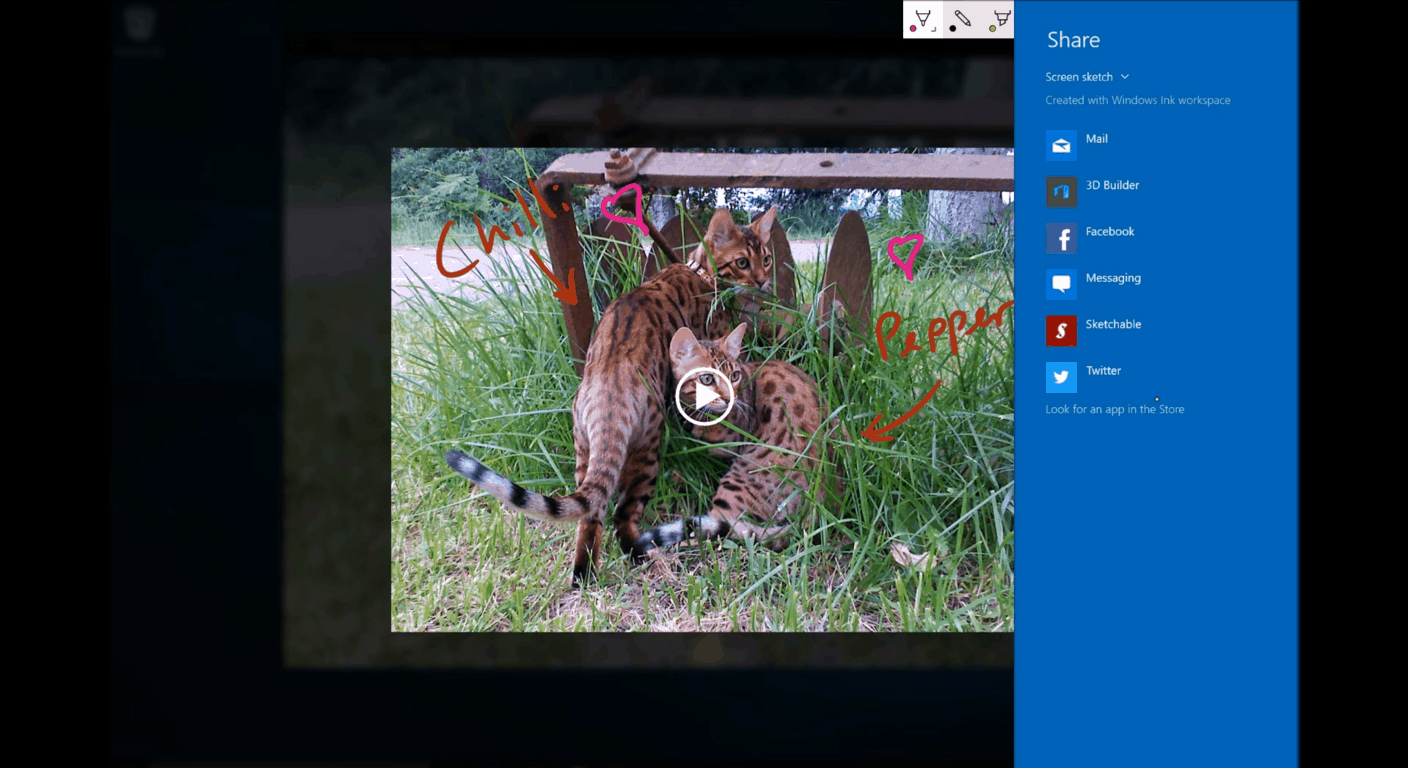
Share your screen and images instantly by double clicking with the pen’s button.

Screen Sketch will allow an overlay drawing over the current screen’s content despite what’s on it. Users can even draw and sketch over a video as it plays in the background. Want to share that funny sketch or a quick note to your friends on Facebook and Twitter? The Screen Sketch application allows the user to double click the pen button to send it quickly and easily without interrupting your current progress.

It’s with Sketchpad, however, that the Windows Ink Workspace interface truly shines. Introducing a simultaneous pen and touch, users will now have the option by default to utilize their non-dominant hand to maneuver the interface at the same time as using the pen. Users will be able to drag and drop a built-in digital ruler to make drawing straight lines, making charts, and cleaning up lines much easier. This will be the space to create, doodle, and get ideas down in an efficient manner with all the personality of hand-drawn capabilities.

Beyond the featured applications, Microsoft has added a curated list of suggested apps as well as a dedicated link to all pen apps on hand. To up the ante, a recently used and favorites list will make it easier to find the apps you just can’t live without.

Sketchpad isn’t the only application that will integrate with the new simultaneous pen and touch. Microsoft’s Office and OneNote will showcase Windows Ink with features such as shapes, rulers, new pen types, easier means of revising and editing, and math recognition. Maps will be allowing a user to draw a route or landmark for personal use or sharing.

Sketchpad
Using the simultaneous pen and touch gives users more freedom to create.

A Simpler Way to Integrate

Microsoft is trying to make it as easy as possible for developers to master the tools with two new building blocks for the Direct Ink platform in Windows 10. Third-party developers such as Adobe will be adopting the technology with a new responsive blob brush and stencil tools that can be manipulated with the non-dominant hand.

With InkCanvas, a single line of code will enable using inking in the developer’s app with a canvas or overlay that users can write on. For example:

1
<InkCanvas x:Name=“myInkCanvas”></InkCanvas>

Similarly, the InkToolbar is an XAML control that will allow for consistent inking across multiple apps. The simple design offers three brush types, common color picker, width picker, eraser tool, and the ruler tool. The developer can then edit the default keybindings, buttons, options, and color schemes to their liking. More information on the InkToolbar will be released later. More customization and flexibility will become available to developers via the InkPresenter with more information coming in the future as well.

Microsoft expects a larger catalog of applications developed and integrating over the course of the year.

1_inkbrushtypes
Example of a Windows Ink control

The Future of Pen Devices

This is just the beginning. Windows Ink will provide the opportunity for licensing the Microsoft Pen Protocol to hardware manufacturers worldwide, bringing bring together turnkey solutions for high quality, affordable, and interoperable devices. Wacom has already begun building pens that are compatible with a broad variety of currently available PCs, but are also expected to join a wave of newly integrated devices that are expected to reach market during the holiday season of 2016.

The Windows Ink Workspace will bridge the personal experience of handwriting to digital tools with ease this summer. Keep tuned to WinBeta as Microsoft continues its progress towards the release of the Windows 10 Anniversary update.

Microsoft takes a deeper dive into Delve Analytics

Microsoft is always trying to find ways to help offices run more smoothly, and better manage their time. It’s one thing to make available a suite of tools that let employees do their job better, but at the end of the day, those tools can only be so effective when the people using them don’t have the data necessary to determine how to best utilize them. To help people keep track of the relevant figures that will allow them to work more efficiently, Microsoft is releasing “Delve Analytics,” a new Microsoft Office add-in that keeps track of all sorts of things so that you can make better use of your valuable time.

Delve Analytics will be keeping track of all sorts of numbers that you never knew you needed access to. It can tell you how long you’re spending reading emails, it can tell you when the last time is that you contacted someone (so that you can keep in touch with everyone on your team) and it gives you a detailed report at the end of the week so you can tell, at a glance, what you can improve on.

For those who might be worried about how an add-in like this is going to affect their security, they shouldn’t be too worried. In an FAQ that you can read more of in the official blog post, Microsoft assures us that everything that’s collected by Delve Analytics is confidential, and is only accessible by the person it’s collecting data on. Delve Analytics is, pure and simple, an intelligent cloud to inform you on how you budget your time throughout the day.

If you’re interested in getting Delve Analytics for yourself or your team, you can check out the official page right here.

Outland and Gunstar Heroes joins ever-growing list of Xbox One Backward Compatible titles

Xbox One Backward Compatibility continues to grow its library for those who have been with Xbox since the last generation, and still have a bunch of games left over from Xbox 360 that they’d like to play on their shiny new Xbox One. Today’s new additions are some Xbox Arcade titles that you may have had a blast with back in the day: Outland and Gunstar Heroes.

Outland is a gorgeous platformer that deserves a spot on anyone’s library. The game has a gorgeous color palette of red and blue mixed in with its stylistic silhouette-focused art style. It has an absolutely gorgeous soundtrack, some interesting puzzles, and all things considered is the sort of game that makes an impression on you. Outland is most definitely welcome among the Backward Compatibility library.

Gunstar Heroes is a much different kind of arcade classic. The game initially released back in 1993, and it’s a popular and well-liked side-scrolling shooter. You can now play this through your Xbox One with backwards compatibility and experience some of the golden days yet again on your current-gen console.

Thanks to WinBeta reader Natan A. for the tip!

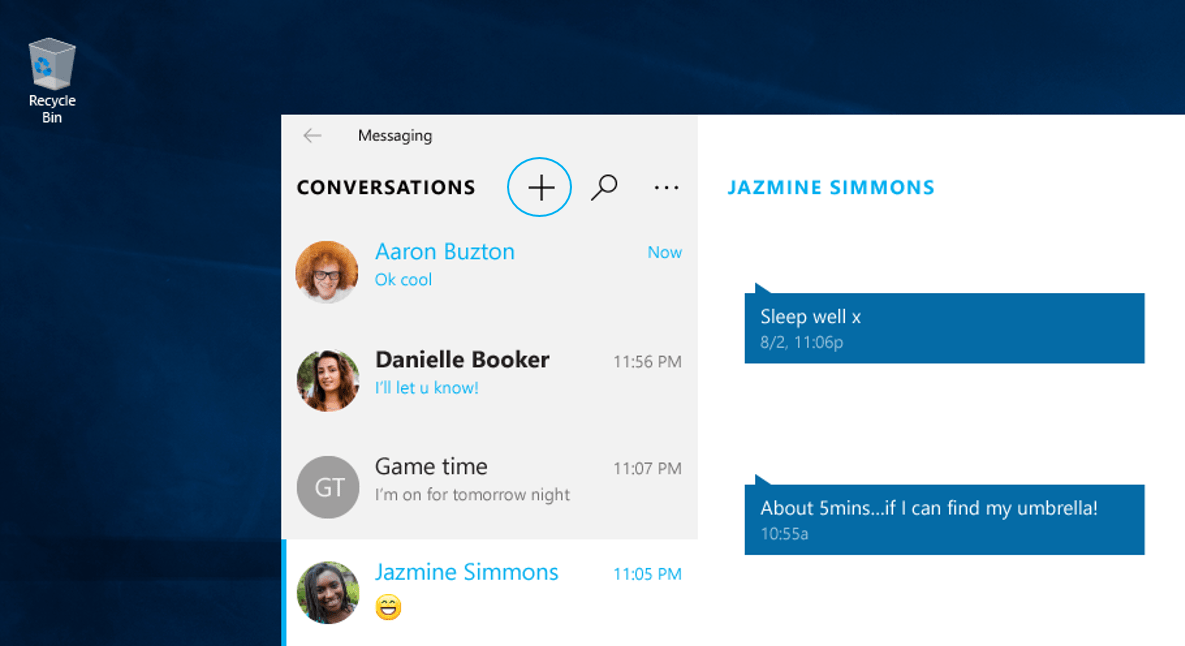
Microsoft’s Messaging feature gets a bit more refined in Windows 10 Insider build 14316

In 2014, Apple introduced its Continuity feature to its line of Mac and iOS devices in a rather impressive demo at its World Wide Developer Conference. Before that, Google made a seemingly similar play with cross-device communication in its Babel service that was later renamed to Google Hangouts in 2013.

In early 2015, Microsoft held an event for the unveiling of upcoming Windows 10 features and among them was a native messaging service that would span devices (mainly Windows Phones and Windows 10 enabled PCs) that would act similar to both Google Hangouts and Apple’s Continuity. With the release of Windows 10 Insider build 14316, it looks like Windows users are inching closer to a reality of Messaging Everywhere being enabled on devices.

The idea behind Microsoft’s messaging service was simple: begin a conversation via SMS (text) on your mobile device and pick up that same conversation on your PCs desktop without hiccup or interruption. Part of Microsoft’s pitch for the messaging service leveraged its popular in-house video messaging service Skype. With Skype’s cross-platform and cross-device architecture, Microsoft would be able to deliver a truly “Messaging Everywhere” experience for Windows 10 users.

Skype-Messenger-on-Windows-10-1024x574
SMS on Windows 10

Since the January 2015 announcement, the company has gone relatively dark on its development or a time frame on which Windows 10 and Windows Phone users could hang their hat on regarding the feature.

However, in today’s release of Windows 10 Redstone Insider build 14316, the Windows makes an explicit call out to the feature’s continued development as well as hinting at an early implementation of it coming soon.

Messaging Everywhere Preview Coming Soon: We will soon be enabling a preview of the “Messaging everywhere” feature in Windows 10 that allows you to send and receive text messages from your phone directly from your Windows 10 PCs. You will see options for this feature in the Messaging app on PC. However, an update is required for the Messaging app for Mobile for this experience to work. More to come on this when the experience is live.”

Presumably, when the latest Windows 10 Mobile build drops or the Message App on Mobile gets updated, Insiders will finally get their hands on the long-awaited Messaging Everywhere experience. Up until recently, the Windows team had been briefly experimenting with moving text messages across mobile devices to PCs with some relative success. Perhaps, the new Messaging Everywhere Preview builds upon that with better functionality and newer features. We’ll just have to wait and see.

To get your PC and mobile device ready for the new Messaging Everywhere Preview, head over to the Windows Insider website and sign up for free to become a Windows Insider. Set your rigs to Fast Ring (presumably) and allow the Windows team to do the rest.

Happy downloading, Insiders!

Microsoft’s “Women Made” ad named top breakthrough ad by Ace Metrix

Microsoft has always had one mission statement: empowering people to do great things. It’s no wonder, then, that they try and pour some of their resources to help empower women – a group that, whether you realize it or not, is often brushed to the side and ignored by the tech industry. It was with this goal in mind that Microsoft decided to put out a super bowl ad focused on pointing out the fact that the way we’re educated about history is often male-centered, and should be expanded to include other extremely significant inventions that were brought into the world by women.

The ad interviewed a few young girls about what they knew about inventors they learned about in school, and they named some of the people that you might name if asked the same questions – the most famous inventors in history, like Alexander Graham Bell and Benjamin Franklin. Afterwards, they asked a fairly simple question: “Can you name any women inventors?”

The question stumped all of them, and it may stump a fairly large portion of you as well. It’s sort of a depressing moment when you realize just how few of the great women inventors that changed the course of history are made a focus in our schools, most notably people like Ada Lovelace, who made the very first computer algorithm.

The ad then went on to show us a list of many different women inventors and the thing that they did to change the world, and leaves us with a message that we should celebrate all things that “women made,” and showing us that knowing about some of these great women gave some hope to the young interviewees about how they could make an impact in the world.

This ad won the top spot in Ace Metrix’s list of their “Top 10 Breakthrough ads,” scoring a likability rating of 771 and an attention score of 769. The ad won the spot on the list against some other popular super bowl commercials, including the “Zedd and Blacc: Singing in the Studio” ad for M&Ms, and the “No Dogs Allowed” ad for Doritos.

Issues with Edge on 14316? Use the new Microsoft Edge Platform Issue Tracker

The Windows team has released a list of Windows 10 Insider Preview Build 14316 features that include tweaks to over-all customization, new ways to categorize and maneuver your favorites, updates for the clever personal assistant Cortana, and small refinements to the general experience of Microsoft Edge. However, no Windows 10 release is without its issues to report and the Windows team has now found an even easier way to make that easier for the user.

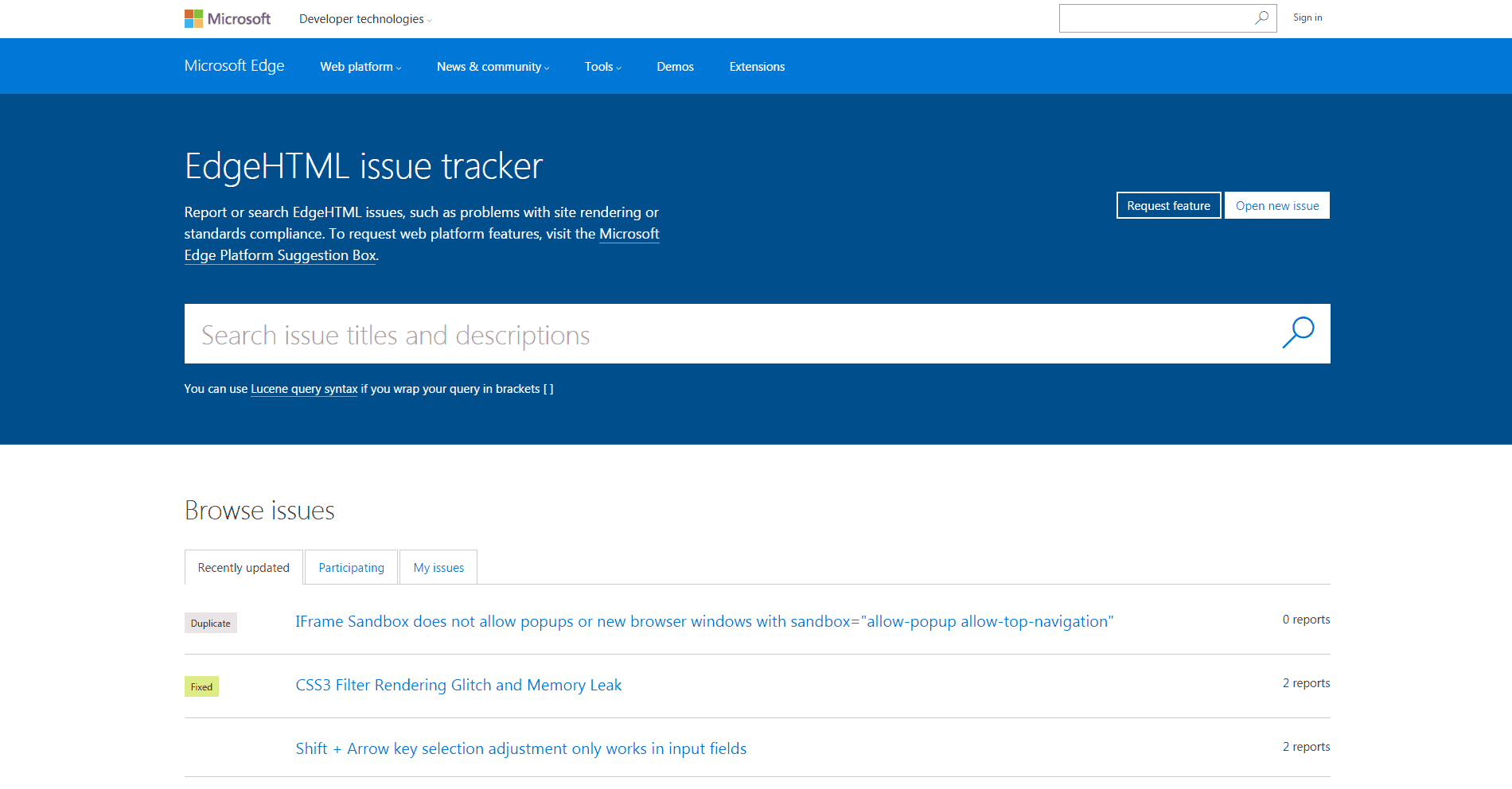
During the Edge Web Summit held in San Francisco on Monday, Microsoft Edge has announced a more efficient means of providing crucial feedback and reporting bugs. The Microsoft Edge Platform Issue Tracker is designed for the web platform, allowing users to report and search through EdgeHTML issues and problems. Users will also be notified concerning replies for issues that they have reported or topics that they have participated in allowing for better collaboration between the developers and engineering team.

In light of the new platform, Microsoft will also be discontinuing the connect.microsoft.com/ie service going forward, according to its latest blog. Specific bugs related to the Chakra JavaScript engine should be directed to the ChakraCore source located on GitHub.

The Microsoft Edge Team will be watching for feedback and reported issues closely and look forward to collaborating with developers more for the future of EdgeHTML.


Microsoft Cloud App Security is generally available

In late February, Microsoft announced a new security service called Microsoft Cloud App Security. This latest security offering by Microsoft focuses on helping companies manage all of the different cloud services their employees are connecting to.

The challenge is that in many organizations, employees use multiple cloud services to share data and collaborate in the current digital workplace. This can lead to an organization’s data being shared externally without their knowledge and with no control over what happens to it. All of these unofficial Software as a Service (SaaS) clouds to which employees are connecting are beyond the company’s reach or even knowledge, and they’ve become what the Microsoft Cyber Trust staff refers to as the company’s Shadow IT.

This Shadow IT problem is where Microsoft’s new Cloud App Security comes in. Based on technology from Microsoft’s acquisition of Adallom, the new Cloud App Security services is a “comprehensive cloud-delivered service built for IT and security teams to help combat one of the top security concerns today: “How can we gain deeper visibility, stronger controls and enhanced protection for cloud apps?”

Microsft is announcing today the general availability of their new Cloud App Security service. In today’s announcement, Microsoft describes Cloud App Security as providing the following three key security features:

  • App Discovery: Cloud App Security identifies all cloud applications in your network—from all devices—and provides risk scoring and ongoing risk assessment and analytics.
  • Data Control: With special focus on sanctioned apps, you can set granular controls and policies for data sharing and loss prevention (DLP) leveraging API-based integration. You can use either out-of-the-box policies or build and customize your own.
  • Threat Protection: Cloud App Security provides threat protection for your cloud applications leveraging user behavioral analytics and anomaly detection.

Cloud App Security accomplishes this by first connecting to your network logs and then by connecting to your sanctioned apps. The list of sanctioned apps includes Office 365, Box, Okta, Google Apps, Service Now, Salesforce, Dropbox, and even Amazon Web Services. Once connected to the logs and sanctioned apps, Cloud App Security will scan and analyze for users, data, and activities. The analysis then gives IT pros a full picture of what cloud services their company’s data is connected to, and they can begin handing out out-of-the-box alerts or establish custom data control policies.

This new security service helps companies manage the every growing list of enterprise cloud services their employees are connecting to, which is a real problem that exposes the company to more security threats and data leaks. It also further demonstrates Microsoft’s commitment to being a mobile first cloud first company as it works to help companies manage multiple cloud services and give companies a holistic picture of their IT security.

Microsoft patents a smart ring that could replace the conventional computer mouse

Microsoft has filed a patent application in November and December 2015 for a smart ring, but it took U.S. Patent & Trademark Office over four months to publish it. This is good news for Microsoft because the company would like for the idea to take hold and serve as a virtual mouse for devices such as watches, wristbands, and glasses, all which have limited input options.

With this Smart Ring, users will be able to move their finger to control a companion device by wirelessly transmitting information. How will it work? The smart ring will have at least one flexion sensor (“bend sensor”) and when the distance between one flexion sensor and another segment of the user’s finger is detected, a gesture will be interpreted and applied to control the companion device. For example, if you scratch your jeans in a specific way, you will be able to decline a phone call or you will control the screen of your smartwatch without touching it.

Smart Ring mobile device controller, Microsoft’s invention to be used as a Virtual Mouse 2

If Microsoft can make it possible for a user to wear multiple rings on his/her hand to control a virtual mouse that performs right or left clicks or even more, then it might have a hit. This killer feature will surely be appreciated by HoloLens owners who will be able to easily control this augmented reality headset.
Back in 2015, Apple has filed a similar patent, but the smart ring would be used as an add-on device only for Apple Watch, MacBook, and Apple TV. What’s special about this ring is that its size will be automatically adjusted, depending on wearer’s finger and presumably have more versatility than something Apple would make.

Motion book reader Madefire updated for Windows 10

If you’re a comic book fan, there’s a good possibility that you may have heard about Madefire Motion Books app which provides users with an “innovative reading experience for mobile devices.” The app was just updated, making it optimized for Windows 10 devices and now offers Cortana integration and Continuum.

Here’s the official description:

Madefire Motion Books is a free app that delivers the most innovative reading experience for mobile devices as it pioneers the next chapter in storytelling. In its purest form – the Madefire app is a free comic book reader that takes digital comics and cartoons a step further than traditional static images with the new format called Motion Books. Motion Books immerse the reader in an interactive experience with sound, motion, and depth.

Do you like to read comic books on your Windows device? Which app do you use? Share your recommendations with us in the comments below.

Madefire
Madefire
Developer:
Madefire
Price:
Free

Hitman Episode 2: Sapienza to be released on 26th April for Windows PC

IO Interactive just unveiled the release date for the second episode of this year’s installment of the Hitman series. Titled Sapienza, the episode will be set in a fictional Italian town of the same name. Hitman Episode 2: Sapienza is going to be released on 26th April, a month and a half after its first.

Along with the release date, the Hitman official Twitter account released a short teaser video. Truth be told, the video doesn’t reveal much: it just shows a floating crocodile toy on the beach. With that, we assume that Sapienza is a coastal town but we’ll have to wait for the release to find out about the cryptic purpose of the crocodile toy.

Check out the video below:

The fact that the game is going to be released in April means that Square Enix and IO Interactive are keeping their promise of releasing one episode every month, a plan that received a divided response from gamers. An episodic format is uncommon for AAA games, but publishers of Hitman decided to take the gamble.

⇒ Get Fallout New Vegas – Ultimate Edition from GOG.com

The third episode should arrive in May if IO Interactive continues with one episode per month philosophy, but the exact release date is still uncertain. The third episode will see Agent 47 in Morocco, with the U.S., Japan, and Thailand in coming episodes. As soon as more details are revealed, we’ll make sure to let you know

What do you think about an episodic release for a AAA game like this? Let us know in the comments below!

This Windows 10/11 tablet has a built-in gaming controller

During Build 2016, Microsoft revealed important software development projects to spur improvements of its services and apps. The hardware segment was somehow left aside during the event, though. Still, that doesn’t mean OEMs can’t develop new and innovative gadgets like the Exertis Linx Vision.

The Exertis Linx Vision is an interesting Windows 10-powered tablet that features a dedicated built-in gaming controller. Basically, if you love your Xbox One, you’ll probably be a fan of the Exertis Linx Vision, even if the tablet and its gaming controller combo lack that something which usually makes such unique devices really great. Still, the idea is still awesome, even if its controls are laid out in a strange way, which can make the gaming experience a little bit odd.

The materials used for manufacturing this tablet isn’t exactly premium, and the glossy display is maybe its biggest downside –it’s really hard to imagine that you can really enjoy a game outside on a sunny day, for instance.

(READ ALSO: New Razer Blade gaming laptop officially released this month)

Specs wise, the Exertis Linx Vision comes packed with an 8-inch 720p display, 2GB of RAM, 32 GB of built-in storage capacity, a 2MP rear facing shooter and an Intel Atom processor. The tablet is running on Windows 10 by default and has an external Xbox controller built onto it. At Build 2016, the Exertis Linx Vision was shown streaming a game from Xbox One on the same wireless network, but gamers can also download and play their favorite games from Windows Store. Currently, the tablet is available in the U.K with a price tag of £149.99. Unfortunately, there isn’t any information regarding a future U.S release, but we might have something in that matter pretty soon.

What do you think? Is this gaming-friendly Windows 10-powered tablet something that you would want for yourself?

IoT was a big deal at Build 2016, and Microsoft can’t stop talking about it

Even though Microsoft seemed to be doling out Windows 10 specific features piecemeal during its primary Build 2016 keynotes and was frighteningly mum on Windows 10 Mobile news, the company did speak at length about its investments in Internet of Things (IoT).  Microsoft seems so enamored with its IoT investments, in fact, that the company has continued the conversation beyond its developer conference and is now talking about new milestones developers can look forward.

According to the Windows blog:

We’ve been working hard on standards-based connectivity as you might have seen from our recent OCF announcement. Devices with Windows 10 can serve as the central connection point for all of your things, no matter what the ecosystem and if you’ve been building AllJoyn-based applications, not only will they continue to work, but in the future, they’ll talk to even more devices.”

Developers can also target a multitude of devices from a single environment with the introduction of Windows 10 IoT Core Pro edition software.

This will enable OEM/ODMs to move between Windows 10 IoT Core and Windows 10 IoT Enterprise without the need to maintain a separate firmware image for their devices. Additionally, we’re making the Board Support Package for the Raspberry Pi open source (except for the UEFI parts) to help OEM/ODMs provide a customized board experience.”

Aside from what Microsoft has currently enabled for developers, the company has already laid out plans to include support for application updates via the Windows Store for applications on Windows 10 IoT Core Pro as well as building in more security features into a simplified Visual Studio extension. The Visual Studio extension is intended to offer a much simpler experience in connecting devices with Azure IoT hub services.

Microsoft’s IoT initiative stands alongside its push of Windows 10, Azure, Office and Xbox highlighting the company’s vision of scalable platforms. Windows 10 development and Windows 10 IoT, in particular, are showcasing Microsoft’s desire to offer a more cohesive development experience for developers while building out and adapting new technologies as they become available.

Microsoft creates Open Translator to Things projects to bring interoperability to IoT

The Internet of Things has been a goal for Microsoft for a long, long time now – and it doesn’t take much to figure out why. Many people dream of a world where every device can interact with everything, and where you can use your computer or your mobile device as the ultimate control panel for your home, car, etc. One problem has always gotten in the way of that, however: the fact that the individual software that runs our appliances tend to be written in countless different programming languages.

It’s this issue that Microsoft wants to attack with their latest initiative: OpenT2T (Open Translators to Things.) The new program serves to have programmers come together to help create translators that change the way that different coding languages deal with objects, and should be making it so that programming apps that control multiple devices should be possible. The plan revolves around what Microsoft calls “Schemas”. Schemas are essentially categories of devices and bring together subcategories into one cohesive thing. For example, “Light bulb schema, instead of a schema for every different brand of light bulb.” Microsoft hopes to have developers identify these schemas, bring together all of the different languages that refer to them and eventually breaking them down into one thing.

The end game for this process is simple: to make it so that one app, using a set of translated code, will be able to interact with a much wider amount of things in your home. Ideally, this broad reach won’t require developers to spend resources writing code that accounts for every possible kind of device. If this initiative from Microsoft could get developers to come together and make their devices work together more efficiently, we could be looking at a new future for the Internet of Things, and new possibilities that could turn our mobile devices and desktops into the intelligent hubs of our homes.

If you want to learn more about OpenT2T, or if you want to join the discussion around it, check out Microsoft’s detailed blog post about the nitty gritty of it.

No, Microsoft isn’t working on an Xbox NeXt

Like most major technology company, Microsoft is often the subject of rumor. Whether it’s the future of Windows phones, when a major new operating system will release, or who the company might acquire, there’s bound to be a rumor (or fifty). Lately, one rumor that gained some traction is that Microsoft was planning a new Xbox console dubbed Xbox NeXt.

According to Techspot, the rumor began with a random LinkedIn posting by a Microsoft employee:

Rumors that we might see some form of Xbox 1.5 went into overdrive recently when a Microsoft employee, David Gardner, posted a listing for the “Xbox neXt” on his LinkedIn profile. After much speculation that this could be the company’s answer to the PlayStation 4.5/PS4K, Microsoft has now confirmed that this is nothing more than an old internal team name.

From there, things progressed, even though Microsoft Xbox chief Phil Spencer had already indicated that there aren’t any plans for a new Xbox One console.

I’m not a big fan of Xbox One and a half. If we’re going to move forward, I want to move forward in big numbers,” Spencer said. “I don’t know anything about any of the rumors that are out there, but I can understand other teams’ motivations to do that. For us, our box is doing well. It performs, it’s reliable, the servers are doing well. If we’re going to go forward with anything, like I said, I want it to be a really substantial change for people – an upgrade.

While Microsoft could certainly reveal an upgrade to the Xbox One at some point, the current Xbox NeXt rumor doesn’t fit the narrative. According to Microsoft:

“Xbox neXt was an old internal team name for a group that worked on releasing Xbox One and is not related to a future console,” a Microsoft spokesperson said. “We have nothing further to share.”

We’ll likely be waiting for awhile to learn about Microsoft’s plans with regard to the Xbox hardware platform. In the meantime, we’ll just have to settle for all of the attention that Microsoft is lavishing on the Xbox One from a software perspective.

Microsoft to open Innovation Center in Philadelphia

Over the years, Microsoft has opened more than 100 Innovation Centers around the world to engage with startups, raise technological skill levels, and boost innovation. In the US, the company opened its first in 2014 in Miami, which was followed by a second one in Atlanta a year later. But Microsoft has just announced that the company is teaming with venture capital fund SeventySix Capital, innovation hub University City Science Center, and real estate investment and development company Wexford Science & Technology to open a new MIC in Philadelphia this summer.

Microsoft Innovation Centers Worldwide
Microsoft Innovation Centers worldwide.

The new Innovation Center will also help Microsoft to enhance its regional presence, as 350 Microsoft employees are already working the company’s office in Malvern as well as in the Microsoft Store at King of Prussia Mall. Here are some additional details found in the press release:

Located on the ground floor of the Science Center’s corporate headquarters at 3711 Market Street, the MIC will be equipped with the latest Microsoft technology. Through a combination of programming and outreach activities, Microsoft – working closely with the Science Center and SeventySix Capital – will seek to spur economic development and create new opportunities for the local tech startup community. Further, the MIC will host activities that will bring underrepresented groups to greater awareness of and involvement with STEM activities and careers.

The MIC will first open its doors for the Democratic National Convention in July and will propose a number of programs and events that explore the intersection of technology and civic engagement. After the DNC, the MIC will be delivering a suite of technology and innovation focused programming that will offer the startup, entrepreneurial, academic and neighborhood communities access to Microsoft resources and expertise.

Microsoft Director of Modern Government in State and Local Government Solutions Group Jeff Friedman shared:

“We are thrilled to work with SeventySix Capital, the University City Science Center, and Wexford Science & Technology to bring technology and resources to the great city of Philadelphia. MICs are part of Microsoft’s broader strategy to empower developers and entrepreneurs, extending into local metro markets to help startups grow their business with technology and services such as cloud computing, developer tools, software and open source technologies.”

If you want to know more about what Microsoft Innovation Centers are doing around the world, feel free visit the dedicated website.