Microsoft's 'one billion devices' goal has 73% of businesses planning to deploy Windows 10

Image Credit: Channel 9

One billion. Without context, the number still manages to stand alone as impressively massive. However, in regards to Microsoft, the number stands as a reminder of a lofty promise towards a seemingly daunting accomplishment. This year, at Microsoft’s annual Build conference, the company took to stage and attempted to rally Windows developers behind its latest Windows offering. Presenter after presenter celebrated the various new features and additions the new OS would include to make developers lives more convenient. Windows 10 was advocated to developers for its enhancements in security, stability, platform flexibility and compatibility, reduced digital footprint, and its return of user-friendly UI elements, to name a few features. While many of the features discussed at //Build/ this year are welcomed refinements, it may have been Microsoft’s goal of” Windows 10 running on one billion devices in the next few years,” that grabbed most people’s attention.

As comically fiendish as the number may sound, it’s a very real and very needed goal for Microsoft to attain. Microsoft’s brute forced numbering strategy isn’t solely design as a developer grab, but it’s also a pledge to IT Pros and enterprise. A confluence of legacy support, a successful Windows 7 release and the critically panned introduction of Windows 8 and 8.1 updates, chilled the waters for enterprise upgrades recently. IT Pros were either too busy migrating their workforce to Windows 7 or finding workarounds to continue support for legacy Windows, to deal with the admittedly enterprise-unfriendly nature of Windows 8 and 8.1. As enterprise licensing accounts for the bulk of Windows revenue and profits, the tepid enterprise response, wasn’t something Microsoft could stomach for very long.

Image Credit: SpiceWorks

With all the enterprise concession set to launch with Windows 10 at the end of July this year, Microsoft and its relationship with the enterprise is still in question. The folks over at SpiceWorks took a survey to gain insight into where Microsoft and Windows 10 stand in the eyes of enterprise and IT Pros. In an IT report title Windows 10: Will it Soar? SpiceWorks included a survey of 500 IT Pros who were questioned about how they felt about Microsoft’s latest offering.

“Across the board, almost every IT pro we talked to is interested in learning more about Windows 10. An overwhelming 94% of survey respondents are at least somewhat interested in adopting the OS, with 49% saying they’re very or extremely interested. And the enthusiasm for the OS doesn’t stop there… 60% said that they had already evaluated the Windows 10 Technical Preview.”

Image Credit: SpiceWorks

SpcieWorks deduced that the increased level of interest this time around for Windows 10 could boil down to its proliferation through free upgrades. If Microsoft can successfully implement its free upgrade policy for consumers, IT Pros may see that as one less user in need of training. As BYOD continues to grow as a practice in the enterprise, the more users are familiar with Windows 10, the easier it may be for IT Pros to deploy the OS. Other noted influences for Windows 10 enthusiasm from IT Pros include, the promise of a single OS running universal apps across various form factors as well Microsoft’s intent to make this the ‘last’ full version of an upgrade IT will have to deal with.

Although the numbers are encouraging for the bean counters over at Microsoft, the road to victory isn’t a clear one. SpiceWorks also notes that many IT Pros still labor over some concerns regarding unanswered questions about the upgrade.

“Despite lots of early interests, mass adoption of Windows 10 could encounter delays. Preliminary testing of the final Windows 10 code needs to happen, and concerns about the OS need to be addressed before IT departments can declare the OS ready for takeoff. For example, IT Pros worry about OS compatibility issues with existing hardware and software, initial bugs that still need to be worked out, user interface changes that will require end user training, and a lack of support from 3rd party vendors. Additionally, unanswered questions around Windows 10 were licensing, and the free upgrade offer have many IT pros in a holding pattern until they get more information”

Despite the concerns, the survey reveals that 73% of businesses still plan to run Windows 10 on at least some devices within the next two years. In comparison, the famed Windows 7 only managed to reach 60% of usage after the initial two years.

Image Credit: SpiceWorks

The SpiceWorks report is a very detailed look at the ‘what’s’ and ‘how’s’ Microsoft’s Windows 10 will need to address when presenting Windows 10 to enterprise over the next few years. The report delves further into:

  • Which devices Windows 10 will land on
  • Qualities that IT pros look for when choosing an operating system
  • Why IT departments migrate to new OSes
  • Which Windows 10 features are most enticing to IT Pros
  • What IT thinks about the new Edge / Spartan browser

If you have the time and are interested in the report, take a look. Let us know in the comments section below what else you think Microsoft needs to do to achieve universal success with Windows 10.
 

Help Crash make it home in Dodo Pop available on Windows

Help Crash make it home in Dodo Pop available on Windows

On island where dodos can’t fly, Crash the dodo needs to get back to his home. Luckily, in Dodo Pop, it’s raining gumballs, so Crash can blow bubbles to float his way from island to island. 

I tried the game myself, and it’s pretty fun. It’s by the same people who made Where’s My Water. Basically, you are given a set number of pops per level. You’re supposed to pop all of the colors needed for each level. As you can see, I can pop 37 more times and I’m already popping 7 blue with one of my available pops. My goal is to pop all 30 blue gumballs without running out of pops.

And it’s not as simple as just popping a blue gumball here and there. You can’t pop only one gumball, so you’ll need to pop other colors to get more groups of blue so you can pop them. 

Of course, each level has it’s own goals, numbers if pops, etc. Some will ask for just blue, red or green, some will ask all, and some will ask for special gumballs. 

Enough about me playing, why not download the game yourself for free on Windows 8.1 and Windows Phone? 

Office 365 Education welcomes two new educational tools in its Preview program

Image Credit: YouthSpark

As Microsoft continues to march to its ‘empowering’ drum beat, the company has been steadily overhauling its approach to how its products get distributed and implemented. In the past, Microsoft would offer blanket enterprise tools for educational purposes, and it would be up to educators to manipulate the tools to fit best their needs. For years, a contentious relationship between teachers and Microsoft grew as the company seemingly ignored the shifting nuances in education. However, it is beginning to look like a more thoughtful Microsoft, is ready to deliver resources for teachers that streamline their workflow and allow them to focus more on teaching and less on technical acrobatics.

Shanen Boettcher, the general manager for Class Dashboard and School Information Sync, is announcing the first phase of a Preview program for two new educational driven services. As of today, Microsoft is welcoming Microsoft Class Dashboard and Microsoft School Information Sync into the fold of Office 365 Education. Office 365 Education users will now have preview access to two new tools intended to help simplify connections between existing systems as well as simplify communication and collaboration amongst students and fellow teachers. As an added kicker, the new tools will come free of charge to current Office 365 Education accounts.

Image Credit: Office blog

We wrote briefly about Microsoft Class Dashboard a few days ago. As a brief refresher, “Class Dashboard is an easy-to-use website that brings together familiar Office apps including Word, Excel, PowerPoint, OneNote and Outlook in the context of the classroom. Teachers can get the most out of the tools they know and content they have, keep materials and classes organized and accessible, and engage students in new collaborative learning experiences to achieve better outcomes,” according to Shanen. Microsoft’s School Information Sync attempts to simplify the complexity of connecting school Student Information System (SIS) data with educational apps and class websites through automation. Part of its usefulness comes from its vast array of sync options. “It syncs user profiles and class rosters from a school or district SIS, provisions groups and class websites, enables single sign-on (SSO), and allows learning apps to access student data over an encrypted connection. Because security and privacy are so important, schools and districts determine which apps can access student data so that they can remain in compliance with their policies,” Shanen says.

Image Credit: Office Blog

School Information Sync also offers a single API for education vendors and district approved 3rd party solutions to access data and integrate apps while providing a more personalized learning experience. Students also benefit from SIS, by using a single sign-on with Office 365 no matter the device. With the use of cloud APIs, Shanen believes that School Information Sync will be able to deliver SIS independent applications much faster to ISVs.

Image Credit: Office Blog

Microsoft’s overhaul of educational tools is already being met with enthusiasm. “Two-thirds of U.S. school districts use our assessment and instruction programs, and we are excited about the single sign-on and data sync benefits Office 365 offers students and teachers,” said Jack Lynch, CEO of Renaissance Learning. “We are always looking for ways to make educators’ work easier, and streamlining the use of programs like ours with information systems and productivity tools is a win-win for schools and the organizations that serve them.”

Microsoft's new future vision video gives us a peek at OneNote 5-10 years from now

Microsoft's new future vision video gives us a peek at OneNote 5-10 years from now

Every now and then, Microsoft puts out a video of its vision of the future, showcasing the kind of technology the company expects to be mainstream in the next 5-10 years. These videos typically include a look at possible smart-devices that will make our lives a lot more convenient. Today, we get a look at a new video of the future, this time focusing on OneNote.

In a video titled “The future of OneNote starts today”, OneNote is envisioned to be ever-present. Whether you’re a cook preparing a new course on the menu, a student capturing notes on a field trip, or a doctor checking out patient records, OneNote will always be there, ready of you to get productive in very intuitive ways. All so you can spend less time sitting down recalling what you need to take notes of, and more time with the people who are important to you.

The video certainly paints a pretty picture of the next era in digital computing; we see interactive mirrors and surfaces, and new devices too. Is that a Surface 25 shown at minute 0:25? I’d like to think so. Although I’m not too sure here, but that doctor seems to be reading her notes while driving which doesn’t seem very safe. I’m going to give Microsoft the benefit of the doubt and assume that the BMW i3 she’s in is an autonomous vehicle.

“In keeping all your information from everywhere you need to be, lets you spend more time in the places you want to be” – Microsoft

Check out the video above and let us know what your thoughts are on Microsoft’s vision of the future for OneNote in the comments section below. Also, if you’re interested, be sure to check out Microsoft’s productivity vision of the future video from earlier this year as well as one of my personal favorites, the Kinect Effect video from late 2011. 

Microsoft invites Build attendees to revisit HoloLens through the Holographic Academy

Image Credit: Microsoft YouTube

Microsoft’s HoloLens has come quite far in a relatively concentrated amount of time. While the development of HoloLens may have been years in the making, it’s public exposure only amounts to a handful of months. Thanks in part to a handful of well-timed conferences, HoloLens announcements and development have been on a relentless barrage of headline-grabbing attention.

Luckily, for Microsoft, the conversation around HoloLens has quickly shifted from ‘if’ to ‘when’. Prior to HoloLens, many of Microsoft’s far-reaching visionary announcements crashed up against a journalistic wall of cynicism. Much of the dismissive press Microsoft received in the past was handed to the company seemingly because of self-induced lack of execution or follow through. Every so often, Microsoft would announce, showcase, or mention projects that would either never come to fruition or limped out the door with half of its proposed features missing.

Not this time around.

Image Credit: Microsoft YouTube

Microsoft is doing everything within the company’s power to manage expectations while still delivering that far-reaching visionary device. Prior to today, the HoloLens experience for most enthusiast has been recited stories from a handful of lucky journalist and developers who have had some alone time with the headset. No other forms of media have made their way out about the experience. Today, however, Microsoft is releasing video footage of what it calls, the Holographic Academy and Project Origami. The video is a two-minute montage of the experiences developers and journalist had at Microsoft’s Build 2015 conference.

Now that HoloLens has made a commercial name for itself, Microsoft is hoping to capitalize on its recent popularity. This video, is yet another love letter to developers who didn’t attend the HoloLens the event. The video briefly touches on a few HoloLens talking points, that include, voice input, spatial mapping, gestures and spatial sound.

Maintaining, this level of positive excitement and enthusiasm for HoloLens has been nothing short of a herculean achievement for the company. Now, let’s just hope the final product doesn’t find itself as an addition to the annals of Microsoft’s failed visions.

How to Set a Custom Color for Taskbar and Start Menu in Windows 10

User interface of Windows 10 is very customizable and you can design it by your desire, but with one tiny registry tweak, you’ll be able to customize it even more. If you want to set a custom color to your taskbar and Start Menu, you need to perform just one little trick.
windows 10 custom color wind8apps
Windows 10 allows you to choose between a lot of colors for your taskbar and Start Menu through Personalization section of Settings app, but it doesn’t allow you to set a custom color. Fortunately, there’s another way to set a custom color of taskbar and Start Menu with just one simply registry tweak.

First we need to determine where our custom color will be placed. To do that, follow these instructions:

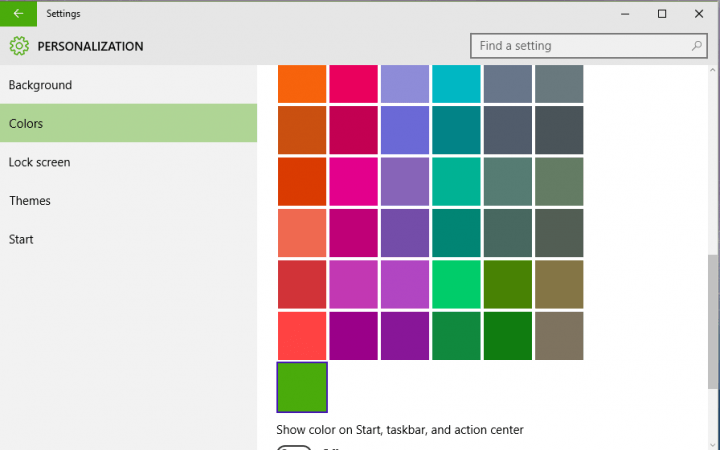
  1. Right click on Desktop, and go to Personalize
  2. Go to Personalization, Colors
  3. If enabled, turn off Automatically pick an accent color from my background, to be able to choose the color for the Start Menu and other UI features
  4. Find the color which has tiny, blue boarder around it, this color will be customized

Now, we need to perform a tiny registry tweak in order to get desired custom color for our UI elements. Here’s what you need to do:

  1. Go to Search, type regedit and open Registry Editor
  2. Navigate to the following path:
    • HKEY_CURRENT_USER\SOFTWARE\Microsoft\Windows\CurrentVersion\Themes\Personalize
  3. Here you will find a 32-bit DWORD value called SpecialColor. This value is a color in RGB format, change it to appropriate color code in order to change the color (For example, change the value to 00bab4ab, if you want your custom color to be grey)
  4. After you change the value of SpecialColor, log out and than log in again to see the changes

Now, when you open Personalization settings, and you’ll be able to set the custom color for the Start Menu and taskbar instead of the previously selected color.

Read Also: How To Make Windows 10 Icons Look Like Windows 8 Icons

Two new Microsoft Stores opening later this year in the US and Canada

Two new Microsoft Stores opening later this year in the US and Canada

Microsoft continues its assault on retail as it opens new Microsoft Stores across the United States and rebrands them around the world. In the United States, the software giant will be opening a new Store and the Stronbriar Center in Texas tomorrow, but even before that happens, we have news on more stores also opening soon.

Two new Microsoft Stores will be opening later this year, the first will be at the Pacific Center in Vancouver, B.C. This store will mark the ninth Microsoft Store to open in Canada. The grand opening takes place on August 6.

The second new store will open at the Easton Town Center in Columbus, OH. This would be the third Microsoft Store to open in Ohio making it a little easier for customers to reach a store. The grand opening for this store will take place on August 20.

Two new Microsoft Stores opening later this year in the US and Canada

While it hasn’t been specifically stated at this time, we are sure that Microsoft will have a ton of deals and offers for those visiting on opening day as the company has done in the past. So this may be your change to take home awesome new products at a significant discount.

Let us know in the comments section below if you plan on visiting any of these new stores.

International pricing information for Windows 10 revealed by Microsoft

Windows 10

Much has been made of the free upgrade that current users of Windows 7 and 8 will receive upon the arrival of Windows 10, but most others have been kept in the dark; that is until now of course. Following an update to the “Get Windows 10” app, pricing information has now been made available to international consumers, following an earlier announcement detailing pricing in the USA.

According to the app update, and as revealed on Neowin, Windows 10 will cost £99 in the UK and approximately 135 Euros in the eurozone, with more international pricing information yet to arrive. This regards Windows 10 Home Edition, what the pricing of other versions will be has also not yet been revealed.

These prices have not yet been finalized, and as such may yet change. With this kind of price point however, and with competitors making their software available for free, an even more drastic change might be approaching.

Do you think Microsoft ought to change its pricing model? Let us know in the comments below.

How to Move Universal Apps to Another Disk Partition on Windows 10

Universal apps for Windows 10 could take a lot of disk space if you have many of them installed on your computer. So, we’re going to show you how to move them to another disk partition in order to free up some disk space.
How To Move Universal Apps To Another Disk Partition In Windows 10 wind8apps
One of many good things about Windows 10 is that, unlike Windows 8 and Windows 8.1, it gives you an option to select the drive you want to install Universal apps on. Don’t worry this is not some registry or system tweak, so you don’t have to mess up with system files. All you need to do is simply use one feature of Windows 10’s Settings app. Here’s exactly what you have to do to move your apps from one partition to another:

  1. Go to Start Menu and open Settings
  2. Go to System, and then to Storage
  3. In Save Locations, under New will save to, you’ll get the list of your disk partitions, so you’ll be able to change the default location

From now on, when you install an Universal app, it will be stored on the given location. Unfortunately, this option doesn’t move already installed apps to the new location, and only known way to move them to other partition is to uninstall them and then install them again, after applying above-mentioned settings.

If you want to save even more space on your hard disk, you can move your Universal apps to an external drive. When you connect the external drive, it will show under Save Locations, and you’ll be able to set it as a default location for installing new apps. However, when you remove the external drive, all apps stored on it will stop working, but they’ll work again when you connect the external drive back.

Now you know how to manage the location of your Universal apps, but if you have problems with connecting them to internet, you can try some of these workarounds.

Read Also: Microsoft Updates Mail and Calendar Apps for Windows 10 Desktop and Mobile With New Features

Law enforcment turning to Microsoft's cloud to keep their files secure: only service to comply with FBI's CJIS policy

Law enforcment turning to Microsoft's cloud to keep their files secure: only service to comply with FBI's CJIS policy

In the post Edward Snowden era there has been a great deal of attention on the general public’s digital privacy and questions about how much reach should the government and law enforcement agencies have. But who does the government turn to for keeping their own files safe and secure in the cloud?

Microsoft is hoping that governments will rely on them for their cloud based needs as the technology company posted an article today detailing how Microsoft Azure Government is the “only hyper-scale cloud platform that is contractually committed to meeting the FBI’s [Criminal Justice Information Services security policy] requirements.”

Law enforcement agencies across the US might soon be looking to use Microsoft’s Azure Government platform as the International Associate of Chiefs of Police, the largest organization of police leaders in the US, updated their guidelines to recommend that all cloud based storage of criminal justice information should comply with these very FBI’s CJIS requirements.

And Michael Donlan, Microsoft’s Vice President of State and Local Government, believes the Redmond based technology company is best suited for the job not only because they are the only provider contractually committed to compliance with the CJIS, but also:

“…for Microsoft, CJIS compliance isn’t just a check box. While other technology companies claim to support CJIS requirements, many are vague on the subject and details around it or how they work with law enforcement agencies to meet the mandatory security and privacy needs.”

On today’s post, Donlan also provides testimonials from the Los Angeles Police Department, the San Bernardino County Sheriff’s Department, and the Oakland Police Department, who are already using Microsoft Azure to store and manage their criminal justice information. While the testimonials agree with the importance of CJIS compliance for their organizations, Oakland Police Officer Dave Burke also adds:

“Once we get our video onto the Azure platform we can aggregate it, we can learn from it, we can make the database proactive to tell us things. We can run a keyword search against all the audio and pull up videos where certain things were said. From an emergency management or even a court and judicial process perspective, this really opens the door.”

As the sole cloud provider that is contractually committed to CJIS compliance, hopefully Microsoft’s Azure will prove to be a safe and effective way for law enforcement agencies to both protect their data as well as the privacy of citizens. If you are a law enforcement officer at an agency that is considering cloud services, Microsoft has provided a list of five questions that they recommend agencies ask potential service providers on today’s post.

Microsoft's personal digital assistant Cortana will support French by the end of 2015

Microsoft's personal digital assistant Cortana will support French by the end of 2015

Microsoft’s digital personal assistant Cortana is already available in several regions across the globe. French users waiting for Cortana have something to be happy about today as the digital assistant is expected to debut by the end of the year. The news came directly from Microsoft France (via Neowin) who revealed that Cortana will be available in beta for in French later this year. It’s good to see that Microsoft is actively working on making Cortana available in as many languages as possible.

As my French is not to good, a rough translation on Bing says,

“The version will be released before the end of the year 2015! And Cortana in beta version will be available in same GST :)”

Windows 10 Mobile is expected to debut later this year in September. Microsoft already announced July 29th to be the launch date for the desktop version, followed by Windows 10 Mobile. Several carriers across the globe have already listed an expected update schedule, but to be honest, it may take some time for the new operating system to reach all existing Lumia devices. 

Microsoft Azure is helping create a noise tracking app in China

Image Credit: Microsoft Research
For those of us who dwell in urban populated areas, the occurrence of noise congestion can sometimes become a mere backdrop in our living conditions, like a soundtrack to a movie. The longer we live in an area, the more adept we become at dealing with the noise. However, studies are showing that noise pollution ranks among the most pervasive forms of harm against a persons well being. An overexposure to the drudgery of noise pollution can manifest itself in the harmful deterioration of mental and physical well-being of residents, according to an article in the Environmental Health Perspectives (ehp).

Thanks in part to a rising socioeconomic bubble in China, an article in The Economist predicted back in 2014, that 70 percent of China’s population will be living in cities by 2030. That prediction assumes that roughly 1 billion people will be moving into highly condensed areas, and this shift will contribute to a few serious problems. Among the potential problems that may arise, an increase in noise pollution is one that a few researchers are aiming to track. As the rise in factories, construction projects, and vehicles continue in China the audible assault on residents could be detrimental.

Image Credit: Microsoft Research

Investigators in the Department of Computer Science and Engineering at Shanghai Jiao Tong University, with funding from Microsoft Research Asia, would like to implement better tools for tracking noise pollution in real-time. Professor Yanmin Zhu is leading a team in the development of a project called NoiseSense. NoiseSense is a service designed to map urban noise by using crowdsourced noise measurements from smartphone users, according to Microsoft Research. At first glance, the sound capturing app and subsequent usage almost resembles a Waze-like implementation of research. According to Microsoft Research, “They envision a noise-mapping service that will allow anyone to query the noise level in any urban area in the world. More importantly, NoiseSense could give authorities the information needed to devise and implement effective noise abatement strategies.”

Image Credit: Microsoft Research

While the app and research methods are forward thinking and inventive, Professor Zhu realizes that is only half the equation in addressing the problem. Once users are capturing and measuring noise levels, Zhu, and his team will need supercomputer systems on standby ready to hash the mountains of input data. Enter Microsoft’s Azure platform. Zhu spent six months at Microsoft Research Asia as the recipient of a Young Faculty Program award. While at (MRA) Zhu became very familiar with Microsoft’s growing research into urban informatics. Using a grant he received from Microsoft, Zhu applied the free cloud computing power of Microsoft’s Azure platform to supplement his research into his noise sensing project. As for the status of Zhu’s noise mapping app, “They have developed a system prototype for a real-time, fine-grained noise-mapping service on Microsoft Azure, and they have created noise-measuring smartphone apps for both Windows Phone and Android operating systems,” according to Microsoft.

Image Credit: Microsoft Research

Zhu’s research is another forward thinking use of how cloud computing and big data can help create applications with far reaching real-world results. Microsoft is also aiding in the expansion of urban computing, with projects designed to improve many other aspects of city life, including urban transportation and air quality and energy consumption. These are the early days for this type implementation of research, but if Microsoft’s Azure platform can position itself accordingly, Azure could be a necessary tool for researchers moving forward. 

Navy signs $9.1 million contract with Microsoft to keep Windows XP afloat

xp

There is no denying that Windows XP was a major success for Microsoft. Businesses around the world helped to turn it into one of the most popular operating systems ever. Now, as the rollout of Windows 10 approaches, and with Windows XP officially dead, its zombie still causes headaches for the software giant, and businesses across the globe, including the US Navy.

Indeed, the dependence of the US Navy on the continued existence of Windows XP is such that the Space and Naval Warfare Systems Command (SPAWAR) has signed a $9.1 million contract with Microsoft to continue supporting its particular flavor of the operating system until it can realistically transfer to something else. The task of switching is no easy one however, as reported on Ars Technica.

With around 100,000 machines throughout the Navy running Windows XP in one form or another, finding new equipment will likely prove to be something of a headache. This will only be exacerbated by the particularly stringent security requirements of the military, and also many of the specialist features that are used regularly. It is a similar story for the army, which is also looking at reducing its dependence on Windows XP.

Windows 10

The renewal contract, according to SPAWAR, will give them,

“time to migrate from its existing reliance on the expiring product versions to newer product versions approved for use in Ashore and Afloat networks, and will provide hotfixes to minimize risks while ensuring support and sustainability of deployed capabilities.”

It is now a matter of time before the Navy, along with other public institutions such as the IRS, navigates its way to the safer waters of Windows 7; yet this goes to show how difficult the process of upgrading can be for large concerns. As the share of Windows XP continues to dwindle, there is an end in sight, but for the moment, the pain is still real for many.

With the news that apparently governments only fix 27% of reported security vulnerabilities however, it appears that this update can not come soon enough, especially given the importance of the information held by the likes of the Navy.

Does your workplace still use Windows XP? Let us know in the comments below.

New mode 25th Anniversary Star Club Collection added to Microsoft Solitaire Collection for free

New mode 25th Anniversary Star Club Collection added to Microsoft Solitaire Collection for free

The free Microsoft Solitaire Collection has updated with a completely new mode based on the Microsoft Solitaire Internal Tournament that took place back in May, called The 25th Anniversary Tournament Star Club Collection. This new mode features a three collections of challenges based on the tournament, each being unlockable with stars earned by playing previous matches.

The 25th Anniversary Tournament is the latest in new themed games in the Star Club Collection section of Microsoft Solitaire Collection, which itself was added last year in an update that added more content such as additional Xbox Achievements and a solitaire game based on the popular video game, Fable.

Microsoft Solitaire Collection is one of many Microsoft-designed self-proclaimed, “casual games” for Windows devices. Similar games include Microsoft Mahjong, Microsoft Sudoku and Microsoft Jigsaw. Do you play any of these casual Microsoft games on your Windows device? Share your recommendations in the comments below. Personally, I’m a big fan of Microsoft Mahjong.

Behind the scenes at how the Xbox Elite controller was made

Xbox Elite controller

Microsoft has made one damn impressive Xbox controller. Called the Xbox Elite controller, this $150 gamepad is encased in a very durable body, with most of the parts inside made of steel. The analog stick is made with a low-friction material that keeps the stick from wearing the steel, so you always get the smoothest movement.

The controls can be remapped, too, with an app for Xbox One coming out to help you do just the thing. The information will be stored in the controller itself, not the console, which prevents lag. You can store two button profiles, so that one profile can be for one game and the other for another. 

On the back of the controller is two pair of elongated paddles that can be used as extra buttons for more gaming excitement. This way you can use them as extra buttons so you don’t have to take your thumbs off the analog sticks. 

This controller is extremely customizable as well. The buttons and sticks can be replaced with other parts so you get the most comfortable experience when playing. The controller will come with two different d-pads, two pairs of analog sticks, and two pairs of paddles. Check out the video below showcasing the controller in action.

Microsoft's Corporate Vice President of Research is being honored for her transformative views on modern computing

Image Credit: Cateinf.wordpress

Thanks to a handful of nifty applications, most people consider modern day ‘computing’ to be the result of glamorous tech start startups, phrases that include ‘algorithms’ and some form of nebulous social media. The nuances and inner workings of actual computer science are lost on the casual computer user. Oddly enough, there was a time when the notion of computer science was in danger of losing its appeal to potential creators. Eventually, these creators became the very people who would build out the apps, services, and software many of us take for granted today.

Fortunately, many in the community never lost sight of the place computer science would hold in our future. Microsoft Corporate Vice President of Research, Jeannette Wing, was among those who fought for a continued interest in computer science. A little over a decade ago, Wing reached out to an undervalued community at the time, asking them to refresh their ideas of computer science. Her ‘Computational Thinking’ essay, challenged traditional notions of how computer science was being applied, fostering a conversation about what computer science could do in the future.

“Computational thinking is thinking recursively. It is parallel processing. It is interpreting the code as data and data as code. It is type checking as the generalization of dimensional analysis. It is recognizing both the virtues and the dangers of aliasing or giving someone or something more than one name. It is recognizing both the cost and power of indirect addressing and procedure call. It is judging a program not just for correctness and efficiency but for aesthetics, and a system’s design for simplicity and elegance.”

Image Credit: Jeannette

Wing’s essay proved forward thinking and almost ten years later, computer science has a working influence in almost every aspect of modern day living. Computer science now has roots ranging from, how farmers produce crops to the digital distribution of live entertainment. As the list of applications continue to grow, so does the amount of incorporated educational curriculum in schools and universities. The Association for Computing Machinery would like to honor Jeannette with their distinguished service award and recognize her as “a leader who has transformed the way the world views computing.” While honored by the award, Jeannette admits, “I literally said, it’s not going to happen in my lifetime,” according to TechNet.

Accompanying Wing’s recognition, as well as a rising tide of computer science interest, last week, Microsoft announced a donation of $10 million to the University of Washington to kickstart the construction of a second Computer Science & Engineering building. According to a UW professor, the University has more students encouraged about computer science than it has places to put them.

Windows 10 Core and Windows 10 Pro apps spotted, will tie your MSA to your PC

Windows 10 Core and Windows 10 Pro app spotted in Windows 10 (beta) Store

Microsoft is set to launch the Windows 10 operating system on July 29th for PC, followed by other platforms in the coming months. The company aims to make sure that one billion devices are running the new operating system in the next two to three years, but it remains to be seen how the company plans to pull the milestone off. Windows 10 brings some promising features, and users running a legitimate Windows 7 or 8.1 license can upgrade to the latest operating system free of cost.

Earlier today, a Russian blog OneTile.ru spotted two mysterious new apps known as “Windows 10 Core” and “Windows 10 Pro”. Although the details about the new apps are scarce at the moment, and the apps cannot be opened in the Windows 8.1 store — they are not even downloadable at the moment.

The report from the Russian blog suggests that these two new apps may have something to do with the Windows 10 upgrade, by switching from the traditional license key mechanism to a store license connected to users Microsoft account — quite similar to app purchases which are connected to the user’s account, allowing them to install it on any compatible device. Windows 8 to 8.1 upgrade was also made available through the Windows Store, followed by Windows Update as the means to push later upgrades and fixes.

Furthermore, they speculate that users must have Windows 10 Core in order to use the Windows 10 Pro app. Basically, this could be a method by which users can upgrade from the basic version of Windows 10 to the Pro version, by just purchasing and installing it from the Windows 10 Store — this will definitely make things easier for users who plan to upgrade to Pro version fof the operating system.

We’ll definitely find out more details about the two apps as they develop. In the meantime, you can find everything related to Windows 10, it’s pricing, availability and everything else here.

Thanks Denis for the tip!!!

Microsoft signs sponsorships with Dale Earnhardt Jr. and NASCAR to promote Windows 10

Microsoft signs sponsorships with Dale Earnhardt Jr. and NASCAR to promote Windows 10

The Associated Press is reporting that Microsoft is stepping into NASCAR as a sponsor through a series of multi-year agreements with both NASCAR and with Hendrick Motorsports.

As part of the deals, Microsoft will now be the Official Technology Partner of NASCAR and a major technology partner of Hendrick Motorsports. The technology company will also be the primary sponsor of Dale Earnhardt Jr.’s car at both the June 28 race at Sonoma Raceway and August 2 at the Pocono Raceway in an effort to promote the upcoming launch of the new Windows 10 operating system.

For the technology partnerships, Hendrick Motorsports is set to deploy both Windows 10 and Microsoft Azure into their team operations to gain insights into their performance and aid in improving their competitive edge.  Hendrick Motorsports will also be incorporate Microsoft technology across team, business, and IT functions.

Steve Guggenheim, Microsoft’s Corporate Vice President of Developer Experience and Evangelism said of the deal:

“NASCAR and Hendrick Motorsports are perpetual innovators in motorsports. This sport demands constant innovation, to have its boundaries pushed, so that the sport delivers the exciting experiences expected by fans. The Windows mobile inspection application we launched last year is a great example of how innovative solutions can push boundaries and make the racing experience even better. We’re looking forward to the next solutions that we can deploy with both NASCAR and Hendrick Motorsports to push each of our organizations forward.”

This isn’t Microsoft’s first foray into major technology sponsorships of America’s most popular pastimes as Surface Tablets have been prominently displayed in the NFL, on the sidelines in use by teams as well as commentators. But this expansion of advertising sponsorships may be a part of a more recent push by Microsoft to change its general perception in pop culture, sports and entertainment. As Microsoft’s Shawn Sanford, senior director of lifestyle marketing, spoke of a “brand-perception shift” during Microsoft’s acquisition of naming rights for the former Nokia Theater.

As the launch of Windows 10 gets closer it probably shouldn’t be surprising to see Microsoft finding new ways to get in front of different customers and promote the next major iteration of their ecosystem.

NVIDIA launches new Windows 10 GeForce drivers, "just in time for Batman: Arkham Knight"

NVIDIAlaunches new Windows 10 GeForce drivers, "just in time for Batman: Arkham Knight"

Microsoft is nearing completion of Windows 10, and NVIDIA has been keeping up with a regular release of new graphics drivers especially suited for the new operating system.  Today, the graphics card company released new WHQL certified drivers for both 32 bit and 64 bit systems for a range of their GeForce graphics cards, including cards in the 400, 500, 600, 700, and 900 series.  The drivers are designated as 353.30, with a release date of 2015.6.22 (the full driver version as shown in driver properties is 10.18.13.5330, with a 6/17 release date).

NVIDIA is promoting the new drivers as game ready:

 Just in time for the highly anticipated title Batman: Arkham Knight this new GeForce Game Ready driver ensures you’ll have the best possible gaming experience. With support for GeForce SLI technology and one-click game setting optimizations within GeForce Experience, you’ll have the best possible performance and image quality during gameplay. 

Game Ready
Best gaming experience for Batman: Arkham Knight, including support for SLI Technology and GeForce Experience 1-click optimizations

NVIDIA has stayed in step with Windows 10 as it moves through the beta process, and previously released an early set of Windows 10 WHQL drivers, and the first set of DirectX 12 drivers for select graphics cards.

I was able to install the new drivers for the pair of GeForce 610 cards in this system, although the video locked up with black screens during the process.  I let it run for a few minutes and then rebooted, and the system came back with the new drivers installed and no further apparent problems.  Your experience may differ, of course, so take the usual precautions, and check that the drivers are indeed intended for your particular card or cards.

Oh, and Batman: Arkham Knight comes out tomorrow, June 23rd, on PC, Xbox One, and PlayStation 4.

Terry Myerson is arguably the second most powerful man at Microsoft

Microsoft logo

When the leadership of a unit or organization changes, there’s a common theme. After a relatively brief evaluation period, the new leader replaces holdovers from the previous regime that aren’t in line with the new direction of the organization. Replacing those individuals are usually people hand selected by the new person on top. There was no exception to this rule at Microsoft. The four high ranking holdovers from the Steve Ballmer days are out, and three Satya Nadella hand selected individuals are in. One of those hand selected individuals is Terry Myerson, who is in charge of a massive amount of Microsoft and some are suspecting may be in line to replace Nadella whenever he decides to leave.

Stephen Elop, who left Microsoft for Nokia only to rejoin Microsoft when they purchased the Nokia phone division, Eric Rudder, who spent 25 years at Microsoft as a strategy chief officer, the top advertising man Mark Penn who was behind Scroogled, and Kirill Tatarinov who ran Dynamics and the Microsoft Business Solutions are all now elsewhere. Business Insider breaks down the full history and changing of the guard.

There are now three notable people in power. First and possibly most importantly when it comes to public perception is Terry Myerson, who is charge of the Windows and Devices Group which includes the Windows operating system and Microsoft hardware including the Surface line and phones. Next is Scott Guthrie who is charge of the Microsoft Cloud. Nadella’s mantra is “cloud first, mobile first” so Guthrie’s new position is likely viewed in high esteem to Nadella, who also manned that position himself before becoming CEO. Finally, there’s Qi Lu who is the boss of applications at Microsoft.

Business Insider is reporting that there are rumors that Myerson is “probably next in line for CEO.” This would likely be years in the future as Nadella only recently became the CEO but with how much Myerson is now in charge of, it wouldn’t be surprising that he is being groomed for an even larger role at Microsoft. Myerson is arguably the most powerful person at Microsoft other than Satya Nadella himself. Windows 10 is a major fork in the road for the future of Windows as an OS, Windows mobile devices, and loads of other hardware. By being in charge of the Windows OS and hardware, Myerson has a direct or indirect effect on almost anything Microsoft is involved in.

For more coverage on Myerson’s new role, you can listen to our most recent podcast in which we discussed how much Myerson is in charge of and how we predict he’ll do in this new large role.

Microsoft clears up confusion, reaffirms free Windows 10 for Insiders

Windows 10

Microsoft has reaffirmed that Windows Insiders who clean installed the Windows 10 Preview can upgrade and activate the Windows 10 RTM for free, regardless of whether they have a Windows 7 or Windows 8.1 license. This announcement was made on Friday, and on Saturday was silently changed to remove any mention of being activated unless you upgraded from Windows 7 or Windows 8.1. This caused confusion, but Gabe Aul has again reaffirmed that Insiders who clean installed the Windows 10 Preview will receive Windows 10 for free, and activated.

Now you may be wondering why Microsoft went ahead and confused the situation by changing the way the announcement was worded in the first place. Well, in short, they did it to cover their backside. Soon after the original announcement, a number of media outlets began posting stories such as “How to get Windows 10 for free”. This is not what Microsoft wants, and continues to advertise Windows 10 as being free for Windows 7 and Windows 8.1 users only.

It does appear that upgrading from the preview builds to RTM doesn’t get you a valid license however. You will remain activated (and can clean install if you wish once upgrading), but you will not have a valid license. This isn’t something normal users need to worry about though.

Twitter

So in essence, Microsoft is turning a blind eye to Insiders looking for an activated, free copy of the Windows 10 RTM, however their public message will continue to be ‘You need a valid Windows 7 and Windows 8.1 license to upgrade.’ This is great news for those who installed the preview over their old Windows installs, so you will not need to downgrade before upgrading to Windows 10. Hooray!

Microsoft backtracks(?) on free Windows 10 for Insiders… again *updated: maybe not*

Facepalm

Updated: Although the updated blog post from Microsoft confused the situation. It appears Insiders will still receive a free upgrade to Windows 10, regardless of whether they had a Windows 7 or Windows 8.1 install prior. The reason the company changed their wording in the first place was to, essentially, cover their backsides and stop the press from posting stories such as “Here’s how to get Windows 10 for free”. So in essence, the company is turning a blind eye to Insiders looking for an activated, free copy of the Windows 10 RTM, however their public message will continue to be ‘You need a valid Windows 7 and Windows 8.1 license to upgrade.’

Update 2: Gabe Aul has again clarified that Insiders *will* get a legitimate, free upgrade to Windows 10.

Original story follows.

Microsoft announced earlier this week that Windows Insiders would ‘remain activated’, regardless of whether they had a Windows 7 or Windows 8.1 license, if they were currently running Windows 10 Insider Preview build 10130 and upgraded to RTM. Now, it appears the company has backtracked on this statement by quietly updating the original blog post and removing all references to the build remaining activated.

The original announcement said:

As long as you are running an Insider Preview build and connected with the MSA you used to register, you will receive the Windows 10 final release build and remain activated. Once you have successfully installed this build and activated, you will also be able to clean install on that PC from final media if you want to start over fresh.

Emphasis on the ‘remain activated’ part. The blog post made no mention of Insiders requiring a Windows 7 or a Windows 8.1 license, and Gabe Aul on Twitter went as far to say you could clean install Windows 10 Build 10130 (nuking your 7/8.1 install and license), and remain activated once upgrading to Windows 10.

Now, the updated announcement removes all traces of this claim, and replaces it with a very confusing statement:

As long as you are running an Insider Preview build and connected with the MSA you used to register, you will receive the Windows 10 final release build. Once you have successfully installed this build, you will also be able to clean install on that PC from final media if you want to start over fresh. It’s important to note that only people running Genuine Windows 7 or Windows 8.1 can upgrade to Windows 10 as part of the free upgrade offer.*

What, Microsoft?

Essentially, what it looks like Microsoft is saying here is that if you don’t have a valid Windows 7 or Windows 8.1 license to upgrade from, you will not be genuine on Windows 10. Insiders who clean installed the preview obviously no longer have a Windows 7 or Windows 8.1 install to upgrade from, and if the Windows 10 preview isn’t enough to remain activated on RTM, what’s the point in delivering it to Insiders if all they’re going to have to do is downgrade to Windows 7/8.1 and then upgrade again?

Microsoft and its communication regarding activation for insiders is confusing, and until they further explain how it will work, we’re going to have to speculate. Perhaps Insiders who installed clean and upgrade to RTM will remain activated, but only for a period of time to push Insiders to continue updating to newer builds, much like the current preview builds do, actually.

Normal consumers who upgrade from Windows 7 and Windows 8.1 have nothing to worry about, your activation will remain for the lifetime of the device. We will keep you updated regarding this topic. Let us know below what you think this means.

Windows Insiders get Windows 10 for free, Windows 7/8.1 not required *updated*

Windows 10

Update: Microsoft silently updated their original blog post, reaffirming that a genuine Windows 7 and Windows 8.1 license is required for a legitimate activated copy of Windows 10. Original story follows.

Microsoft published a blog post last night which spoke about a number of things which are changing for Windows Insiders on the heels of the Windows 10 RTM, which is set to launch on July 29th. Within the blog post, the company explains how upgrading to the Windows 10 RTM will work for Insiders, being that it’ll arrive much like any normal Windows 10 build via Windows Update. They also talk about activation, and how Insiders will remain activated even once RTM hits.

Microsoft has claimed in the past that users upgrading from Windows 7 and Windows 8.1 will receive Windows 10 for free, however that was never the case for Windows Insiders who installed clean. Microsoft consistently said that you would need an existing Windows 7 or Windows 8.1 license to get activated on Windows 10, but now that seems to have changed.

Although the blog post doesn’t specifically state that Windows Insiders get Windows 10 for free, it does explain the process:

As long as you are running an Insider Preview build and connected with the MSA you used to register, you will receive the Windows 10 final release build and remain activated. Once you have successfully installed this build and activated, you will also be able to clean install on that PC from final media if you want to start over fresh.

Gabe Aul also clarifies the process on Twitter:

Windows 10

Also take note, Microsoft specifically mentions the requirement of having a Microsoft Account registered as an Insider to remain activated. So those who want Windows 10 for free without wanting to be part of the Insider Program or have a Microsoft Account synced to their PC will have to miss out, or upgrade legitimately from Windows 7 and Windows 8.1.

So there you have it. It definitely looks like Microsoft is giving Windows 10 away for free to Windows Insiders, regardless of if you had a Windows 7 or Windows 8.1 install prior to installing Windows 10. That’s definitely a nice treat and a great way to say thank you to Insiders for helping test Windows 10, don’t you think?

Microsoft and partners to open new tech-focused school in Bellevue, Washington

Tech centered school to open in Bellevue WA with backing from Microsoft, WU, and Tsinghua University

Creating technology of the future has been occurring around the world at both universities and private companies. However the process doesn’t happen without work and investment of time and money. In an attempt to spur innovation and continue the tradition of Seattle being a tech hub, Microsoft has partnered with the University of Washington and Tsinghua University in China to build a new technology-focused school. The school will be called the Global Innovation Exchange (GIX) and will be located in Bellevue Washington’s Spring District.

Frequently schools and companies in the US partner with Chinese companies and schools to develop new education centers in China, but this time GIX will be located in the US. This partnership will lead to the collaboration between industry and education in a way to drive new innovation around emerging tech trends such as, IoT, smart cities, connected devices, and much more. Students will begin fall 2016 starting with Master of Science in Technology Innovation degree with more programs and degrees are planned as the school expands. Initial student body size will be around 30 students, however there are plans to eventually expand that to over 3000.

Microsoft has begun the funding with a 40 million dollar investment into the school to get the ball rolling. Now the burden shifts to Washington University and Tsinghua University to bring talented instructors to GIX. While Microsoft was the first company to invest they don’t want to be the only one and will invite other tech companies to invest in the future of technology education in the Seattle area. Hopefully this school will encourage students to push the boundaries of what technology can do and how the future will be shaped. GIX will be the first US school which has been formed with partners in the US and China and hopefully the great innovations stemming from GIX will lead more to follow this model.

Video: Windows 10 Build 10147 showcasing improved UI, apps and more!

Windows 10

Windows 10 Build 10147 leaked earlier today and includes a whole bunch of new changes and features which are beginning to give us a good idea on how the Windows 10 RTM will look and feel. Build 10147 includes many improvements to the UI, apps, settings and more.

You can check out our hands on video below, in which we walk through all the latest changes and additions found in this new build. Build 10147 is a leak, meaning it isn’t currently being sent out to Insiders officially, so if you’re planning to install this build you will have to look manually, something we don’t recommend with leaked builds.

What are your thoughts on the changes in this new build? We absolutely love them. Let us know what else you want to see in Windows 10 before RTM, and Microsoft may just listen!

Microsoft Updates Mail and Calendar Apps for Windows 10 Desktop and Mobile With New Features

As we’re getting closer to the release of Windows 10, Microsoft is busy behind the curtains tidying up more thins. The Redmond company has now come up with several updates to its Mail and Calendar apps. Read for more details below.
windows 10 mail calendar apps updated
The default apps are an essential part of the Windows 10 experience, as they need to cater to the needs of both desktop and mobile users. That’s why Microsoft needs to make sure they have enough feature to satisfy both types of users.

Microsoft has now rolled out an update to the Mail and Calendar apps for Windows 10, which seems to be affecting desktop and touch users, as well. According to multiple Windows-focused publications, it seems that the update brings updated modern style icons for Settings, Mail, within the apps.

Also, when you will tap on the Settings icon, this will prompt the menu to fly in from the right instead of appearing from the left side of the app. There’s also a new swipe tutorial which explains how to manage email. Thus, you can swipe left to delete a message and swipe right to flag it.

These are pretty much all the changes we’ve managed to observe. What about you, what’s your take on these new improvements?

READ ALSO: Fix: Keep Your PC on Until This is Done: Computer Freezes While Configuring Updates

Dell opens up pre-order for Windows 10 devices

Dell opens up pre-order for Windows 10 devices

Dell announced today that U.S. customers can begin pre-ordering select devices that will come loaded with Microsoft’s newest operating system Windows 10.

Orders placed now will start shipping on July 29th, the official release date of Windows 10. The announcement also boasts that with same day shipping you can have your new Dell Windows 10 device delivered on July 30th and be one of the first to show of new laptop or desktop designed for the new operating system.

The website lists the following devices as available today for pre-order with Windows 10:

  • Inspiron desktops
  • The award-winning Inspiron 11 2-in-1
  • Inspiron 15 laptop configurations
  • XPS 8700 desktop

Dell also mentions some of the Windows 10 features that their new devices will be able to support, such as:

  • Great touch interface on the industry’s best high-resolution InfinityEdge screen for use with Microsoft Continuum.
  • Dell is an early adopter of Intel’s RealSense 3D cameras… We’re pretty bullish on what RealSense will do for the facial recognition login with Windows Hello, allowing you to securely and instantly log into your PC.
  • Dell has been on the cutting edge of audio integration, and folding Microsoft’s digital assistant Cortana into the PC experience will be done seamlessly

If you are interested in pre-ordering a new Dell with Windows 10 you can head over to their website dedicated to Windows 10 PCs and Laptops.

As the launch date for Windows 10 gets closer and closer expect to see more OEM’s to offer their latest devices with the new operating system, especially in time for the back to school rush. Hopefully we see devices offered in innovative ways that support the many new exciting features enabled by Microsoft’s latest OS such as Dell’s listing today of support for Continuum, Windows Hello, and Cortana.

Stay tuned to WinBeta as the next way of computers roll out over the summer in preparation for Windows 10.

Disney releases new ‘Inside Out Thought Bubbles’ game for Windows

Disney releases new ‘Inside Out Thought Bubbles’ game for Windows

Joining the already large catalogue of Disney games in the Windows Store is ‘Inside Out Thought Bubbles.’ The new game is available for both Windows and Windows Phone alongside the release of Disney and Pixar’s new animated film ‘Inside Out.’

This little bubble-shooter based game is incredibly simple to play and use. There are 125 different levels to play all based around  the films plot of emotions, thoughts and memories all of which are unlocked by completing levels and tasks. The plot of the game is simple, follow Riley – the little girl in the film – as she is guided by her emotions through different worlds meeting and unlocking new characters as you go.

If you are a fan of simple platformers like ‘Where’s My Water’ and ‘Frozen Free Fall’ then you’ll love Disney’s new edition. It’s good to see Disney developing apps for Windows and releasing them alongside their iOS and Android counterparts. ‘Inside Out Thought Bubbles’ is available to download now.

Toshiba lifts lid on new bespoke Windows 10 PCs

Toshiba

It isn’t just Microsoft that is excited about Windows 10, and dependent on its success.

Pressured by falling sales across the globe, PC manufacturers have placed their hopes on Microsoft’s new operating system to help reinvigorate their fortunes once more. And some are going further than others, with Toshiba today announcing a new lineup of PCs designed specifically for Windows 10.

The first, and certainly most unique, feature of these new machines has already been widely discussed, including by us. That is the dedicated ‘Cortana’ key that will be placed on the keyboards of Toshiba’s new devices, allowing for quick access to the virtual assistant.

The changes do not end there however; across all new machines announced there are two constants. Of these, the first is a bevy of new screen options, from Full HD all the way up to 4K, taking advantage of the improvements that Microsoft has made for running Windows on high-definition displays.

Toshiba has also placed a special emphasis on quality audio, working with the likes of DTS to achieve richer tones than competitors. The Satellite S, Satellite Radius, Satellite Fusion, Satellite C and Satellite L series have all been profiled in detail by Microsoft, and promise to be quite tempting upon arrival.

Will you be picking up a new PC come the arrival of Windows 10? Let us know in the comments below.

Microsoft's Connected Rooms concept adds hi-tech touches to the hotel experience

Image Credit: Microsoft

The hotel experience over the last decade or so has seen the travel-bound hospitality industry evolve into a revolving door of deals, promotions and brand negotiations that all are vying for engagement and money from guests. With the addition of sponsored WiFi hotspots, Netflix exclusivity, and the use of hotel issued iPads, hotels are becoming a battleground for brand awareness and technological familiarity.

This week at HITECH, Microsoft is throwing its hat into the hospitality ring with a concept called Connected Rooms. At the conference held in Austin, Texas this week, Microsoft is demonstrating how hotels might look in the future with the use of its connected technology. Connected Room is a two-pronged approach to offering the best experience for both guest and the hospitality staff. Beginning with the ‘customer journey’, Connected Room examined how hotel guest spend their first 12 minutes in a room. The findings show that most visitors spend their first few minutes figuring out the thermostat, light switches, TV controls and acquainting themselves with other hotel amenities. According to Microsoft, “Connected Room is designed to streamline that process.”

Microsoft’s vision for the future of the hotel experience goes beyond just using tablets; PCs and handheld devices to facilitate in a guest experience. Connect Room developed in partnership with Teknikos, Technovation, and Intel, is intended to make use of the voice-activated solutions built into Windows 10. The Connected Room display at HITECH, combines room service menus, information about the property, in-room entertainment as well environmental controls into a single system that can be operated by a visitors voice.

Image Credit: Microsoft

Granted, the display in Austin, Texas is only a prototype, Microsoft is already seeing their building blocks being implemented in hotels today. The Mandarin Oriental Hotel Group uses a solution called iRiS that utilizes touch-enabled apps on a Surface Pro tablet in each room. iRiS provides guests with information about the facilities spas, exercise rooms, room service, restaurants, hotel requests and what the local areas have to offer, all at their fingertips. Caesar’s Palace at the Hyatt in Bellevue, Washington is another establishment making use of the first phase of Microsoft connected devices in hotels. The Hyatt Hotel uses a digital lobby space that incorporates touchscreens into the tables that offer guests a new user experience. Holland American Line is now using BI tools to surface data to implement real world personalization. The data complied covers guest preferences on food, wine, room settings or services, and Holland American Line is using it to quickly surface the company’s offerings abroad their ships.

Image Credit: eyeonwindows

Beyond delighting residents, Microsoft’s Connected Room was developed to empower the staff at hotels as well. As for the staff, Connected Room will combine the use of mobile devices and the IoT with the cloud to offer a truly scalable approach. Devices linked to Microsoft’s cloud will offer establishments better insights ranging from financial reports to energy use in individual rooms. Microsoft is endorsing enterprise-class tablets and mobile phone use with staff to get them from behind a desk and into more personal interactions with customers. Using enterprise-level tablets also puts collaborative tools at the staff’s fingertips while on the move. Software such as Sharepoint, Skype or OneDrive for Business can help a mobile staff remain on the same page while also being in very different places.

Ultimately, Microsoft sees the landscape of hospitality evolving with data, the date that will eventually allow hotels to offer a more personalized experience for the guest.

How Office 365 can search emails, documents, and sites for sentisitve information and prevent data leaks

Use Office 365 to search emails, documents, and sites for sentisitve information and prevent data leaks

More and more business gets conducted online which means more and more personal data will be stored in more internet connected databases. One approach would be to avoid the internet and remain offline and safe from internet-based threats. However most people and business can’t choose avoidance so they need good tools to make sure their business’ and their customers’ data remains safe while working in the could. A common way to ensure compliance with data protection involves doing routine checks of data across mailboxes, files, and sites, and in a recent blog post the Office 365 team shows how IT admins can easily verify that their systems are safe and secure.

Network administrators now have the power to perform customizable searches to identify and secure sensitive data such as credit card numbers, account numbers, social security numbers, etc. These searches can be saved and preformed on a regular basis to ensure sensitive data isn’t leaking out into the wrong hands. Searches can also be tailored to check for specific properties of the data such as if outside partners have access to documents.

Massive data breaches continue to capture headlines because companies are not executing proper procedure when processing and storing customer data. Tools like Compliance Search enable IT professionals to secure data and assess risk. Without powerful searching and filtering tools companies may have no clue what level of access third parties have to their internal documents.

Since email will be around for some time to come the ability for search tools to identify leak points can help companies retrain employees and in the process secure their networks. Searching content helps companies strengthen their IT training and identify which employees may be putting data at unneeded risk. Sending or storing sensitive information without encryption or permissions needs to be a thing of the past however failure to follow procedure will still be a big threat driven by incompetent employees misusing their tools. Hopefully tools like Office 365 will reduce the number of security breaches and improve the overall security culture of enterprises.

Stephen Elop, others, to leave Microsoft in large re-organization

 
In an email from Satya Nadella to his employees across the globe, Microsoft announced a large restructuring of its engineering division in order to better fit with its strategy for the future.
And among a number of prominent individuals moving between departments and positions, controversial executive Stephen Elop is a high profile casualty, having opted to retire.
As Nadella described,

“We are aligning our engineering efforts and capabilities to deliver on our strategy and, in particular, our three core ambitions. This change will enable us to deliver better products and services that our customers love at a more rapid pace.”

Currently, Terry Myerson, is to take head of a new team, the Windows and Devices Group (WDG), which will be a combination of the current Operating Systems Group and Microsoft Devices Group, the latter of which was previously headed by Elop. This division will drive Windows as a service across devices, and manage all Microsoft consumer hardware products.

Microsoft
Scott Guthrie is to stay with the Cloud and Enterprise team, which will now also handle development of Dynamics products, following the move of several engineers from that division. The Applications and Services Group (ASG) under Qi Lu will also now handle engineering efforts to build solutions for education.
Stephen Elop will not be the only veteran Microsoft figure taking the opportunity to move onwards. Kirill Tatarinov (Dynamics), Eric Rudder and Mark Penn have also opted to move to pastures anew.
One thing is clear from this reorganization, which is likely to be the last for some time,  the future is no joke for Microsoft. With the continuing, and unrelenting, focus on building Windows as a brand across multiple devices, this adjustment will likely help the process continue a little more easily, though the long-term effects will remain unknown for some time yet.
Are these changes you welcome? Let us know in the comments below.

Microsoft helps entrepreneurs rebuild Detroit

Microsoft helps entrepreneurs rebuild Detroit

Recently we’ve heard of Microsoft’s assistance to startups around the world and the building of Innovation Centers here in the US. But today Microsoft is showcasing a slightly different kind of story about their work with startups in Detroit.

The story focuses on two startups in one of the most financially distraught major metropolitan cities in the US. As the Microsoft blog notes, Detroit’s unemployed had reached 20% in 2011, possibly being as high as 50% if accounting for people who gave up looking for work. But the city has had issue for much longer than the recent recession as the 2000 and 2010 census show a decline in population by 25% and only last December did the city exit bankruptcy, which it forced to enter into to deal with the realities of years of financial mismanagement.

But Microsoft’s story starts with how since 2010, there seems to be a trend of millennial moving into the urban center of Detroit, and helping create  a young startup community in this once large industrial urban metropolis.

Specifically, Microsoft focuses on two young startups 1701 Bespoke and Paramita Sound, both of which have incorporated Microsoft devices into their daily operations and the ways they collaborate.

1701 Bespoke is a clothing boutique specializing in custom-made garments for discerning men and they have used Surfaces and Lumias for more than typical business purposes and automating as many processes as they could. They also use Microsoft devices for taking measurements in fitting customers and designing clothing. They take over 25 measurements of each customer with their Surface and Tom Daguanno explains:

“There is one thing people think is pretty cool: When we measure the slope of a customer’s shoulders, we use the Microsoft Level app on our Lumia phones to measure the degrees of slope.”

1701 Bespoke’s Tom’s Daguanno does say, “The biggest change for us was taking this business that was all paper forms and fax machines, and turning it into a simpler, digital automated solution.”

Paramita Sound is a new-era vinyl music shop that relied on classes at D:Hive Build and TechTown’s Retail Boot Camp before opening their doors. Technology meets their needs for interacting with customers, managing transactions, and connecting with their distributors and partners. Andrey Douthard of Paramita Sound says Microsoft devices:

“allowed us to stay connected on a cohesive platform. With all of us having Lumia phones and Surface Pro tablets, it gives us the ability to speak clearly through all our devices.”

The two companies have also found a way to collaborate, offering customized product lines in each other’s stores in an effort to benefit Detroit’s Music Hall through proceeds. The story highlights how two young business use Microsoft devices and technology to help bring “old tactile business back to music, old tactile business back to style” in an exciting time of change in Detroit after such a long periods of decline.

The Lumia Conversations post definitely reads as a promotional piece for Microsoft devices. However, that doesn’t make their success stories less true, or the uniqueness of how Microsoft devices changed the way not only two different startups operate, but also find ways to collaborate for change in their community.

Have Microsoft devices give your business an competitive advantage or just simply made things easier? Let us know in the comments section.

Next at Microsoft podcast: Big Data being used to monitor, predict and provide real-time, real-world results

Next at Microsoft podcast: Big Data

In the latest Next at Microsoft podcast, Drew Purves from the Microsoft Research Ecology division and Jon Porter, Vice President of AccuWeather discuss the benefits of using Big Data and Microsoft’s Azure services to predict and give up-to-date statistics and tangible results. According to Purves, Big Data provides the agribusiness with useful information on their crop yield and what they can do to improve. He is able to get such information by building ecological models of crops and exposing them to hundreds of weather conditions. For Purves, the predictions made in the models can be used to prevent possible crop eradication due to droughts or floods. You can listen to the latest podcast here:

Jon Porter argues that Global Food Security is of great concern and AccuWeather’s collaboration with Microsoft Research allows for real-time decisions to be made to prevent food shortage and provide results to individuals that have never had access to any sort of predictive data before.

This 4th podcast from Next at Microsoft reveals that Microsoft Research is working hard with their partners to help predict and monitor issues like climate change and food security in controlled conditions yet complete analytical processes for large scale environmental endeavors.

Rare announces Rare Replay: 30 games, $30 and shows off the word premiere of Sea of Thieves

Rare announces Rare Replay: 30 games, $30 and shows off the word premiere of Sea of Thieves

The British video game developer Rare, which is now a subsidiary of Microsoft, made two big announcements during today’s Xbox E3 Briefing.

First, Rare announced “Rare Replay,” which will bring 30 classic Rare titles to the Xbox One. The collection will include titles such as “RC Pro-Am,” “Battletoads,” “Perfect Dark,” “Banjo-Kazooie,” and more.  The collection of games, which spans developer Rare’s 30 year history, will be priced at $30, giving a great value of $1 per classic game.

Rare also announced “Sea of Thieves” for Xbox One. The first person pirate adventure game showed opportunities for exploring jungles, roaming the high seas, and multiplayer naval combat. The game was announced as an Xbox One and Windows 10 exclusive but no release date was announced at this time.

Xbox’s E3 briefing was full of announcements for Xbox Exclusives and new features for the console like backwards compatibility, but stay tuned to WinBeta as E3 continues as more news is sure to follow Microsoft and it’s partners’ further announcements over the next few days.

WinBeta Podcast 19: Windows 10, the Nokia smartwatch that never was, Oculus Rift, and more

WinBeta Podcast logo

Welcome to another episode of the WinBeta Podcast. Each week we discuss the top Microsoft related news. This week we discuss latest Windows 10 news including the next potential mobile build, when Windows 10 mobile will be released, dark mode in Edge, and issues with Windows 10 on the Surface 3. We also discuss the Nokia smartwatch that never was, Oculus Rift and Microsoft’s partnership, and the Surface Hub.

We also have a poll this week on if you are more excited about augmented reality, such as the Hololens, or virtual reality like the Oculus Rift.

We broadcast each week live on YouTube at 3PM EDT and then post the video and audio which are embedded below. You can also listen to us on iTunes, the Windows podcast app, TuneIn, and watch us on YouTube.

Whether you’re looking for good discussion and insight on Windows news, or just a good time with some guys who love tech, you’ll enjoy the podcast. During the full episodes of the show we discuss the Windows news of the week and then after each week’s episode recording we have a general discussion and Q&A with our viewers. This week we had a good set of questions about Windows 10 and other Microsoft related questions.

Links to the stories discussed this week: