Improved window animations and updated Notification Center coming in next Windows 10 preview

Windows 10

It’s been a little over 2 weeks now since the release of the last public Windows 10 preview build, which introduced the barebones of new window animations and Notification Center. Recent internal builds of Windows 10 have seen things improve, with the new window animations being far more polished than before, and we’re also told to expect some additional improvements to the Notification Center too.

The most recent builds of Windows 10 (being 987x and now early 988x) have far improved the new window animations, as they finally complete their animation before cutting off now. In build 9860, the animations seem to end abruptly before they’re supposed to. Of course, that is a bug which has been mended by adding a fade effect to the animation whilst also making the window display during the animation for just a tad longer than before, so it looks like a nice clean transition with no rough edges.

The Notification Center has also seen some updates, as the button on the taskbar where the Notification Center would usually sit has moved over next to the tray clock. WinBeta also understands that Microsoft is working on improvements to the actual Notification Center itself, perhaps introducing the inevitable action center, however we cannot confirm whether said feature will arrive in the next preview, but it’s definitely coming.

The moving of the Notification Center button has already been seen by the public, thanks to a screenshot which was revealed by Microsoft when build 9860 was released. It’s unclear whether this new position for the Notification Center button is permanent, as the company is still toying with a sensible location.

Windows 10

Of course, with every new public preview build comes thousands of new improvements, being under the hood and on the surface. Expect more features and functions to show up in upcoming preview builds, as Microsoft is slowly working towards the introduction of Cortana and Continuum.

Windows 10 Gets New DISM Options – Handles .ffu Files and Multi-volume Images

We continue highlighting new features that will make their way into Windows 10. This time we’re informing you about a minor, yet important feature for some power users – new DISM options.
dism windows 10
For those who are not aware, DISM stands for Deployment Image Servicing and Management (DISM.exe) and is a command-line tool that can be used to service a Windows image or to prepare a Windows Preinstallation Environment (Windows PE) image.

DISM can be used to service a Windows image (.wim) or a virtual hard disk (.vhd or .vhdx) and it replaces the ImageX tool which was deprecated in Windows 8 as well as the Package Manager (Pkgmgr.exe), PEimg, and Intlcfg.

And it seems that with the Windows 10 release, Microsoft will make available new DISM options. Microsoft has added the ablility to handle *.ffu files and multi-volume images, with a similar option being available for Windows Phone.

/Split-FfuImage
/ImageFile: /SFUFile: /FileSize:

Splits an existing .ffu file into multiple read-only split FFU files.
Use /FileSize to specify the maximum size in megabytes (MB) for each
created file.

Example:
DISM.exe /Split-FfuImage /ImageFile:flash.ffu /SFUFile:flash.sfu
/FileSize:650

/Apply-FfuImage /ImageFile: /ApplyDrive:
[/SFUFile:]

Applies an existing .ffu image to a specified drive.
Use /SFUFile to reference split FFU files (SFUs). is the naming
pattern and location of split files.

Examples:
DISM.exe /Apply-FfuImage /ImageFile:flash.ffu
/ApplyDrive:\\.\PhysicalDrive0

DISM.exe /Apply-FfuImage /ImageFile:flash.sfu /SFUFile:flash*.sfu
/ApplyDrive:\\.\PhysicalDrive0

READ ALSO: Windows 10 Lets You Share Files Directly From File Explorer

Microsoft provides tips to make the classroom more productive and interactive

Microsoft provides tips to educators on how technology can make the classroom more productive and interactive

Microsoft’s push in education continues, as the software and hardware giant helps transform an industry that is in dire need on a global scale. Microsoft aims to reach educators around the world with a series of ‘Quick Tip’ videos that cover a range of topics that teachers would face daily on the job.

The 2-minute clips are designed to enlighten educators on how technology can help them better collaborate with their students, as well as with fellow educations. The videos also cover designing lessons with software and hardware solutions, teaching those lessons in ways that is interactive and engaging, and saving time while at it. The ultimate goal is to have students leaving empowered to do more.

“These Quick Tip Videos are short, consumable clips that empower teachers to accomplish a task with free Microsoft tools and technology… [they] present product capabilities to teachers, organized and aligned around classroom goals.” – Microsoft Education Team

Check out the playlist video above, which contains all 46 videos in the series; they cover everything from taking notes by hand and converting it to digital text to using OneNote to create rich content with text, image and audio. Microsoft also covers uploading and sharing lessons using their Office Mix software and much more.

Microsoft Discontinues the Surface Pro 2, Discounts to Follow

The latest generation in the Surface Pro line is the Surface Pro 3 and Microsoft wants its customers to be interested only about it, as it seems that sales of the Surface Pro 2 have stopped.
surface pro 2 end of sales
It seems that Microsoft has decided to stop selling the Surface Pro 2 device in its online stores and perhaps at brick-and-mortar locations, as well. If you will go and check out the official webpage, you will see the above products only – the Surface 2, Surface Pro 3 and various accessories, with no sign of the last-year’s Surface Pro 2 model.

As a matter of fact, the previous product link is currently a dead one, which means Microsoft has removed the product from its online listing. It’s been a while now since the device is no longer to be found online, so this means that Microsoft won’t be bringing it back.

What this means for consumers is that bargains could soon follow, since retailers will most likely try to deplete their 1-year old stock. On Amazon, things are the same, where one of Microsoft’s partners has just 5 more units left in stock, with the current price being set at $880 for the 128 GB version.

surface pro 2 stock

If you’re not sure whether the Surface Pro 2 is still an interesting purchase, I recommend to check out our previous post on this – Microsoft Surface Pro 3 vs Surface Pro 2: Should I Upgrade? Personally, I’d get a Surface Pro 2 if I will be able to spot a nice bargain. What about you?

READ ALSO: Installing Windows 10 on Surface Pro 3: Potential Problems You Could Encounter

Office 365 now available in 140 total markets including Afghanistan, Ethiopia, and Nepal

Office 365 now available in 140 total markets including Afghanistan, Ethiopia, and Nepal

Microsoft has announced today that Office 365 is now available in nine new markets, making the service available in a total of 140 markets. Office 365 brings together the Microsoft Office productivity suite, including Office, SharePoint Online, Exchange Online and Lync Online, coupled with an always-up-to-date cloud service and an affordable monthly subscription.

“In the past five years, that vision has expanded across the globe – from 40 markets in 2011 to 88 markets in 2012 to 127 markets in 2013. And today that number grows to 140. We are proud to announce that O365 is now available commercially to customers in the following nine new markets: Afghanistan, Botswana, Ethiopia, Namibia, Nepal, Tajikistan, Tanzania, Uganda, and Zambia,” Microsoft stated in an official blog post.

Microsoft also revealed today that Office 365 will be available for non-profits (direct only) in Cyprus, Estonia, and Paraguay. You can check out the entire list of markets with Office 365 here.

Microsoft recently announced that Office 365 customers would get unlimited storage space on OneDrive at no additional cost. This bump in storage space applies to Office 365 Home, Personal, and University customers. This means you don’t have to worry about the storage space anymore, you can upload all your documents to Microsoft’s cloud storage service.

Here are the New Touchpad Gestures in Windows 10

Windows 10 comes with a bunch of new features, such as desktop shortcuts for Windows Store apps, MKV file support out of the box, Battery Saver, Data Sense and much, much more. Now we take a look at what are the new touchpad gestures in Windows 10. 
trackpad gestures windows 10
Microsoft will bring a bunch of enhancements in Windows 10 that will make it easier for users to interact with their machines using trackpads. This is one more novel feature aimed at pleasing desktop users, and by the looks of it, Redmond has did a great job. You can have a look at the video from below to see a brief overview of the new trackpad gestures in Windows 10.

New trackpad gestures coming in Windows 10

READ MORE: Why Windows 10’s Action Center is a Smart Move from Microsoft

The new gestures are aimed at Windows 10 users who work with virtual desktops and multiple windows on the desktop, so they will find this really useful. Microsoft said the following about this new features:

“In the past, touchpads on Windows have really been done very differently because OEMs do them With Windows 10, we’re adding support for power users on a touchpad, where multiple-finger gestures, which all of you power users learn, can make you really efficient.”

Here’s a quick rundown of the new features:

  • Minimize all open windows by swiping down with three fingers
  • Re-maximize all windows by swiping up with three fingers
  • When windows are already open on the desktop, swipe up with three fingers to launch Task View, to easily view virtual desktops and open apps
  • Swipe three fingers left or right to switch between open apps


The new touchpad gestures for Windows 10 currently aren’t available in early builds, but Microsoft could release them any time.

READ ALSO: Fix: Can’t Open Skype in Windows 10, Windows 8

Microsoft Ventures executive Rahul Sood is leaving Microsoft to start a startup

Microsoft Ventures executive Rahul Sood is leaving Microsoft to start a startup

Rahul Sood, general manager of Microsoft Ventures and former head of VoodooPC is leaving the company to start his own startup called Unikrn (pronounced as unicorn).

The executive announced his departure on LinkedIn, and admitted that he is leaving the dream job, but blamed his entrepreneurship traits for the shift. “This is the kind of crazy shit entrepreneurs do (or at least I keep telling myself that!)”. He said he is proud of the work Microsoft Ventures is doing right now.

“Microsoft is an amazing place to work, it’s the one place where you can take on any challenge and thrive, we have a living founder who has dedicated his life to making the world a better place, and the people are just so damn smart,” wrote Sood in the post. “I am so thankful for this memorable life changing experience. I’m now ready to take my next step. Now that Microsoft Ventures is up and running and in a good place I think it’s about damn time for me to jump out and risk everything again.”

Before joining Microsoft, Sood started VoodooPC, a boutique seller of custom-made computers in 1991. Among other services, the company also sold hand-painted computers for thousand of dollars. Sood sold the company to HP in 2006. He joined the Redmond-based company in 2010, where he was a general manager in the Xbox division. He later moved to a leadership role at Microsoft Ventures.  

Windows 10 gets native support for MKV and High Efficiency Video Coding (HEVC)

Windows 10 gets native support for MKV and High Efficiency Video Coding (HEVC)

Microsoft has been working very hard with Windows 10, addressing user feedback as part of the Windows Insider Program and making various refinements and improvements to the operating system. Unlike Windows 8.1, Windows 10 will come with out-of-the-box support for two media formats.

Windows 10 will get MKV support. MKV, for those that did not know, is a flexible and open standard video file format that has quickly become the preferred file extension for high definition video. Now those who are on Windows 10 can have MKV support without the need for an additional codec.

High Efficiency Video Coding (HEVC), on the other hand, is a video compression standard and is a successor to H.264 or Advanced Video Coding (AVC).  Also known as H.265, HEVC promises the same level of picture quality as H.264/AVC, however, there will be better compression so the file size can be smaller. This is important when dealing with 4K or UHD media. As the resolution increases, the file size increases along with it. HEVC promises better compression so these files are not massive.

Windows Media Player on Windows 10 will now be able to play these two new formats. Those of us on Windows 8.1 have had to rely on Media Player Classic or VLC for our MKV or HEVC needs, and that is still an option on Windows 10, but now you have native support which kills the need for a third-party solution.

Samsung: Microsoft’s acquisition of Nokia made them a direct hardware competitor

Samsung: Microsoft's acquisition of Nokia made them a direct hardware competitor

For those that did not know, Samsung has been paying Microsoft as part of an Android licensing agreement. In fact, Samsung paid Microsoft $1 billion dollars last year as part of the agreement. Now, Samsung believes the collaboration with Microsoft on the company’s Windows Phone platform has ended, since Microsoft’s purchase of Nokia’s Devices and Services division makes them a ‘direct hardware competitor.’

Samsung claims that Microsoft’s purchase of Nokia breaches the contract it signed with Microsoft. The Redmond tech giant is asking the court to uphold the contract, and have Samsung pay unpaid interest of $6.9 million dollars. 

Samsung inked a deal with Microsoft back in 2011 to pay Microsoft royalties in exchange for a patent license covering Samsung’s Android phones. The deal between the two companies also involved Samsung’s agreement to develop Windows Phone devices and share confidential business information with Microsoft as part of the collaboration between the two giants. Microsoft would then reduce the royalty payments if certain Windows Phone sales goals were met by Samsung.

However, Samsung believes that once Microsoft acquired Nokia, it became a direct hardware competitor. This places Samsung in a tough situation where they feel that sharing sensitive information to Microsoft could now be harmful towards their business. “[T]he agreements, now between competitors, invite charges of collusion,” Samsung said in the court filing.

Microsoft is confident that their case is strong. “We are confident that our case is strong and that we will be successful,” Microsoft’s Deputy General Counsel David Howard said. “At the same time, Microsoft values and respects our long partnership with Samsung, is committed to it, and expects it to continue.”

Internet Explorer 11 now the most used web browser in the world as IE maintains its dominance over Chrome and Firefox

Internet Explorer 11 now the most used web browser in the world as IE maintains its dominance over Chrome and Firefox

Microsoft’s most current web browser Internet Explorer 11 is now the most popular web-surfing tool out there. According to the latest stats from analyst firm Net Applications, Internet Explorer 11 has climbed up the order to take the baton from the widespread Internet Explorer 8 to claim the number 1 spot. Let’s see how other browsers did last month.

Internet Explorer browser has maintained the top spot in the browser space. Internet Explorer 8, the default browser in Windows 7, however, is no longer the most popular IE version. The browser saw a decline from 22.2% it had at the end of September to 17.31%. The Internet Explorer 11 browser gained a significant number of users helping it go up from 17.13% to 24.05%.

Internet Explorer 11 now the most used web browser in the world as IE maintains its dominance over Chrome and Firefox

Among other browsers, Internet Explorer 9 saw a drop from 9.34% to 8.68%, while Internet Explorer 10 gained a few points going up from 5.58% to 6.09%. Looking at Microsoft’s rival browsers, the recently released Chrome v38 now has 6.75% of the share, while the v37 accounts for 6.4% of share. Firefox v32 also gained a few users going up from 5.94% to 7.76%.

Microsoft announces their cloud-based health service alongside their smartband

Microsoft announces their health service alongside their smartband

Microsoft has finally taken the wraps off their health solution. In addition to their smartband, Microsoft has announced a cloud platform called Microsoft Health. This platform will enable integration with a range of different health tracking devices and services. The aim is to provide a central, cross-platform place where users can store all of their health related data.

Microsoft is playing to their strengths here by providing a cross-platform cloud solution. Apple and Google are too entrenched into their own ecosystems to provide solutions for each other. Microsoft on the other hand is still trying to break into the mobile device market.  While many competitors may attempt to keep consumers on their product by forcing them to use their device and their app, and their service, Microsoft is trying to get people interested in using their platform any way they can.

Microsoft Health can connect with a range of established services at launch such as Up by Jawbone, MapMyFitness, MyFitnessPal, and RunKeeper and, Microsoft plans to keep updating the service. An SDK and more cross-platform applications and services are in the pipeline according to Microsoft. An API is already available for smartband makers to plug their data into Microsoft Health. The Microsoft Health App is available on Android, iOS, and Windows Phone starting today.

The App connects with the cloud service and the newly announced Microsoft Band to communicate health, fitness, workout, and notification information to users. The app is the connection between users’ phone and band which gives text, email, calendar, call, and social media updates on their wrist. The watch can also connect with Cortana and preform a range of functions with voice.

The 3 elements to health, cloud, device, app

The app does more than just push notifications though; it also communicates with Microsoft’s cloud service to process the raw data. A smartband which gathers data is nice, but there needs to be another step in the process. Microsoft thinks they have created that step with their cloud service. Microsoft automatically collects data and returns what they call actionable insights. These are assessments on what the data may say about a workout or sleep schedule. This tells you which workout is more effective, how much time to rest after a workout, and the amount of good restful sleep in a night you will need, etc.

Microsoft Health can also combine fitness data with other data such as calendar, email, and location to paint a more complete picture of the user’s lifestyle. With this extra data, Microsoft Health will be able to suggest workouts and sleep routines. Microsoft has a long history in big data and machine learning, which is how they will be making these recommendations. Microsoft also has a great track record of providing support and improvements to their platforms over time — Microsoft Health should be no different. Time will tell if this service and band will be adopted because of the cross-platform support and powerful backend.

Microsoft integrates powerful spreadsheet search functionality in Office 365

Microsoft integrates powerful spreadsheet search functionality in Office 365

Spreadsheets — they’re filled with numbers, formulas, and if you’ve ever attempted to scroll down a blank Excel sheet, you’d have come to the horrific realization that they can be infinite too. Still, they are extremely powerful tools especially for organizations large and small to help them manage financials.

The European Spreadsheet Risk Interest Group, or EuSpRIG for short, has recently highlighted the need for powerful spreadsheet management as such documents could very dangerous to a company if they ever were to fall into the wrong hands. To help make that possible, Microsoft has made the search functionality in Office 365 smarter when it comes to spreadsheets.

Microsoft integrates powerful spreadsheet search functionality in Office 365

In order to make searching for and within spreadsheets easier, they need to be managed and categorized first. Microsoft accomplishes this by integrating the same sophisticated functionality to categorize spreadsheets and other documents that was introduced in Office 2013 to Office 365. This functionality, called the Discovery and Risk Assessment tool, in Microsoft’s words:

“…helps you find spreadsheets in your organization and determine which present the greatest risk, so you can take steps to reduce your risks. It does this by crawling network shares and SharePoint sites to find the spreadsheets; then analyzes and rates each one for complexity, materiality (impact to the organization) and risk based on configurable criteria. Businesses are using this powerful tool to gain better visibility of their spreadsheet inventory.”

This enables several new search properties to be used when looking for specific spreadsheets. Users can now search based on the number of unique formula sets, the total number of cells containing formulas, the number of sheets, data connections, linked workbooks in a spreadsheet, or the path and filenames to those linked workbooks.

Microsoft integrates powerful spreadsheet search functionality in Office 365

Users can use these search properties in any search box on SharePoint Online, or the eDiscovery Center in the Office 365 admin center. In the future, Microsoft plans to create a new search experience in Office 365 that will guide and make it easier for users to use these search properties.

You can read the detailed report on how these search properties work and how they benefit enterprise customers by clicking the VIA link below.

How-To: Get an Xbox One and a game for only $249 (U.S. only)

When the Xbox One launched, I ran out and picked it up for $499; that high price tag included the unit itself, a special edition ‘Day one’ controller, and a Kinect. Since then, prices have dropped and Microsoft has introduced special bundles and trade-in deals. So, thanks to a tip from a Microsoft Employee, here is how you can pick up an Xbox One bundle for only $249.

Starting November 2, Microsoft Stores will be selling Xbox One bundles for Assassin’s Creed Unity and Sunset Overdrive, for only $349. The Assassin’s Creed bundle includes a black version of the console, while the Sunset Overdrive model includes a white variation. Here is our first hint though, the Sunset Overdrive model can be picked up with price drop, today. Just ask the Microsoft Store employee when you go to pick up your unit. Price is now down from $399 to $349 ($50 saved).

Next, take advantage of Microsoft’s Xbox 360 trade-in deal and snag $100. You will need to bring in an Xbox 360 with power cables, AV cables, and a controller. Microsoft officially states that the console has to power on for the trade in to be valid, but we are being told that is not always the case and you might just get away with trading in a dead Xbox 360 (however, not always). Price is now down from $349 to $249.

That’s it. Simply take advantage of Microsoft’s upcoming holiday bundles and trade in your Xbox 360 to pick up an Xbox One for only $249 (before tax). Microsoft Stores are currently present in the United States, Canada, and Puerto Rico.

Disclaimers: Offering the bundle early is up to the discretion of each store manager. We are not suggesting that you trade in a dead Xbox 360. None of the above bundles include an Xbox Kinect.

No Worries: Windows 10 Will Run on Windows Vista

If you are currently on Windows Vista (and I am sorry for you), and you heard of Windows 10 and you find it an interesting proposal, you’ll probably may want to switch to it. So, rest assured, this will be possible.
windows 10 on windows vista
Windows 10 won’t require different hardware specifications from Windows 8.1, Windows 8, so this means you will be able to run it without any issues on your current computer, tablet, laptop or hybrid. And this is the same for previous operating systems, as well.

If you recall, Windows 8 ran on the same hardware as Windows 7, which ran on the same hardware as Windows Vista. So, this means that Windows 10 will run without any problems on any machine that has been built in the past 5 years, which I guess includes your Windows Vista laptop or desktop machine.

Windows 10 system requirements are as follows:

  • 1 gigahertz (GHz) or faster processor
  • at least 1 GB of RAM for the 32-bit and 2GB for the 64-bit version
  • 16 GB of free space

Windows Vista Home Premium, Windows Vista Business, Windows Vista Enterprise, and Windows Vista Ultimate require 1 GB of RAM for both 32- and 64-bit configurations, and 15 GB of free space.

READ ALSO: Windows Store Apps Will Get Desktop Shortcuts in Windows 10

HP Stream 11 goes on sale at Amazon for $199, comes with one free year of Office 365

HP Stream 11 goes on sale at Amazon for 99, comes with free one year Office 365 Personal

HP is ready to take on the budget-friendly Chromebooks with its own Stream 11 notebook. The notebook comes with an extremely affordable $199.99 price tag, and is now available for sale on Amazon, as well as the company’s website.  

Before you get too excited, you should know that this is just an entry-level machine, which is capable of handling your basic day-to-day tasks such as browsing, emails, Skype, and similar tasks. The notebook is lightweight, and if you are in the above-mentioned category, it’s definitely a device worth taking a look. 

For quick refresher, the HP Stream 11 comes with an 11.6-inch display boasting a resolution of 1366 by 768 pixels, and is powered by an Intel Celeron processor clocked at 2.16GHz. There’s 2GB of RAM, 32GB of internal storage, WiFi 802.11 b/g/n, Bluetooth, one USB 2.0 port, one USB 3.0 port and a 3-cell, 37 Wh Li-ion polymer battery which the company touts an average timing of eight hours on a single charge. 

On the software front, it comes with Windows 8.1 with Bing, and also features a free one year Office 365 Personal subscription for its users. It doesn’t end there — the Amazon product page lists the notebook with a free $25 Windows Store credit which can be spent on games, apps and more.

Special Olympics now running on Azure through partnership with Microsoft

Special Olympics now running on Azure through partnership with Microsoft

Microsoft has announced a partnership with the Special Olympics to modernize their software and game management system. Microsoft will leverage the cloud as a part of this multi-million dollar deal to increase efficiency as well as quality.

The new, Azure-based game management system will allow real-time updates and athlete information. In addition to server power, Microsoft will be providing the Special Olympics with 800 Surface tablets and 1,200 Lumia mobile phones. These will be in action at the 2015 World Games in Los Angles, and be used to track events and connect volunteers across the venues.

This partnership is a result of the Special Olympics realizing that it needs to increase efficiency. They do not receive the same advertisement funding as other sporting events, and need to be “lean and mean” to take care of their 4.5 million athletes from 170 different countries around the globe. Through this partnership, tasks such as scheduling the athletes to compete, track performance information, and capture health data. The Organization sees technology as their key to the future, and explains “The more we can make that technology driven, the more power our movement has.”

In addition to the technology, Microsoft has pledged $1 million dollars and committed to raising funds for the Special Olympics.

 Ty was just excited "to be part of a team, to pass the ball to the other players, to make friends."

Money and financials aside, this is a great example of community relations and using technology to provide a positive impact on humanity. Announcing the partnership included their Redmond campus hosting a soccer match with teams consisting of Special Olympics Play Unified athletes from a local High School, and Microsoft Employees. The teams were coached by Seattle Sounders FC legends Roger Levesque, Kasey Keller, Taylor Graham and Michael Morris.

Ted Youmans, a software lead at Microsoft, brought his son Ty, who has cerebral palsy, so he could have an opportunity to see what he could accomplish through hard work. Ty was just excited “to be part of a team, to pass the ball to the other players, to make friends.” And that is exactly the type of experience that can result in a life time of passion, and dreams to fuel a kid’s ambitions as he grows up.

Tune in to Microsoft’s TechEd Europe on Tuesday, October 28th, in Spain

Tune in to Microsoft's TechEd Europe on Tuesday, October 28

Microsoft’s TechEd Europe will take place from October 28th to 31st in Barcelona Spain. TechEd is a conference for IT Professionals and Enterprise Developers, held all over the world.

TechEd promises three reasons to attend: deep technical education, community connection, and access to experts. And this doesn’t even take into account Barcelona, a beautiful and historic city.

Further, for IT professionals it will offer knowledge of Microsoft Cloud OS, Office 365, SQL Server, System Center, Virtualization, Windows 10, and Windows Server. For developers, it will provide information on Microsoft .NET innovations, Office 365, Visual Studio tools and services, as well as Windows 10 and Windows Phone. 

For further details of the topics, reasons to go, how to convince your boss, and to join the mailing list, go to the TechEd webpage here. If you couldn’t attend, or convince your boss of the conference’s merits, you can watch the keynote streamed live, and get all the updates from us, here at WinBeta, and Microsoft.  

Microsoft is trying to enable real time communication via web browsers

Microsoft is trying to enable real time communication via web browsers

Microsoft is working to bring Real Time Communications (RTC) to Internet Explorer by leveraging expertise from Skype and Lync. However this RTC won’t be locked down to only Skype and Lync. The plan is to work together with W3C and IETF to create an open standard everyone can use. This is a critical step in keeping Microsoft technology highly compatible and cross-platform.

Real time communication is an essential tool for most people in the modern world. Communicating via chat in a WebApp has been done many times but VoIP and video conferencing is a different animal. Currently VoIP clients require compatible software and proprietary technology to work. There is also no cross-platform communication, so Skype only calls with Skype, Hangouts with Hangouts, etc. The future will hopefully hold a more open and compatible approach to RTC.

Microsoft is working on improving IE to be advanced and up-to-date. Although Microsoft doesn’t want to invest their time into standards and technology which will not be adopted. So when it comes to breaking into new standards for the web working together is the best option. So an API is being developed to enable RTC in the most compatible way.

Focusing on compatibility will hopefully drive adoption. Using the most common video and audio codecs will make more devices compatible without any changes. Also by working with standards organizations like World Wide Web Consortium (W3C) and Internet Engineering Task Force (IETF) Microsoft hopes to develop a standard which will be adopted by big companies like Google and Apple.

The ideal outcome would create an API which can be used with all consumer and business devices. This includes devices like SIP-based VoIP endpoints, “Public Switched Telephone Networks” and “video Teleconferencing” systems. By laying a ground work of open APIs, Microsoft is hoping that real time communication via the browser will be widely used and improved.

Microsoft Works on Software for ARM-Based Servers

According to a recent story from Bloomberg, Microsoft is working on a version of its software for server computers that run on chips based on ARM Holdings’s technology. Find out more details about this below.
microsoft arm based server
Microsoft is looking to be less dependent on Intel by running its software on ARM-based servers. According to some people familiar with the matter, it seems that Microsoft has a test version of Windows Server that’s already running on ARM-based servers.
READ MORE: Microsoft Surface Sales Reach Almost $1Billion, the iPad is Challenged

At the moment, however, Microsoft hasn’t decided whether to make the software commercially available or not. Microsoft currently has a server operating system for use on Intel’s X86 technology-based processors but an ARM-based version of Windows Server could help challenge Intel’s dominance.

ARM is known for its domination in mobile-phone chips and Intel for its processors used in servers that run on personal-computer chips. Previously, HP and other big tech companies hinted that ARM-based chips have a place in servers, as they can innovating in power savings and price.

Hewlett-Packard currently has a version of its Moonshot server running on ARM-based processors from Applied Micro Circuits Corp. One of the reasons why early ARM-based server chips didn’t manage to compete with Intel made is because they lacked fundamental capabilities needed in servers and there wasn’t even enough software available.

ARM servers are said to be energy efficient in hyperscale data centers; so, as ARM tries to give Intel a run in server chips, Intel does the same in mobile. And if ARM servers prove to be really a good alternative, then a Windows Server version for the ecosystem would constitute a great Microsoft alternative to Linux.

So, if the ARM-based Surface RT was quite a flop, maybe Microsoft can have more success with an ARM-based server.

READ ALSO: Microsoft Office 16 Preview to Get Released Soon for Windows Desktop, Android & iOS to Follow

DocuSign Download for Windows 10 & 11 [Electronic Signatures]

The official DocuSign app for Windows 8, Windows 10 and Windows Phone allows users to electronically sign, send and store documents. Now, the app has received an important update that makes it even better – offline signing.
docusign windows free download
DocuSign is perhaps one of the most known solutions for electronic signatures and now it has received a feature in Widows that was present in other mobile apps, as well. The app now comes with offline signing, so you can sign documents from your Windows desktop, tablet or Windows Phone smartphone without an internet connection. Here’s a reminder of its previous features:

Sign – You can sign any document for FREE directly from your device in multiple formats (Microsoft documents, PDF, images, and more).
Send – Electronically send documents for signature(s) and manage the documents you send. Your recipients will be able to sign electronically as well.
Store – Access and store all of your documents both in your DocuSign account and SkyDrive.
Secure & Legal – DocuSign eSignatures are safe, secure and legally binding. Documents are encrypted with a tamper-proof seal and complete transaction history.
Manage Signature – You can create, edit, and manage your unique electronic signature and DocuSign identity.
Track – View and track all of your documents. With the windows live tile you can see your critical document status directly from your home screen.
Login with your Office 365 account to automatically access your connected OneDrive account as well as your Office365 contacts.

You can also add your signature on Microsoft Word using various ways.

READ ALSO: Microsoft’s ‘Project Siena’ App for Windows Receives Massive Update, Download from Windows Store

Microsoft familiarises higher education institutions around the globle with 21st century solutions

Microsoft

Last week we talked about how Microsoft is helping classrooms better utilize the power of the web with Bing in the Classroom. The company did this by sending volunteers to familiarize teachers with Bing and technology that helps kids learn in a way that’s both fun and educational.

Today, in a blog post the Microsoft Education Team, they detailed how they strive to achieve a similar goal, but in higher education institutions with the company’s Technology Enriched Instruction workshops.

“Microsoft Technology Enriched Instruction (TEI) workshop is designed to help higher education faculty develop competencies that will enable them to effectively select and use technology tools and resources in their teaching. Microsoft recognizes that supporting faculty, and their students, with the instructional integration of information technology is critical for improving workforce capacity and providing a foundation for building community and local economies ready to compete in today’s changing economic environments”.

Microsoft is educating educational staff and faculties on how products such as Office 365, Office Mix, Yammer, Skype, and Lync can make their jobs easier and more efficient, as well as how students could use those tools to collaborate. Learning to use these tools early will also prepare students as their future workplaces might very well be using Microsoft technology too.

In these TEI workshops are designed as a lead-by-example process where educators will get to witness the use of the technology as it is implemented and will get hands-on experience with them.

The workshops is a worldwide effort that will hopefully benefit higher education institutions in China, Ukraine, Mexico, Canada, and the United States for the time being. As the software giant likes to put it, this is 21st century technology for 21st century classrooms, and that’s the way it’s supposed to be. Unfortunately, I’m sure many of us can attest to how that is not always the case, so it’s good to see Microsoft working on changing that.

Italy residents no longer need to pay a ‘Microsoft tax’ while purchasing a new computer

Italy residents no longer needed to pay the 'Microsoft tax' while purchasing a new computer

If you’re in Italy, you will no longer have to pay the “Microsoft tax” while purchasing a new computer. If you don’t wish to have Windows pre-installed on your new computer, your vendor won’t charge for it. Sounds simple enough? Well, it wasn’t so until recently.

Every computer you buy comes with an operating system. To keep this simpler, we are only going to talk about Windows-powered systems. Your computer vendor will typically charge you for both the machine as well as the Windows OS running on it. So whatever amount you ended up paying, be assured that it also covered the Windows operating system that was installed on the computer.

But what if you did’t want Windows OS running on it? (Or maybe didn’t want to pay for it.) Until recently, if you were in Italy, you had to pay for it anyway. But in 2005, a guy named Marco Pieraccioli didn’t buy this idea, and went to court to ask if he should pay for the operating system he wasn’t going to use or had asked for.

Well, the decision has arrived, finally! The Italian Supreme Court sided with Pieraccioli, and found that if a person doesn’t want Windows OS, then they have all the rights in the world to ask for a refund. Simple. More officially put, the court believes that if a person doesn’t want the operating system, then this is clearly a disagreement to the user license agreement. Case solved: every such users get a refund.

Furthermore, the court also found that forcing users to have a specific operating system installed on the computer was wrong in the first place. This is to be considered as violation of freedom of competition among different companies. It also found that OEMs shouldn’t forcefully sell hardware and proprietary software.

The focus of the Court’s reasoning is that the sale of a PC with software preinstalled is not like the sale of a car with its components (the 4 wheels, the engine, etc.) that therefore are sold jointly. Buying a computer with preinstalled software, the user is required to conclude two different contracts: the first, when he buys the computer; the second, when he turns on the computer for the first time and he is required to accept or not the license terms of the preinstalled software. Therefore, if the user does not accept the software license, he has the right to keep the computer and install free software without having to pay the “Microsoft tax.” said Marco Ciurcina.

Looking at the other side of the pond now, this ruling also affects other operating systems that are sold pre-installed on a machine in Italy. It will be interesting to see how it affects Apple, as the company doesn’t really sell hardware separately without putting its OS X software on it. 

Weekend Recap: Office 16 unveiled, Microsoft’s cloud briefing, Lumia 830 review, and much more

Weekend Recap: Office 16 unveiled, Microsoft's cloud briefing, Lumia 830 review, and much more

This week has been quite interesting in the world of Microsoft. We’ve covered a lot over the past week and chances are you most likely missed an important piece of news. Let’s take a look back at the past seven days in a feature we call “Weekend Recap.”

Earlier this week, we published our Lumia 830 hands-on review. There’s something different about the Nokia Lumia 830. It’s a mid-range device, but it feels like a flagship. Head over here to read why. We also pit the Lumia 830 against the Blu Win HD to see which device is the better mid-range smartphone. Speaking of the Lumia name, Microsoft recently confirmed that it will rebrand Nokia Lumia to Microsoft Lumia. Future devices will come with the new branding, but there’s no word on when we’re going to see it at the moment.

Microsoft is currently in the process of developing and testing its next version of Office, currently codenamed Office 16. This new version of Office is rumored to be the first iteration of the suite to include dedicated touch-first Modern UI apps. Microsoft has issued a private group of users an early build of Office 16, and we’ve managed to get our hands on with this pre-release build. You can check out our exclusive hands-on video of Office 16 here, including a showcase of the new black theme.

Microsoft held its Cloud Event on October 20th and our very own Dilraj Singh was in attendance. “Overall, I was impressed by the immense breadth of Microsoft’s cloud services; there really is something for every business, and I left believing their claim of the most ‘complete’ cloud,” Singh writes. You can read his entire recap of the event here.

Weekend Recap: Office 16 unveiled, Microsoft's cloud briefing, Lumia 830 review, and much more

Microsoft: We love Linux!

You have probably heard of Ebola. It is a disease that is infectious through contact of body fluids and often fatal, with symptoms including fever and internal bleeding. This past week, Microsoft co-founder Paul Allen committed $100 million in the fight against Ebola.

For those of you in the Windows Phone 8.1 Developer Preview program, Microsoft rolled out a mandatory update this past week. This update bumps the build number to 8.10.14192.280 and tests Microsoft’s ability to deliver critical updates to Windows Phone users.

Microsoft released its financial numbers for the first quarter in the 2015 fiscal year (FY15 Q1), which ended on September 30th, 2014. The numbers are quite impressive, and feature $23.2 billion in total revenue, and $14.93 billion in gross margin, $5.48 billion in operating income

It was confirmed earlier this week that Yahoo Mail app for Windows 8.1 was pulled from the Windows Store. “We can confirm that we recently ended support for the Yahoo Mail app for Windows 8 to better focus on our core offerings,” a Yahoo spokesperson told WinBeta.

Weekend Recap: Office 16 unveiled, Microsoft's cloud briefing, Lumia 830 review, and much more

Win HD vs. Lumia 830: Which device is better?

Microsoft Garage launched a handful of free useful Windows 8.1 apps, including AutoTag ‘n Search My Photos, Student Planner, and Collaborate. Microsoft Garage also launched a cool new lockscreen app for Windows Phone 8.1.

On December 1st, Microsoft will be canceling their free Xbox Music streaming option that is currently available on the web, and Windows 8/8.1 devices. Microsoft is touting the Xbox Music Pass as your best bet for a fantastic music experience.

It appears Microsoft has quietly retired the Surface Pro 2 from their online store. Microsoft responded to WinBeta’s inquiry and the Redmond giant mentioned the tablet is out of stock at select retailers, and will not be replenished as the company is now focusing on selling the Surface Pro 3. 

Microsoft has added a new app launcher to easily switch between Outlook.com and its other online services. According to Microsoft, the new launcher “offers a single point of access to the personal services you use daily: Outlook.com, People, Calendar, OneDrive and Office Online”.

Weekend Recap: Office 16 unveiled, Microsoft's cloud briefing, Lumia 830 review, and much more

Microsoft wants you to use the Surface Pro 3 to make music

Following the launch of Bing Elections designed to aggregate the latest news on political perspectives, and offer you predictions on who could be the next state governor, Microsoft’s prediction engine now offers an interactive TV companion experience for people to voice their opinions with the new Bing Pulse.

Microsoft recently rolled out the October system update to the Xbox One, adding new Snap and Friends functions, TV and video improvements, and much more. The company is detailing the updates that are set to arrive in November, and those in the preview program can snag the update right now. In the November update, Microsoft is adding the ability to customize your Xbox One background and showcase, as well as share, some of your favorite achievements and game clips. 

That’s all for this edition of Weekend Recap. Stay tuned for another week of exciting news. Don’t forget that you can stay up to date with the latest Windows 10 news, features, and tutorials, by checking out our dedicated Windows 10 page.

Windows 10: How to tell when a new build is ready for the public

Windows 10

With the recent release of a new build of Windows 10, comes a few questions regarding how each public build is deciphered and released. Microsoft is constantly compiling new Windows 10 builds every day, however only a tiny subset of those builds will be seen by the public. To put that into perspective, out of hundreds of Windows 10 builds which have been compiled (and are still being compiled), the public has only received two builds.

So, how does Microsoft decide on which build is ready for public consumption? Well, it has everything to do with the development branches which are associated with the development of Windows 10. Builds which are released to the public only ever come from the fbl_release branch. This branch is dedicated to those outside the walls of Microsoft who aren’t developing the operating system, but are simply testing and delivering feedback.

The fbl_release branch follows similarly to that of the winmain development branch, which is the master development branch for Windows. More often than not, features that are newly available in the winmain branch are soon after available in the fbl_release branch too. The fbl_release branch is constantly getting updated with new builds, much like every other development branch, however that doesn’t mean we get access to every single build compiled.

There is a flight level system within the fbl_release branch which deciphers which builds reach the public. There is a high and low flight level system, and the low flight level is where the public gets access to new builds. You can keep an eye on which builds are marked as low with the help of buildfeed.net, which is updated daily with new builds compiled internally at Microsoft. We’ll also keep you updated on when a new low level build has been compiled here at WinBeta.

So, now you know what the low flight level is. What’s the high one for? It’s still for testers, but it’s not for the general public. The builds which are labeled high are issued to Microsoft Partners, as Microsoft has stopped compiling builds in the fbl_partner range.

fbl_release builds are compiled daily, and most of which are labeled high. The few which are labeled low will get sent out to the public. Those who are wondering how the slow and fast lanes work within PC Settings on the Technical Preview, it’s pretty simple. Builds which are marked as a low level build will get sent out to those on the fast lane as soon as possible, whereas those on the slow lane will get access to the same builds, but at a slower pace.

Now the only question remains is what build do you think will get sent out to the public next? Leave us your ideas below!

Microsoft Surface Sales Reach Almost $1Billion, the iPad is Challenged

Microsoft seems to be correcting its hardware strategy, as well as its software one, with the Surface RT flop getting the axe and Windows 10 being just around the corner to fix Windows 8’s drawbacks. And now we see that the Surface line of products is seeing an increase.
microsoft surface revenue
Microsoft has recently published its Q1 fiscal 2015 earnings report, disclosing that it has made $4.5 billion in net income on $23.20 billion in revenue. According to the report, revenue has increased by $4.67 billion, compared to $18.53 billion from the same period last year. However, net income has decreased 14 percent compared to last year’s $5.24 billion mainly because of the $1.14 billion cost associated with the integration and restructuring expenses related to the Nokia acquisition.

Surface line starts getting nice sales

Microsoft didn’t yet reveal Surface sales, but we know that Surface revenue was $908 million this quarter, up a massive 127 percent from the $400 million this time last year. However, if we assume that the average spent amount on the purchase of this year’s Surface Pro 3 was around $1000, then we have less than 1 million units sold, which isn’t that impressive, but it’s a good start.

READ MORE: Free Xbox Music Streaming Service on Windows 8.1 to be Discontinued

CEO Satya Nadella said Thursday during a conference call:

“Surface had strong results this quarter, driven by positive customer response to Surface Pro 3. The product lineup is the right one and customers are responding favorably.”

Surface Pro 3 sales continue to be strong, and consumers are already looking forward to the much-rumored Surface Mini, which could bring in even more sales. Microsoft also said that its Surface gross margin was positive this quarter, which means the company finally starts making money on Surface sales.

Server and cloud business still going strong

Microsoft also sold 2.4 million Xbox units in the quarter, but hasn’t revealed the split between Xbox One and Xbox 360. Microsoft also sold 9.3 million Lumia phones in the most recent quarter, which represents a 5.6 percent increase from the record 8.8 million handset sales in the same period last year.

Revenue has increased 13 percent for server, and commercial cloud revenue grew by a massive 128 percent thanks to Office 365, Azure, and Dynamics CRM. As for its Office line, Microsoft said that 7 million people are now subscribed to a mix of Office 365 Home and Personal, which is up from 5.6 million this time last year.

READ ALSO: Why Windows 10’s Action Center is a Smart Move from Microsoft

Microsoft FY15 Q1 numbers released: $23.2bn in total revenue, $908m for the Surface

Microsoft FY15 Q1 numbers released: $23.2bn in total revenue, $908m for the Surface

Microsoft has released its financial numbers for the first quarter in the 2015 fiscal year (FY15 Q1), which ended on September 30th, 2014. The numbers are quite impressive, and feature $23.2 billion in total revenue, and $14.93 billion in gross margin, $5.48 billion in operating income, and $0.54 in diluted earnings per share.

If you are an investor, cash dividends per common share end up at $0.31, up from $0.28 on the same time as last year.

To explain a little bit, the total revenue is all the money that Microsoft was paid. The gross margin is the difference in the revenue and the cost Microsoft put to make the products or services. The operating income is the revenue minus the operating costs of the company. All these statistics are supposed to create a predictive future for how the company actually did, as the total revenue could be misleading by itself.

If none of that makes sense, that’s ok, there is one more way to judge the performance for the casual. This is through looking the same stats from last year’s quarter from the same time period.

SEGMENT REVENUE AND GROSS MARGIN

Microsoft has also included some highlights of their quarter. The Surface revenue, thanks to the Surface Pro 3, tallied up at $908 million. The Surface revenue, thanks to the Surface Pro 3, tallied up at $908 million. There were a total of 2.4 million Xbox sales, which is an increase of 102%, partly thanks to the Xbox One launching in 28 new markets. Phone hardware has less context, Microsoft merely stated that it exceeded $2.6 billion, “with ongoing focus on execution discipline.” Interestingly, Windows consumer licensing grew, while OEM non-Pro revenue declined (but only by 1%).

In total, the devices and consumer totaled $10.96 billion, a growth of 47%. The commercial revenue totaled $12.28 billion, a growth of 10%, and featured involvements in all Server products and servers, Office, Lync, SharePoint, Exchange, and Windows volume licensing.

To find out more about on the statistics, highlights, forward-looking statements, and more, go here.

Interoperability: Pushing towards a unified experience on Microsoft, Apple, and Google platforms

The Interoperability of Operating Systems

The term “personal computer” has over the past decade become as vague and ambiguous as device spec sheets at IT retailers. Let’s see, it started off as a device that was always tethered to your home or office; you’d use it to get work done, browse the internet, and play minesweeper among other things of course. The PC then lost its wires, making it portable in its book-shaped form factor, and allowing you to accomplish your computing needs while you’re out and about. It then started shrinking, becoming smaller, thinner, and lighter, so much so that it could fit in our pockets. The image below pretty much sums up just how much technology can change in 10 years.

The Interoperability of Operating Systems

The evolution of the PC is undoubtedly a remarkable feat, PC’s now come in all sorts of shapes, sizes, and form factors. Just look at the Lenovo Yoga 3, Dell’s XPS 12, the Surface Pro 3, and the Asus Padfone S. It’s all covered. Check out the “portable” AIO “tablets” from Asus and Dell and tell me it’s not all covered. So the hardware has evolved desperately beautifully, but there’s still much that can be done with the software.

Despite the form factors that try to merge the phone and the tablet, and the tablet and the desktop and so on, the software remains relatively fragmented across individual devices. What you could call the ‘interoperability of operating systems’ – coincidentally (I swear) abbreviated ‘IOS’ – has not reached its potential. Devices don’t “talk” to each other as much as they could to make for a seamless computing experience. Although progress is being made in this area, it’s still at a messy, headache-inducing stage.

Today, in the midst of a vicious platform war, you get to choose from three major ecosystems; Apple’s OSX and iOS, Microsoft’s Windows and Windows Phone, and Google’s Chrome OS and Android. As the cloud becomes more prominent, the big 3 ecosystems are respectively becoming ever so integrated, making it harder for one to own a Mac desktop, a Windows tablet, and an Android phone without having to deal with significant incompatibility issues between the three devices. 

The Interoperability of Operating Systems

It’s also more expensive to be invested in 3 separate ecosystems. Unless you use a third-party service, none of your apps, music, or movies will transfer between devices, forcing you to purchase the same content thrice. Not very ideal. It’s hard enough these days to justify the purchase of a single application let alone have to consider which devices that application will be available on, and whether or not you’ll have to buy that very same app 2 more times.

Here at WinBeta, we tend to focus on all things Microsoft, but this piece isn’t about convincing you to switch to any single platform, nor will it attempt to justify which platform is the ultimate best. No, this editorial attempts to look at the current state of the interoperability of operating systems from the 3 major software giants. Which one is leading the pack in this area will be left for you to decide.

Although I must admit, my inner fanboy is screaming at the back of my head with what it thinks is the obvious answer. But as Thomas Nagel suggested; there is no such thing as a ‘view from nowhere’. What’s important is that I’m wary of that inner fanboy, and I’ll try my very best to keep him locked up in a sound-proof cage for the duration of writing this piece. Savvy?

The Platforms

The Interoperability of Operating Systems

Before we dive into what sets each of the three platforms apart, let’s get the basics out of the way. These are the features that everyone will come to expect from a desktop + mobile ecosystem in 2014. Each of the ecosystems offer a free cloud service that acts as the glue between the devices you own; Apple with iCloud, Google with Drive, and Microsoft with OneDrive. These cloud services will make sure that your contacts, calendar, email, files, photos, music, videos, device settings, and browser histories are always with you and up-to-date. You probably already know all this, and you should, they’re 2014 expectations after all. So the basics are out of the way, let’s move on to what makes each platform special, and unique in terms of the interoperability features that tie the different form factors of devices together.

Apple

The Interoperability of Operating Systems

Starting chronologically with Apple, despite claiming that iOS shares OSX’s base code during the announcement of the first iPhone, the two operating systems are fairly distinct. The company has been putting a lot of emphasis on drastically improving their mobile OS after defining the “Post-PC” era while making only minor changes to its desktop OS. In fact, many of the recent changes to OSX were carried over from iOS. Going back to OSX Lion, the desktop OS saw the App Store, FaceTime, auto-save and auto-resume for app multi-tasking, Launchpad, Messages, Notification Center, Notes, Reminders, Game Center, and a fresh design language all brought over or inspired by the company’s mobile OS.

“…it might be hard for OS X users not to feel neglected — many of the latest new features feel a bit like iOS hand-me-downs.” – Brian Heater, Engadget.

Despite Apple’s push to increase the synchronicity between iOS and OSX, the two operating systems still function as separate entities, and it’s only the aforementioned basics that the platforms share. Apple argues that this may not necessarily be a bad thing considering the different use cases of a phone and desktop PC.

The Interoperability of Operating Systems

Progress is being made though in the upcoming version of OSX, Yosemite, which is the first major improvement on device interoperability by bringing the phone to the desktop. Customers who own both an iPhone and a Mac will enjoy the added benefit of managing their phone calls and messages directly from the Mac, without having to pull their iPhone’s out of their pocket. That comes in addition to what Apple calls ‘Handoff’, a form of continuity between devices where a user could start writing an email or a document on the phone and continue exactly where they left off on a Mac. The feature works both ways and the best part is that the API is available for developers to integrate into their apps.

It’s these types of features that really add to the experience and practicality of owning multiple devices from a single manufacturer.

Google

The Interoperability of Operating Systems

I said “Google” and asked friends to blurt out the first thing that pops into their heads, you can probably guess their answers because it’s likely the exact same thing you’re thinking of; “search engine”, “Android”, or “Google”. The last one I found particularly interesting, and upon further inquiry, the response I got was both surprising and obvious. “Google is everything”, because they’ve got their fingers in everything; the phone market, search, robotics, automotive, internet service provision, wearables, you name it. It’s reached a point where you can think of any industry in tech and it wouldn’t sound too weird if you put Google’s name before it. It’s only a matter of time before Google Aerospace sees the light of day.

The problem with an approach like that is that a company loses focus of their core competencies. While their mobile platform is a force to be reckoned with, Chrome OS is a confusing product. It would have made more sense to better optimize Android for larger screens than to offer a completely different OS that is practically useless offline. Unfortunately, unless you are satisfied with a very basic level of cross-device interoperability, there is absolutely no special or unique benefit of owning both a Chrome OS device and an Android phone. Android apps don’t run on Chrome OS – although Google is trying to make that happen – and Chrome extensions/apps don’t carry over to Android.

“At the recent Google I/O conference, the dissonance between the two systems [Chrome OS and Android] was apparent” – Steven Levy, Wired.

Since Android is open source, OEM’s have taken it upon themselves to customize the OS. You’ll find Android installed on not only phones, but hybrid tablets, and even AIO PC’s that would each classify as different form factors. In cases such as those, one would of course benefit from a singular OS on all their devices, but Android is not yet suited for serious PC usage, and it’s certainly no competitor to Windows or OSX.

“Chrome OS is still just bookmarks masquerading as native apps” – David Pierce, The Verge.

The Interoperability of Operating Systems

Although, to give credit where it’s due, Google’s cloud-based solutions are powerful, particularly Google Now which we’ve recently seen come to Chrome on the desktop. Since many spend at least half of their time on a PC in the browser, there is a lot of potential for Google to exploit. The current card-based notification center shared by Chrome and Android is a good first step, but that only goes so far. The search behemoth has done a good job with wearable thus far though. Android Wear looks great on devices like the Moto 360 and according to reviewers, does go a great length in making you forget that you have a smartphone in your pocket. That right there is what the interoperability of operating systems is all about, making you disregard the form factor of a device for the functions it can perform, whether those functions be watch, phone, tablet, or desktop centric.

Microsoft

The Interoperability of Operating Systems

If you’re a regular reader of WinBeta, you likely already know a lot about Microsoft, its products, and what the company has been up to lately. If not, here’s the down-low; you’ve got Windows powering the PC, Windows RT as the companion OS for tablets, and Windows Phone for smartphones.

Microsoft has worked hard to make Windows (+RT) and Windows Phone feel like they are extensions of each other. Not only is that true with the shared Modern UI, but also in a collection of smaller ways.

While Apple also has universal apps, they only work across iOS devices. Microsoft’s approach goes a step further, it makes for a significant convenience for customers by allowing them to purchase an app once, and have the ability to install the app on all of their devices; PC, tablet, or phone. Microsoft’s solution also offers continuity with its universal apps, where some apps and games will remember where you last left off, so you can continue watching a movie or continue playing a game exactly where you last left off on one device, and jump right back in on another.

Other ways in which Microsoft adds to the interoperability of devices are smaller, yet make for great practicality when put in use. An example would be how a Windows Phone will automatically offer to share its internet connection with a Windows device when they are in Bluetooth proximity. Or how your Windows and Windows Phone devices will share Wi-Fi passwords among each other. Or even how Windows will automatically match the theme you set on your Windows Phone. All these add up to you getting a sense of sameness when owning devices with Microsoft OS’s installed on them, a sense that you’re not using two or three distinct OS’s, but ones that are one in the same.

To further tie the form factors together, a rebrand effort will soon be underway that will see “Windows” become the sole brand irrespective of the form factor of the device it’s running on. But it’s not just the brand that’s being made cohesive, but the OS itself is gradually being unified.

The Interoperability of Operating Systems

Starting with Windows 10, all ‘Windows’ based devices will share the same store, bringing devices closer together than they ever were before. Windows 10 users will also enjoy the same features and services across devices like Cortana and Action Center. Whether or not the phone will be integrated to Windows 10 on the PC is yet to be seen, as Microsoft is still in the early stages of its development.

“The promising Universal Apps that Microsoft announced earlier this year will finally have the universal operating system they needed to thrive [in Windows 10].” – Eric Limer, Gizmodo.

The company has also been reportedly testing streaming Xbox games to browsers, while it’s not a native experience, it does bring the Xbox and console gaming into the interoperability fold, something that neither Google nor Apple have.

Final Thoughts

To conclude, Microsoft is clearly pushing for a more unified, seamless computing experience across devices, and it’s pushing hard. Apple may be out first by bringing simple phone integration to the desktop, and they may even be credited for setting the trend in device interoperability, as they usually are, and Google is well on its way with the wearables, but there’s no denying that Microsoft is set to offer a more complete solution on top of what they already offer today, all due in the latter half of 2015.

Microsoft adds new app launcher to easily switch between Outlook.com and its other online services

Microsoft adds a new app launcher to easily switch between Outlook.com and its other online services

When Outlook.com first launched as the new Hotmail, Microsoft’s main priority was to offer a cleaner, simpler, and more modern email experience for the masses. However, the software giant hasn’t stopped there, as more improvements are being rolled out to Outlook to enhance that experience.

Today, the Outlook team have announced the addition of an app launcher on the new Outlook.com header. According to Microsoft, the new launcher “offers a single point of access to the personal services you use daily: Outlook.com, People, Calendar, OneDrive and Office Online”.

Microsoft adds a new app launcher to easily switch between Outlook.com and its other online services

The new launcher brings a level of familiarity to users of Microsoft consumer-centric email services, considering that a similar launcher was also added for Office 365 customers. Users can now quickly and easily switch between different Microsoft services on the fly. Head over to outlook.com now to check out the new launcher, and if it hasn’t rolled out for you yet, the image above is what it looks like.

Microsoft Wireless Display Adapter App Available on Windows Store, Download Now

A few hours ago, we were presenting the Microsoft Wireless Display Adapter and why it’s better than other rival products like the Chromecast. Now we’re pointing you to the app that has been made available for download. Read more below.
Microsoft Wireless Display Adapter App Available on the Windows Store Download Now
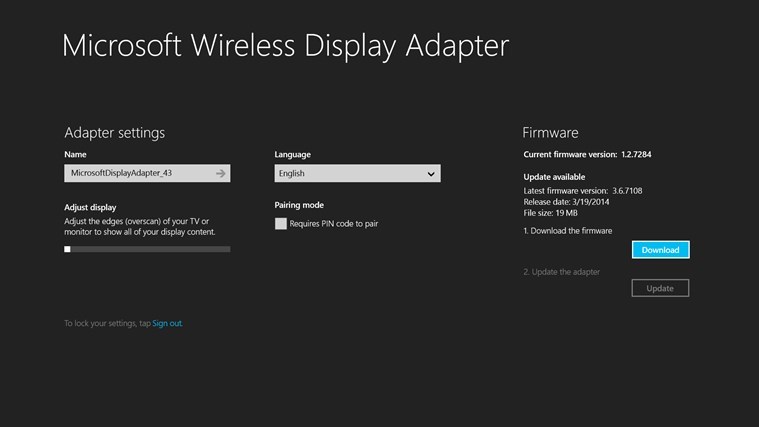
Microsoft has recently made available the official application for the new Wireless Display Adapter. By using it, you can get settings and firmware updates for the Microsoft Wireless Display Adapter. The app is very basic, allowing you to name your Dispaly adapter, adjust the edges of your TV or monitor to show all of your display content. Also, you can enable the pairing mode.

READ MORE: Microsoft to Launch its own Smartwatch, Windows on a Tiny Screen?

Also, from inside the app, you can change the TV or monitor language  and set a password to lock the adapter. So, if you’re looking to buy a Wireless Display Adapter or if you already own one, then this is a must-have.

The app is available in the following languages – English (United States), Chinese (China), German (Germany), Spanish (Spain), Japanese (Japan), French (France), Russian (Russia), French (Canada), Danish (Denmark), Finnish (Finland), English (India), Italian (Italy), Korean (Korea), Dutch (Netherlands), Norwegian (Bokmål) (Norway), Portuguese (Brazil), Portuguese (Portugal), Swedish (Sweden), Chinese (Taiwan), Thai (Thailand), Spanish (Latin America and the Caribbean).

It will work on x86, x64 and ARM processors. Follow this link to download the free app from the Windows Store.

READ ALSO: Toshiba’s New Satellite Radius 11 Convertible with Windows 8.1 Announced for $329

Windows 10 build 9860 includes new Notification Center, PC settings changes and more (video)

Windows 10

Microsoft earlier today released a brand new preview build for Windows Technical Users which includes a number of new features and enhancements. We’ve compiled a quick video demonstrating the most noticeable new changes within the build, including the Notification Center, new window animations, zPC Settings and more.

The build released today is 9860, which was compiled on October 8th and is a pre-release development build meaning it’s rather buggy and not intended for production use. Data Sense and Battery Saver are new in this build, as well as the features listed above. References are being found to the Continuum UI which was shown off via Microsoft as a concept last September.

Still no Cortana in this build sadly. We’re not sure when Microsoft is planning to push out a build with Cortana enabled, we doubt it’ll be anytime soon sadly. Make sure you watch our video below demonstrating all the new features available in this new build!

Microsoft Fixes ‘The Profile for the User is a Temporary Profile’ Error

We’ve been reporting here at Wind8Apps about a bunch of recent updates that have been released by Microsoft for Windows 8 users, and also for Windows 7 to fix their problems. Now we’re covering the ‘the profile for the user is a temporary profile” error when you install a MSI package in Windows.
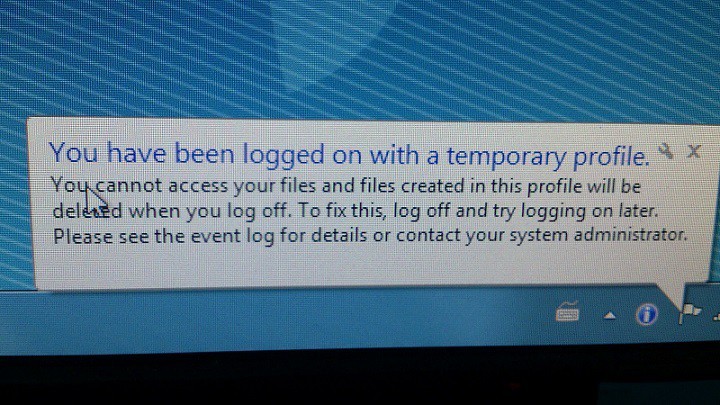
The profile for the user is a temporary profile error fix
“The profile for the user is a temporary profile” is an issue after you install update KB 2918614 in Windows 8.1, Windows Server 2012 R2, Windows RT 8.1, Windows 8, Windows Server 2012, Windows RT, Windows 7, or Windows Server 2008 R2. Here’s how the problem has been described by Microsoft on the official page:

READ MORE: Why Windows 10 Needs to be Free for Windows 8, 8.1

Assume that you install update 2918614 on a computer that is running Windows 8.1, Windows Server 2012 R2, Windows RT 8.1, Windows 8, Windows Server 2012, Windows RT, Windows 7, or Windows Server 2008 R2. When you try to install any MSI package that uses a mandatory or temporary user profile, the MSI package installation fails, and you receive an error message that resembles the following:
The profile for the user is a temporary profile.

When this issue occurs, the MSI log will contain an error message that resembles the following:
SECREPAIR: A general error running CryptAcquireContext / Crypt Provider not initialized. Error:-2146893813

Here’s how the cause has been described:

This issue occurs because update 2918614 uses cryptographic keys and certificates for hashing the installation files together with the logged-in user profile. However, cryptographic keys and certificates cannot be used by mandatory or temporary user profiles. Therefore, when a user uses a mandatory or temporary user profile to install any MSI package, the MSI package installation fails and the error message returns.

You can choose to fix this problem by downloading the available hotfix from Microsoft’s secure servers or by following the links indicated here to get the latest KB install files that takes care of this problem. However, to install this update or hotfix, you must install update 2919355 in Windows 8.1 or Windows Server 2012 R2 prior to getting and Service Pack 1 for Windows 7 or Windows Server 2008 R2.

READ ALSO: Fix Error Code ‘0x80073cf9′ in Windows 8, Windows 10

Buy the 14-inch Lenovo ThinkPad X1 Carbon Windows 8 Laptop Now, Save $600+

If you plan on getting a new Windows 8.1 laptop that you will easily be able to upgrade to Windows 10, then you need to check out the 14-inch Lenovo ThinkPad X1 Carbon that’s been discounted on Microsoft’s online store.
lenovo windows 8 laptop discount
A 14-inch Windows 8/Windows 10 laptop can have a lot of power if you know where to look. The Lenovo ThinkPad X1 Carbon laptop is currently on sale over at the Microsoft Store and can be yours with a price cut of $600. We’re talking about the i7 256GB LTE Signature Edition, which is the top one that you can buy.

READ MORE: Lenovo’s Latest Windows Tablet Has a Pico Projector and Subwoofer, First of Its Kind

The price is now $1,699.00, down from $2,299.00. If this still doesn’t seem affordable for you, have a look at the specs to see why:

  • Display – 14.0 in WQHD IPS ThinkPad ColorBurst (2560 x 1440), 10-finger multi-touch support
  • Processor – Intel Core i7-4600U 2.10 GHz with Turbo Boost Technology up to 3.30 GHz
  • Memory – 8GB DDR3L 1600 MHz
  • Hard drive size – 256GB SSD
  • Operating system – Windows 8.1 Pro, 64-bit
  • Audio – Dolby Home Theater v4
  • Video – Intel HD Graphics 4400 with shared graphics memory
  • windows 8 laptop lenovo price cut

  • Ports – 2 USB 3.0 (1 charge) • HDMI • Mini DisplayPort • Headphone output/Microphone input combo • Lenovo OneLink connector • Micro-Sim slot • LAN (10/100/1000) with included adapter
  • Battery – 8-cell lithium-ion (up to 9 hours)
  • Camera – 1.3 MP 720p HD webcam
  • Wireless – 802.11ac/a/b/g/n (Miracast enabled), Bluetooth
  • Dimensions – 13.03 x 8.94 x 0.55-0.79 in (330.96 x 227.07 x 13.97-20.06 mm)
  • Weight – 3.09 lbs (1.40 kg)
  • Other features – 4G LTE enabled • Keyboard travel: 1.5 mm • Touchpad dimensions: 100 x 70 mm • Adaptive keys • Fingerprint reader • Security lock slot • Backlit keyboard

If you choose the version with Office 365 included, you’ll have to pay more – $1,778.99 but you’ll also save $20 more. If you’re still not interested, check out the newest convertible laptop from Lenovo that’s said to be even better than the MacBook Pro.

READ ALSO: Lenovo’s Latest Windows Tablet Has a Pico Projector and Subwoofer, First of Its Kind

Police investigating the disappearance of a Microsoft Windows program manager

Police investigating the disappearance of a Microsoft Windows program manager -- search under way

Over the weekend, a Microsoft Windows program manager has gone missing. Following the discovery of Krishna Venkatesh’s Toyota Corolla at a parking lot at Deception Pass State Park, a missing persons search is now underway.

According to close friends of Venkatesh, there was nothing unusual found on or inside the car. The Island County Sherriff’s Department and the Seattle Police Department are now involved and working on the case, with local authorities set to aid as well.

Attempts have been made to obtain data from Venkatesh’s smartphone via T-Mobile to help locate him, but T-Mobile have yet to comply with the requests. Below is the poster put together by his friends and co-workers that is currently being distributed. Those with any relevant information are encouraged to contact the Seattle Police Department or the number provided in the poster.

Venkatesh, 27, was last seen on Wednesday October 15th at the Microsoft Redmond campus.

Police investigating the disappearance of a Microsoft Windows program manager -- search under way

How to mirror Windows 10/11 via Wireless Display Adapter

There are plenty solutions available on the market to perform the thing that I have described in the title – to connect Windows 8 or Android devices to High-Definition TVs, monitors or projectors, but Microsoft’s new Wireless Display Adapter comes with many advantages.
Microsoft Wireless Display Adapter Connects Windows 8 10 Android to HDTVs Monitors and Projectors
Unveiled more than a month ago, just as we have previously hinted, I feel that this product hasn’t received all the attention it deserved, so that’s why I’m speaking about it just now. Microsoft’s new wireless display adapter, which is available for preorder for $59.95, allows devices running Windows 8.1 and Android 4.2.1 (and later) to connect to HDTVs, monitors and projectors. And it does so in a very, very simple and intuitive matter.

The wireless adapter connects to an HDTV, monitor or projector and shares audio and visual content from Miracast-enabled devices within a 23-foot range. The adapter won’t work with Surface RT, but there are big chances that its death is imminent, anyway.

READ MORE: Internet Explorer 12 Release Gets Closer: Many Upcoming Features Revealed by Microsoft

connect windows 8 tv

You can use this dongle to project from Windows Phone running version 8.1 of the Windows Phone OS to a large-screen device, but also from Android, which goes along with Microsoft’s cross platform strategy.

Albeit more expensive than the $35 Chromecast dongle (or the recently announced $25 Mozilla Firefox OS Matchstick), it does mirroring of both Android and Windows devices while Chromecasts supports mirroring just from Android devices. At least for now.

And it’s incredibly easy to set up – just plug the USB and HDMI from the Wireless Display Adapter into your HDTV or monitor, connect, then mirror or extend your screen. Just make sure that all the latest Windows updates are installed.

Right now, the adapter is available via Microsoft’s online and brick-and-mortar stores and via Best Buy, but probably more retailers will soon follow.

READ ALSO: World’s Smallest USB Mini-PC From Intel Can Run Windows 8.1 or Android, Linux

Microsoft Project Online web app (PWA) receives updates and improvements

Microsoft Project web app recieves updates and improvements

Microsoft Project Online has received new updates to improve usability. Most of these changes are improving and tweaking the experience for Project Online. Menus were refined to reduce the number of steps to accomplish a task and many features received performance enhancements. Administrators now have more power with these new updates. The ability to limit site creation and task syncing is now possible. Microsoft has also increased the number of instances the web app can run from 2,000 to 5,000 and increased the number of instances per tenant to seven.

Microsoft Project is a tool for project management. This program has a desktop and web app version which enables access to projects from anywhere. Microsoft Project is a timeline based task management program where very detailed project structures can be modeled. Team members can be assigned tasks and can track the overall project status. Microsoft has created this tool to help companies stay on top of highly detailed and complex projects.

The Microsoft Project Web App (PWA) has received an update. This update improves the overall experience of PWA by improving performance and reducing unnecessary steps. PWA has been improved to handle more projects and more instances per tenant. Managers of projects now have the option to disable new enterprise site creation by their team members. In addition to normal performance gains, users can now turn of Task List Sync which speeds the publishing time.

These improvements are small steps toward a future where web apps are fully featured and highly responsive. Microsoft is fully embracing the cloud by improving their Office cloud suite. This also makes Office 365 a more enticing deal for IT administrators. Microsoft will not be left behind when it comes to the future of enterprise, but they are also keeping one foot firmly in desktop programs. The future is a dual solution, where some situations call for a cloud solution and some for the dependable desktop.

Microsoft Cloud Event Recap: What makes it the most complete cloud platform?

Microsoft <3 Linux

Microsoft hosted an event today talking about the future of their cloud offerings. Overall, I was impressed by the immense breadth of Microsoft’s cloud services; there really is something for every business, and I left believing their claim of the most ‘complete’ cloud.

Microsoft sees two other key players in their cloud market: Amazon and Google. Microsoft aims to distinguish itself from its two competitors with its ability to offer a hyper-scale, enterprise-grade, and hybrid cloud infrastructure. While Amazon or Google are competitive in some areas, such as hyper-scale solutions, no one does all three as well as Microsoft.

In fact, one of these areas, hybrid cloud infrastructure, is only offered as a solution by Microsoft; they are the only company that supports on premise servers. Using Azure, companies can connect every on-premises server they host (Storage, Backup, Disaster recovery, Identity, Networking, etc.) to the cloud.

In addition to the breadth of Microsoft’s cloud, the company talked about their higher level cloud services, such as Machine Learning, and live streaming capabilities, which offer higher margins. They are also quite impressive — for example, NBC encodes and streams live using Azure. I inquired about start-ups being able to afford this technology, but wasn’t given a detailed response as pricing is not readily available. However, as there are startups that are finding business in setting up these services for larger corporations, I am assuming that the price a premium for now.

What sets Microsoft's Cloud apart from the competition

New announcements

While Microsoft talked about their general current approach and future, they also announced specific updates and additions to their cloud. The first was the G series, the largest Virtual Machines in the public cloud that offers up to 32 CPU cores, 450 GB RAM, and 6.5 TB of local SSD storage. Microsoft also announced premium storage of up to 32 TB of storage per Virtual Machine, and 50,000+ IOPS (input/output operations per second) with under a millisecond of read latency. Furthering their hybrid solutions, Microsoft also announced Cloud Platform System to bring Azure to your datacenter. Lastly, they announced further Docker support in the form of CoreOS support on Azure. 

“We love Linux”

This was iterated many times through the event. Azure supports five Linux distributions, which means they have iso images available on the Azure Marketplace and you can get one running on your Virtual Machine. CoreOS, the new addition, a container-focused distribution that supports Docker, a platform to build, ship, and run applications.

Actually, CoreOS requires a container format, which are similar to Virtual Machines, in that they promise a safe environment for your web application, but unlike VMs, they are application focused.

 Microsoft Cloud Event Recap: What makes it the most complete cloud platform?

Talking to the CEO confirmed my impressions of CoreOS — it is not the typical Linux distribution. It is not based on Debian (as Ubuntu is) or any other distribution, and neither is its philosophy.  For one, they push updates automatically, and the users don’t get a choice. They had patched the recent bash vulnerability in mere hours! If that scares you, they have ‘Alpha’ and ‘Beta’ tester programs to test out their updates before they hit stable. Typically servers like running very stable builds (you don’t want your website to crash because of a bug!), so I was very surprised when he told me that their users were pretty split among the alpha and stable builds.

Second, they push best practices upon their developers. They are requiring container applications since they can ensure stability of APIs and the environment as they push updates. The aim of CoreOS is for you not to worry about it ever.

Lastly

My impression of Microsoft’s strategy on the cloud is Google’s strategy in the consumer space. Both companies want you to use their services in any way possible, and enable you to injunction with pretty much anything (in different ways).

This is only a fraction of what was covered, and if you want the full details (including a lot of details on different companies such as Cloudera, strategies including Office 365, etc.), we highly recommend watching the event for yourself (here, or reading the transcript here), or reading more here and here. You can also read our live reporting for my impressions here.