
Perplexity’s Comet Browser Gets Chrome’s Split View, Compare Tabs Side by Side
The AI-powered Comet browser now includes Split View, a Chromium feature that lets you place two tabs side by side for easier multitasking.


 3 min. read
  Updated on

When Perplexity launched its Comet Browser for Windows and Mac, everyone talked about the AI. People expected smart features to help plan trips and summarize documents. The conversation was all about artificial intelligence.
But while trying it out, I found the best new feature is not related to AI at all. It is a simple tool that makes everyday work easier, a feature that even Google Chrome has not yet made this simple.
If you have ever tried to compare two web pages, you know it is usually a hassle. You have to open two browser windows and drag them into place, or keep switching between tabs. Now, Comet solves this with a built-in feature called “Split View”.
How to Use Chrome Split View in Perplexity Comet Browser
Setting up Split View in Comet on Windows or Mac is easy. Here are two simple ways:
From the main menu: Click “Add Split View.” A list of open tabs appears on the right. Pick one, and it opens side by side with your current tab.
This menu option is easily accessible. That is how I first discovered Split View.
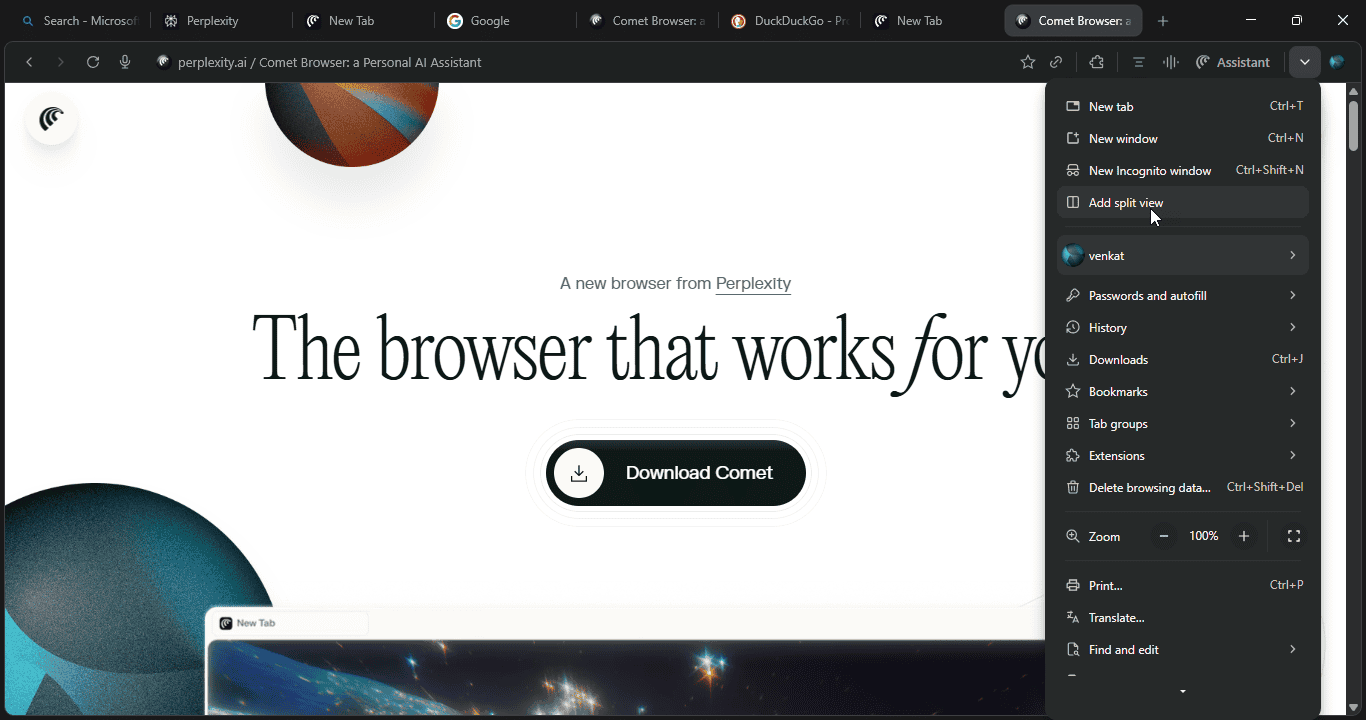

From the tab bar: Right-click any tab and select “Add tab to new Split View.”
If you already have Split View active, right-click a tab next to it to see more options, like “Move tab into Split View,” or to swap with the left or right pane.

Once you have two tabs open in Split View, you can right-click again to :
- Separate them back to normal tabs
- Swap their positions using the “Arrange Split View” menu

Why Split View Is So Useful
This feature is perfect for multitaskers and makes daily browsing much easier. Here are some ways you might use it:
- Compare prices or products when shopping
- Read and write at the same time
- Check two sources or articles side by side
- Research and take notes together
Comet did not invent Split View fully from scratch. The basic technology comes from Chromium, the same engine that powers Chrome, Edge, and Comet. In regular Chrome, this feature is hidden in experimental settings and not always easy to use.
Comet improved things by bringing Split View out of hiding and making it simple and accessible for everyone. They took an unfinished idea and turned it into a clear, practical tool.
Split View shows that sometimes the simplest features are also the most useful. Comet proves it is more than just Chrome with AI. It wants to help people get real work done.
As Comet continues to add more AI tools and native VPN Support, this basic side-by-side view might actually be the best reason to give the browser a try. When it comes to getting things done, simple upgrades like this often make the biggest difference.


Read our disclosure page to find out how can you help Windows Report sustain the editorial team. Read more



Improve this guide


User forum
0 messages