
What Is Portmaster Firewall? Complete Windows Setup Guide


 3 min. read
  Published on

If you want more control over your network connections and online privacy, Portmaster Firewall is one of the best free tools you can install on Windows. It helps you block unwanted tracking, monitor all internet connections, and encrypt your DNS traffic automatically.
This guide explains what Portmaster does and walks you through the setup and configuration process step by step.
Table of contents
What Is Portmaster Firewall and How to Use It on Windows?
How to Install Portmaster Firewall on Windows
- Go to the official Portmaster website: https://safing.io.
- Click Download for Windows and save the installer file.

- Open your Downloads folder and right click the installer.
- Select Run as administrator to launch the setup.
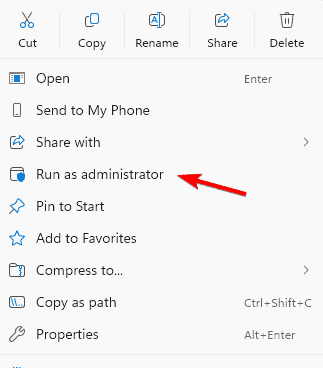
- Accept the license agreement when prompted.
- Choose an installation location or use the default path.
- Click Install and wait for the setup to finish.
- When complete, Portmaster starts in the background automatically.
If Windows Firewall interferes during setup, see how to check if Windows Firewall is blocking a port or program.
How to Configure Portmaster Firewall
- Click the Portmaster icon in the Windows system tray.
- Select Open Dashboard to launch the control panel.
- Open Settings > Network to review your current network setup.
- Enable DNS over HTTPS (DoH) to encrypt DNS traffic.
- Choose your preferred secure DNS provider from the list.
- Go to Privacy Filter and toggle Block Trackers to prevent tracking.
- Open Apps to view programs connected to the internet.
- For each app, set Allow or Block to control network access.
Understanding how ports work can improve your setup. Learn more about SMB ports 139 and 445.
Why Use Portmaster Firewall?
- It is free and open source.
- Visualizes and controls every connection on your PC.
- Encrypts DNS requests for added security.
- Blocks trackers and unwanted background activity.
- Works alongside Windows Firewall without conflicts.
What Is Portmaster Firewall?
Portmaster Firewall is a free, open source privacy firewall that lets you monitor and manage every connection your computer makes to the internet. Unlike traditional firewalls that only block ports or programs, Portmaster also offers privacy filters, DNS encryption, and advanced connection visualization. It is designed for users who want an easy to use but powerful way to safeguard their online activity without manually editing complex firewall rules.
For comparison, review this overview of Windows 10 firewalls to understand how Portmaster differs from built in options.
FAQs
What Is Portmaster Firewall? Complete Windows Setup Guide
No. It complements Windows Firewall by focusing on privacy while Windows Firewall handles system level protection.
Yes. Portmaster works with VPNs and can route apps through them for stronger privacy.
In most cases, no. DNS encryption may add a slight delay that is usually unnoticeable.
Conclusion
Portmaster Firewall is a powerful and user friendly tool that gives you visibility and control over your online activity. By following the steps in this guide, you can install, configure, and start protecting your network connections within minutes. If you value transparency, privacy, and open source software, Portmaster is an excellent addition to your Windows security toolkit.

Read our disclosure page to find out how can you help Windows Report sustain the editorial team. Read more



Improve this guide



User forum
0 messages