
PowerToys Upcoming Feature May Soon Help You Natively Adjust Multiple Monitor Settings


 2 min. read
  Published on

After releasing version 0.96 of PowerToys, Microsoft is now working on another useful addition to the productivity-centric app. And, this time, it is trying to fix one of the most annoying parts of using an external monitor.
A new “Power Monitor” feature is in development, which will give Windows users a native way to tweak brightness, contrast, color temperature, and even speaker volume without digging through clunky monitor menus. Microsoft program manager Niels Laute shared a screenshot on X, hinting at a cleaner alternative to the on-screen display tools built into monitors.
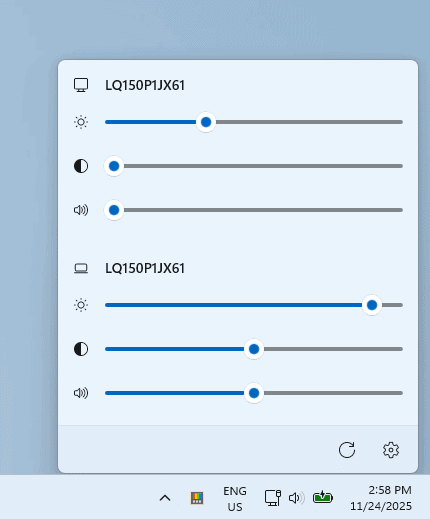
Most monitors still require physical buttons for basic adjustments, and the experience isn’t always intuitive. A related GitHub pull request reveals additional features like color temperature adjustments and deeper calibration options. This suggests Power Monitor may evolve into a more advanced tool rather than a bare-bones brightness slider.
Microsoft hasn’t confirmed a release window yet. The tool is still in early development, and Insiders will likely see it first before it rolls out widely. Not to forget, the tool got much-needed upgrades to the Command Palette and Light Switch, along with fixes for broken features.
All that said, Microsoft is doing its best to make PowerToys one of the most handy productivity tools yet. What do you think about the feature being tested right now? Do let us know in the comments below.
via: Neowin

Read our disclosure page to find out how can you help Windows Report sustain the editorial team. Read more



Improve this guide


User forum
0 messages