
Safe OS Dynamic Update KB5071844 for WinRE, Windows 11 24H2 & 25H2 Out


 2 min. read
  EEST
EEST

Microsoft pushed a Safe OS Dynamic Update last week, KB5071844, Windows 11, for version 24H2 and 25H2, and Windows Server 2025. As the name suggests, this update doesn’t include any new features; rather, it focuses on making sure your PC can actually recover when things go wrong.
Microsoft says the recovery update will install automatically through Windows Update, so most users won’t have to do anything. For IT admins or anyone managing images manually, the package is also available via Microsoft Update Catalog.
Microsoft also notes that this update replaces the previously released update KB5067040. Notably, after installing this update, the WinRE version installed on the device should be 10.0.26100.7297.
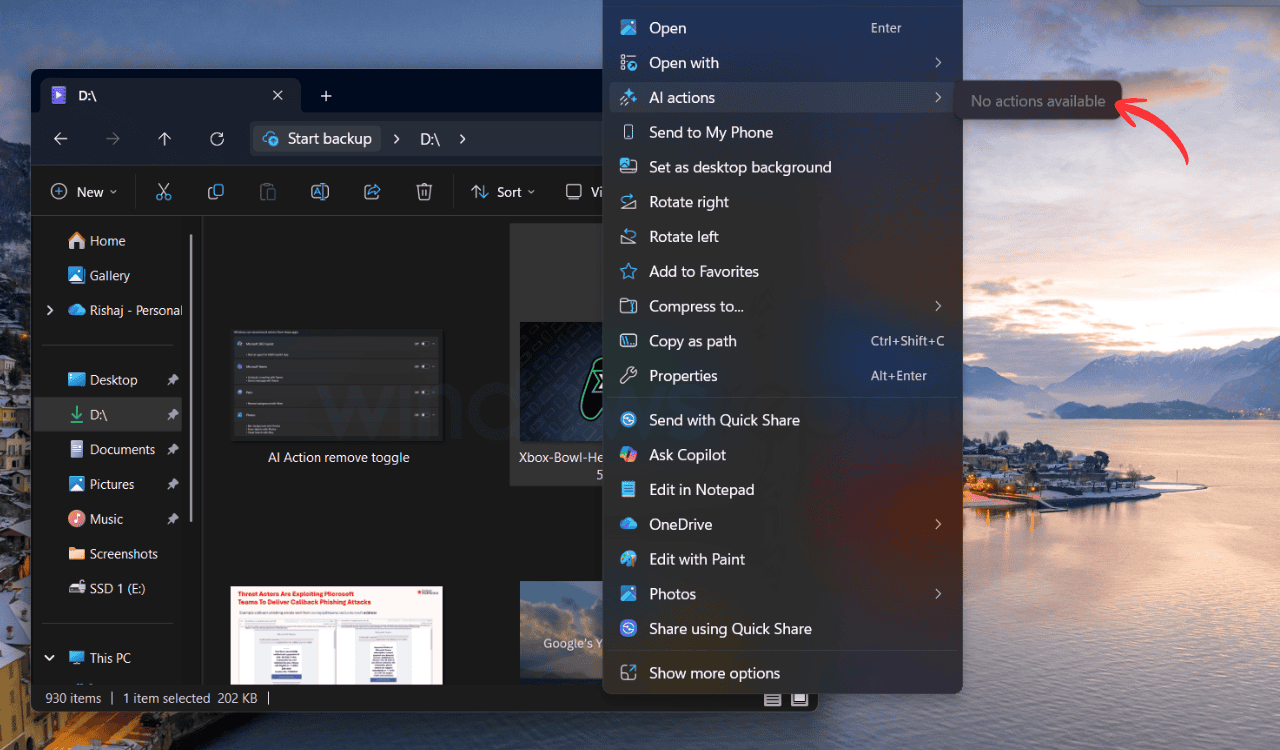
Speaking of updates, Microsoft also released KB5070316 last Friday, which finally allows users to hide AI Actions in Windows 11. But, in our testing, we found out that even when you turned off these apps, the AI Actions label is still visible there in the context menu like a ghost category, doing absolutely nothing except taking up space. You can read more about it here.
Other than KB5070316 also introduces a new app update framework, which Microsoft calls “The Unified Update Orchestration Platform (UOP).” The company said that with UOP, app updates become more consistent and predictable, with fewer interruptions.
A new page will be visible for Beta and Dev channels under Settings > Apps > App Updates, where they can check update progress and take action if needed.

Read our disclosure page to find out how can you help Windows Report sustain the editorial team. Read more



Improve this guide



User forum
0 messages