
Verizon Wireless Login: How to Sign In to Your Account


 3 min. read
  Published on

Verizon Wireless lets you manage your mobile account, pay bills, check data usage, and update your plan online. You can log in to your Verizon Wireless account through the My Verizon website or mobile app using your Verizon phone number or User ID. Here’s how to sign in and what to do if you have trouble accessing your account.
How to Log In to Verizon Wireless Online?
1. Use the Verizon website
You can access your Verizon Wireless account from any web browser without installing additional software.
- Visit the official My Verizon website.
- Type your Verizon User ID or 10-digit mobile number and click Continue.
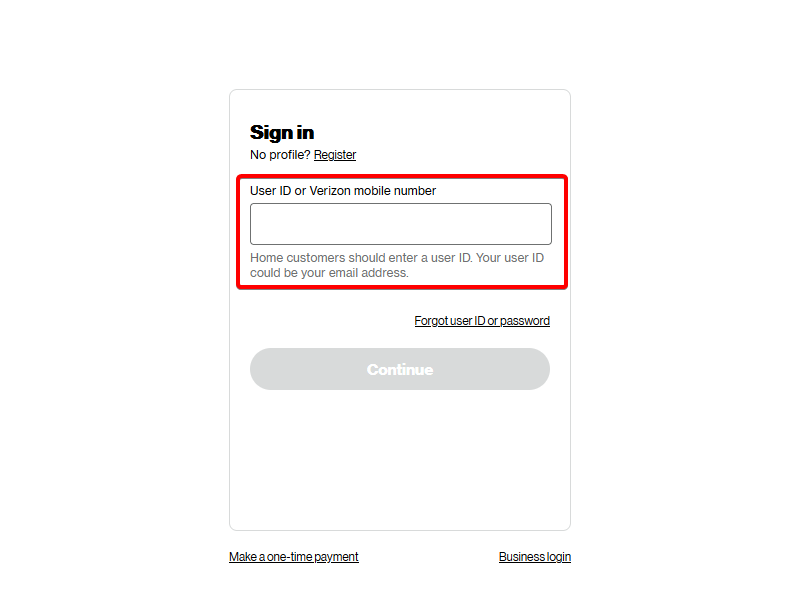
- Select Sign in with password or another available verification option.
- Type your My Verizon password and click Sign in.
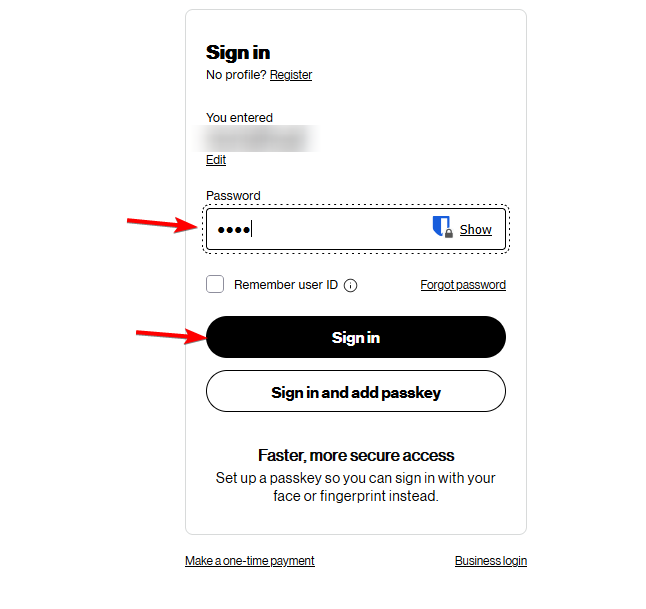
- Approve the sign-in request on your phone if Verizon asks you to verify your identity.
- Once signed in, you can view bills, manage your wireless plan, and check account details.
2. Use the My Verizon App
The My Verizon app provides another way to manage your wireless account directly from your smartphone.
- Install the official app from the Google Play Store or Apple App Store.
- Launch My Verizon on your Android phone or iPhone.
- Provide your 10-digit Verizon mobile number if the app requests it.
- Enter your password and tap Sign in.
- Enable fingerprint or facial recognition if your device supports it and the app offers the option.
- Check your balance, pay bills, monitor usage, or change your plan.
How to Fix Verizon Wireless Login Problems
If you cannot access your My Verizon account, try these troubleshooting steps.
- Make sure you entered the correct User ID, phone number, and password.
- Use Verizon’s password recovery page if you forgot your credentials or locked your account after repeated failed attempts.
- Switch between Wi-Fi and mobile data to rule out connectivity problems.
- Install the latest version of the My Verizon app from your device’s app store.
- Remove outdated cookies and cached data if the website fails to load correctly.
- Open Verizon’s login page in a different browser or private browsing window.
- Check your phone for any pending verification notifications.
- Visit the Verizon support website if you still cannot access your account.
Sometimes, login problems may accompany other Verizon issues. If the My Verizon app is not working, you can try additional troubleshooting steps to restore access.
Similarly, if you’re experiencing connectivity problems, check how to fix Verizon service issues or resolve problems when your Verizon international travel plan is not working.
FAQs
Can I log in to Verizon Wireless with my phone number?
Yes. Verizon allows customers to sign in to My Verizon using their 10-digit mobile number or User ID, depending on their account setup.
How do I log in to a Verizon prepaid account?
Open the My Verizon app or visit the My Verizon website. Enter your prepaid mobile number and password, then complete any required security verification.
Can I access my Verizon Wireless business account using My Verizon?
Verizon business customers use a separate account management system. Visit the Verizon Business login page to access your business wireless account.
Can I pay my Verizon Wireless bill without logging in?
Yes. Verizon offers a one-time bill payment option that lets eligible customers make payments without signing in to My Verizon.
Why is my Verizon Wireless account locked?
Verizon may lock your account after multiple unsuccessful login attempts. Reset your password through the official recovery page to regain access. If your account remains locked, contact Verizon support.

Read our disclosure page to find out how can you help Windows Report sustain the editorial team. Read more



Improve this guide




User forum
0 messages