
What Is a CBS Log File in Windows and How to Use It


 3 min. read
  Published on
CBS log files are created by Windows to record the results of system file scans and repairs. They are generated by the Component-Based Servicing (CBS) component that manages updates, installations, and system repairs.
These logs help troubleshoot issues with Windows Update, DISM, and System File Checker.
Table of contents
What Is a CBS Log File in Windows?
What Does a CBS Log File Do?
The CBS log records actions taken during repair or update processes, including which files were scanned, repaired, or skipped. If sfc /scannow reports errors, you can check the CBS log to find the cause.
For step-by-step fixes when the file is damaged, see how to repair a corrupted CBS log file.
Where Is the CBS Log File Located?
You can find the CBS log here:
C:\Windows\Logs\CBS\CBS.log

The file is updated whenever you run SFC or DISM scans. If you need similar paths for crash data, see where to find BSOD log files.
How to View the CBS Log File
You can open the CBS log in Notepad or use Command Prompt to filter entries.
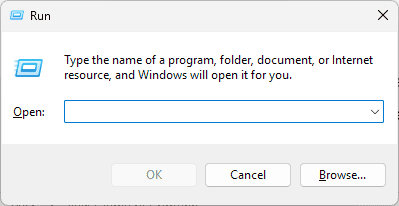
- Press Windows + R to open Run.

- Type C:\Windows\Logs\CBS and press Enter.
- Right-click CBS.log and choose Open with > Notepad.

- Press Ctrl + F and search for [SR] or error.

If the file is too large, extract recent SFC entries with this command:
findstr /c:"[SR]" %windir%\Logs\CBS\CBS.log > "%userprofile%\Desktop\sfcdetails.txt"
How to Delete or Clear the CBS Log File
CBS logs can grow large. You can safely remove them after troubleshooting.
- Open Command Prompt as administrator.

- Stop the Windows Modules Installer service:
net stop trustedinstaller - Go to the CBS folder:
cd C:\Windows\Logs\CBS - Delete the log:
del CBS.log - Restart your PC. Windows will create a fresh
CBS.logwhen needed.

Why CBS Logs Are Useful
- Diagnose failed Windows updates.
- Identify system file corruption.
- Investigate DISM or SFC scan errors.
For broader diagnostics, learn how to check Windows 11 error logs.
FAQs
It records actions from the Component-Based Servicing process, such as update installs and SFC repairs.
Yes. It is safe to delete after troubleshooting. Windows will recreate it automatically.
Frequent scans and updates increase size. Clear it when space is needed.
Open it in Notepad and search for [SR] or use the findstr command to export key lines.
Conclusion
A CBS log file is a key diagnostic resource during Windows repairs and updates. By knowing where it is, how to open it, how to filter important entries, and how to clear it when necessary, you can quickly resolve update failures, fix corrupted files, and keep Windows running smoothly.

Read our disclosure page to find out how can you help Windows Report sustain the editorial team. Read more



Improve this guide



User forum
0 messages