
Windows 11 KB5065782 Preview displays full-screen Microsoft 365 renewal ads
You can skip it entirely, though


 2 min. read
  Published on
Last Friday, Microsoft released new Windows 11 Preview Builds for 25H2 in the Dev Channel and 24H2 in the Beta Channel. The update revamps the Windows Search menu, adds Emoji 16.0, and a lot more.
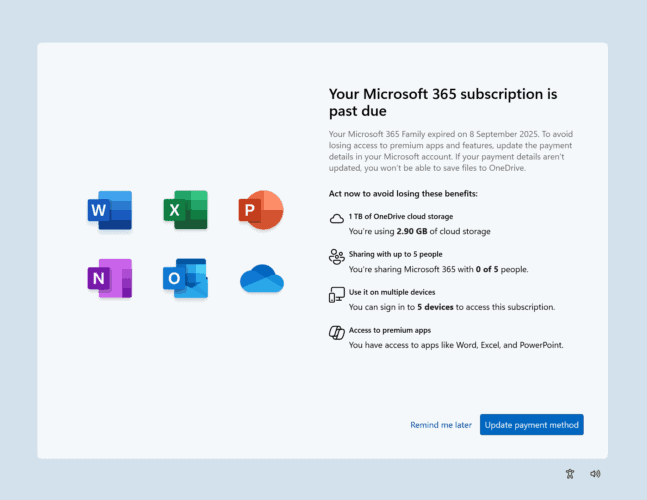
Let’s not forget that both builds include something for users with expiring Microsoft 365 subscriptions. Here, we’re talking about a full-screen prompt that locks your PC until you respond.
The feature appears as part of SCOOBE (Second-chance out-of-box experience), the same system Microsoft uses to upsell OneDrive or backup services.
This time, the UI is designed to highlight accounts that “need attention,” for example, when a renewal payment fails. In the release notes, Microsoft described the prompt as a “simple reminder” that lets users quickly review and update payment methods to avoid interruptions.
The interface has been simplified to a single screen, but it still occupies the entire display until you accept or dismiss it.
Wondering whether you’ll also see it? For now, it’s unclear whether it will roll out to the masses. Microsoft often experiments in Insider builds before making final decisions for public releases.
If you’d rather skip SCOOBE prompts entirely, Windows 11 includes a toggle under Settings > System > Notifications > Additional Notifications. Moreover, Microsoft also encourages you to leave feedback via the Feedback Hub. So, don’t forget to do that and have a say in what you need next from the company.

Read our disclosure page to find out how can you help Windows Report sustain the editorial team. Read more



Improve this guide




User forum
0 messages