
Windows 11 Release Preview Build Improves File Explorer, Search, and Voice Access


 3 min. read
  Published on
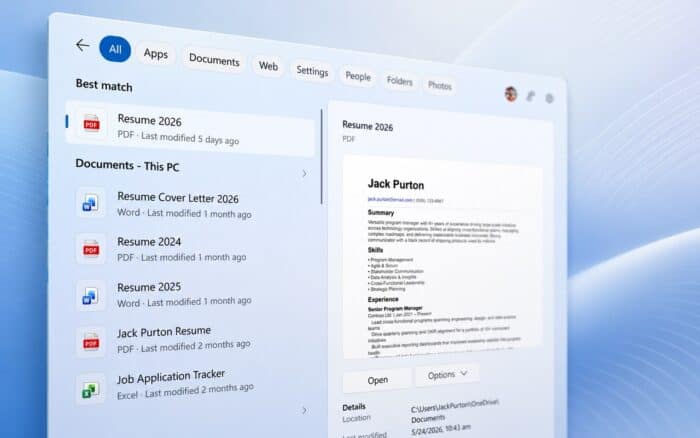
Windows 11 Insider Release Preview Build 26100.8942/26200.8942 introduces File Explorer, Windows Search, Voice Access, Widgets, touchpad, and Start menu improvements.
Microsoft is rolling out all listed features gradually, so they will not reach every supported device at the same time. Availability may vary depending on the PC and rollout stage.
File Explorer Gets Better File Sizes and Folder Tabs
File Explorer now displays file sizes using the most appropriate KB, MB, or GB unit, making size information easier to read.
Users can also middle-click a folder in the address bar or on the Home page to open it in a new tab.
Microsoft has fixed gray flashes and unexpected scrolling on the File Explorer Home page. The Recommended section also receives higher-quality file thumbnails.
Windows Search Adds Better File and App Results
Windows Search now provides improved results across local files, cloud content, and connected sources.
The update adds support for two-character file searches, which should make it easier to find files with short names. Search also handles spelling mistakes and partial application names more effectively.
Settings-related results should now appear higher in the results when they better match the search query.
Voice Access Adds Voice Isolation and Korean Support
Voice Access now includes Voice Isolation, which reduces interference from nearby speakers and background noise.
Users can choose between three speech recognition modes:
- Voice Isolation
- Background-noise removal
- No filtering
The update also adds Korean language support to Voice Access.
Widgets Notification Badges Match the Accent Color
Widgets notification badges on the taskbar now use the selected Windows accent color instead of always appearing red, as seen in the older Beta build.
Microsoft has also changed the default Lock screen Widgets configuration for new users. New accounts will initially see only the Weather widget.
Touchpad Settings Add New Scrolling Controls
The touchpad Settings page now includes controls for adjusting scroll and zoom speed.
Microsoft has also added accelerated scrolling, allowing users to move through long documents and pages more quickly.
Start Menu Reliability and Navigation Improve
The Start menu should now remember saved view preferences more reliably.
Microsoft has also improved keyboard navigation within the apps list and refreshed the account control interface. The updated design includes a badge that displays the user’s subscription status.
Features Will Roll Out Gradually
Microsoft is releasing these improvements through a gradual rollout. Some Windows Insiders may receive individual features earlier than others, even when running the same Release Preview build.
The company has also released Windows 11 Insider Beta Preview Build 26220.8925, Experimental Preview Build 26300.8935, and Beta 26H1 Preview Build 28020.2539.

Read our disclosure page to find out how can you help Windows Report sustain the editorial team. Read more



Improve this guide


User forum
0 messages